Physical Address
304 North Cardinal St.
Dorchester Center, MA 02124
Physical Address
304 North Cardinal St.
Dorchester Center, MA 02124
Most developers and site owners treat downtime like bad weather. It happens, you wait it out, everything goes back to normal. But downtime isn’t free. Every minute your site is unreachable, something is being lost. Revenue, trust, search rankings, or all three at once. The problem is that most people have never actually done the math.
Once you calculate what an hour of downtime really costs your business, the way you think about hosting, monitoring, and infrastructure changes completely.
When people say “downtime,” they usually picture a completely dead website. A blank screen, a 500 error, the whole thing offline. That’s the dramatic version. But partial outages are far more common and arguably more dangerous because they go unnoticed longer.
A checkout page that times out. An API endpoint returning errors to half your users. A login page that works in Europe but fails in the US because one CDN node went sideways. These are all forms of downtime, and they all cost money. The tricky part is that your visitors won’t always tell you. They’ll just leave.
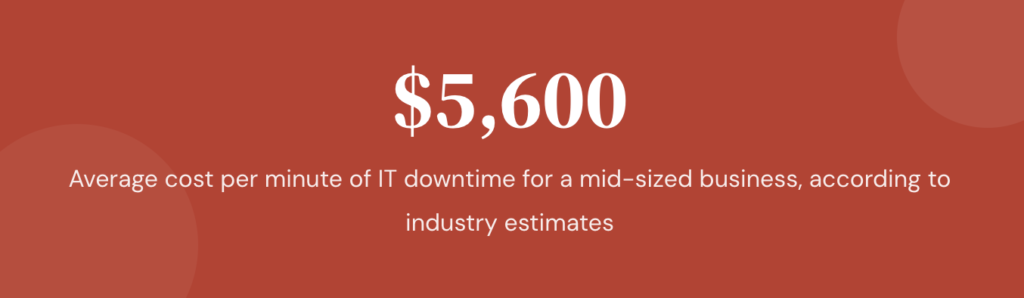
According to various industry surveys, the average cost of IT downtime for a mid-sized business sits somewhere between $5,600 and $9,000 per minute. That number gets thrown around a lot, and it’s technically accurate for enterprise environments. But even if you’re running a small e-commerce store doing $300,000 a year, one hour of downtime during peak hours could cost you $200 to $500 in lost sales alone. That doesn’t include the support tickets, the refund requests, or the customers who never come back.
There’s a straightforward way to estimate this. It won’t be perfect, because no formula captures every ripple effect, but it gives you a number you can actually work with.
Hourly downtime cost = (Annual revenue / total hours per year) × percentage of revenue dependent on site availability × productivity impact multiplier
Let’s break that apart with a real example.
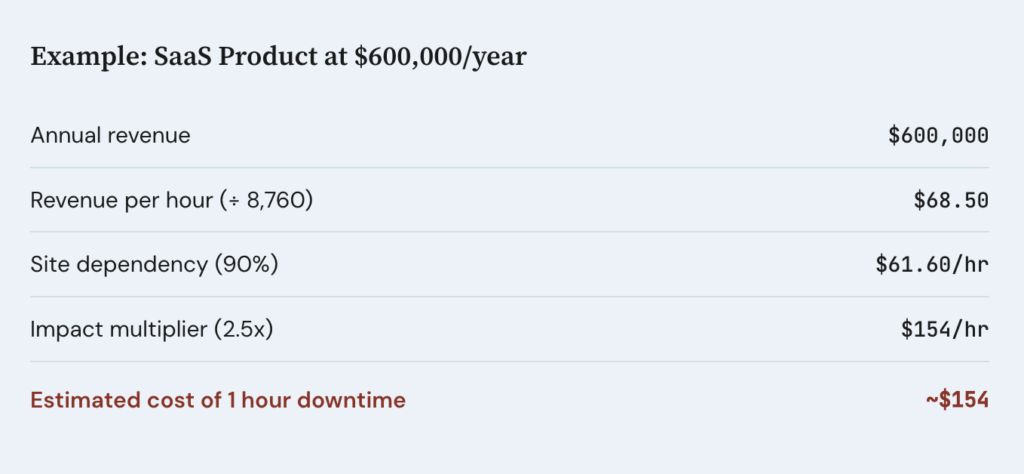
Say you run a SaaS product generating $600,000 per year. Total hours in a year: 8,760. That gives you roughly $68.50 in revenue per hour. If 90% of your revenue depends on the site being live (which is true for most SaaS), you’re looking at about $61.60 per hour of lost revenue during an outage.
That sounds manageable until you factor in the multiplier. Support costs spike. Your team drops what they’re doing to investigate. If you have an SLA with customers, you may owe credits. A reasonable multiplier for a SaaS company is 2x to 3x, which pushes the real cost to $120 to $185 per hour.
For an e-commerce site, the multiplier can be even higher during seasonal peaks. Black Friday downtime isn’t just lost sales. It’s lost sales at the highest-margin moment of the year, plus ad spend you’re burning while the site is unreachable.
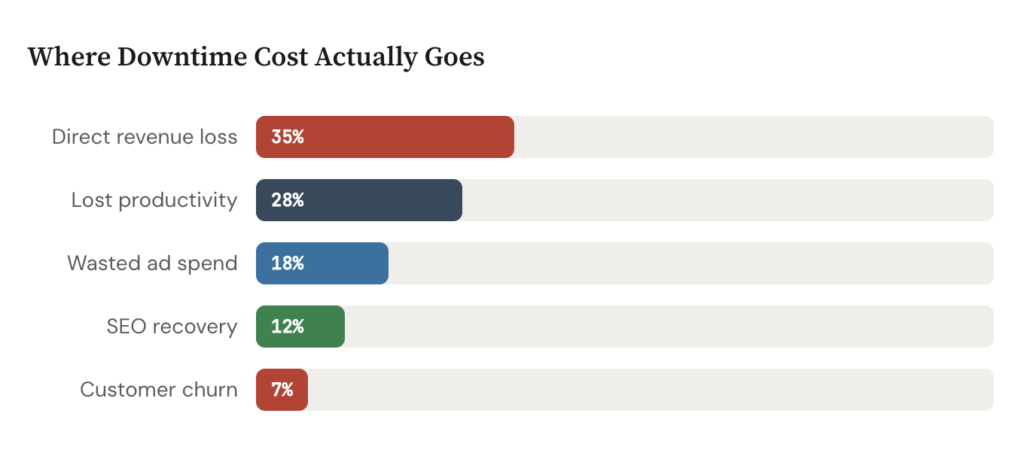
The direct revenue loss is the easy part. The indirect costs are where things get ugly.
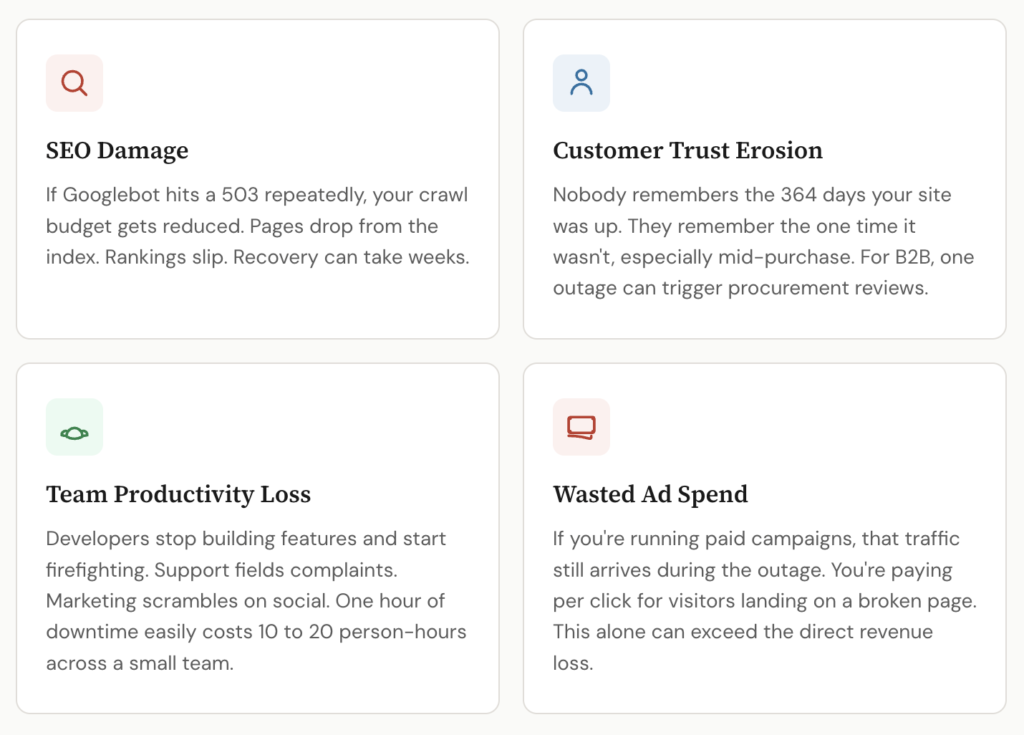
SEO damage. Google’s crawlers don’t wait around. If Googlebot hits your site and gets a 503 multiple times, your crawl budget gets reduced. Pages drop from the index. Rankings slip. It can take weeks to recover what a few hours of downtime cost you in organic visibility. If you’re in a competitive niche, your competitors just got a free boost.
Customer trust erosion. Nobody remembers the 364 days your site was up. They remember the one time it wasn’t, especially if it happened during a purchase, a signup, or a time-sensitive workflow. For B2B products, a single outage can trigger procurement reviews and push customers toward alternatives.
Team productivity. When the site goes down, your developers aren’t building features. They’re firefighting. Your support team is fielding complaints instead of doing proactive work. Your marketing team is scrambling to update social channels. An hour of downtime can easily cost 10 to 20 person-hours across a small team.
Ad spend waste. If you’re running paid campaigns (Google Ads, Facebook, programmatic), that traffic is still arriving during the outage. You’re paying per click for visitors who land on a broken page. Depending on your daily ad budget, this alone can exceed the direct revenue loss.
There’s a psychological thing that happens with reliability. When your site has been up for three months straight, it feels invincible. You stop thinking about monitoring. You skip the load testing before a launch. You let the SSL certificate auto-renew and assume it’ll work (it usually does, until the one time it doesn’t).
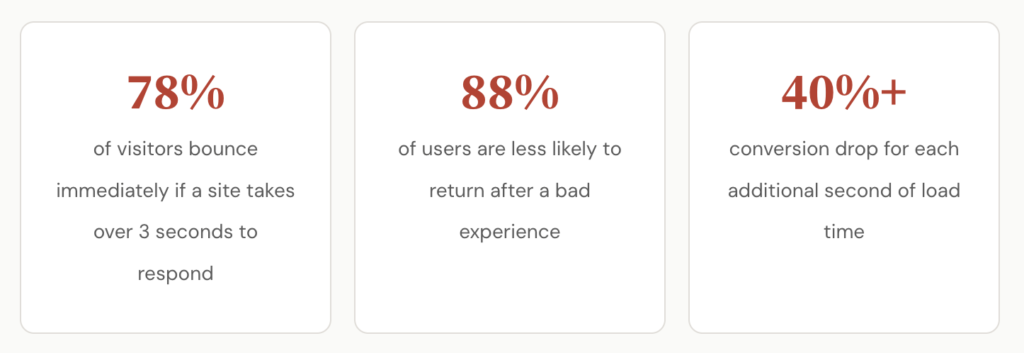
The other issue is that many teams only count total outages. If the site was technically “up” but responding in 14 seconds instead of 2, that doesn’t show up as downtime in a basic ping check. But your conversion rate during those slow periods probably dropped by 40% or more. Research from Google has consistently shown that each additional second of load time increases bounce rates significantly.
This is where proper monitoring makes the difference. A basic “is it up or down” check is better than nothing, but it won’t catch degraded performance, regional failures, or broken individual endpoints. If you’re serious about understanding your real uptime, you need a tool that checks frequently, from multiple locations, and alerts you before your customers notice. I put together a detailed comparison of 15 uptime monitoring platforms that covers check intervals, pricing, status page features, and some fine print you’ll want to read before committing to a tool. It’s worth looking at if you haven’t evaluated this space recently, because the options and pricing models have changed a lot.
Here’s a concept that most small teams skip but shouldn’t: set an actual downtime budget.
If your site generates $50,000 per month and 85% of that depends on availability, you can estimate that one hour of downtime costs roughly $80 to $120 when you include indirect effects. That means 10 hours of downtime per year would cost you somewhere between $800 and $1,200.
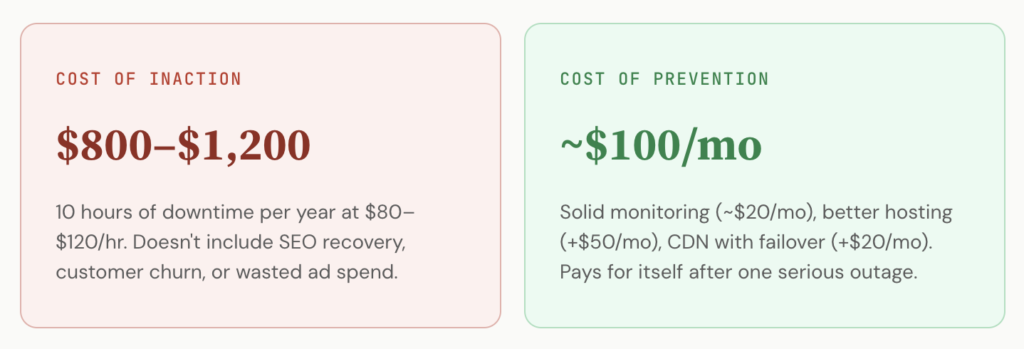
Now compare that to the cost of preventing it. A solid monitoring service like Pulsetic runs about $19 per month for most small to mid-sized setups. Better hosting might cost $30 to $50 more per month than the bargain plan you’re on. A CDN with failover adds another $20. You’re looking at maybe $100/month in reliability infrastructure, or $1,200/year, to prevent losses that could easily be multiples of that.
The math almost always works out in favor of prevention, which makes it strange how many teams still treat monitoring as an afterthought. It’s one of those things that feels optional until the first real outage, and then suddenly it’s the most obvious investment you should have made six months ago.
If you’re going to take downtime costs seriously, you need to know what to measure. Not everything needs a complex dashboard, but a few numbers go a long way.
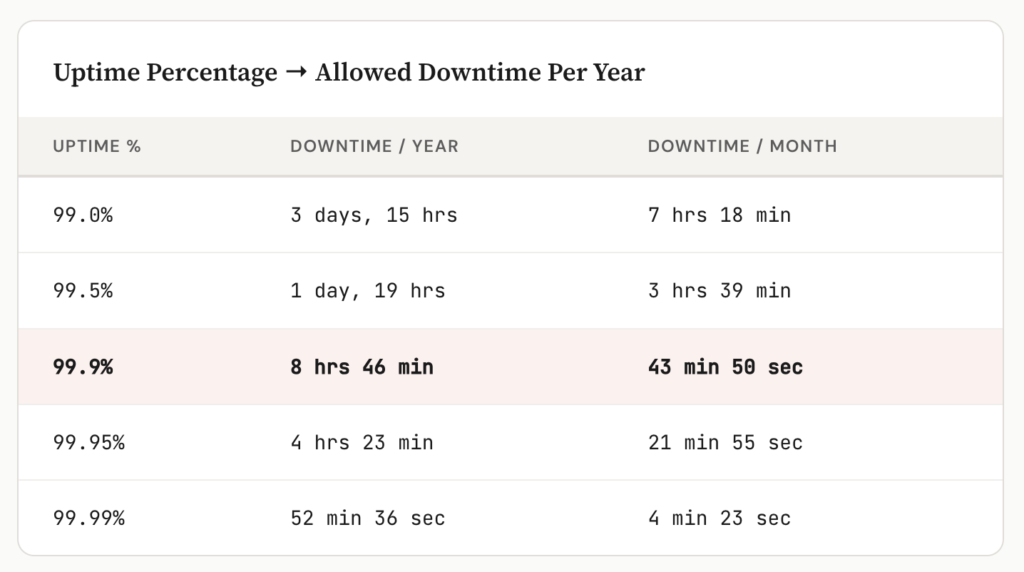
Uptime percentage. The classic metric. 99.9% uptime sounds great until you realize that still allows for nearly 9 hours of downtime per year. For most commercial sites, you want to target 99.95% or higher.
Mean time to detection (MTTD). How long does it take you to find out something is wrong? If the answer is “when a customer emails us,” you have a problem. Good monitoring tools can get this down to under a minute.
Mean time to recovery (MTTR). Once you know about the issue, how fast can you fix it? This depends on your team, your infrastructure, and whether you’ve documented your incident response process. Most teams haven’t, which is why the same 20-minute fix turns into a 2-hour scramble at 2 AM.
Revenue per hour of uptime. This is the number from the formula above. Keep it updated as your business grows. What was a $60/hour cost last year might be $200/hour this year.
If you’re a developer trying to convince your manager or a freelancer trying to explain this to a client, the formula above is your best friend. Vague warnings about “the site might go down” don’t move budgets. A specific number does.
“Our site earns roughly $140 per hour. Last quarter we had 6 hours of unplanned downtime. That’s $840 in direct losses, probably $2,000+ when you factor in SEO impact and wasted ad spend. A monitoring and alerting setup would cost us $240 per year.”
That’s a conversation most decision-makers can follow. You’re not asking for a blank check. You’re showing the gap between the cost of the problem and the cost of the solution.
Downtime will happen. Hardware fails, code has bugs, DNS propagates slowly, and third-party services go offline without warning. You can’t prevent every outage, but you can dramatically reduce how often they occur, how long they last, and how much they cost you.
Start by running your own numbers through the formula. Even a rough estimate will probably surprise you. Then look at what you’re currently spending on reliability and ask whether it matches the risk. For most small teams and solo developers, there’s a meaningful gap between what downtime actually costs and what they’re doing to prevent it.
Close that gap, and you’re not just avoiding losses. You’re building the kind of site that users trust enough to come back to.