Spring Newsletter Design Ideas for Bootstrap Emails
Inboxes are crowded, so a strong subject line and a clean, responsive design are what get your newsletter opened and read. Below are spring-themed, fully responsive email layout ideas you can prototype with Bootstrap and adapt to your own brand. They lean into seasonal themes, which makes the design more interesting for your recipients and gives you a reason to land in the inbox at all.
As April approaches each year, it’s time to refresh your newsletter design and content around themes of renewal and the freshness of springtime. This guide gives you four concrete April modules (Earth Day, Easter, a spring sale, and end-of-tax-season relief), each with a real Bootstrap 5 snippet you can paste and adapt, plus a calendar of April hooks and a spring palette with hex codes. Let’s see how to combine Bootstrap’s features so that your April newsletter is well-liked by your audience.
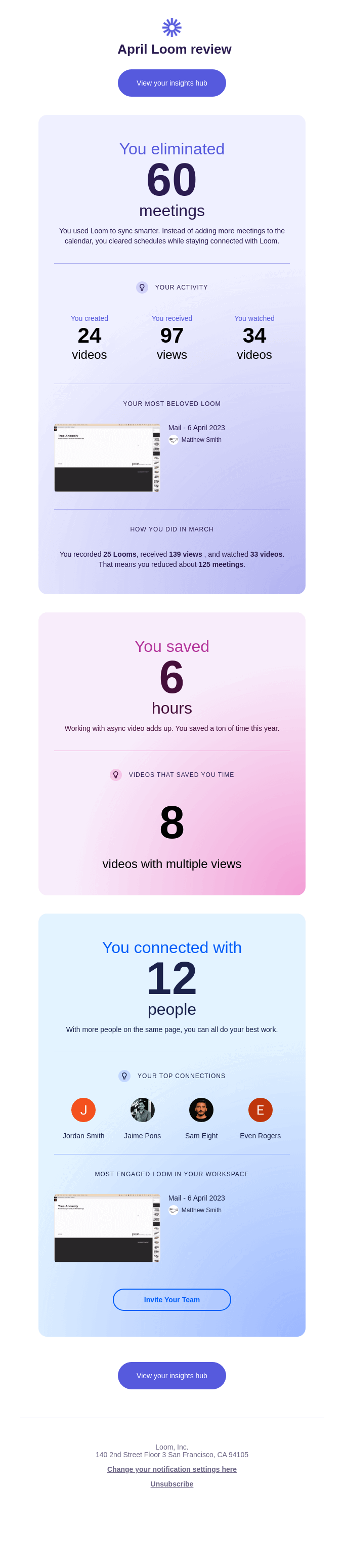
A note on Bootstrap and real email clients: Bootstrap is excellent for prototyping newsletter layouts in the browser, and for the web-viewable version (landing pages, “view in browser” links). But most email clients, including Gmail, Outlook, and Apple Mail, strip out JavaScript and ignore the bulk of modern CSS. That means Bootstrap’s JS components (carousels, modals, accordions) and its flex and grid layout will degrade or break inside an inbox. The workflow below is: prototype in Bootstrap, then convert each module to table-based, inline-styled HTML before you send. See our guides to Bootstrap email HTML templates and responsive email templates for Gmail for the production markup. The current stable release is Bootstrap 5.3.8.
Why Seasonal Content Lifts April Sends
Seasonal content does not just spice things up: it increases relevancy and creates more opportunities for engagement. When your message resonates with what is happening in your readers’ lives and the season around them, it helps them develop a deeper connection and encourages more interaction. April brings connotations of growth and new beginnings, plus a tightly packed calendar of observances (Easter, Earth Day, the tax deadline), so you have a natural reason to send and a natural hook for the subject line.
The rest of this article is built around that calendar. Pick the modules that fit your audience, prototype them in Bootstrap, then inline and ship.
April Hooks, Subject Lines, and Preheaders
Use this as a planning grid. The dates below are the fixed or typical US observances; Easter moves each year (check the calendar for your send year), and the tax deadline can shift to the next business day if April 15 falls on a weekend or holiday.
| Date | Hook / observance | Subject-line idea | Preheader idea |
|---|---|---|---|
| Apr 1 | April Fools’ / spring kickoff | “No joke: spring picks are here” | A real offer, no gotcha inside |
| Early Apr | Easter (date varies) | “Hop to it: Easter weekend deals” | Free shipping ends Sunday |
| Apr 15 | End of tax season (US) | “You filed. Now treat yourself.” | A little reward for surviving April 15 |
| Apr 22 | Earth Day | “Small swaps, big impact this Earth Day” | Our 2026 sustainability pledge inside |
| Mid/late Apr | Spring refresh sale | “Spring into 25% off sitewide” | Sale ends Sunday at midnight |
| Late Apr | Spring cleaning / outdoor season | “Out with winter, in with the fresh” | 5 quick wins for a lighter home |
Keep subject lines under roughly 45 characters so they don’t truncate on mobile, and treat the preheader as a second subject line rather than letting the client pull random body text.
A Spring Palette with Hex Codes
Spring is the season to lean into color. Think pastels, fresh greens, and flowering shades that feel like April. The palette below reads as light and optimistic the moment the email opens, and every value is a plain hex code you can inline directly into your production HTML.
| Role | Color | Hex |
|---|---|---|
| Primary (fresh green) | Leaf | #7CB342 |
| Secondary (bloom) | Blossom pink | #F8BBD0 |
| Accent (sky) | Sky blue | #90CAF9 |
| Highlight (sun) | Soft yellow | #FFF59D |
| Text | Deep slate | #2E3D2F |
| Background | Warm cream | #FFFDF6 |
To wire these into a Bootstrap prototype, override the theme variables before you compile, then carry the same hex codes into your inlined email styles:
// _custom.scss, imported before Bootstrap
$primary:   #7CB342;
$secondary: #F8BBD0;
$info:      #90CAF9;
$warning:   #FFF59D;
$body-color: #2E3D2F;
$body-bg:    #FFFDF6;

@import "bootstrap/scss/bootstrap";
Keep contrast in mind: pastel text on a pastel background fails accessibility checks and reads poorly in dark-mode inboxes. Use the deep slate (#2E3D2F) for body copy and reserve the pastels for backgrounds, borders, and decoration.
Four April Newsletter Modules
Each module below is a small, self-contained Bootstrap 5 block: prototype it, preview it, then convert it to table-based, inline-styled HTML for the actual send. None of these rely on Bootstrap JavaScript, which keeps the conversion to email markup straightforward.
1. Earth Day Pledge Card (April 22)
A single card with a green palette and one clear ask (donate, sign a pledge, or shop a sustainable line) is the highest-converting Earth Day pattern. Lead with the value, not the logo.
<div class="card border-0" style="background-color:#7CB342;color:#FFFDF6;">
  <div class="card-body text-center p-4">
    <h2 class="h4 card-title">Earth Day: Small Swaps, Big Impact</h2>
    <p class="card-text">For every order this week we plant a tree. Make your
      spring refresh count.</p>
    <a href="#" class="btn btn-light fw-semibold">Take the Pledge</a>
  </div>
</div>
Email-safe caveat: the rounded card and btn styling come from Bootstrap’s CSS, which most clients drop. In production, rebuild this as a single-cell table with the background color set via bgcolor and a bulletproof, inline-styled button so it renders in Outlook.
2. Easter Promo Grid (date varies)
A two- or three-up card grid suits an Easter collection or weekend sale. Bootstrap’s row-cols utilities give you a responsive grid that stacks to one column on mobile while you prototype.
<div class="row row-cols-1 row-cols-md-3 g-4">
  <div class="col">
    <div class="card h-100">
      <img src="easter-treats.jpg" class="card-img-top" alt="Easter treats">
      <div class="card-body">
        <h3 class="h5 card-title">Easter Treats</h3>
        <p class="card-text">Hand-packed boxes, ready by the weekend.</p>
        <a href="#" class="btn btn-primary">Shop the box</a>
      </div>
    </div>
  </div>
  <!-- Repeat the col for two more products -->
</div>
Email-safe caveat: Bootstrap’s grid uses flexbox, which Outlook ignores, so columns won’t sit side by side in real inboxes. Translate this into nested tables with fixed-width cells (and a single stacked column for narrow screens) when you build the email.
3. Spring Sale Hero with Single CTA (mid/late April)
A spring “refresh” sale works best as a pastel hero block with one prominent button. Resist adding a second CTA; one focused ask out-converts a cluttered header.
<div class="text-center p-5" style="background-color:#F8BBD0;color:#2E3D2F;">
  <h1 class="display-6 fw-bold">Spring Into 25% Off</h1>
  <p class="lead mb-4">Sitewide through Sunday. Brighten up the season.</p>
  <a href="#" class="btn btn-lg" style="background-color:#7CB342;color:#FFFDF6;">
    Shop the Sale
  </a>
</div>
Email-safe caveat: display-6, lead, and the button padding are CSS classes that won’t survive the trip into an inbox. Set the type size, padding, and colors as inline styles, and use a fixed-width table cell so the hero holds its shape in Gmail and Outlook.
4. End-of-Tax-Season Relief Banner (around April 15)
Once the filing deadline passes, a light “you made it” message lands well, whether you sell software, services, or just want goodwill. A simple list group reads cleanly as a checklist of next steps.
<ul class="list-group">
  <li class="list-group-item active" style="background-color:#90CAF9;border-color:#90CAF9;color:#2E3D2F;">
    You filed. Here's what's next.
  </li>
  <li class="list-group-item">Archive this year's documents</li>
  <li class="list-group-item">Set aside time to plan for next April</li>
  <li class="list-group-item">Treat yourself: 15% off, code FILED15</li>
</ul>
Email-safe caveat: list groups are styled entirely with CSS borders and backgrounds that clients strip. Rebuild the checklist as table rows with inline borders, or as a plain styled <ul> with inline rules, so it renders consistently.
Real-World Patterns That Engage in Spring
A few patterns show up again and again in newsletters that engage well in spring. Retailers run a “spring refresh” sale paired with a pastel hero image and a single, prominent call-to-action button (module 3 above). Nonprofits tie their April send to Earth Day with a green palette and one clear donation or sign-up ask (module 1). Lifestyle brands lean on spring-cleaning and outdoor-activity content, using a two-column layout that collapses to a single column on mobile. The common thread: pair seasonal content and design with a responsive structure, then ship it as bulletproof email markup so the open rate you earn with a good subject line isn’t lost to a broken layout.
For further inspiration on creative directions for the month, Designmodo’s April Newsletter Ideas is a good pool to draw from, whether you need design advice or content angles.
Testing Before You Send
A spring layout that looks perfect in your browser can still break in a real inbox, so preview before you send. Email on Acid is the most affordable option for cross-client previews, starting around $74/month; Litmus offers similar previews but moved to enterprise-tier pricing after its 2025 acquisition. Run at least one Gmail and one Outlook preview, since those two clients account for most of the rendering surprises. Our responsive email templates for Gmail guide covers the specific quirks worth checking.
Wrapping Up: Your April Newsletter Blueprint
When April rolls around, revisit your newsletter strategy and fold in fresh, seasonal elements. Pick the modules that fit your audience from the four above, prototype the layout with Bootstrap’s grid and components, set your colors from the spring palette, then convert everything to inlined, table-based email HTML and test it. The result is an April newsletter that looks great, renders everywhere, and resonates with the season. For more on the email side, see our Bootstrap email strategy guide, and to keep the seasonal series going, look ahead to May email campaigns and June newsletter ideas.
FAQ
Can I use Bootstrap to build HTML email newsletters?
Bootstrap is great for quickly prototyping an email’s layout and visual direction, but its default CSS is not built for email clients. Gmail, Outlook, and others strip out JavaScript and most embedded CSS, so a production newsletter needs to be converted to table-based, inlined HTML. Use Bootstrap to design the structure and preview it, then export it to email-ready markup. See our Bootstrap email HTML templates guide for the conversion.
What are good April newsletter ideas?
April’s calendar gives you several natural hooks: an Earth Day pledge or donation ask (April 22), an Easter promo or weekend sale (date varies), a spring “refresh” sale with a single CTA, and an end-of-tax-season “you made it” message around April 15. Spring-cleaning tips and outdoor-activity content round out the month. Match the theme to what April means to your specific audience.
What color palette suits a spring or April newsletter?
Pastels, fresh greens, and flowering shades work well. A practical set: leaf green #7CB342, blossom pink #F8BBD0, sky blue #90CAF9, soft yellow #FFF59D, with deep slate #2E3D2F for text and warm cream #FFFDF6 for the background. Reserve the pastels for backgrounds and decoration, and use the dark slate for body copy so it stays legible and passes contrast checks.
How do I make a Bootstrap email responsive across Gmail and Outlook?
Design the layout with Bootstrap’s responsive grid so columns stack on mobile, then convert it to table-based HTML with inlined styles before sending, since Outlook ignores flexbox and most clients drop <head> CSS. Our responsive email templates for Gmail guide walks through making a newsletter render consistently across email clients.
What subject line works for an April email?
Tie the subject to a specific April hook and keep it under about 45 characters so it doesn’t truncate on mobile. Examples: “Small swaps, big impact this Earth Day,” “Spring into 25% off sitewide,” or “You filed. Now treat yourself.” Pair each with a preheader that acts as a second subject line rather than letting the client pull random body text.
Which tools test Bootstrap emails across clients?
Email on Acid is the most affordable option for previewing how your email renders across many clients, starting around $74/month; Litmus offers similar previews but moved to enterprise-tier pricing after its 2025 acquisition. At minimum, preview in Gmail and Outlook, where most rendering surprises happen.
Build your Bootstrap theme
Design a custom Bootstrap 5 theme visually with a live preview, then export clean Sass or CSS.
Open the Builder