Email Design Trends 2027: 9 Shifts to Plan For
The email design trends for 2027 are less about new visual styles and more about the inbox changing around your email: AI summaries can replace your first lines, mailbox providers reject unauthenticated bulk mail, and the unsubscribe link is now part of the layout. Below are nine email design and email marketing trends for 2027, each with what it is, the verifiable change behind it, and how to apply it. It is for marketers and small teams; facts were checked in November 2026. Where a trend continues from last year, it links to email and web design trends for 2026 instead of repeating it.
TL;DR
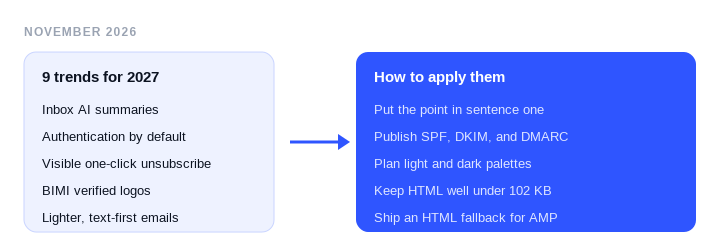
- Write for the summary: Apple Mail can show an AI summary instead of your first lines, so sentence one has to carry the message.
- Design starts with authentication: Gmail, Yahoo, and Outlook.com require SPF, DKIM, and DMARC from high-volume senders, and Gmail ramped up rejections from November 2025.
- Make leaving easy: one-click unsubscribe (RFC 8058) plus a visible footer link is a requirement for bulk senders, not a courtesy.
- Earn the logo: BIMI with a Verified Mark Certificate puts your logo and a checkmark next to your name in Gmail.
- Lighter and text-first: Gmail clips heavy HTML, and summaries and screen readers read text, not images.
- Interactive email, honestly: AMP for Email works in Gmail and Yahoo but not in Apple Mail or Outlook, so every interactive block needs a fallback.
Email design trends 2027 at a glance
| Trend | What changes in 2027 | First step |
|---|---|---|
| Inbox summaries and categories | First lines may be replaced or grouped | Put the point in sentence one |
| Authentication by default | Unauthenticated bulk mail is filtered or rejected | Publish SPF, DKIM, and DMARC |
| Visible unsubscribe | One-click unsubscribe required for bulk senders | Header plus a readable footer link |
| Verified logos (BIMI) | Logo and checkmark next to the sender name | DMARC at quarantine or reject |
| Dark mode, designed | From fixes to two planned palettes | Test both modes before sending |
| Accessibility as baseline | EU rules raise the bar for digital services | Live text, alt text, 4.5:1 contrast |
| Lighter, text-first emails | Heavy HTML gets clipped | Keep HTML well under 102 KB |
| Modular, mobile-first templates | Tested blocks replace one-off layouts | Build a small module library |
| Interactive email, honestly | AMP stays a Gmail and Yahoo extra | Ship the HTML fallback first |
The 9 email design trends for 2027
1. Inbox AI summaries and categories rewrite the preview
What it is. With Apple Intelligence on, Apple Mail shows a short summary under each unread email in the inbox; users get “the first lines of the most recent message” back only by turning summaries off. Apple Mail on iPhone also sorts mail into Primary, Transactions, Updates, and Promotions, and opening a message in the last three shows a digest of other messages from that sender. In the Gmail app, Gemini summary cards appear on long threads or messages with several replies (at launch in May 2025: English only, on paid Google plans).
Why it is happening. Apple’s Mail documentation describes summaries that “automatically appear in your inbox,” and its iPhone guide documents the four categories and the digest view. Google announced Gemini summary cards on May 29, 2025.
How to apply it.
- Put the most important fact (offer, date, change) in the first sentence of the body, as live text.
- Keep writing a preheader, but make the first visible line work as one too, since either may be hidden.
- Use a consistent sender name; in a digest grouped by sender, it is how subscribers recognize you.
- Never put the headline only inside an image. A summary can only use text it can read.
2. Authentication is part of the design brief
What it is. An unauthenticated template may never be seen, so design and deliverability checks now share one workflow.
Why it is happening. Since February 1, 2024, Gmail has required all senders to use SPF or DKIM and keep reported spam rates below 0.3%; senders of 5,000 or more messages a day need SPF, DKIM, and DMARC, plus one-click unsubscribe. Google says that starting November 2025 Gmail is “ramping up its enforcement,” including temporary and permanent rejections. Yahoo asks bulk senders for SPF, DKIM, DMARC of at least p=none, and a spam rate below 0.3%. Outlook.com followed on May 5, 2025: domains sending more than 5,000 emails a day must pass SPF, DKIM, and DMARC, and Microsoft says failing mail goes to junk first, with rejection to follow.
How to apply it.
- Confirm SPF, DKIM, and DMARC for every sending domain, including the one your email platform uses. The guide to DMARC monitoring covers moving from p=none to enforcement.
- Spam test the final design, not a draft. Unspam scores a message on authentication, content, blacklists, and HTML, and its inbox placement test reports whether seed copies landed in Inbox, Promotions, or Spam, or went missing.
3. The unsubscribe link becomes a visible design element
What it is. Unsubscribing used to be tiny gray footer text. In 2027 it is a feature: a header that lets the mailbox show its own unsubscribe button, plus a readable footer link.
Why it is happening. RFC 8058 (January 2017) defines the List-Unsubscribe-Post: List-Unsubscribe=One-Click header, which lets the mailbox send the unsubscribe as an HTTPS POST; the header must be covered by a valid DKIM signature. Gmail requires one-click unsubscribe for marketing mail from senders of 5,000 or more a day, with a visible link in the body, and recommends honoring requests within 48 hours. Yahoo asks for 2 days. Gmail on the web also has a Manage subscriptions view that lists senders with a count of recent emails and an Unsubscribe button next to each.
How to apply it.
- Confirm your platform sends List-Unsubscribe and List-Unsubscribe-Post, signed with DKIM.
- Give the footer link real contrast and a tap-friendly size.
4. Verified logos with BIMI
What it is. Brand Indicators for Message Identification (BIMI) shows your logo next to your messages in supporting inboxes. In Gmail, senders verified with a Verified Mark Certificate (VMC) also get a checkmark next to the sender name.
Why it is happening. Gmail’s help center says the blue checkmark means the sender has verified ownership of the address and brand logo through BIMI, a VMC, and DMARC. Google’s BIMI setup guide requires DMARC at quarantine or reject (p=none is not supported) with pct=100, a logo in SVG Tiny Portable/Secure format at least 96 pixels square, and a certificate. A VMC needs a trademarked logo; a Common Mark Certificate (CMC) is the alternative, but the checkmark is tied to the VMC.
How to apply it.
- Finish trend 2 first: there is no logo without DMARC enforcement.
- Design a simple square logo that stays legible as a small circle on light and dark backgrounds.
5. Dark mode moves from defense to design
What it is. The 2026 guide treated dark mode as a baseline and focused on defensive fixes such as color-scheme tags and haloed logos. In 2027 the shift is to design two palettes on purpose, knowing which clients will honor them.
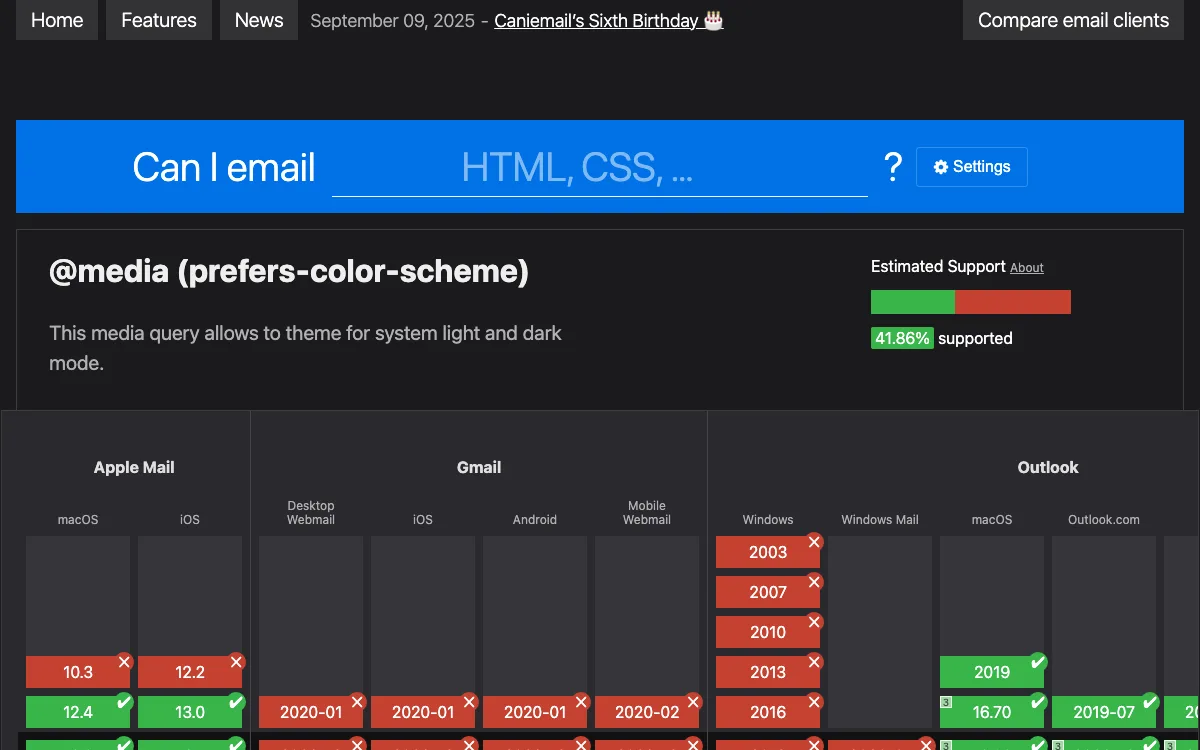
Why it is happening. Support is still split. Caniemail’s data (last tested March 2023) shows @media (prefers-color-scheme) working in Apple Mail on macOS and iOS, Outlook for Mac, Outlook.com, and Outlook for iOS, but not in Gmail’s webmail or apps. Caniemail estimates overall support at 41.86%. Your dark palette reaches part of the list, while Gmail users see your light design as Gmail renders it.
How to apply it.
- Define a light theme and an explicit dark theme with tested link and button colors.
- Make the light design survive Gmail: no dark text on transparent images, and a light outline or padded background behind dark logos.
- Preview both modes before sending. Unspam’s device previews cover 60+ clients and devices including dark mode, and Designmodo says every Postcards template has been tested in dark mode.
6. Accessibility becomes the baseline
What it is. Accessible email means a screen reader can follow it, text is readable, and nothing important lives only in an image. The 2026 guide covered the basic fixes; the 2027 change is that accessibility is increasingly expected by regulation, not just best practice.
Why it is happening. The European Accessibility Act came into effect on 28 June 2025, and the European Commission lists online retail, banking services, and e-books among the services it covers. The Act does not single out marketing email, but if you sell online in the EU, email is part of the customer journey those services include. The usual target is WCAG, whose criterion 1.4.3 asks for a contrast ratio of at least 4.5:1 for normal text and 3:1 for large text.
How to apply it.
- Set
langon the HTML element androle="presentation"on layout tables. - Write alt text that says what an image communicates; leave decorative images with empty alt.
- Check contrast against 4.5:1 in both palettes.
- Use link text that makes sense alone (“See the winter menu,” not “Click here”). The guide to HTML email buttons shows how to build buttons as live text.
7. Lighter, text-first emails
What it is. Plain-text-style and image-light emails keep growing: a short letter from a person, or a design where most of the message is live text.
Why it is happening. Gmail clips messages with large HTML and shows a “View entire message” link. Google does not publish the limit, but Email on Acid puts it at about 102 KB of HTML and suggests staying under 80 KB, since clipping is not fully consistent. A clipped email can hide the footer and unsubscribe link. AI summaries and screen readers also work from text, so an image-heavy email gives them little to use.
How to apply it.
- Check the HTML size of the final export after your platform adds tracking links, and strip unused CSS and nested tables.
- Use live text for headlines, prices, and calls to action; keep images for photos.
- Try a plain-text-style version for founder or editor updates, sent under a person’s name.
8. Modular, mobile-first templates
What it is. Instead of designing each campaign from scratch, teams keep a small library of tested modules (header, hero, product row, text block, footer) and assemble emails from them, single column first.
Why it is happening. Every trend above adds a check: dark mode, accessibility, HTML weight, a footer that must not be clipped. Caniemail’s tables show the same CSS behaving differently across Apple Mail, Gmail, and Outlook, so testing once per module beats testing every one-off layout.
How to apply it.
- Start with five to eight modules, and document spacing, type sizes, and colors for both themes. The guide to email newsletter design covers layout and hierarchy.
- Design at 600 px wide or less, single column, with thumb-sized tap targets.
- Reuse one header and footer everywhere. For patterns, see these newsletter examples.
9. Interactive email, used honestly
What it is. AMP for Email adds live elements such as carousels, accordions, and forms. Restrained micro-animations from 2026 remain the common way to add motion.
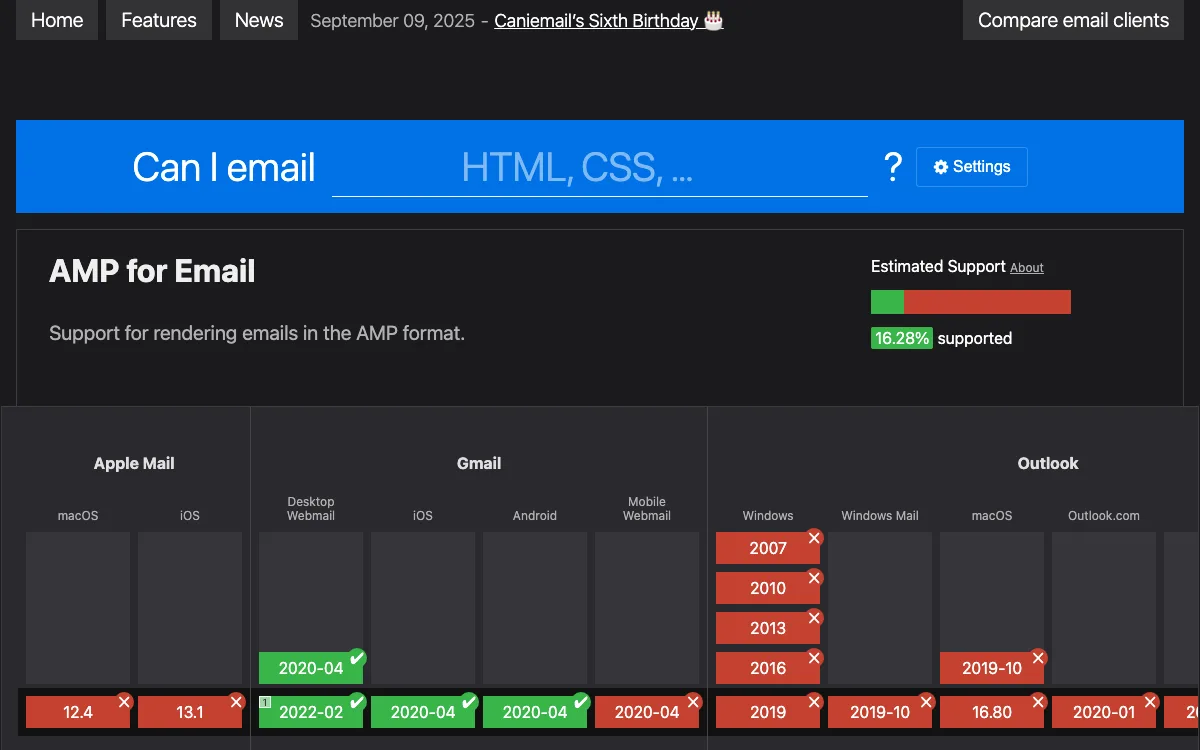
Why it is happening. Support has not broadened. The AMP project lists Gmail, Yahoo Mail, AOL Mail, Mail.ru, and FairEmail as supporting clients; Apple Mail and Outlook are not listed. Caniemail’s AMP table (last tested 2020) marks Apple Mail and every Outlook version unsupported and estimates overall support at 16.28%.
How to apply it.
- Treat AMP as an extra for Gmail and Yahoo readers. The HTML part must work on its own.
- Postcards includes AMP elements such as accordions and image carousels on its paid plans, with an HTML fallback for other clients.
Tools to apply these trends
Postcards: build modular, dark-mode-ready emails
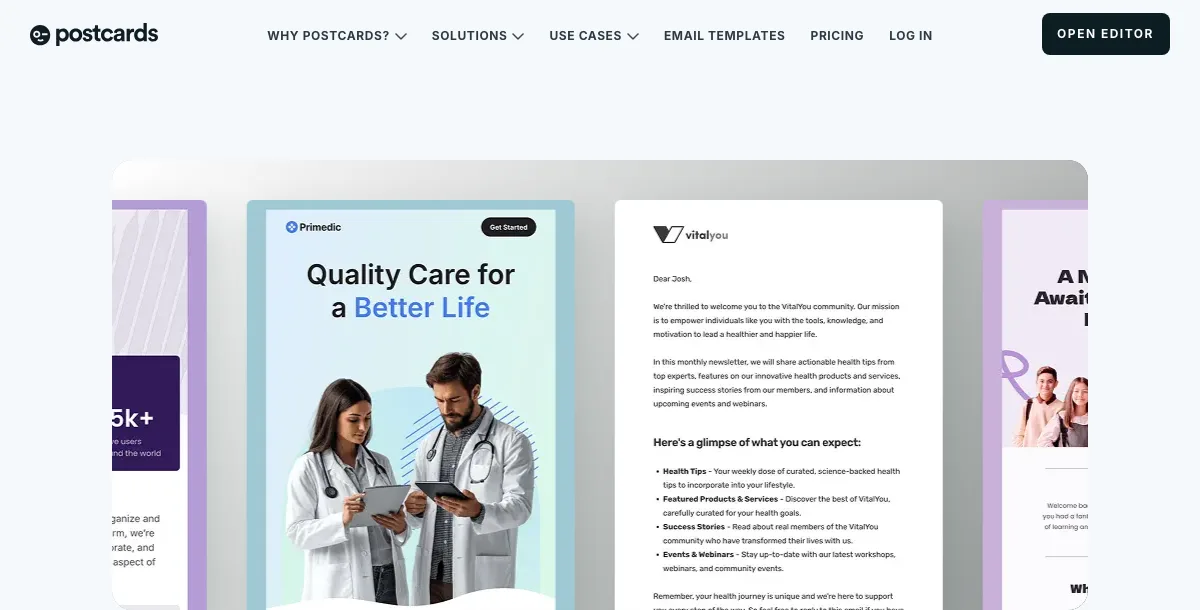
Postcards by Designmodo is a drag-and-drop email builder with templates and 100+ ready-made modules, which Designmodo says were tested with Litmus and Email on Acid. It exports to platforms such as Mailchimp, HubSpot, Klaviyo, Brevo, and SendGrid, or as clean HTML.
- Start: free, 10 template projects, 5 exports a month.
- Plus: $19 a month, or $16 a month billed yearly: unlimited projects, 20 exports and 20 email client previews a month, countdown timers, and AMP for Email.
- Pro: $29 a month, or $24 a month billed yearly: unlimited exports, 50 client previews a month, 3 teammates.
Limitations: the free plan has no client previews or AMP, and Postcards does not send campaigns, so you still need an email platform.
Unspam: test placement and rendering before sending
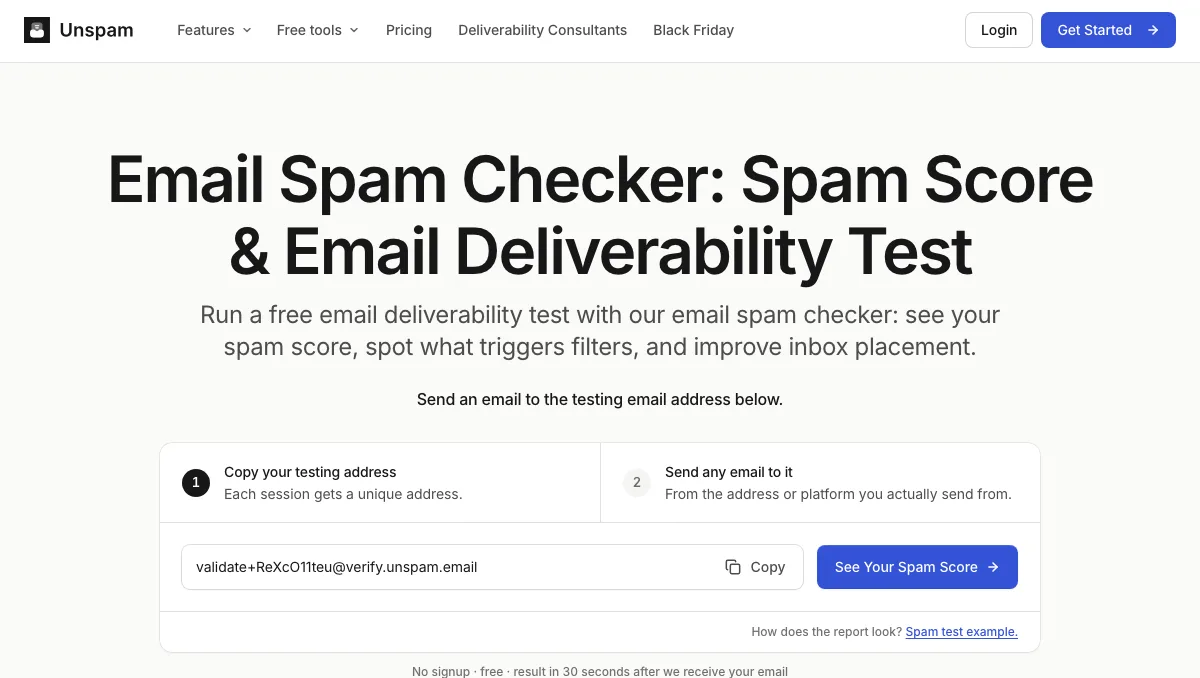
Unspam offers spam tests, inbox placement tests across Gmail, Outlook, Yahoo, and others, and device previews across 60+ clients and devices, including dark mode.
- Free: $0, 21 tests a month (5 spam tests, 3 inbox placements, 3 device previews, 5 screenshots, 5 heatmaps), 14-day retention.
- Custom: pay per test, such as $0.18 per spam test, $0.50 per inbox placement, and $0.10 per device preview; the default 25-test bundle is $6.40 a month, and annual billing saves 15%. Adds DMARC monitoring (first domain free), API access, and 3-year retention.
Limitations: no DMARC monitoring or API on the free plan, and each device render counts as one preview, so wide device tests use the allowance quickly.
For the website side of the same shifts, see the web design trends for 2027. For the visual side, Designmodo publishes a yearly roundup of email design trends.
FAQ
How do email marketing trends for 2027 differ from 2026?
The 2026 trends focused on how the email looks: personalization, dark mode fixes, minimalism, micro-animations, and accessibility. The 2027 trends add how the inbox treats the email, with summaries, categories, sender requirements, and unsubscribe rules shaping the design brief.
Do AI summaries make the preheader useless?
No, but less reliable. Clients that do not summarize still show the preheader, so keep writing it, and make the first body sentence clear enough to stand in for it.
How big can an HTML email be before Gmail clips it?
Google does not publish a limit, but Email on Acid puts it at about 102 KB of HTML and recommends staying under 80 KB. Check the size after your platform adds tracking links.
Do small senders need SPF, DKIM, and DMARC?
Gmail requires SPF or DKIM from all senders, and SPF, DKIM, and DMARC from senders of 5,000 or more messages a day. Setting up all three is the safer default for any business sending marketing email.
Build your Bootstrap theme
Design a custom Bootstrap 5 theme visually with a live preview, then export clean Sass or CSS.
Open the Builder