DMARC Monitoring in 2026: How to Get From p=none to p=reject
Publishing a DMARC record takes five minutes. What comes after is where most domains stall. Since 2024, Gmail and Yahoo have required bulk senders to publish DMARC, and since May 2025 Outlook.com has rejected high-volume mail that lacks it, so a huge number of domains now have a record set to p=none. That policy asks receivers to take no action at all. Its only real job is to make them send you reports about who is sending mail as your domain, and those reports arrive as compressed XML files that almost nobody reads.
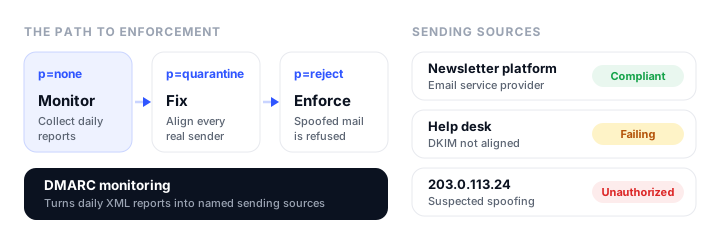
DMARC monitoring is the work of reading those reports, and the tooling that does it for you. It is how you find every service that sends as your domain, fix the ones that fail, spot the ones that should not be sending at all, and eventually move to a policy that actually stops spoofing. This guide covers what the reports contain, why they matter more in 2026 than ever, what changed when DMARC became a full internet standard in May 2026, and a safe path from p=none to p=reject, using Unspam’s DMARC monitoring as the worked example.
What DMARC monitoring actually is
A DMARC record is a DNS TXT record at _dmarc.yourdomain.com. It does two things: it tells receiving mail servers what to do with messages that claim to be from your domain but fail authentication (the p policy), and it tells them where to send reports about what they saw (the rua address). A minimal monitoring record looks like this:
v=DMARC1; p=none; rua=mailto:dmarc-reports@example.com
Once that record is live, mailbox providers send aggregate reports to the rua address, usually one per provider per day. Each report is an XML file, normally gzip-compressed, that lists the IP addresses that sent mail using your domain in the From address, how many messages each sent, whether SPF and DKIM passed and aligned, and what the receiver did with the mail. A single row, trimmed, looks like this:
<record>
  <row>
    <source_ip>203.0.113.24</source_ip>
    <count>412</count>
    <policy_evaluated>
      <disposition>none</disposition>
      <dkim>fail</dkim>
      <spf>fail</spf>
    </policy_evaluated>
  </row>
  <identifiers>
    <header_from>example.com</header_from>
  </identifiers>
</record>
That row is the whole problem in miniature. It says 412 messages claiming to be from your domain failed both checks, and it gives you an IP address. It does not say whether that IP belongs to your help desk software that nobody configured, or to someone sending phishing mail in your name. Multiply that by every provider, every day, and every service you use, and raw reports become unreadable fast. A monitoring tool parses the files, groups IP addresses into named sending sources, and tracks how each one changes over time.
There is a second report type, the failure or forensic report (ruf), which describes individual failing messages. Do not plan around it: Gmail does not send failure reports (Google’s DMARC setup guide), and neither does Microsoft 365 (Microsoft’s DMARC documentation). Aggregate reports are where the useful data is.
Why it matters more in 2026
DMARC stopped being optional for anyone who sends in volume. The three largest consumer mailbox providers now require it:
| Provider | Applies to | DMARC requirement | What happens if you miss it |
|---|---|---|---|
| Gmail | Senders of more than 5,000 messages a day to Gmail accounts, since February 2024 | A DMARC record of at least p=none, with the From domain aligned with SPF or DKIM |
Since November 2025, Gmail has been ramping up enforcement, including temporary and permanent rejections |
| Yahoo | Bulk senders, since February 2024 (Yahoo publishes no volume threshold) | A DMARC record of at least p=none that passes; a rua tag is strongly recommended |
Mail may go to the spam folder or be rejected |
| Outlook.com, Hotmail, Live | Domains sending more than 5,000 messages a day, since May 5, 2025 | SPF and DKIM passing, and DMARC of at least p=none aligned with one of them |
Rejected with error 550 5.7.515 |
Sources: Google’s email sender guidelines, Yahoo’s sender best practices and FAQ, and Microsoft’s announcement for high-volume senders, which originally said non-compliant mail would go to Junk and was updated to say it is rejected.
Notice what all three accept: p=none. That meets the requirement, but it does nothing to stop someone else sending as your domain, because it asks receivers to deliver failing mail anyway. The requirement is the floor. The reason to go further is protection, and there is a practical carrot too: BIMI, the standard that shows your brand logo next to your messages in Gmail and other clients, only works once your domain enforces DMARC at p=quarantine or p=reject (Google’s BIMI requirements, BIMI Group implementation guide).
Getting from p=none to enforcement without blocking your own mail is exactly what monitoring is for.
What changed in May 2026: DMARC is now RFC 9989
For its first decade, DMARC was defined by RFC 7489, an informational document rather than a formal standard. In May 2026 the IETF published its replacement as three Standards Track documents: RFC 9989 for DMARC itself, RFC 9990 for aggregate reporting, and RFC 9991 for failure reporting. Existing records keep working, but several details changed:
| Tag | What it does | Status under RFC 9989 |
|---|---|---|
v |
Version; must be first and must be DMARC1 |
Unchanged |
p |
Policy: none, quarantine, or reject |
Unchanged |
sp |
Policy for subdomains that exist | Unchanged |
np |
Policy for subdomains that do not exist | New in the core standard |
rua / ruf |
Where aggregate and failure reports go | Unchanged |
adkim / aspf |
Alignment mode for DKIM and SPF: relaxed (r, the default) or strict (s) |
Unchanged |
fo |
Which failures trigger a failure report | Unchanged |
t |
Test mode: t=y asks receivers to apply one policy level lower than the one published |
New |
psd |
Marks a record published by a public suffix domain | New, and not something most domains need |
pct |
Apply the policy to only a percentage of mail | Removed, replaced by t |
rf / ri |
Failure report format and report interval | Removed |
The practical changes for most domains:
pctis gone, andt=yreplaces it. Instead of applying a policy to, say, 25% of failing mail, you publish your target policy witht=y, and receivers apply one level lower:p=reject; t=yis handled as quarantine, andp=quarantine; t=yas none. Google’s own DMARC rollout guide still describes raisingpctin steps, so expect both to appear in documentation for a while.npcovers subdomains that do not exist. Attackers like to invent plausible subdomains such asbilling.example.com.np=rejectasks receivers to refuse mail from any subdomain of yours that has no DNS records at all.- Receivers should send reports to every
ruaaddress. RFC 7489 only required receivers to support two, so some still stop at the first two. If you list several destinations, put your monitoring service early in the list. - There is explicit guidance on
p=reject, covered in the rollout section below.
Reading your reports: sort every source into four buckets
Whatever tool you use, the job is the same. Every source that appears in your reports belongs in one of four buckets, and only one of them needs real work.
- Your mail, passing and aligned. Your main email platform with SPF and DKIM set up correctly. Nothing to do except keep it that way.
- Your mail, failing alignment. A legitimate service sending as your domain without authenticating as your domain. This is the bucket that blocks enforcement, and fixing it is most of the project.
- Forwarders and mailing lists. Mail you sent that someone’s alumni address, role alias, or mailing list relayed onward. SPF usually breaks when mail is forwarded, because the forwarding server is not in your SPF record; DKIM usually survives. Some failures here are expected.
- Strangers. IP addresses you cannot connect to any service you use, failing both checks. This is spoofing, and it is what enforcement exists to stop.
Why legitimate mail fails, and the usual fixes
Almost every source in bucket 2 fails for one of three reasons:
- The service uses its own bounce domain. SPF checks the envelope sender (the Return-Path, technically the
RFC5321.MailFrom), not the From address people see. Many platforms send with a Return-Path on their own domain, so SPF passes for them but does not align with yours. The fix is to set up a custom return-path domain in the service’s settings, or to rely on DKIM instead. - DKIM is not signed with your domain. DKIM aligns when the
d=domain in the signature matches your From domain. A tool that signs with its own domain passes DKIM but does not align. The fix is to enable custom DKIM in the tool and publish the records it gives you. This is the single most important fix, because DKIM survives forwarding and SPF does not. - Your SPF record has too many lookups. SPF allows at most 10 DNS lookups; go over and the whole record returns a permanent error (RFC 7208, section 4.6.4). Every
include:for a new service adds lookups. The fixes are removing services you no longer use, or moving some senders to their own subdomains.
Google keeps a useful list of other causes in its DMARC troubleshooting guide.
A note on alignment modes: relaxed alignment, the default, only requires the authenticated domain and your From domain to share the same organizational domain, so mail.example.com aligns with example.com. Strict alignment requires an exact match. Leave it relaxed unless you have a specific reason not to; strict mode mostly creates new failures.
A safe path from p=none to p=reject
The sequence is the same everywhere: observe, fix, tighten. The timing is where people go wrong.
Step 1: monitor at p=none. Publish a record with a rua address and leave the policy at none. Your mail flow does not change. Give it at least two weeks so weekly and monthly senders, such as invoicing and newsletters, show up in the data. RFC 9989 notes that fixing every legitimate stream can take many months on a large domain.
Step 2: fix bucket 2. Work through every legitimate source that fails alignment, starting with the highest volume. After each fix, watch the next few days of reports to confirm that source moved from failing to passing.
Step 3: quarantine. When your legitimate mail passes consistently, move to p=quarantine. Failing mail now goes to spam instead of the inbox. Keep reading the reports; anything you missed will show up as quarantined mail from a source you recognize.
Step 4: reject. When quarantine has run clean for a while, move to p=reject, and add policies for subdomains:
v=DMARC1; p=reject; sp=reject; np=reject; rua=mailto:dmarc-reports@example.com
When p=reject is the wrong target
RFC 9989 is unusually direct about one case. Domains whose users post to mailing lists should not publish p=reject, because lists often modify messages in ways that break DKIM, and rejected list mail can get subscribers automatically unsubscribed. If such a domain does move to reject, the RFC says to spend at least a month at p=none and an equally long period at p=quarantine first, comparing the results, and it requires any p=reject domain to sign all its mail with DKIM rather than relying on SPF alone (RFC 9989, section 7.4).
You can see this split in practice. Google’s corporate domain publishes p=reject, while gmail.com, where millions of people join lists and forward mail, publishes p=none with sp=quarantine for its subdomains:
_dmarc.google.com   v=DMARC1; p=reject; rua=mailto:mailauth-reports@google.com
_dmarc.gmail.com    v=DMARC1; p=none; sp=quarantine; rua=mailto:mailauth-reports@google.com
For most businesses, the clean answer is to separate the streams. Send marketing email from a subdomain such as news.example.com and transactional email from another such as mail.example.com, take those subdomains all the way to p=reject, and move the root domain, where staff send everyday mail, more cautiously. Microsoft’s DMARC guidance recommends the same shape: tighten the policy one subdomain at a time and the parent domain last.
Monitoring DMARC with Unspam
Unspam’s DMARC monitoring is built around the four-bucket job described above, with the end goal of getting a domain to an enforced policy.
Setup is one DNS record. You add your domain, and Unspam generates the record to publish. If you already have a DMARC record, it gives you that same record with its reporting address added, so your current policy and any other report destinations stay as they are. Unspam checks your DNS on its own and verifies the domain as soon as the record appears, and it flags the domain if its address is later removed. Mailbox providers usually send their first aggregate reports 24 to 48 hours after that. Because some receivers still only use the first two rua addresses, keep Unspam’s address among the first two if you list several.
What you get once reports arrive:
- A compliance view for every domain. For the last 30 days: messages reported, the share that passed DMARC, SPF and DKIM alignment, and the policy each domain publishes, with a daily volume timeline that marks the policy changes receivers reported.
- Named, categorized sources. IP addresses are grouped into sources and labeled as an email service provider, your own infrastructure, a forwarder, or suspected spoofing, and each is marked compliant, partially failing, failing, or unauthorized. Opening a source shows why its mail fails and how to fix it. This is the four-bucket sort, done for you.
- Policy readiness. For each domain, Unspam checks whether you can move to
p=quarantineorp=rejectand lists what stands in the way: too few days of data, compliance below the threshold, a failing source, or traffic nobody has reviewed yet. - Raw reports when you need them. Each report is listed by the organization that sent it, down to the source IP, the receiver’s decision, and the SPF and DKIM results for every record.
- A weekly summary email every Monday with the week’s pass rate, volumes, a daily chart, and each domain’s compliance. It is on by default, skips weeks with no traffic, and can be turned off.
- A REST API and an MCP server, so adding a domain, fetching the record to publish, verifying it, and reading reports can be part of your own provisioning scripts, or requests to an AI assistant.
- Many domains in one list, which matters for agencies and multi-brand teams comparing compliance across clients.
Pricing. DMARC monitoring is part of Unspam’s Custom plan. The first domain is included at no charge, each additional domain costs $6 a month, annual billing takes 15% off (about $5.10 per domain a month), and you can monitor up to 500 domains. The Custom plan has a $5 monthly minimum, so the free domain comes with a paid plan rather than on its own: monitoring two domains and nothing else works out to $6 a month, or $61.20 a year. Paid plans have a 14-day refund window. Prices verified in September 2026 on Unspam’s pricing page.
Free tools that pair with it. Before you publish or change a record, Unspam’s free DMARC checker validates what is live, the DMARC record generator builds a record (including the new t and np tags), and the DMARC report analyzer parses a single report file in your browser if you want to look at one before committing to monitoring. The SPF checker and DKIM checker cover the two records DMARC depends on, and the BIMI checker is there for when you reach enforcement.
Sending reports to another domain
One DNS detail trips people up when they point rua at a mailbox on a different domain, which is what every hosted monitoring service asks you to do. To stop anyone flooding a stranger’s inbox with reports, receivers check that the destination agreed to receive them: the destination domain must publish a TXT record at yourdomain.com._report._dmarc.destination-domain that starts with v=DMARC1 (RFC 9990, section 4). A monitoring service publishes that authorization on its own side, which is why its setup is a single record on yours. If you route reports to a mailbox on another domain you own, you have to publish it yourself, or the reports never arrive.
If you build the sites that send the mail
For developers, the most common bucket 2 sources are the ones you wrote: contact forms, password resets, order confirmations, and notification emails sent from an application through a transactional provider. Each is a sending source that has to align before the domain can enforce. When you add a new sender to a site, set up its DKIM on your domain in the same pull request, and check the next week of reports to confirm it shows up as passing. Our guide to email marketing for Bootstrap developers covers SPF, DKIM, and the other deliverability pieces developers own.
Wrapping up
A p=none record satisfies Gmail, Yahoo, and Outlook, but it does not protect your domain, and the reports it generates are only useful if someone reads them. Monitoring turns those reports into a list of named senders, shows you which ones to fix, and tells you when it is safe to tighten the policy. Start at p=none with a rua address today, fix your legitimate senders, and move to quarantine and then reject, separating your marketing and transactional mail onto subdomains so they can enforce first. If you want the reports read and sorted for you, Unspam’s DMARC monitoring includes your first domain free on its Custom plan.
FAQ
What is DMARC monitoring?
It is collecting and analyzing the aggregate reports that mailbox providers send to the rua address in your DMARC record. Monitoring tools parse the daily XML files, group sending IP addresses into named sources, and show which of them pass or fail SPF and DKIM alignment, so you can fix legitimate senders and spot spoofing before tightening your policy.
Is p=none enough for Gmail, Yahoo, and Outlook?
It meets their minimum requirement for bulk senders, as long as your mail also passes SPF or DKIM aligned with your From domain. It does not stop anyone else from sending mail as your domain, because p=none asks receivers to deliver failing mail anyway. Protection comes from moving to p=quarantine or p=reject.
How long should I stay at p=none?
Long enough for every legitimate sender to show up in your reports and pass. We suggest at least two weeks so weekly and monthly senders appear, and on a large domain it can take months. RFC 9989 recommends that domains whose users post to mailing lists spend at least a month at p=none and an equally long period at p=quarantine before considering p=reject.
Does Gmail send DMARC forensic reports?
No. Gmail does not send failure (ruf) reports, and neither does Microsoft 365. Both send daily aggregate (rua) reports, which is where the useful monitoring data comes from.
What happened to the pct tag?
RFC 9989, published in May 2026, removed pct and replaced it with a test flag, t=y, which asks receivers to apply one policy level lower than the one you publish. Existing records with pct still work, and some guides, including Google’s, still describe it, but new records should use t for testing.
How much does Unspam’s DMARC monitoring cost?
It is part of Unspam’s Custom plan: the first domain is free, each additional domain is $6 a month, and annual billing takes 15% off. The Custom plan has a $5 monthly minimum, so monitoring two domains costs $6 a month or $61.20 a year. Prices verified in September 2026.
Build your Bootstrap theme
Design a custom Bootstrap 5 theme visually with a live preview, then export clean Sass or CSS.
Open the Builder