Best AI Website Builders in 2026 (8 Compared)
Describing a website in a sentence and watching it appear is no longer a demo. Eight tools now do it well enough to ship real work, and the gap between them has almost nothing to do with which one writes the nicest code. They all write decent code. What separates them is what happens after the first prompt: how fast the meter runs, whether you can take the result somewhere else, and whether what you end up with is a website or just a preview.
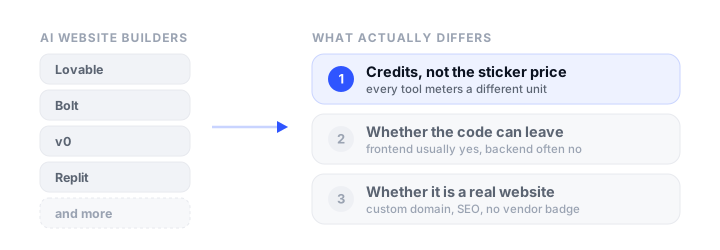
That is also why the sticker prices in every comparison table are close to meaningless. Almost nobody charges for a website. They charge for credits, tokens, or messages, and no two of them meter the same unit, so “$25 a month” means something different in each product. A single Bolt prompt can cost anywhere from a fraction of a percent of your monthly allowance to several percent, depending on how large your project has grown.
This guide compares the eight AI website builders worth considering in September 2026 on the things that actually decide whether you are happy in month three: pricing model, export path, backend lock-in, and whether the finished site can carry your own domain and be found in search. Prices were verified in September 2026.
How we picked
Every tool here was judged on the same criteria, weighted for people who want a website at the end rather than a science project:
- What it builds: a static marketing site, a full-stack app with a database, or both.
- The real cost: what the credit or token unit is, what the free tier genuinely allows, and how fast the meter moves.
- Getting your code out: ZIP download, GitHub sync, one-way or two-way, and whether export is paywalled.
- Backend lock-in: if it gave you a database and auth, can those move too?
- Is it a real website: custom domain, no forced vendor badge, and whether search engines can index it.
If you have already built something and just need somewhere to put it, our companion guide on where to host a website built by AI covers that side in detail.
The best AI website builders at a glance
| Tool | Free tier | Paid from | Builds | Code export | Custom domain |
|---|---|---|---|---|---|
| Lovable | 5 credits/day, badge | $25/mo | Full-stack React | GitHub on all plans, ZIP paid | Paid plans |
| Bolt | 1M tokens/mo, badge | $25/mo | Full-stack React | ZIP + GitHub, no paywall | Pro |
| v0 | 7 messages/day | $30/user/mo | Next.js apps | GitHub, free | Free (Vercel Hobby) |
| Replit | 1 app, expires 30 days | $20/mo | Anything, any language | ZIP + GitHub, free | Paid plans |
| Base44 | 25 messages/mo, 5 apps | $20/mo | Full-stack, proprietary backend | Paid plans only | Starter and up |
| Figma Make | Not included | $16/seat/mo | React prototypes and apps | ZIP, not build-ready | Paid plans |
| Claude | Artifacts on free | $20/mo | Single-page sites, or real repos | Download, free | No |
| Framer | 1 site, Framer domain | $10/mo | Marketing sites | None | Paid plans |
The builders, reviewed
Lovable
What it is. The market leader for prompt-to-app, built on Vite and React with a built-in backend called Lovable Cloud that is Supabase underneath. You describe the app, it builds it, and publishing to a lovable.app subdomain is free and takes one click.
Who it is for: people building a real product with accounts, data, and payments, who want the backend handled rather than wired up by hand.
Strengths: two-way GitHub sync is available on every plan including free, and the repository is created private in your own account, so the code is never hostage even on $0. Published sites stay live indefinitely with no expiry and no traffic cap, and running out of credits does not take your site down. The backend is real rather than a toy: auth, storage, realtime, and edge functions.
The catch. On 13 May 2026 the default template for new projects changed from a Vite single-page app to TanStack Start with server-side rendering, which quietly changed where these projects can be hosted. A current Lovable project builds to .output/ with no index.html, so a plain static host cannot serve it at all. Free sites carry a Lovable badge, custom domains need a paid plan, and Lovable Cloud projects pause after a period of inactivity, at which point the backend stops answering and visiting the site does not wake it. You have to open the editor and click Wake up.
Pricing: Free $0 (5 build credits a day, up to 30 a month, plus 20 Cloud credits); Pro $25/month (100 credits); Business $50/month (100 credits, SSO and governance rather than more capacity); Enterprise custom. Annual billing gives two months free.
Bolt
What it is. StackBlitz’s builder, and the most technically unusual one here: your project runs entirely inside your browser tab in a WebContainer, a Node runtime compiled to WebAssembly. It ships with its own hosting on bolt.host and its own database.
Who it is for: developers who want a full-stack app with the least friction, and who care about getting clean, portable code back out.
Strengths: the export story is the best of the full-stack tools. ZIP download is not paywalled, GitHub sync is genuinely two-way (Bolt commits your changes automatically and polls the repo every thirty seconds for outside edits), and because WebContainers can only run JavaScript and WebAssembly, Bolt physically cannot write code that depends on native modules. The result is unusually portable by construction.
The catch. The free hosting has a hard ceiling that most comparisons miss: a free site stops serving once it hits 10 GB of bandwidth or 333,333 requests in a month, and stays offline until the billing cycle resets. Bolt counts bot and crawler traffic toward that. Free sites also carry Bolt branding, custom domains need Pro, and if you used Bolt Database the only documented export is manual, per table, as CSV or JSON, with no SQL dump and no connection string.
Pricing: Free $0 (300K tokens a day, 1M a month, no rollover); Pro $25/month (from 10M tokens, rollover, custom domains, no branding); Teams $30/month per member; Enterprise custom. Yearly billing is discounted.
v0
What it is. Vercel’s builder, rebuilt in February 2026 around a sandbox where every chat becomes a branch in your GitHub repository. It writes Next.js with TypeScript, Tailwind, and shadcn/ui, and it writes it the way Vercel would.
Who it is for: developers who already work in Next.js and intend to stay on Vercel.
Strengths: GitHub is the source of truth rather than an export feature, so the code is in your repository from the first prompt, with every change a commit and a real pull request workflow. Vercel explicitly disclaims ownership of the generated code. Free accounts get GitHub sync and deployment, and preview URLs are automatic.
The catch. Two things. It generates Next.js whether or not your project wants it, complete with server actions, API routes, and cookies, which means the output usually cannot be exported as a static site at all. And the free Hobby plan it deploys to prohibits commercial use in unusually broad terms: Vercel counts being paid to create, update, or host a site as commercial, along with ads and even donations. A freelancer building a client site on Hobby is in breach regardless of whether the site sells anything.
Pricing: Free $0 ($5 of included credits, capped at 7 messages a day); Plus $30 per user/month; Business $100 per user/month; Enterprise custom. The old $20 Premium plan is being sunsetted and is closed to new users. See our Vercel alternatives roundup if the Hobby terms rule it out.
Replit
What it is. The most general-purpose tool here. Replit’s Agent will build in almost any language, run it, deploy it, and give you a full IDE around it, with a Neon-backed Postgres database and its own auth.
Who it is for: people whose project is not really a website, or who want one environment for a frontend, an API, a cron job, and a database.
Strengths: nothing else here is this flexible, and the database is genuinely portable because it is standard Postgres you can pg_dump. ZIP download and GitHub sync are both available on free accounts. There are four deployment types, including a static one that is free apart from bandwidth.
The catch. The free tier publishes one app and it expires after 30 days unless you republish, with a “Made with Replit” badge that only paid plans remove. Agent billing is effort-based rather than per-message, so cost scales with how hard the task is and is hard to predict in advance. The two things that make leaving painful are the .replit config file, which holds the run and build commands that no other host can guess, and Replit Auth, where every user identity is issued by Replit, so migrating means migrating your users.
Pricing: Starter free (1 published app, expires after 30 days); Core $20/month, or $17 billed annually; Pro $100/month, or $95 annually; Enterprise custom.
Base44
What it is. A full-stack builder acquired by Wix in 2025, built around a completely managed backend: a MongoDB-compatible database, hosted auth, file storage, and built-in integrations for sending email, generating images, and calling an LLM from inside your app.
Who it is for: non-developers who want an internal tool or a small SaaS working end to end without touching infrastructure.
Strengths: the batteries-included backend genuinely removes work, the free tier lets you keep up to five apps, and search engines get a pre-rendered version of the page rather than an empty React shell, which is better than most client-rendered builders manage. Custom domains moved down to the Starter plan in August 2026, so they no longer require a mid-tier subscription.
The catch. This is the tightest lock-in on the list, and it is worth understanding before you build a business on it. The React frontend is portable, but the backend is not self-hostable in any form: the SDK connects by app ID with no way to point it anywhere else, so “hosting it yourself” means serving your own frontend that still calls Base44’s backend. Data export is manual and per collection as CSV or JSON, with no schema, foreign keys, or user passwords. Export itself requires a paid plan, so a free account has no way out at all. Two separate credit types, message and integration, meter your building and your users’ activity respectively.
Pricing: Free $0 (25 message credits, 100 integration credits, up to 5 apps); Starter $20/month, or $16 billed annually; Builder $50/$40; Pro $100/$80; Elite $200/$160.
Figma Make
What it is. Figma’s prompt-to-app tool, sitting inside the design tool your team probably already pays for. It produces React and can attach a Supabase backend that lives in your own Supabase account.
Who it is for: design teams who want a working prototype from a design conversation, without leaving Figma.
Strengths: the workflow advantage is real if you are already in Figma, and the Supabase project belongs to you rather than the vendor, which is a better ownership story than most. Publishing to a figma.site subdomain is included with a paid plan, and GitHub push is available on every plan.
The catch. The export is the weak point: the downloaded ZIP has no package.json, no Vite or TypeScript config, and pins dependency versions inline in the import statements, so it is not a runnable project until you rebuild the scaffolding by hand. GitHub push is one-way, and edits made in the repository are overwritten on the next push. Figma-hosted sites cannot serve a robots.txt or sitemap.xml at all, which is a hard limit for anything that needs to rank. Make needs a paid plan and a Full seat, so it is not available on free Figma.
Pricing: Starter free but no Make access; Professional $16 per Full seat/month billed annually (3,000 AI credits); Organization $55; Enterprise $90. Credits reset monthly and do not roll over.
Claude
What it is. Not a website builder as such, which is exactly why it belongs here. Describe a page in a chat and Claude produces a working artifact you can see and iterate on, and Claude Code does the same job against real files in a real repository.
Who it is for: people who want one good-looking page fast, and developers who would rather have an agent editing their actual codebase than a hosted builder.
Strengths: for a single self-contained page it is the shortest path in this list, and the output is plain HTML you own outright with no vendor account attached. Claude Code sits at the opposite end: ordinary source files, ordinary git, no proprietary runtime, and nothing to migrate off later because there is nothing to migrate off. Our walkthrough of building and publishing a website with Claude covers the full flow, and the AI prompts for Bootstrap themes guide covers getting a specific look out of it.
The catch. A published artifact is a shareable page, not a website. It cannot use your own domain, it is served with a noindex directive so it will never appear in search, it is a single page with no backend, and unpublishing is irreversible: once unpublished, that artifact cannot be published again. Claude Code, meanwhile, has no hosting at all, which is a feature rather than a flaw but does mean you bring your own.
Pricing: Free $0 (artifacts included); Pro $20/month, or $17 billed annually, which includes Claude Code; Max from $100/month.
Framer
What it is. A design-first website builder whose 2026 AI layer, Framer Agents, generates pages from a prompt or a screenshot, writes code components, and handles SEO metadata and the CMS.
Who it is for: marketers and designers who want a polished, animated marketing site and have no intention of ever touching the code.
Strengths: the visual output is the best here by a distance, and the CMS, localization, and A/B testing are built in rather than bolted on. For a landing page that needs to look expensive, it is hard to beat.
The catch. There is no code export. Framer states plainly that it does not offer HTML export for self-hosting because sites rely on platform-managed services, so a Framer site lives on Framer permanently. The free plan does not include a custom domain, which makes it a trial rather than a free tier for anything public.
Pricing: Free $0 (Framer subdomain, 500 one-time AI credits, no custom domain); Basic $10/month (custom domain, 1,000 credits); Pro $30/month (3,000 credits); Enterprise custom.
Credits are the real price, and they are not comparable
Every tool on this list meters something different, which is why comparing monthly prices tells you almost nothing:
- Lovable charges credits per message, roughly 1 for planning and 0.5 to 2 for a build, and Pro’s 100 monthly credits are the same on Business. You are buying governance at $50, not capacity.
- Bolt charges tokens, and the count scales with how much of your project it has to read, not with how much work you asked for. A one-line change to a large project can cost more than a feature in a small one.
- v0 charges credits derived from model tokens, with the free plan additionally capped at 7 messages a day.
- Replit charges by effort, meaning time and computation, so identical prompts cost different amounts.
- Base44 runs two meters: message credits when you build, and integration credits when your users trigger email, images, or an LLM call. The second one keeps running whether or not you are working.
- Figma charges AI credits that reset monthly and never roll over, and its own examples put a font change at about 30 credits and generating an app at 100 or more.
Two consequences worth planning around. Debugging is billed at the same rate as building, so a tool that gets stuck in an error loop costs you real money to watch fail. And on any tool where live traffic draws from the same balance as development, a spike in visitors competes with your ability to keep working.
Can you take your site with you?
This is the question people ask last and should ask first. The tools fall into three groups:
The code and the data can both leave. Bolt and Replit, if you avoid their built-in databases and use a portable one. Replit’s Postgres is standard and dumps cleanly, and Bolt’s exported project is an ordinary npm project.
The frontend leaves, the backend does not. Lovable, v0, Figma Make, and Base44 all hand over the frontend readily, but the useful half stays put. Lovable’s edge functions and managed OAuth run on Lovable’s servers. Base44 is the extreme case: the SDK takes an app ID and nothing else, so there is no address you could point it at even if you wanted to. Figma Make is the mildest, since the Supabase project is genuinely yours.
Nothing leaves. Framer, by explicit policy. Wix, Squarespace, and Canva’s site tools are the same in practice.
The practical advice is unglamorous: if a tool offers GitHub sync, connect it on day one rather than the day you need it, because on Lovable that is the only free export path, and on Base44 there is no free export path at all. Export your data on a schedule too, since none of these guarantee you a database dump.
Is the result actually a website?
A working preview is not the same thing as a site people can find. Three things to check before committing:
- Custom domain. Only v0 gives you one on a free plan, and that comes with Vercel’s non-commercial restriction attached. Everywhere else it is a paid feature, which is usually the real reason people upgrade.
- Vendor badges. Lovable, Bolt, and Replit all brand free sites, and Lovable’s badge reappears if you downgrade.
- Search. Most of these produce client-rendered single-page apps, which crawlers handle inconsistently. Bolt sells prerendering as a paid “SEO boost” feature. Figma-hosted sites cannot serve
robots.txtorsitemap.xml. Claude artifacts arenoindexby design. Base44 prerenders for crawlers but only generates a sitemap on custom domains.
If any of that matters, the cleanest fix is to stop treating the builder as your host. Export the built files and put them on a host that gives you a domain, SSL, forms, and analytics for less than the builder charges for the privilege: Static.app starts at $6/month, or $5 billed annually, and Cloudflare and Netlify both include custom domains free. Our guides on where to host a website built by AI and static website hosting cover the options.
One to avoid starting on
Firebase Studio is being shut down. Google announced the sunset in March 2026, disabled new signups and workspace creation on 22 June 2026, and will delete remaining data on 22 March 2027. It still appears in plenty of current comparison articles, but you cannot sign up for it today. Google points people to AI Studio and Antigravity instead. Apps already deployed to Firebase itself are unaffected, since only the development environment is going away.
How to choose
- You want a marketing site that looks expensive: Framer, as long as you accept never getting the code out. Budget for Basic at $10/month, since the free plan has no custom domain.
- You want a real app with accounts and data: Lovable for the most mature product, or Bolt if getting your code back out matters more than polish.
- You already live in Next.js and Vercel: v0, provided the site is not commercial or you are paying for Pro.
- You want one page, fast, that you fully own: Claude, then upload the file anywhere.
- Your project is not really a website: Replit.
- You are a design team with Figma seats: Figma Make for prototypes, but plan to rebuild the scaffolding if it graduates into a real project.
- You want the least infrastructure work and accept the trade: Base44, with your eyes open about the export path.
Whichever you pick, put an uptime check on the finished site: our roundup of the best website monitoring tools covers the free options, and where to host an HTML website covers the wider hosting field.
FAQ
What is the best AI website builder in 2026?
There is no single winner, because the tools solve different problems. Lovable is the most capable for full-stack apps with accounts and data. Framer produces the best-looking marketing sites but never lets you export the code. Bolt offers the cleanest way to get your project back out. Claude is fastest for a single page you own outright. v0 is the natural choice if you already work in Next.js on Vercel. Choose by what you are building and how much you care about portability, not by which one has the best demo.
Are AI website builders free?
All of them have a free tier, but none is free for a real public site. Free plans put the vendor’s badge on your site (Lovable, Bolt, Replit), withhold custom domains (every tool except v0), or expire (Replit publishes one app that dies after 30 days). Free allowances are small too: Lovable gives 5 build credits a day, v0 caps you at 7 messages a day, and Base44 gives 25 messages a month. Expect to pay $10 to $25 a month once the site is real.
Can I export the code from an AI website builder?
Usually the frontend, rarely the backend. Bolt and Replit give you a ZIP and GitHub sync on free accounts. Lovable gives two-way GitHub sync on every plan but paywalls the ZIP. v0 puts the code in your GitHub repository by default. Base44 requires a paid plan to export at all. Figma Make’s ZIP is missing its build configuration, so it will not run until you rebuild that yourself. Framer has no export at all.
Why did my AI builder subscription run out so fast?
Because credits are consumed by the tool reading and rewriting your project, not by the value of what you asked for. Costs rise as the project grows, and debugging is billed exactly like building, so a model that gets stuck in an error loop burns your allowance while producing nothing. On tools where live traffic draws from the same balance, visitors compete with your development budget too. Working in smaller projects and reverting rather than repeatedly patching a broken state both help.
Can I use my own domain with an AI website builder?
On paid plans, yes, almost everywhere. Lovable, Bolt, Replit, Figma Make, and Framer all gate custom domains behind a subscription. v0 is the exception, since it deploys to Vercel where custom domains work on the free Hobby plan, but that plan bans commercial use. Base44 moved custom domains down to its $20 Starter plan in August 2026. If the domain is the only reason you are upgrading, exporting the site to a dedicated static host is usually cheaper.
Will a site built by AI rank in Google?
It can, but several of these make it harder than it needs to be. Most produce client-rendered single-page apps, which crawlers index inconsistently. Figma-hosted sites cannot serve a robots.txt or sitemap.xml. Published Claude artifacts carry a noindex directive and will never rank. Bolt charges for prerendering as a paid feature. If organic search matters, host the exported build somewhere that serves real static HTML.
Should I use an AI website builder or just build it myself?
Use one if the site is standard, you want it this week, and you would otherwise not build it at all. Build it yourself when you need control over performance, accessibility, and markup, or when the project will live for years and you do not want a subscription in its dependency chain. There is a middle path worth knowing about: have an AI write plain HTML and CSS, or a Bootstrap theme, and host the output yourself. You get the speed without the platform.
Build your Bootstrap theme
Design a custom Bootstrap 5 theme visually with a live preview, then export clean Sass or CSS.
Open the Builder