Where to Host a Website Built by AI (Lovable, v0, Bolt, Claude)
You described a website to an AI tool, watched it appear in a preview pane, and now you want it on the real internet at your own address. This is where most people hit an unexpected wall. The tool has a publish button, that button puts the site on a subdomain like yourproject.lovable.app, and somewhere between the badge in the corner, the plan that gates custom domains, and the credits ticking down, it stops feeling like your website.
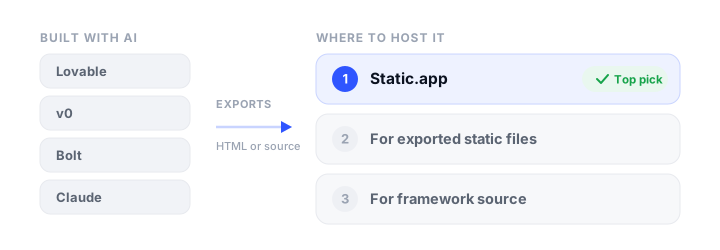
The good news is that every major AI builder lets you take the code out. The catch is that what comes out is rarely what people expect. In 2026, almost none of these tools produce a folder of HTML files you can drag onto a host. They produce React projects, Next.js apps with server-side code, or full-stack applications wired to a hosted database. Which of those you have is the single fact that decides where your site can live, and it is the thing nobody tells you before you go looking for a host.
This guide sorts AI builder output into three categories, matches each to the hosts that can actually serve it, and then walks tool by tool through getting your site out and online somewhere you control. If you have not settled on a builder yet, our comparison of the best AI website builders weighs them on pricing, export, and lock-in first. Prices and plan details were verified in September 2026.
What your AI builder actually hands you
Before comparing hosts, work out which of these three things you are holding. Everything else follows from it.
A single HTML file. This is what you get from a Claude artifact, and from most one-shot “build me a landing page” prompts. One file containing the markup, the styles, and any JavaScript, all self-contained. It is the easiest possible thing to host: every static host on earth will serve it, most of them free.
Framework source that compiles to static files. This is Bolt, and Lovable projects created before mid-2026. You get a Vite and React project. It is not directly hostable, but running npm install and npm run build turns it into a dist/ folder of plain HTML, CSS, and JavaScript, which is hostable anywhere. The build happens on your machine or in your host’s CI, once, and the result is a static site.
A server-rendered or full-stack app. This is v0 by default, and Lovable projects created since May 2026. The code expects a Node.js process running somewhere: server-side rendering, API routes, server actions, a database connection. There is no dist/ folder of static files to upload, because the app is not static. It needs a host that runs code, not one that serves files.
| What you built with | What you get | Hostable as static files? |
|---|---|---|
| Claude artifact | Single self-contained HTML file | Yes, immediately |
| Bolt | JavaScript source, usually Vite + React | Yes, after npm run build |
| Lovable (before May 2026) | Vite + React source | Yes, after npm run build |
| Lovable (current default) | TanStack Start, server-rendered | No, needs a Node host |
| v0 | Next.js with server actions | Usually not, see below |
| Replit | Varies by project | Depends on what it generated |
The Lovable row is the one that catches people out. On 13 May 2026 Lovable switched the default template for new projects from a Vite single-page app to TanStack Start with server-side rendering. Build a current Lovable project and the output lands in .output/, not dist/, and .output/public/ contains no index.html at all. A plain static host has nothing to serve. Worth knowing: both Lovable’s own external-hosting documentation and most third-party guides still describe the old Vite recipe, so if you follow instructions that say “upload the dist folder” and there is no dist folder, this is why. Older Lovable projects keep working as they always did, and upgrading to the new template is opt-in.
The trap that has nothing to do with technology
There is a second filter that matters as much as the technical one, and it is easy to miss because it lives in the terms of service rather than the docs.
Vercel’s Hobby plan is free, and forbidden for commercial use. Vercel defines commercial unusually broadly: any deployment used for the financial gain of anyone involved in any part of producing it. Their own examples include processing payments, advertising a product or service, running ads, and being paid to create, update, or host the site. Donations count too. So a freelancer building a client site on the free plan is in breach, even if the site itself sells nothing. Since v0 deploys to Vercel by default, and v0’s free plan advertises deployment as an included feature, this is the single most common way people end up quietly offside. If the site makes money, or you were paid to make it, you need Vercel Pro at $20 per seat per month, or a different host.
GitHub Pages has a similar restriction that gets less attention: its terms rule out running an ecommerce site or a commercial SaaS on it. Netlify, Cloudflare, Static.app, Render, and Surge do not restrict commercial use on their free tiers.
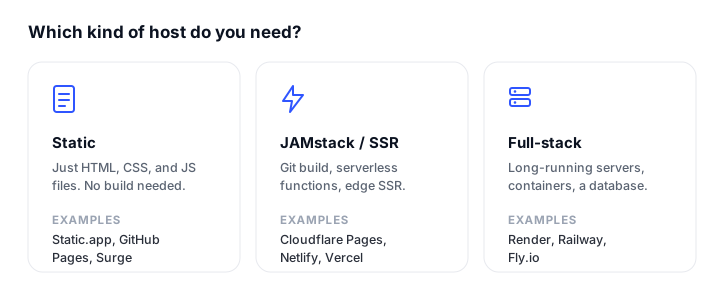
Where to host each kind of output
| Host | Free tier | Starting price | Serves static | Builds from source | Runs server code |
|---|---|---|---|---|---|
| Static.app | 1 site, 50 MB | $6/mo (Starter) | Yes | No | No |
| Netlify | 300 credits/mo | $9/mo (Personal) | Yes | Yes | Yes |
| Vercel | Hobby, non-commercial | $20/seat/mo (Pro) | Yes | Yes | Yes |
| Cloudflare Workers | Unlimited static requests | $5/mo (Workers Paid) | Yes | Yes | Yes |
| GitHub Pages | Public repos | $4/mo (private repos) | Yes | Via Actions | No |
| Render | Hobby, metered | $25/mo (Pro) | Yes | Yes | Yes |
| Surge | Unlimited sites | $30/mo (Professional) | Yes | No | No |
Static.app
Static.app is the simplest answer for the first two categories, and bootstrap.build’s hosting partner. You drag a folder or ZIP into the dashboard and the site is live with free SSL, with no build step, no git repository, and no CLI. For a Claude artifact it is close to frictionless: you can paste the public artifact link and Static.app publishes it as a real website, without downloading anything first. For a Bolt or older Lovable project you run npm run build locally and upload the contents of dist/.
What makes it a better destination than the builder’s own subdomain is what comes with it. Sites are indexed by search engines, custom domains work on paid plans, and the managed extras cover exactly the things a static export loses: form submissions land in your dashboard with spam protection, analytics are cookieless, and pages can be password protected. Updating is a re-upload, an edit in the browser editor, or a folder sync from the desktop app. There is also a REST API, an MCP server, and a GitHub Action on paid plans if you want to automate it later.
The catch. Static only. There is no server-side runtime, so a current-generation Lovable project or a v0 app with server actions cannot run here, and Next.js API routes will not execute. It is a smaller vendor without Cloudflare’s edge footprint. The free plan is one site, 50 MB, on a subdomain, and custom domains start at Starter.
Pricing: Free $0 (1 site, 50 MB); Starter $6/month, or $5/month billed annually (2 sites, 500 MB, custom domains, unlimited traffic, forms, analytics); Medium $12/month, or $10/month annually (7 sites, 3 GB, 1 team seat); Large $18/month, or $15/month annually (30 sites, 10 GB, 3 team seats, backup slots).
Netlify
The most capable free tier for AI builder output, because it covers all three categories. Netlify Drop now detects your framework and runs the build for you: as of the July 2026 refresh you can drag a project that still needs building, as long as you are logged in, and it will install, build, and publish. It also runs server-side rendering and serverless functions, so a Next.js or TanStack Start app can live here. Custom domains with free SSL are included on the free plan.
The catch. The credit system introduced in 2026 is a hard ceiling rather than a slowdown. The free plan gets 300 credits per month, a production deploy costs 15 credits, and bandwidth costs 20 credits per GB. That works out to roughly twenty deploys per month before a single visitor is counted, which is tight for the iterate-and-redeploy rhythm AI building encourages. When credits run out, every project on the account is paused and serves an unavailable page until the monthly reset.
Pricing: Free $0 (300 credits); Personal $9/month (1,000 credits); Pro from $20/month (3,000 credits, now tiered up to $126/month for 20,000); Enterprise custom.
Vercel
The natural home for v0 output, and the only place a v0 app with server actions, cookies, and API routes runs without modification. Deploys are fast, preview URLs are automatic, and custom domains with SSL work on the free Hobby plan, up to 50 per project.
The catch. The non-commercial restriction on Hobby, covered above, is the thing to check before anything else. Beyond that, Pro is $20 per seat per month plus usage, and the credit-based metering has generated a steady stream of complaints from people who burned through a month of allowance in days.
Pricing: Hobby free (personal, non-commercial); Pro $20 per seat/month plus usage; Enterprise custom. Our Vercel alternatives guide covers the wider field.
Cloudflare Workers
The most generous free traffic terms available: requests to static assets are free and unlimited, with no bandwidth charges at any scale. Workers also runs server-side code, so it handles all three output categories, and a Nitro-based build like current Lovable output actually targets Cloudflare by default.
The catch. It is the most developer-oriented option here. Deployment is via Wrangler CLI or a git connection rather than a simple upload, and Cloudflare now explicitly directs new projects to Workers rather than Pages, so most tutorials you find are written for the older product.
Pricing: Free $0 (100,000 Worker requests/day, unlimited static asset requests); Workers Paid from $5/month. See our Cloudflare Pages alternatives roundup.
GitHub Pages
Free, permanent hosting for public repositories with free SSL on custom domains, and a sensible destination if your builder already syncs to GitHub, which Lovable, v0, and Bolt all do. With a GitHub Actions workflow it will build a Vite or Next.js static export for you.
The catch. Static only, no drag-and-drop or upload path at all, publishing from a private repository needs a paid plan, and the terms prohibit ecommerce and commercial SaaS.
Pricing: Free for public repos; GitHub Pro around $4/month for private repos. Our GitHub Pages alternatives roundup covers the alternatives.
Render and Surge
Two narrower options worth knowing. Render runs full-stack apps from a git repository, which makes it a reasonable home for a server-rendered Lovable or v0 project, though custom domains are now metered beyond the two included on the free workspace and $0.25 per domain per month after that. Surge publishes a built folder from one command, with unlimited free sites and free managed SSL on custom domains, if you want the fastest possible CLI path for a static build.
Getting your site out, tool by tool
Claude
Usually the easiest case, with one fork in the road. If you asked for a web page, the artifact is a self-contained HTML file: download it, rename it to index.html, and it is a complete website that will run anywhere. If you asked for a React component, what downloads is the component file on its own, without the package.json, Vite config, or Tailwind setup that surrounds it in Claude’s preview. That will not build as-is. The fix is to scaffold an empty Vite project, drop the component into src/, install the libraries it imports, and build it, at which point you have an ordinary dist/ folder. A quick way to tell which you have: open the downloaded file in a browser. If it renders, it is static and ready to upload. If it does nothing, it needs the build step.
Claude can also publish an artifact to a shareable link, which is genuinely useful for showing someone your work. It is not a substitute for hosting: the link lives on Claude’s domain, cannot use your own domain, and cannot collect form submissions. It is also deliberately hidden from search, served with a noindex directive, so nothing you publish this way will ever rank. Unpublishing is one-way, too. Once an artifact is unpublished it cannot be published again, and its stored data goes with it. To publish it properly, either upload the downloaded file to a static host, or paste the public artifact link into Static.app, which will pull it in and publish it as a real site. Our step-by-step walkthrough of building and publishing a website with Claude covers the whole flow, and the HTML tester is handy for checking the file renders before you upload.
If you used Claude Code rather than the chat interface, you already have real files in a real folder, and you can skip straight to the build and upload step for whatever framework it used.
Lovable
Two-way GitHub sync is available on every plan, including free, and the repository is created private in your own account. That is the export path worth using. Downloading a ZIP directly is a paid-plan feature, so on the free plan GitHub is your route out.
Once you have the code, check package.json to see which template you have. If it is vite_react_shadcn_ts, run npm install and npm run build, then upload the contents of dist/ to any static host. If it is tanstack_start_ts, you have a server-rendered app: build it and you get .output/ with no index.html, so you need Netlify, Vercel, Cloudflare, or Render rather than a static host.
Either way, if your app uses Lovable Cloud for auth or data, you will need to reconnect it. The frontend reads three environment variables at build time, VITE_SUPABASE_URL, VITE_SUPABASE_PUBLISHABLE_KEY, and VITE_SUPABASE_PROJECT_ID, and because Vite embeds these at build time rather than runtime, changing them means rebuilding. Features that run on Lovable’s own servers, including edge functions and managed OAuth, do not come with you. One more thing to know if you keep using Lovable Cloud: Cloud projects pause after a period of inactivity, and a paused backend does not wake up when someone visits your site. You have to open the editor and wake it manually.
v0
Since the February 2026 rebuild, GitHub is the source of truth. Every chat gets its own branch and every change that touches code becomes a commit, so the code is already in your repository. GitHub sync and deploying to Vercel are both included on the free plan, and Vercel does not claim ownership of the generated code.
The difficulty is not the export, it is what v0 writes. It generates Next.js with server actions, API routes, and cookies by default, and Next.js static export supports none of those. Static export also drops incremental regeneration, redirects, headers, and default image optimization. If your project genuinely is just pages and components, add output: 'export' to next.config.js, run the build, and upload the contents of out/ to a static host. If it touches a database, handles a form server-side, or reads cookies, do not fight it: host it somewhere that runs Node.
Bolt
Click the project name, then Export, for a ZIP download, which is not plan-gated. GitHub sync is two-way: Bolt commits your changes automatically and checks the repository every thirty seconds for edits made outside Bolt. Projects are JavaScript source, usually Vite and React, so npm install and npm run build produce a dist/ folder that any static host will serve. Bolt only builds JavaScript backends, so there is no PHP or Python to worry about.
The frontend code is the most portable of any builder here, for an unusual reason: Bolt runs entirely in your browser using WebContainers, which can only execute JavaScript and WebAssembly. Native Node modules like sharp or bcrypt cannot load there, so Bolt is unable to write code that depends on them, and what you export is ordinary npm source that builds anywhere.
Two things to watch. First, the export does not include the values from Bolt’s Secrets panel, so any API keys or service URLs your app depends on are missing after you deploy elsewhere and have to be re-entered at your new host. Second, if you used Bolt Database, the built-in option that has been the default since late 2025, the data is the part that does not travel: the documented export is manual, per table, as CSV or JSON, with no SQL dump or connection string. Switching the project to Supabase, which Bolt still supports and can be set as your default, is the stated way out. Export your data before you need it.
The reason to move is usually the hosting terms rather than the code. Bolt publishes to a bolt.host URL for free, but free sites carry Bolt branding, custom domains need Pro at $25 per month, and the free tier stops serving entirely once it hits 10 GB of bandwidth or 333,333 requests in a month, staying offline until the next billing cycle. Bolt also counts crawler and bot traffic in those figures. For a site you want reliably reachable, that quota is the argument for hosting it somewhere else.
Replit
Replit output varies more than the others because it will happily build anything from a static page to a Flask API. Check what you actually have before choosing a host: if it produced a static frontend, export it and treat it like any other static build; if it produced a server, you need a host that runs processes. Download a ZIP from the three-dot menu, or connect the project to GitHub; neither is paywalled.
The free Starter plan publishes one live project, but it expires after 30 days unless you republish it, and it carries a “Made with Replit” badge that only paid plans remove. Custom domains need a paid plan too, with Core at $20 per month, or $17 billed annually. The detail that catches people moving off Replit is that the run and build commands often live in the .replit file rather than in package.json, so another host has nothing to go on until you copy them across. If your app uses Replit Auth, budget for more than a move: every user identity is issued by Replit, so migrating means migrating your users.
One thing every single-page app needs
If your build produces a single-page app with client-side routing, which covers most Vite and React output from these tools, visiting a deep link like /about directly will 404 on a plain static host, because there is no about.html file to serve. The fix is a fallback so unknown paths serve your index.html and let the router take over. On Static.app and Surge, add a 200.html file. On Netlify and Cloudflare, add a _redirects file. This one detail accounts for a large share of “it worked locally but the live site is broken” reports.
How to choose
- You have a Claude artifact or a single HTML file: upload it to Static.app, or paste the public artifact link and let it pull the file in. Nothing else in this list is simpler, and you get a custom domain, forms, and analytics on top.
- You have a Bolt or older Lovable project: run
npm run buildand uploaddist/to Static.app for the least ongoing friction, or push to GitHub Pages if the repository is public and the site is not commercial. Remember the200.htmlfallback. - You have a current Lovable or v0 project with server-side code: you need a host that runs Node. Netlify’s free tier is the most forgiving starting point, Cloudflare Workers is the cheapest at scale, and Vercel is the path of least resistance for v0 specifically, as long as the site is not commercial or you are paying for Pro.
- You were paid to build the site, or it makes money: rule out Vercel Hobby and GitHub Pages on terms grounds before you compare anything else.
- You want to stop paying builder subscriptions: get the code onto GitHub while your plan is active, since that export path is free on Lovable and included on v0, then host it somewhere with flat pricing.
Once the site is live, put an uptime check on it. Our roundup of the best website monitoring tools covers the free options, and if you are still choosing where to build, static website hosting and where to host an HTML website cover the wider landscape.
FAQ
Can I host an AI-generated website anywhere I want?
Usually yes, but it depends on what your builder exports. A Claude artifact is normally a single HTML file that any static host will serve, though a React artifact needs a build step first. Bolt and older Lovable projects are Vite and React source that compile to static files with npm run build. Current Lovable projects and most v0 apps are server-rendered and need a host that runs Node.js, such as Netlify, Cloudflare Workers, Vercel, or Render. Check package.json and look at what your build command produces before choosing.
Is it free to host a website built by AI?
Yes, on every host in this guide, within limits. Static.app is free for one site up to 50 MB on a subdomain, Cloudflare gives unlimited free static asset requests, GitHub Pages is free for public repositories, and Netlify’s free plan includes custom domains and SSL but caps you at 300 credits per month. The costs that surprise people are custom domains, which usually require a paid plan, and the AI builder’s own subscription, which is generally more expensive than the hosting.
Why does my AI-built site show a 404 when I refresh a page?
Almost certainly missing single-page app routing. React apps handle routes in the browser, so a static host asked for /about looks for a file that does not exist and returns a 404. Add a fallback that serves index.html for unknown paths: a 200.html file on Static.app or Surge, a _redirects file on Netlify or Cloudflare. The home page works and every other route breaks is the classic symptom.
Can I use my own domain with Lovable, v0, or Bolt?
Yes, but not on the free plans, with one exception. Lovable requires a paid plan starting at $25 per month, and Bolt requires Pro at $25 per month. v0 is the exception, since it deploys to Vercel where custom domains work on the free Hobby plan, but Hobby forbids commercial use. Moving to a dedicated host is often cheaper: Static.app includes custom domains from $6 per month, and Netlify and Cloudflare include them free.
Do I lose my database if I move off the builder’s hosting?
Not the data, but you do lose the automatic wiring. Lovable Cloud is Supabase underneath, and your frontend keeps talking to it from wherever it is hosted, as long as you set the environment variables in your new host’s build settings. What does not come with you are the features that run on the builder’s servers, such as edge functions and managed OAuth token refresh. Export your database schema and data before you move, and expect to reconfigure auth providers and redirect URLs.
Is Vercel’s free plan really off limits for client work?
For commercial sites, yes. Vercel’s fair use guidelines restrict Hobby to non-commercial personal use, and define commercial broadly enough to include receiving payment to create, update, or host a site, running ads, and even accepting donations. Building a client’s site on Hobby is a breach regardless of whether the site sells anything. Vercel Pro is $20 per seat per month, or you can host the same project on Netlify or Cloudflare without the restriction.
Should I keep using the AI builder’s hosting?
It is fine for prototypes and for sharing work in progress. The reasons people move are concrete: free tiers put the vendor’s badge on your site, custom domains sit behind a subscription that is priced for AI generation rather than hosting, and your site’s availability is tied to a plan you may stop paying for. Once a site is finished and changing rarely, a flat-priced static host is cheaper and one less thing to renew. Keep the builder for building.
Build your Bootstrap theme
Design a custom Bootstrap 5 theme visually with a live preview, then export clean Sass or CSS.
Open the Builder