How to Host a Website for Free in 2026 (Step by Step)
You can host a real website for free, with HTTPS, on a fast global network, and even on your own domain name. The catch is that “free” works best for one kind of site: a static site made of HTML, CSS, JavaScript, and images, which covers portfolios, landing pages, documentation, blogs built with a static site generator, and anything an AI tool exports as files. WordPress and other PHP sites can be hosted free too, but with more limits.
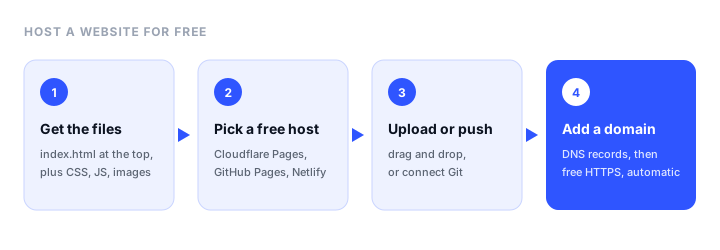
This guide shows which free hosts to use for which kind of site, then walks through publishing a site three ways, step by step: drag and drop, from GitHub, and on Cloudflare. It ends with connecting your own domain and the limits to watch for.
The short answer
- A static site (HTML, CSS, JS): Cloudflare Pages or GitHub Pages. Both are free with no time limit, include HTTPS, and support custom domains. Cloudflare Pages doesn’t meter bandwidth at all.
- A site you want online in two minutes, with no Git: drag the folder onto Netlify, Cloudflare Pages, or Static.app (a 7-day free trial, then paid).
- WordPress or PHP: InfinityFree hosts PHP and MySQL sites free, with no ads, on your own domain. WordPress.com is free on a
wordpress.comsubdomain, with ads shown to visitors. - Your own domain: the hosting can be free, but the domain itself isn’t. Expect to pay a registrar every year.
Which free host should you use?
| Host | Free plan | Best for | Custom domain on free | Limits to know |
|---|---|---|---|---|
| Cloudflare Pages | Free, no time limit | Static sites with any amount of traffic | Yes, free HTTPS | 500 builds a month, 20,000 files per site |
| GitHub Pages | Free for public repositories | Portfolios, docs, and projects already on GitHub | Yes, free HTTPS | 1 GB site size, soft 100 GB/month bandwidth |
| Static.app | 7-day free trial, then from $5/mo billed yearly | Drag-and-drop HTML sites with no setup | Paid plans only | Trial: 1 site, 50 MB, free subdomain |
| Netlify | 300 credits a month | Git workflow with previews, built-in forms | Yes, free HTTPS | Sites pause when credits run out |
| Vercel | Hobby plan | Next.js and React apps | Yes, free HTTPS | Personal, non-commercial use only |
| InfinityFree | Free, no ads | WordPress and PHP sites | Yes, bring your own domain | 5 GB disk; must get some visits each month |
| WordPress.com | Free plan | A simple blog with no setup | No | 1 GB storage, ads shown, no plugins |
Our guide to static website hosting compares eight static hosts in more depth, and where to host an HTML website covers the decision for plain HTML sites.
Before you start: get your site files ready
A static host serves files, so you need a folder that contains an index.html, the home page, plus your CSS, JavaScript, and images. Check three things before uploading:
index.htmlis at the top of the folder, not inside a subfolder. Hosts look for it at the root.- Links and image paths are relative or start with
/, notC:\Users\...orfile:///, which only work on your computer. - File names match exactly, including case.
Logo.pngandlogo.pngare different files on a web server, even if your computer treats them the same.
If your site comes from a framework or generator (React with Vite, Astro, Hugo, Next.js static export), run its build command first and upload the output folder, usually dist, build, public, or out. If you built the page with an AI tool, export or download the files first; our guide on where to host a website built by AI covers each tool’s export.
Need a starting point? Our free Bootstrap templates download as ready-to-host folders.
Method 1: Drag and drop (no Git, no command line)
The fastest way to publish. Good for a portfolio, a landing page, or testing how a site looks online.
On Netlify:
- Create a free Netlify account and sign in.
- Open app.netlify.com/drop.
- Drag your site folder onto the page.
- Netlify uploads it and gives you a live address like
random-name-123.netlify.app, with HTTPS. - To update the site, open its Deploys tab and drag the new folder in.
On Cloudflare Pages:
- Create a free Cloudflare account.
- In the dashboard, go to Workers & Pages, choose Create, then Pages, and pick the option to upload assets.
- Name the project, then drag in your folder or a ZIP of it.
- Your site goes live at
project-name.pages.dev.
On Static.app: sign up, drag in the folder or ZIP, and the site is live on a Static.app subdomain. The free trial lasts 7 days; keeping the site online and adding your own domain needs a paid plan from $5 a month billed yearly ($6 billed monthly), with unlimited traffic. It suits people who want the simplest possible upload and flat pricing, and paid plans collect form submissions without extra setup.
Method 2: GitHub Pages (free, from a repository)
Best when you already use GitHub or want your site’s history in version control.
- Create a free GitHub account and a new public repository. Name it
your-username.github.ioto publish at that address, or use any name to publish atyour-username.github.io/repo-name. - Upload your site files to the repository with Add file, then Upload files, and commit.
index.htmlmust be at the root. - Open the repository’s Settings, then Pages.
- Under Build and deployment, choose Deploy from a branch, select
mainand/ (root), and save. - After a minute or two, the Pages settings show your live address.
Every time you commit a change, GitHub publishes it. Publishing from a private repository needs a paid GitHub plan. For a framework site that needs a build step, use the GitHub Actions option in the same settings, which runs the build for you.
Method 3: Cloudflare Pages from Git (free, unlimited traffic)
Best for a site that might get a lot of visitors, since Cloudflare doesn’t charge for bandwidth on the free plan.
- Put your site in a GitHub or GitLab repository.
- In Cloudflare, go to Workers & Pages, choose Create, then Pages, and connect your Git account.
- Pick the repository. For a plain HTML site, leave the build command empty and set the output directory to
/. For a framework, choose its preset, which fills in the build command and output folder. - Deploy. The site goes live at
project-name.pages.dev, and every push to the repository publishes again. Other branches get their own preview addresses.
Use your own domain
A free host’s subdomain (.netlify.app, .github.io, .pages.dev) works, but a domain of your own looks more professional and stays yours if you ever change hosts.
- Buy a domain from a registrar. A
.comusually costs $10 to $20 a year, and the renewal price is often higher than the first year’s, so check it before you buy. - Add the domain in your host’s settings: “Custom domains” in Cloudflare Pages and Netlify, or the “Custom domain” field in GitHub Pages settings.
- Create the DNS records the host shows you at your registrar or DNS provider. Usually that is a
CNAMErecord forwwwpointing at your free subdomain, andArecords or a provider-specific record for the bare domain. - Wait for HTTPS. Every host above issues a free certificate automatically once the DNS records are in place, usually within minutes, sometimes a few hours.
Our step-by-step guide to a GitHub Pages custom domain shows the exact records for GitHub Pages, including the apex domain.
Free domains do exist (some hosts offer free subdomains, and a few registries offer free domains), but they are often blocked by email providers, look less trustworthy to visitors, and can be taken back. For a site that matters, a paid domain is worth the few dollars a month.
The limits of free hosting
Free plans are generous, but each has a catch. Know these before you build anything important on one:
- No server-side code on static hosts. Contact forms, logins, and databases need a form service, serverless functions, or a different host. Netlify and Static.app include form handling.
- Usage caps. Netlify’s free credits pause every site on the account when they run out. GitHub Pages has a soft bandwidth limit. Vercel’s free plan forbids commercial use.
- Free PHP hosting is slower and more limited than paid hosting, and free hosts can suspend sites that break their rules or get no visitors. Keep a backup of your files and database.
- No email. Hosting a website doesn’t give you an email address at your domain. You need a separate email service.
- No support. Free plans rely on documentation and community forums.
After you publish
Two quick checks keep a free site healthy:
- Test it on a phone and in a private browser window, to catch broken paths and cached files.
- Set up uptime monitoring, so you hear about an expired domain, a paused site, or a broken deploy before your visitors do. Pulsetic monitors up to 10 sites free, with domain expiry and SSL reminders, and our roundup of the best website monitoring tools compares other free options.
FAQ
Can I really host a website for free?
Yes. Cloudflare Pages and GitHub Pages host static websites free with no time limit, include HTTPS, and support custom domains. Netlify and Vercel have free plans with usage limits, and InfinityFree hosts WordPress and PHP sites free. You only pay for a custom domain if you want one.
What is the best free website hosting?
For a static site, Cloudflare Pages is the most generous, with unlimited bandwidth on the free plan. GitHub Pages is the simplest if your site is already on GitHub. For WordPress, InfinityFree offers free PHP and MySQL hosting with no ads, and WordPress.com is free on a subdomain with ads.
Can I host a website for free with my own domain?
Yes. Cloudflare Pages, GitHub Pages, Netlify, Vercel, and InfinityFree all let you connect your own domain on their free plans, with free HTTPS. You still pay a registrar for the domain itself, usually $10 to $20 a year for a .com.
How do I host an HTML website for free?
Put your files in a folder with index.html at the top, then drag the folder onto Netlify Drop or Cloudflare Pages, or upload it to a public GitHub repository and turn on GitHub Pages in the repository settings. The site goes live on a free subdomain with HTTPS within minutes.
Can I host a WordPress site for free?
Yes, with limits. WordPress.com’s free plan hosts a site on a wordpress.com subdomain with ads shown to visitors and no plugins. InfinityFree runs self-installed WordPress free with no ads, on your own domain, with 5 GB of disk space.
Is free website hosting safe?
Reputable free hosts such as Cloudflare Pages, GitHub Pages, and Netlify are as secure as their paid plans and include HTTPS. The risks are limits rather than security: a site can pause when it hits a usage cap, and free PHP hosts can suspend inactive sites, so keep a copy of your files.
Build your Bootstrap theme
Design a custom Bootstrap 5 theme visually with a live preview, then export clean Sass or CSS.
Open the Builder