Netlify vs Vercel in 2026: Pricing, Features, and Verdict
Netlify and Vercel do the same core job: connect a Git repository, and every push builds and deploys your site to a global network, with a preview URL for every pull request, serverless functions, and free HTTPS on your own domain. For a static site or a typical frontend project, either works well. The differences that decide it are how each one charges, whether the project is commercial, and whether you build with Next.js.
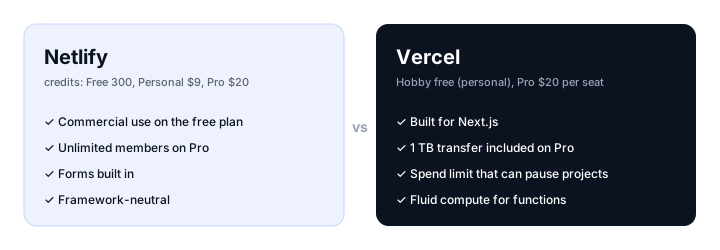
This comparison covers both platforms as they are in November 2026: pricing, free plans, frameworks, functions, and the extras around them. Prices are from each vendor’s own pricing page and documentation, in US dollars.
The short answer
Choose Netlify if:
- The site is for a business and you want to start free. Netlify’s free plan has no personal-use restriction; Vercel’s does.
- You have a team. Netlify Pro is $20 a month with unlimited members, where Vercel Pro is $20 per developer.
- You need forms. Netlify Forms are built in and don’t use credits.
- You use Astro, Hugo, Eleventy, SvelteKit, Nuxt, or plain HTML and want a host with no favorite framework.
Choose Vercel if:
- You build with Next.js. Vercel makes Next.js, and new features work there first.
- You expect real traffic. Vercel Pro includes 1 TB of transfer a month, and a spend limit can pause projects before a bill gets out of hand.
- You want the most polished developer experience for a frontend team, with comments on previews and close integration with the frameworks Vercel maintains.
Netlify vs Vercel at a glance
| Netlify | Vercel | |
|---|---|---|
| Free plan | 300 credits a month, hard limit | Hobby: 100 GB transfer, 1M requests, 1M function invocations |
| Commercial use on the free plan | Allowed | No, Hobby is personal and non-commercial |
| First paid plan | Personal, $9/mo (1,000 credits) | Pro, $20/mo per developer seat |
| Team plan | Pro, $20/mo for 3,000 credits, unlimited members | Pro, $20 per developer seat, unlimited viewers |
| How usage is billed | One credit pool for bandwidth, deploys, compute, and requests | Per resource, with $20 of usage credit and set allowances on Pro |
| Bandwidth | 20 credits per GB (about $0.13) | 1 TB a month on Pro, then from $0.15 per GB |
| When the free allowance runs out | Every site pauses until the next month | Usage caps; Hobby can’t buy more |
| Overspend protection | Auto recharge is off by default | Default $200 budget with alerts, optional pause |
| Best Next.js support | Good, through Netlify’s adapter | Native |
| Forms | Built in, free, unlimited | Not built in |
| Database | Netlify DB (Postgres) and Blobs | Postgres and others through the Vercel Marketplace, plus Blob and Edge Config |
| Drag-and-drop deploys | Netlify Drop | Vercel Drop |
Pricing
The two platforms bill in different ways, and that is the biggest practical difference between them.
Netlify bills in credits. Every plan includes a monthly pool, and everything draws from it:
- Bandwidth: 20 credits per GB
- Production deploys: 15 credits each (deploy previews and branch deploys are free)
- Compute for functions and databases: 10 credits per GB-hour
- Web requests: 2 credits per 10,000
Free includes 300 credits, Personal $9 a month includes 1,000, and Pro $20 a month includes 3,000 with unlimited members. On paid plans, you can buy more in packs: 500 credits for $5 on Personal, 1,500 for $10 on Pro, automatically if you turn on auto recharge.
To put 300 free credits in perspective: a site deployed 10 times a month uses 150 credits on deploys alone, which leaves enough for about 7.5 GB of bandwidth. That covers a small site comfortably and a popular one not at all. And on the free plan the limit is hard: when the credits run out, every site on the account is paused and shows a “Site not available” page until the next cycle.
Vercel bills each resource separately. Hobby is free with fixed allowances: 100 GB of Fast Data Transfer, 1 million edge requests, 1 million function invocations, and 4 hours of active CPU a month. Pro costs $20 per developer seat and includes 1 TB of transfer, 10 million edge requests, and $20 of usage credit, then charges from $0.15 per GB, $2 per million edge requests, $0.60 per million function invocations, and $0.128 per hour of active CPU. Viewer seats are free.
What it means. For a solo developer with a personal project, both are free. For a small business site, Netlify can stay free or cost $9, where Vercel needs Pro at $20 from the start because of the Hobby plan’s personal-use rule. For a team of five developers, Netlify Pro is still $20 a month, and Vercel Pro is $100. For a site with heavy traffic, Vercel Pro’s included terabyte goes much further than Netlify’s credits: 1 TB on Netlify would be about 20,000 credits.
Free plans
Netlify Free can host commercial projects, includes custom domains with free SSL, deploy previews, functions, forms, and a database, and is limited by its 300 credits. The risk is the hard stop: a traffic spike or a busy month of deploys takes every site on the account offline until the credits reset.
Vercel Hobby is generous for a personal project, with fixed allowances that are easy to understand. But Vercel’s terms restrict Hobby to personal, non-commercial use, so a business, a client’s site, or anything that earns money belongs on Pro.
Frameworks and Next.js
Vercel builds Next.js, so features such as server components, streaming, incremental static regeneration, image optimization, and middleware work there without configuration, and new Next.js releases are supported on day one. It also supports other frameworks well, including SvelteKit, Nuxt, Astro, and Remix, but the platform’s center of gravity is Next.js.
Netlify is framework-neutral. It detects most frameworks automatically, has long been a favorite for static site generators such as Hugo, Eleventy, and Astro, and runs Next.js through its own adapter, which supports the App Router. For a Next.js project that relies on the newest features, Vercel is the safer choice; for anything else, there is little difference.
Functions, edge, and data
Both run serverless functions next to your site and code at the edge:
- Netlify has Functions for serverless code, Edge Functions running on Deno, Netlify DB for Postgres, and Blobs for file and key-value storage.
- Vercel has Vercel Functions on its Fluid compute model, which bills for active CPU time rather than time spent waiting on a database or an AI model, plus middleware at the edge. Databases come from the Vercel Marketplace (Postgres from Neon, Redis from Upstash, Supabase, and others), with Vercel Blob for files and Edge Config for fast-changing settings.
For a site with a few API routes, both are more than enough. For AI apps that stream long responses, Vercel’s active CPU billing is often cheaper than paying for the whole duration.
Deploys, previews, and collaboration
Both build on every push and create a preview URL for every pull request, with instant rollbacks to an earlier deploy. Netlify’s previews and branch deploys don’t use credits, and Netlify Drop lets you deploy a folder by dragging it into the browser. Vercel’s preview toolbar lets reviewers leave comments directly on the page, and Vercel Drop does the same drag-and-drop job.
Netlify’s built-in forms are a real advantage for marketing sites: add an attribute to an HTML form and submissions appear in the dashboard, free and unlimited. On Vercel you need a third-party form service or your own function.
Which should you choose?
- A personal project or portfolio: either; Vercel Hobby’s fixed allowances are simpler to reason about.
- A small business or client site: Netlify, which allows commercial use for free or from $9 a month.
- A Next.js app: Vercel.
- A team of several developers: Netlify Pro, at one price for the whole team.
- A site that might get a lot of traffic: Vercel Pro, for the included terabyte and the spend limit.
- A marketing site with contact forms: Netlify, for built-in forms.
- An AI app with streaming responses: Vercel, for active CPU billing.
If neither fits
If your site is plain HTML, CSS, and JavaScript with no build step or functions, both platforms are more machinery than you need. Static.app publishes a ZIP or folder with flat pricing from $5 a month billed yearly, unlimited traffic on paid plans, and no credits or overages to track. Cloudflare Pages is the other strong option, with unmetered bandwidth even on its free plan, which removes the traffic worry of both Netlify and Vercel.
Our guides to Netlify alternatives, Vercel alternatives, and static website hosting compare the wider field.
FAQ
Is Netlify or Vercel better?
Neither is better for everyone. Vercel is better for Next.js apps and for high-traffic sites, with 1 TB of transfer included on Pro. Netlify is better for small business sites on a budget, for teams, since Pro includes unlimited members, and for sites that need built-in forms.
Is Netlify cheaper than Vercel?
For small sites and teams, usually yes. Netlify’s free plan allows commercial use and Personal costs $9 a month, while Vercel needs Pro at $20 per developer for any commercial site. For high traffic, Vercel is often cheaper, because Pro includes 1 TB of transfer, which would cost about 20,000 credits on Netlify.
Can I use Vercel’s free plan for a business?
No. Vercel’s Hobby plan is for personal, non-commercial use, so a business or client site needs the Pro plan at $20 per developer seat a month. Netlify’s free plan has no such restriction.
What happens when Netlify’s free credits run out?
On the free plan, every site on the account is paused and shows a “Site not available” page until the credits reset at the next billing cycle. Paid plans can buy more credits in packs or turn on auto recharge, which is off by default.
Is Vercel better for Next.js than Netlify?
Yes. Vercel makes Next.js, so every feature works there without configuration and new releases are supported straight away. Netlify runs Next.js well through its own adapter, including the App Router, but Vercel is the safer choice for projects that depend on the newest features.
Does Netlify or Vercel have unlimited bandwidth?
Neither. Netlify charges 20 credits per GB of bandwidth from your credit pool, and Vercel includes 100 GB a month on Hobby and 1 TB on Pro, then charges from $0.15 per GB. Cloudflare Pages is the main option with unmetered bandwidth on its free plan.
Can I move a site between Netlify and Vercel?
Yes, easily for most sites. Both deploy from the same Git repository, so you connect the repository to the other platform, set the same build command and output folder, and point your domain at it. Netlify-specific features such as Forms, and Vercel-specific features such as Edge Config, need replacing.
Build your Bootstrap theme
Design a custom Bootstrap 5 theme visually with a live preview, then export clean Sass or CSS.
Open the Builder