Best Netlify Alternatives in 2026 (8 Compared)
Netlify is one of the most popular ways to deploy a website from Git, and for good reason: zero-config builds, instant deploy previews, free SSL, and an integrated edge plus serverless platform make it a low-friction home for static and Jamstack sites alike. So why look for an alternative? Mostly it comes down to the pricing model and where your project is headed. As of 2026, Netlify runs on a credit-based plan: bandwidth, build deploys, compute, web requests, and even AI usage all draw from one shared credit pool, which can make costs hard to predict and lets a traffic spike drain credits fast. The free plan is hard-capped at 300 credits a month, and once those run out your site pauses and shows a “Site not available” page, which can knock a hobby project offline. Unused monthly credits do not roll over. Netlify is also serverless and function-oriented, so it is not a fit for long-running servers, custom containers, or Docker workloads. And for heavy Next.js apps, Vercel is often the clearer pick.
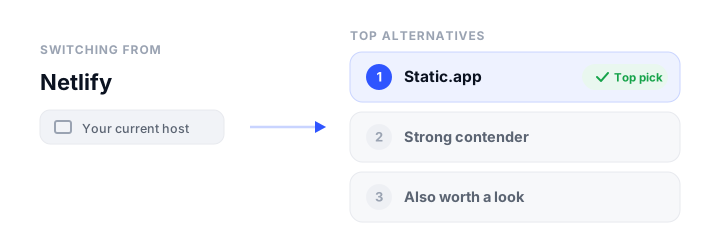
None of that makes Netlify bad. It makes it worth comparing. This guide reviews eight alternatives across the full range, from dead-simple static hosting to full-stack platforms with databases and containers, using verified 2026 pricing and limits so you can match a host to what you are actually building. If you want the wider context first, our overview of static website hosting and the guide on where to host an HTML website are good companions.
How we picked
The platforms here are judged on the things that actually matter when you are choosing where a site lives:
- Free tier: how much you get for $0, and whether it is permanent or time-limited.
- Pricing model: flat subscription versus usage-metered, plus bandwidth and build limits, since this is where surprise bills come from.
- Static vs dynamic support: can it host plain HTML, or also SSR, serverless functions, containers, and databases?
- Build and deploy workflow: Git push, CLI, drag-and-drop, or a mix, and whether previews and rollbacks are included.
- Custom domains and free SSL: table stakes, but the limits and ease of setup vary.
- Ease of use: how much config and platform knowledge it takes to get live and stay live.
The best Netlify alternatives at a glance
| Platform | Free tier | Starting price | Static / Dynamic | Custom domain + SSL | Best for |
|---|---|---|---|---|---|
| Cloudflare Pages | Unlimited bandwidth, 500 builds/mo | $20/mo (Pro, annual) | Both (edge functions) | Yes, free auto SSL | Unlimited-bandwidth Jamstack/SSR |
| Vercel | 100 GB transfer (personal only) | $20/seat/mo (Pro) | Both (serverless/edge) | Yes, free auto SSL | Next.js and modern SSR apps |
| Static.app | 1 site, 50 MB, free SSL | $6/mo (Starter) | Static only | Yes on paid (free SSL all tiers) | Simplest no-build static sites |
| Render | Free static + web services | $25/mo (Pro, flat) | Both (containers + DB) | Yes, free auto SSL | Full-stack apps with a database |
| GitHub Pages | Free for public repos | $4/user/mo (private) | Static only | Yes, free auto SSL | Free static sites from a repo |
| Azure Static Web Apps | 100 GB bandwidth, free SSL | $9/app/mo (Standard) | Both (managed APIs) | Yes, free auto SSL | Azure-based Jamstack + APIs |
| Firebase Hosting | 10 GB storage, 10 GB/mo transfer | Pay-as-you-go (Blaze) | Both (via Cloud Run) | Yes, free auto SSL | Google/Firebase ecosystem apps |
| AWS Amplify | 12-month free tier only | Pay-as-you-go | Both (SSR + Lambda) | Yes, free managed SSL | Teams already on AWS |
The best Netlify alternatives, reviewed
Cloudflare Pages
What it is. A Jamstack and full-stack host that deploys static sites and dynamic SSR apps from Git to Cloudflare’s global edge network, with serverless Functions powered by Workers. It is the closest like-for-like Netlify replacement, and for many sites it is a straight upgrade on cost.
The headline reason to switch is bandwidth: truly unlimited bandwidth and unlimited static requests on every tier, including free, so there is no metered-traffic billing and no surprise overage when a post goes viral. That alone answers Netlify’s biggest pricing anxiety. The free plan also covers unlimited sites, 500 builds per month, and up to 100 custom domains per project, with automatic free SSL. Git push triggers builds and unlimited preview deployments, with broad framework auto-detection (Next.js, Astro, SvelteKit, Remix, Nuxt, Hugo, and more). For dynamic work, Pages Functions run on the Workers runtime with access to KV, the D1 SQL database, R2 object storage, and Durable Objects.
The catch. Cloudflare is steering new full-stack and SSR projects toward Workers (with Static Assets) rather than Pages. Pages remains fully supported but is no longer where new feature work lands, which creates some platform-direction uncertainty. Dynamic Functions are also billed separately under Workers pricing (Workers Paid starts at $5/mo), so the “free” picture for dynamic apps is more nuanced than for pure static sites. Build limits on free are by count (500/mo, 1 concurrent build, 20-minute timeout), which can bottleneck busy teams.
Pricing. Free $0. Pro $20/mo billed annually ($25/mo monthly). Business $200/mo annually ($250/mo monthly). Enterprise is custom. Bandwidth stays unlimited on all tiers. If you are weighing the edge-first options specifically, see our Cloudflare Pages alternatives breakdown.
Vercel
What it is. A frontend cloud from the company behind Next.js, built for static sites, Jamstack apps, and dynamic SSR applications, with git-driven deploys, a global edge CDN, and serverless plus edge compute. If your stack is Next.js, this is the smoothest host you can pick.
The developer experience is the draw: zero-config git-push deploys, an instant preview URL on every pull request, and framework detection that just works. Next.js features (SSR, ISR, streaming, edge middleware) are first-class because Vercel builds Next.js. The free Hobby plan is generous for personal projects: 100 GB monthly Fast Data Transfer, 1M edge requests, 1M function invocations, up to 200 projects, 50 custom domains per project, and automatic free SSL including wildcards. Deploy paths are flexible too: Git, the CLI, drag-and-drop via Vercel Drop, deploy hooks, or the REST API.
The catch. The free Hobby plan is restricted to non-commercial, personal use, so a business has to be on Pro even for a small site. Pro is $20 per developer seat per month, which adds up for teams, and it is usage-metered above an included $20 credit (bandwidth around $0.15/GB, plus edge requests, invocations, and build minutes), so a traffic spike can get expensive. There is also strong gravity toward Next.js and the Vercel ecosystem.
Pricing. Hobby free (personal use). Pro $20 per seat/mo with usage-based overages above the included credit. Enterprise is custom. For more options in this category, see our Vercel alternatives guide.
Static.app
What it is. Static.app is a one-click static-website host where you publish pre-built HTML, CSS, and JavaScript by drag-and-drop, ZIP upload, desktop sync, REST API, MCP server, or GitHub Actions, with free SSL and managed extras like form collection and analytics. It is the simplest pick on this list for a plain static site, and it is bootstrap.build’s hosting partner. When your Netlify project is really just a static site with no SSR or backend, it is also the simplest and cheapest place to land it.
The appeal is honesty about scope. There is no build pipeline to configure and no backend to reason about: you drag a folder and the site is live. Pricing is flat and transparent ($6 to $18/mo, or $5 to $15/mo billed annually), with unlimited traffic on paid plans and no per-bandwidth or per-build-minute metering, which sidesteps Netlify’s whole credit-pool model. Free SSL is included on every tier, including the free plan, and paid plans add custom domains, form collection with spam protection, analytics, password-protected pages, and QR codes. For a Bootstrap portfolio, a landing page, or docs, that is often all you need.
The catch. It is static files only: no SSR, serverless or edge functions, containers, or databases, so it cannot host dynamic or full-stack apps. There is no platform-side build step either, so any site generator works only if you supply the compiled output yourself (for example via your own GitHub Actions). Storage caps are tight (Free 50 MB, Starter 500 MB), the free plan has no custom domain, and it is a smaller vendor with a more limited global edge story than Cloudflare, Vercel, or Netlify.
Pricing. Free $0 (1 site, 50 MB). Starter $6/mo, or $5/mo billed annually ($60/yr): 2 sites, 500 MB, unlimited traffic, custom domains. Medium $12/mo ($10/mo annually): 7 sites, 3 GB. Large $18/mo ($15/mo annually): 30 sites, 10 GB. If you started on a single-file host, our Tiiny Host alternatives piece covers the same simple-hosting niche.
Render
What it is. A unified cloud that deploys static sites, containerized web services, background workers, cron jobs, and managed Postgres or key-value databases from a Git repo. It is positioned as a simpler Heroku or AWS alternative, and it is the alternative to reach for when “website” actually means “full-stack app.”
Where Netlify is serverless-only, Render runs long-running containers in any language, which is exactly what you need for a traditional backend, a persistent server, or a Dockerized app. One Git-driven workflow covers static frontends, services, workers, cron, and databases, with zero-downtime deploys and per-pull-request preview environments. There is a real free tier with no credit card: free static sites, free web services, and free Postgres, plus free auto-renewing TLS on custom domains and free DDoS protection. Static sites are served over a global CDN with instant cache invalidation.
The catch. The free tier has production-unfriendly gotchas: free web services spin down after 15 minutes idle with a 30 to 60 second cold start, and free Postgres is deleted around 30 days after creation (with a 14-day grace period). The 2026 plan changes also cut included bandwidth sharply (Hobby 5 GB/mo, Pro 25 GB/mo) with $0.15/GB overage, and workspace fees are separate from per-instance compute and database costs, so the real monthly bill stacks up and is harder to estimate. It is overkill for a simple static site.
Pricing. Hobby free. Pro $25/mo flat (25 GB bandwidth, around 1,000 build minutes, 15 custom domains). Scale $499/mo flat. Compute is billed per instance on top (Starter around $7/mo, Standard around $25/mo). See our Render alternatives comparison for adjacent platforms.
GitHub Pages
What it is. A free static-site host that publishes HTML, CSS, and JavaScript (optionally built with Jekyll or GitHub Actions) straight from a GitHub repository, with changes going live on every git push. For free, public, static content it is hard to beat.
If your code already lives on GitHub, the integration is the whole point: push to deploy, and use GitHub Actions to build any static site generator (Hugo, Astro, a Next.js export, Vite) with full CI. It is genuinely free for public repos, with auto-renewing Let’s Encrypt HTTPS, custom domains for apex and subdomains, and an “Enforce HTTPS” toggle. It is backed by GitHub and Microsoft infrastructure, so it is reliable and low-maintenance, and the per-hour build limit is bypassed entirely when you publish via Actions.
The catch. It is static only: no serverless, SSR, edge, containers, or databases, so dynamic and full-stack apps are out of scope. Publishing from a private repository requires a paid GitHub plan. There is a hard 1 GB site-size cap and a soft 100 GB/month bandwidth limit with no built-in way to pay to raise them, and there is no drag-and-drop deploy or out-of-the-box PR preview.
Pricing. Free $0 for public static sites. Private-repo Pages needs GitHub Pro (around $4/user/mo, as of 2026) or Team ($4/user/mo). Pages limits are identical across tiers. Our GitHub Pages alternatives guide is worth a look if you bump into those caps.
Azure Static Web Apps
What it is. A Microsoft Azure service that auto-builds and deploys full-stack web apps to a globally distributed static host from a GitHub or Azure DevOps repo, with integrated serverless Azure Functions APIs and hybrid SSR support. It is the natural choice if your team already lives in Azure.
The free tier is genuinely capable: 100 GB bandwidth per month, free auto-renewing SSL, custom domains, managed serverless APIs via Azure Functions, and three staging or preview environments per app, all at $0. Pull requests automatically get staging environments, and there is built-in support for the usual SPA and SSG frameworks (React, Angular, Vue, Svelte, Next.js, Astro). Because builds run on GitHub Actions, there is no separate Azure build-minute meter to watch. It is a true Jamstack experience rather than static-only, with managed APIs and hybrid SSR.
The catch. Per-app, per-environment $9/month billing on Standard plus $0.20/GB overage can add up unexpectedly, since each kept-alive preview environment and Functions usage is billed. Quotas are tight (250 MB per environment, 500 MB total, 15,000 files on Free), and the free plan’s 100 GB bandwidth is a hard cap with no overage, so the site can simply stop serving. The best experience is locked to GitHub or Azure DevOps, with no drag-and-drop deploy, and hybrid Next.js SSR is still in preview.
Pricing. Free $0. Standard $9 per app per month, with $0.20/GB bandwidth overage. Both plans include 100 GB bandwidth/month.
Firebase Hosting
What it is. Google’s CDN-backed host for static sites and single-page apps, with optional SSR and dynamic content via Cloud Functions or Cloud Run, as part of the broader Firebase and Google Cloud ecosystem. Pick it when you are already using Firebase for auth or a database.
The always-free Spark tier gives you a global CDN, automatic free SSL, custom domains, and atomic rollbacks, with 10 GB stored content and 10 GB/month of transfer. Deploys are a single firebase deploy CLI command, with GitHub Actions for CI and preview channels. The real strength is integration: wiring in Auth, Firestore, Cloud Functions, or Cloud Run to add dynamic features is straightforward, and for server-rendered Angular or Next.js apps Google now points you to the newer Firebase App Hosting (Cloud Run-backed).
The catch. Dynamic and SSR features require the paid Blaze plan, which is pay-as-you-go with no hard spending cap by default, so a traffic spike can cause surprise costs (budget alerts notify but do not stop charges). SSR is also fragmented across multiple products (Cloud Functions, Cloud Run, the newer App Hosting), each adding billing and complexity, and the free Spark transfer quota of around 10 GB/month is modest.
Pricing. Spark free (10 GB storage, 10 GB/mo transfer). Blaze is pay-as-you-go: storage keeps the free allotment then $0.026/GB, transfer $0.15/GB over the free quota, with $300 in credit for eligible new users. Dynamic usage is billed separately at Google Cloud rates.
AWS Amplify
What it is. Amazon’s fully managed, git-based CI/CD service for deploying full-stack web apps, static sites, SPAs, and SSR frameworks (Next.js, Nuxt) on the AWS global CDN. It is the alternative for teams that are already committed to AWS and want hosting that plugs into the rest of the stack.
Native AWS integration is the whole pitch: Amplify ties directly into Lambda, DynamoDB, Cognito, S3, Route 53, ACM, and CloudFront. You get a polished git-based pipeline with PR previews, per-branch environments, and atomic deploys, plus genuine full-stack and SSR support. Deploy options are flexible, including drag-and-drop of a zipped build without a Git repo, and there is no per-seat team pricing. A free managed SSL certificate via ACM and easy custom domains are included.
The catch. Pricing is pure pay-as-you-go across separate dimensions (build minutes, storage, egress, SSR requests, GB-hours), which is hard to predict and can surprise you, with data transfer at $0.15/GB on the pricier side for high-traffic sites. The free tier is only free for the first 12 months (apart from UI dev and collaboration); there is no permanent free hosting tier. Tight coupling to AWS services and the broader IAM and console ecosystem adds real complexity for newcomers.
Pricing. AWS Free Tier for 12 months (1,000 build minutes/mo, 5 GB storage, 15 GB served, 500,000 SSR requests, 100 GB-hours SSR compute). After that, pay-as-you-go: build from $0.01/min, storage $0.023/GB/mo, data out $0.15/GB, SSR compute $0.30 per 1M requests plus $0.20/GB-hour. Our AWS Amplify alternatives guide covers comparable managed hosts.
How to choose
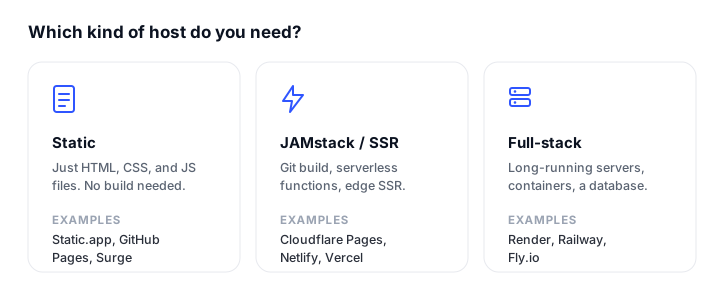
The right Netlify alternative depends entirely on what you are deploying, so match the host to the job.
For a plain static site (portfolio, landing page, docs, blog). If your code is on GitHub and the repo is public, GitHub Pages is free and excellent. If you want unlimited bandwidth and an edge CDN with room to add dynamic features later, Cloudflare Pages is the best all-rounder. If you would rather not deal with Git or a build pipeline at all, Static.app gets a finished site live by drag-and-drop with flat, predictable pricing.
For a JAMstack or SSR app. Cloudflare Pages and Vercel are the two strongest picks. Choose Vercel if you are on Next.js and want the smoothest possible experience; choose Cloudflare Pages if unlimited bandwidth and avoiding metered-traffic bills matter more. Azure Static Web Apps is a strong third if your team is already on Azure and wants integrated serverless APIs.
For full-stack with a database or containers. This is where Netlify itself runs out of room, since it is serverless-only. Render is the cleanest answer for long-running containers, background workers, and managed Postgres in one Git workflow. Firebase Hosting and AWS Amplify make sense when you are already invested in Google Cloud or AWS respectively and want hosting that integrates with those services.
For the simplest no-build option. Static.app, full stop. No CI, no Dockerfile, no framework config: drag a folder and you are live, with free SSL on every tier.
Whatever you pick, plan to keep an eye on it. Free and metered plans can pause sites when limits are hit, so a lightweight check from one of our best website monitoring tools is worth setting up the day you go live.
FAQ
What is the best free Netlify alternative?
For static sites it is a close call between Cloudflare Pages and GitHub Pages. Cloudflare Pages gives you unlimited bandwidth, unlimited sites, free SSL, and edge functions at $0, which makes it the strongest free tier overall. GitHub Pages is the simplest free option if your code is already in a public GitHub repo. If you want zero build setup, Static.app has a free plan with one site and 50 MB of storage.
Is Cloudflare Pages cheaper than Netlify?
For most sites, yes. Cloudflare Pages keeps bandwidth and static requests unlimited on every tier, including free, so you avoid the metered-traffic billing that drives Netlify’s credit consumption. Netlify’s free plan is hard-capped at 300 credits a month and pauses your site when they run out. The one nuance is dynamic functions, which Cloudflare bills separately through Workers pricing (from $5/mo).
Can these alternatives host dynamic and SSR sites, or only static?
It depends on the platform. Cloudflare Pages, Vercel, Render, Azure Static Web Apps, Firebase Hosting, and AWS Amplify all support dynamic and SSR workloads (some through serverless functions, others through containers). GitHub Pages and Static.app are static only, meaning they serve pre-built HTML, CSS, and JavaScript with no server-side execution.
Which Netlify alternative is best for a full-stack app with a database?
Render. It runs long-running containers in any language plus managed Postgres and key-value databases in a single Git-driven workflow, which Netlify’s serverless-only model cannot do. If you are already on AWS or Google Cloud, AWS Amplify and Firebase Hosting are reasonable alternatives that integrate with those ecosystems’ databases.
How hard is it to migrate from Netlify?
For a Git-connected site, usually not hard. Cloudflare Pages, Vercel, Render, Azure Static Web Apps, and AWS Amplify all deploy from the same GitHub or GitLab repo with auto-detected build settings, so you point the new host at your repo and update your DNS. The work is mostly re-creating any Netlify-specific pieces: redirects, environment variables, serverless functions, and form handling, since those use platform-specific config. A pure static site moves in minutes.
What is the simplest Netlify alternative for non-developers?
Static.app. There is no build pipeline, no CI, and no framework config: you drag and drop a folder or ZIP and the site is live, with free SSL included on every tier and flat pricing from $6/mo ($5/mo billed annually). It is built for publishing finished static sites quickly rather than running a build on every push.
Do all these alternatives include free SSL and custom domains?
Yes. Every platform here provides automatic, free, auto-renewing SSL certificates and supports custom domains. The differences are in the limits: GitHub Pages allows one custom domain per site, Cloudflare Pages allows 100 per project on free, and Static.app reserves custom domains for paid plans (though free SSL is included on its free plan too).
Build your Bootstrap theme
Design a custom Bootstrap 5 theme visually with a live preview, then export clean Sass or CSS.
Open the Builder