Best Render Alternatives in 2026 (8 Compared)
Render earned its following by being the simple, unified place to deploy a full-stack app: static sites, containerized web services, background workers, cron jobs, and managed Postgres, all from one Git push. It is a popular Heroku replacement, and for many teams it is exactly the right tool. But people start looking for alternatives once the bill or the limits stop matching the project.
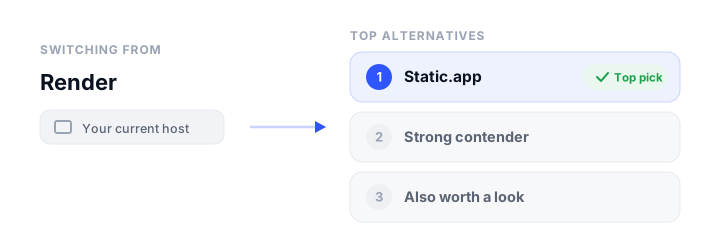
The honest reasons are in the details. As of the workspace plans that took effect in April 2026, Render’s included bandwidth dropped sharply: 5 GB/month on the free Hobby workspace and 25 GB/month on the $25 Pro plan, with overage at $0.15/GB, so a media-heavy or popular site can rack up surprise traffic costs. The free tier has real gotchas too: free web services spin down after 15 minutes of inactivity with a 30 to 60 second cold start, and free Postgres is deleted around 30 days after creation. The workspace fee is also separate from per-instance compute and database charges, so the true monthly cost stacks up and is hard to estimate. And because Render is container and instance based, it is heavier (and pricier) than a pure static or JAMstack host if all you are shipping is a website.
This guide covers eight alternatives in depth, from edge-native JAMstack platforms to full-stack container hosts to the simplest drag-and-drop static option, so you can match the host to what you are actually building. Prices were verified in June 2026.
How we picked
Every platform here was judged against the same practical criteria, the same things you would check before committing a project:
- Free tier: is there a genuinely usable free plan, or only a trial?
- Pricing model: flat and predictable, or usage-metered, and what are the bandwidth and build limits?
- Static vs dynamic: can it host plain static files only, or also SSR, serverless functions, containers, and databases?
- Build and deploy workflow: Git push, CLI, drag-and-drop, and whether builds and previews are automatic.
- Custom domains and free SSL: supported on the free tier, and how many domains you get.
- Ease of use: how much config stands between you and a live site.
If you only want a plain static site, the calculus is different from a full-stack app, so this list spans both. For background on the static side, see our guide to static website hosting and where to host an HTML website.
The best Render alternatives at a glance
| Platform | Free tier | Starting price | Static / Dynamic | Custom domain + SSL | Best for |
|---|---|---|---|---|---|
| Cloudflare Pages | Yes (unlimited bandwidth) | $20/mo (Pro) | Both (Functions/SSR) | Yes, free SSL | Static or JAMstack with no traffic bills |
| Railway | Trial only ($5 credit) | $5/mo (Hobby) | Both (containers + DB) | Yes, free SSL | The closest full-stack Render twin |
| Static.app | Yes (1 site, 50 MB) | $6/mo (Starter) | Static only | Paid plans, free SSL | Simplest plain static sites |
| Fly.io | No (pay-as-you-go) | Usage-based | Both (micro-VM containers) | Yes, free SSL | Global containerized apps and APIs |
| DigitalOcean App Platform | Yes (3 static apps) | $5/mo (paid component) | Both (containers + DB) | Yes, free SSL | Predictable full-stack PaaS pricing |
| Vercel | Yes (Hobby, personal use) | $20/seat/mo (Pro) | Both (SSR/edge) | Yes, free SSL | Next.js and modern SSR apps |
| Netlify | Yes (300 credits/mo) | $9/mo (Personal) | Both (functions/SSR) | Yes, free SSL | Frictionless JAMstack deploys |
| AWS Amplify | 12-month free tier | Pay-as-you-go | Both (SSR + Lambda) | Yes, free SSL | Teams already on AWS |
The best Render alternatives, reviewed
These are ordered roughly by how widely they fit, starting with the most flexible all-rounder. Your best pick still depends on whether you need dynamic compute, which the “How to choose” section breaks down.
Cloudflare Pages
What it is. A JAMstack and full-stack host that deploys static sites and dynamic SSR apps from Git to Cloudflare’s global edge network, with serverless Pages Functions powered by Workers. It is the strongest all-round Render alternative for most websites because it covers both static and dynamic without metering your traffic.
Who it is for: developers and teams who want unlimited bandwidth and free SSL, and who may grow from a static site into edge functions and databases.
Strengths: the standout is truly unlimited bandwidth and static requests on every tier, including free, which directly fixes Render’s tightened bandwidth limits. The free plan also covers unlimited sites and up to 100 custom domains per project. Git-push builds are automatic with unlimited preview deployments and broad framework auto-detection (Next.js, Astro, SvelteKit, Hugo, and more). For dynamic work, Pages Functions run on the Workers runtime with access to KV, the D1 SQL database, and R2 object storage.
The catch. As of 2026 Cloudflare is steering new full-stack and SSR projects toward Workers (with Static Assets) rather than Pages. Pages remains fully supported, but receives less new feature work, so there is some platform-direction uncertainty. Free builds also cap at 500/month with one concurrent build and a 20,000-file limit per deployment.
Pricing: Free $0; Pro $20/month billed annually ($25 monthly); Business $200/month annually. Bandwidth stays unlimited on all tiers; dynamic Functions usage is billed separately through Workers (Workers Paid from $5/month). See our Cloudflare Pages alternatives roundup for the full field.
Railway
What it is. A usage-based, container-oriented PaaS that deploys full-stack apps, services, and databases from a Git push or CLI, scaling resources per second rather than per site. It is the closest one-to-one replacement for Render’s Heroku-like, all-in-one model.
Who it is for: developers shipping full-stack or SSR apps that need an integrated database and long-running containers, not hobbyists hosting a free static site.
Strengths: a single platform for app plus database plus networking, with managed Postgres, MySQL, Redis, or MongoDB provisioned in a few clicks from a large template marketplace. Deploys are frictionless: git-push auto-deploy, CLI, your own Dockerfile, or zero-config Nixpacks builds, and static sites deploy with no setup. There are no fixed build-minute quotas, free automatic SSL on custom domains, and per-second billing so you pay only for what runs.
The catch. There is no real free tier, only a one-time $5 trial credit that expires in 30 days, so it is a poor fit for the hobby static sites that competitors host free. Usage-based pricing can also be unpredictable, and idle or overspend surprises are common.
Pricing: Hobby $5/month (includes $5 of usage, charged even if you use less); Pro $20/month per seat (includes $20 of usage per seat); Enterprise custom. Resource rates run at $10/GB RAM/month, $20/vCPU/month, and $0.05/GB egress.
Static.app
What it is. Static.app is a simple, one-click static-website host where you publish pre-built HTML, CSS, and JS via drag-and-drop, ZIP upload, desktop sync, a REST API, an MCP server, or GitHub Actions, with free SSL and managed extras like form collection and analytics. It is bootstrap.build’s hosting partner, and it is the simplest and cheapest pick when your Render project is actually just a static site that needs no build pipeline or backend.
Who it is for: non-technical users, freelancers, and developers who need to publish a portfolio, landing page, or docs quickly and cheaply, without the container overhead Render brings.
Strengths: extremely beginner-friendly, with drag-and-drop or desktop sync getting a site live instantly and zero config. Pricing is cheap and flat ($6 to $18/month, or $5 to $15/month billed annually) with unlimited traffic on paid plans and no per-bandwidth or build-minute metering, which sidesteps Render’s bandwidth-overage worry entirely. Free SSL is on every tier, plus useful managed extras (forms with spam protection, analytics, password-protected pages), and a modern deploy surface (REST API, MCP server, GitHub Actions CI).
The catch. It is static only: no SSR, serverless functions, containers, or databases, so it cannot host the dynamic or full-stack apps that Render can. There is also no platform-side build step, so you supply pre-built output yourself, and the free plan has tight storage (50 MB) with no custom domain.
Pricing: Free $0 (1 site, 50 MB, subdomain only); Starter $6/month, or $5/month billed annually (2 sites, 500 MB, unlimited traffic, custom domains, forms); Medium $12/month ($10/month annually, 7 sites, 3 GB); Large $18/month ($15/month annually, 30 sites, 10 GB).
Fly.io
What it is. A developer-focused cloud that runs your apps as hardware-isolated micro-VM containers (Fly Machines) deployed close to users across roughly 18 regions, suited to full-stack and SSR apps, APIs, and databases more than to plain static hosting.
Who it is for: developers shipping containerized apps that need genuine global low-latency compute, persistent storage, and private networking.
Strengths: real container and VM compute with multi-region deployment and scale-to-zero, so idle apps can stop and cost little to nothing. Billing is genuinely usage-based with no build-minute metering and per-second machine time. It handles dynamic workloads, persistent NVMe volumes, managed Postgres, and even AI agent sandboxes that static hosts cannot touch. Custom domains get free auto-renewing Let’s Encrypt TLS, and every app gets a free *.fly.dev subdomain.
The catch. There is no free tier for new accounts, and it is overkill and clunky for plain static sites: no git-push or drag-and-drop deploy, no built-in CDN or SSG pipeline, so you must containerize the site (for example behind nginx or Caddy) and wire up GitHub Actions yourself. Operational complexity (Dockerfiles, fly.toml, regions, volumes) is higher than push-and-forget hosts.
Pricing: pay-as-you-go, not flat plans. A shared-cpu-1x/256 MB machine runs around $2/month, a performance-1x/2 GB around $32/month; volumes are $0.15/GB/month and egress around $0.02/GB in North America and Europe. Support plans start at $29/month.
DigitalOcean App Platform
What it is. A fully managed PaaS that builds, deploys, and scales static sites, web services, APIs, containers, and serverless functions from a Git repo, container registry, or Dockerfile on DigitalOcean’s infrastructure. It pairs Render-style breadth with more predictable, fixed instance pricing.
Who it is for: developers who want one managed platform to run both static sites and dynamic or container apps with built-in managed databases, especially those already in the DigitalOcean ecosystem.
Strengths: it spans the full range, from free static sites to containers, SSR, functions, cron jobs, and managed databases, so projects grow without re-platforming. Pricing is transparent fixed-size instances starting at $5/month rather than hard-to-predict metering, and free automatic SSL, custom domains, a global CDN, and DDoS mitigation come on every tier (backed by a 99.95% uptime SLA). There is also a free static tier: up to 3 static-only apps at $0/month.
The catch. That free static tier is stingy, with just 1 GiB of outbound transfer per app per month, and any dynamic component immediately costs at least $5/month. Per-component pricing also adds up for multi-service apps, with databases and extra static sites as separate line items, and it is less of a dedicated edge-CDN specialist than Cloudflare, Vercel, or Netlify.
Pricing: free for up to 3 static apps; paid components from $5/month (1 vCPU / 512 MiB / 50 GiB transfer), $10/month (1 GiB RAM), up to $50/month (2 vCPU / 4 GiB). Outbound overage is $0.02/GiB; extra static apps are $3/month each.
Vercel
What it is. A frontend cloud from the company behind Next.js, built for deploying static sites, JAMstack apps, and dynamic SSR applications with git-driven deploys, a global edge CDN, and serverless and edge compute.
Who it is for: frontend and full-stack teams shipping Next.js or modern SSR apps who want the smoothest git-push deploy experience.
Strengths: best-in-class developer experience with zero-config git deploys, an instant preview URL per pull request, and automatic framework detection. The first-party Next.js integration makes it the smoothest host for SSR, ISR, and edge React apps. The free Hobby plan includes 100 GB/month bandwidth, 1M edge requests, and 1M function invocations, with automatic free SSL and up to 50 custom domains per project.
The catch. Hobby is restricted to personal, non-commercial use, so businesses must move to Pro even for a small site. Pro is $20 per developer seat per month plus usage-based overages above a $20 credit (bandwidth around $0.15/GB), so a traffic spike can get expensive, much like Render’s bandwidth model.
Pricing: Hobby free (personal use); Pro $20/seat/month with metered overages; Enterprise custom. Our Vercel alternatives guide compares it head to head with the rest.
Netlify
What it is. A JAMstack and composable web platform that builds, deploys, and hosts static sites and dynamic SSR apps from Git, CLI, drag-and-drop, or AI prompts, with a global edge CDN, serverless and edge functions, managed Postgres, and blob storage.
Who it is for: developers and teams shipping static and JAMstack or SSR sites who want frictionless Git-based deploys, previews, and an integrated platform without managing infrastructure.
Strengths: excellent zero-config CI/CD with instant deploy previews, branch deploys, and one-click rollback. Framework support is broad and often the easiest for static-first or non-Next.js stacks (Astro, Hugo, 11ty, Nuxt, SvelteKit). The free plan includes custom domains with free SSL, serverless and edge functions, a managed Postgres database, blob storage, and unlimited form submissions, and the Pro plan now includes unlimited team seats.
The catch. The 2026 credit-based model can make costs hard to predict: bandwidth, compute, requests, deploys, and AI usage all draw from one credit pool (bandwidth is around 20 credits/GB), and a traffic spike can drain it fast. The free plan is also hard-capped at 300 credits/month: once they run out, sites pause and show a “Site not available” page.
Pricing: Free $0 (300 credits/month); Personal $9/month (1,000 credits); Pro $20/month (3,000 credits, unlimited seats); Enterprise custom. See Netlify alternatives for the deeper comparison.
AWS Amplify Hosting
What it is. Amazon’s fully managed, git-based CI/CD service for deploying and hosting full-stack web apps, static sites, SPAs, and SSR frameworks (Next.js, Nuxt) on the AWS global CDN.
Who it is for: developers and teams already in the AWS ecosystem who want managed git-based hosting with deep AWS service integration.
Strengths: native ties into Lambda, DynamoDB, Cognito, S3, Route 53, and CloudFront, which is ideal if you already live on AWS. It offers genuine full-stack and SSR support with a polished git-based pipeline, PR previews, atomic deploys, and per-branch environments, plus drag-and-drop manual deploys without a repo, free managed SSL, and easy custom domains. There is no per-seat team pricing.
The catch. Pay-as-you-go billing across separate dimensions (build minutes, storage, egress at $0.15/GB, SSR requests, GB-hours) is hard to predict and can surprise you versus flat-rate competitors. The free tier is only free for the first 12 months; after that there is no permanent free hosting tier. AWS and IAM complexity also adds a learning curve.
Pricing: pure pay-as-you-go, no flat plans. Build and deploy from $0.01/min; hosting storage $0.023/GB/month; data served $0.15/GB; SSR compute $0.30 per 1M requests plus $0.20 per GB-hour. For more, see AWS Amplify alternatives.
How to choose
Match the host to the job rather than to a brand:
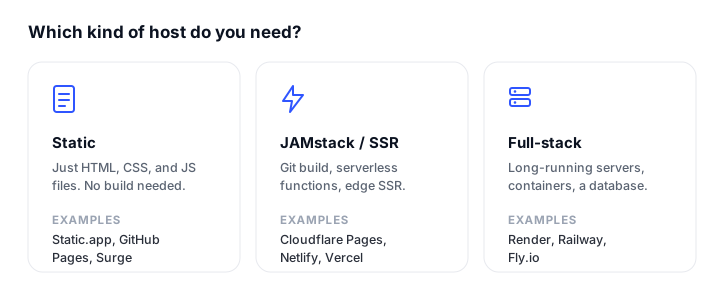
- Plain static site (portfolio, landing page, docs): the cheapest path is a static specialist. Cloudflare Pages wins on free unlimited bandwidth and a real CDN, while Static.app is the simplest if you want drag-and-drop with no Git. DigitalOcean’s free 3-app static tier works for tiny sites if you keep transfer under 1 GiB each.
- JAMstack or SSR app: for Next.js specifically, Vercel is the smoothest. For other frameworks (Astro, Nuxt, SvelteKit, Hugo) Netlify and Cloudflare Pages are excellent, and Cloudflare is the one to pick if metered bandwidth scares you.
- Full-stack with a database or containers: this is Render’s home turf, so the closest twins are Railway (Heroku-like, integrated DB), Fly.io (global micro-VM containers), and DigitalOcean App Platform (predictable fixed instance pricing). AWS Amplify fits if you are already on AWS.
- Simplest no-build option: if you just want finished files online with the least friction and no metering, Static.app’s drag-and-drop and flat pricing are the least to think about.
Whatever you choose, set up uptime checks once it is live: see our roundup of the best website monitoring tools so you hear about an outage before your visitors do. If you are building the front end yourself, our guides on customizing Bootstrap 5 and how to build and publish a website help you get there faster.
FAQ
What is the best free Render alternative?
For a free plan you can actually live on, Cloudflare Pages is the strongest: unlimited bandwidth, unlimited sites, free SSL, and serverless functions at $0. For plain static sites, Netlify (300 credits/month), Vercel Hobby (personal use), and DigitalOcean’s free static tier are also free, and Static.app has a free single-site plan. The container-style hosts (Railway, Fly.io) do not offer an ongoing free tier.
Is there a cheaper alternative to Render?
It depends on the workload. For a static or JAMstack site, Cloudflare Pages, Netlify, and Static.app are far cheaper than Render’s $25 Pro workspace plus per-instance compute, and Cloudflare never bills you for bandwidth. For full-stack apps, Railway starts at $5/month and DigitalOcean components at $5/month, both of which can undercut Render’s stacked workspace and instance fees for small projects.
Which Render alternative is best for full-stack apps with a database?
Railway is the closest match to Render’s all-in-one model, with managed Postgres, MySQL, Redis, or MongoDB provisioned in clicks alongside your containers. DigitalOcean App Platform offers similar breadth with more predictable fixed instance pricing, and Fly.io is the pick when you need global, low-latency container compute.
Can I host a dynamic or SSR site on these alternatives?
Yes. Cloudflare Pages, Vercel, Netlify, and AWS Amplify all support SSR and serverless functions, while Railway, Fly.io, and DigitalOcean App Platform run long-running containers and databases. Static.app is the exception: it is static only, so dynamic behavior there must come from external APIs called by client-side JavaScript.
How hard is it to migrate from Render?
For Git-connected projects it is usually straightforward. Render, Cloudflare Pages, Vercel, Netlify, Railway, DigitalOcean, and AWS Amplify all deploy from a GitHub or GitLab repo, so migrating often means connecting the same repo to a new platform and resetting environment variables, custom domains, and DNS. Container apps move via the same Dockerfile. Databases need a manual export and import. Static.app expects pre-built output, so you would deploy your compiled files via drag-and-drop or GitHub Actions.
Do these alternatives include free SSL and custom domains?
Yes. Every platform here provisions free, auto-renewing SSL/TLS certificates and supports custom domains. The differences are in counts and tiers: Static.app reserves custom domains for paid plans, Cloudflare allows up to 100 domains per project on free, and Render itself included only 2 on its Hobby tier, which is part of why people look elsewhere.
Static or dynamic: which kind of host do I actually need?
If your site is fixed content (a portfolio, landing page, blog, or docs) you only need a static host, which is cheaper, faster, and simpler. You need a dynamic or full-stack host only if you run server-side rendering, server code, user accounts, or a database. See our where to host an HTML website guide if you are unsure which camp your project falls into.
Build your Bootstrap theme
Design a custom Bootstrap 5 theme visually with a live preview, then export clean Sass or CSS.
Open the Builder