Build a Website with Claude + Static.app (No Code)
Build and publish a website without writing a line of code. Claude AI drafts it, Static.app hosts it. Free, under 10 minutes.
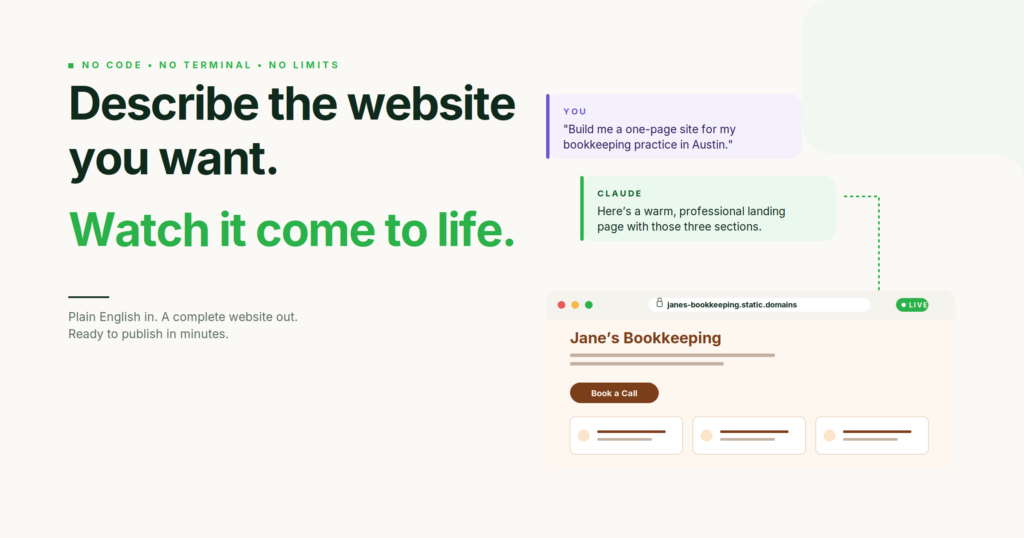
You don’t need to learn to code to have a real website. Not anymore. What looked like a requirement a few years ago is now one of the strangest outdated assumptions in tech: that anyone who wants a website online must first understand HTML, buy a domain through a confusing registrar, sign up for a deployment platform full of jargon, and learn tools named after things like git (which has nothing to do with code) and npm (which is not a company).
None of this is true today. Two tools, used together, get you from an idea in your head to a working website on the real internet in under ten minutes. Neither one requires you to write code. Neither one asks you to open a terminal. Neither one makes you create a GitHub account. The first tool is Claude, an AI you already know how to talk to because you’ve probably already been chatting with it. The second is Static.app, a hosting platform built specifically for people who want the website, not the workflow.
This guide walks through the whole process. By the end you’ll have a live URL, with HTTPS, on the real internet, that you can text to anyone. No code written, no terminal opened, no cryptic error messages to debug. Ready when you are.
Why Most Website Advice Fails Non-Developers
Here’s the trap. You decide you want a website for your business, your portfolio, your side project, your wedding, or a landing page for something you’re launching. You Google “how to make a website.” The first results are either WordPress tutorials (which assume you’ll learn WordPress), Squarespace ads (which assume you’ll pay $23 a month forever), or developer tutorials (which assume you’ll install a code editor and learn three new tools before writing your first line).
None of these actually match what most people need. What most people need is: I can describe the website I want, a thing builds it, another thing puts it online, and I can share the link. That’s it. The fact that the internet doesn’t offer a direct path to this has been the single biggest gap in web tooling for a decade.
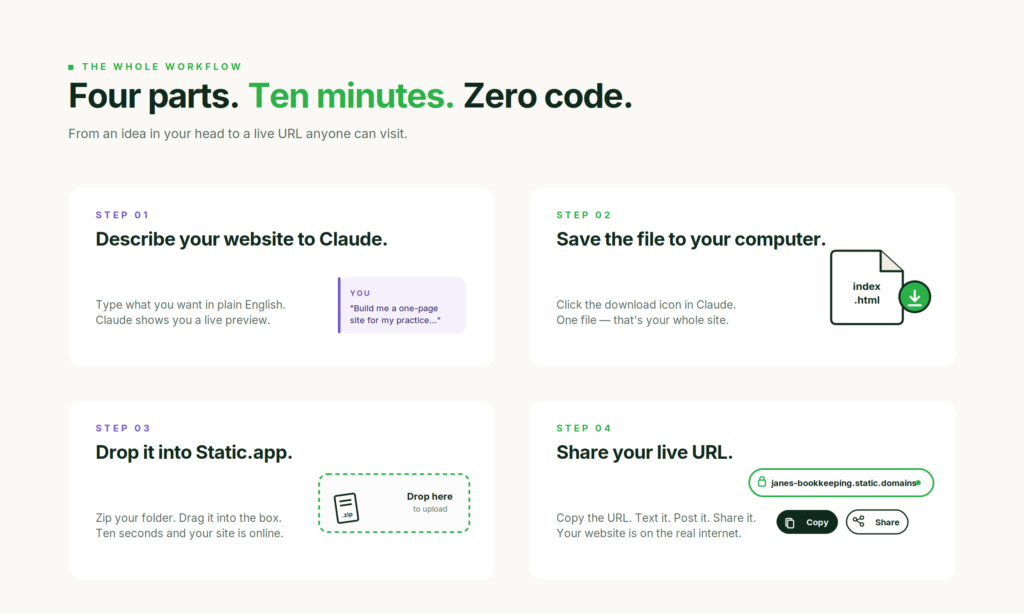
Claude and Static.app together are that direct path. Not because they were designed as a pair (they weren’t), but because their strengths happen to cover each other’s blind spots. Claude can produce a full website from a conversation. Static.app can take what Claude produced and put it online without asking you anything technical. That’s the whole workflow. Everything in this guide is just the details of how those two pieces click together.
Part 1: Describe Your Website to Claude
Open claude.ai and start a new conversation. You’re going to ask Claude to build your website. The only skill you need is the ability to describe what you want in plain English.
Here’s the prompt pattern that works best for non-developers. Be specific about three things: what the website is for, who it’s for, and what sections it should have. Claude will handle the rest.
I’m a freelance bookkeeper starting my practice in Austin. Build me a one-page website with a welcoming hero section, a list of my three services (small business bookkeeping, tax prep, monthly financial reviews), a brief “about me” paragraph, testimonials from two happy clients, and a contact form where people can reach me. Use warm, professional colors and make it feel like a small local business rather than a corporate firm.
That single paragraph, pasted into Claude, produces a complete website. Claude thinks for a moment and then shows you a live preview right inside the chat window. You can scroll through it, click the buttons, fill out the form. This is the Artifacts feature, and it’s the thing that makes the whole workflow possible. You see exactly what your visitors will see, before you’ve committed to anything.
Look at what Claude built. Nine times out of ten, something will be slightly wrong. The color feels too corporate, the hero image is too generic, the services are in the wrong order, the tone is off. This is totally normal. Tell Claude what to change.
The hero section feels too formal. Make it warmer, like I’m introducing myself to a neighbor. Also swap the green accent color for a softer terracotta, and move the testimonials above the services list.
Claude updates the preview in seconds. You can iterate like this for as many rounds as you need. People often do ten or fifteen rounds before they’re happy, and that’s fine. Every round is free. Every round is fast. There’s no version of this where you’re paying a designer by the hour or waiting for a developer to push a fix.
When the website looks exactly right, you’re ready for the next step.
Part 2: Get Your Website Out of Claude
Claude’s Artifacts feature has a download button in the top-right corner of the preview pane. It looks like a small downward arrow. Click it, and Claude saves your website to your computer as a single file ending in .html. Don’t worry about what HTML means. Just know that this one file is your entire website.
A few things to make this easier:
- Save the file somewhere you’ll find it again. Your Desktop is fine. Create a folder on your Desktop called my-website and drag the file into it.
- If the file is called something weird like artifact-2026-04-22.html, rename it to index.html. The name index is important because it’s the name that tells browsers “start here.” Static.app (the hosting tool we’ll use next) looks for a file named exactly this.
- Double-click the file. It should open in your web browser and look identical to the preview Claude showed you. If it does, you’re done with this part. If it doesn’t, go back to Claude and ask for help. (If you want to double-check the file renders correctly before uploading, you can also drop it into a quick HTML tester.)
That’s it. You now have a complete website sitting in a folder on your computer. It works. Anyone could open that HTML file and see exactly what you built. The problem is that “anyone” currently means “only you, on your computer.” We need to get it on the real internet so you can share a link.
Claude can now publish an artifact to its own shareable link directly, using the Publish button in the artifact panel. That’s great for a quick demo, but the link lives on Claude’s domain, isn’t indexed by search engines, and can’t use your own domain or collect form submissions. For a real website people can find and you can grow, you still want a dedicated host like Static.app.
Part 3: Meet Static.app
Static.app is a hosting platform, which is a fancy word for “a place that puts your website on the real internet so other people can visit it.” It’s free for one website (50MB of storage, which is plenty for a typical one-page site), requires no credit card, and asks you to do exactly one thing: drag a folder into a box. It’s one of several drag-and-drop hosts (if you want to compare, see our roundup of Tiiny Host alternatives), but for this workflow its desktop-app sync makes it the natural fit.
Go to static.app and click the Sign Up button in the top-right corner. Give it an email and a password. That’s the whole signup. When you land inside the app, you’ll see a dashed box with “Drag your archive here” written inside it.
Before you can drag anything in, you need to do one small thing to your my-website folder. The box expects what’s called a “zip file,” which is a single file that contains everything inside your folder. Zipping is a standard feature built into every Mac and Windows computer.
- On a Mac: Right-click the my-website folder on your Desktop. Choose “Compress my-website.” A new file appears next to it called my-website.zip. That’s what you’ll upload.
- On Windows: Right-click the folder. Choose “Send to,” then “Compressed (zipped) folder.” Same result: a new file ending in .zip.
Drag the .zip file into the dashed box on Static.app. That’s it. About ten seconds later, Static.app will show you a URL, something like bookkeeping-austin.static.domains. That URL is your website. It’s live right now. Copy it and paste it into a new browser tab. Your site will load, exactly the way it did on your computer, except now anyone in the world can visit it.
If you want to text the URL to a friend to prove it worked, do it. From idea to live website, you’re already there.
Part 4: The Feature That Changes How You Work Forever
Everything up to this point has been the manual version of the workflow. It works, and for a lot of people, it’s enough. But Static.app has a second feature that’s worth setting up on day one, because it transforms how you update your site going forward.
It’s called the desktop app, and here’s what it does in one sentence: it watches a folder on your computer, and any time anything inside that folder changes, Static.app automatically updates your live website.
This sounds small. It isn’t. The practical effect is that your work with Claude becomes a direct line to your live website. You no longer have to export, zip, and upload every time you want to change something. You just change it, and the change is live.
Here’s how to set it up:
- Go to static.app/download and download the free desktop app for your operating system.
- Install it like any other app. Double-click to open.
- Sign in with the email and password you used for static.app.
- The app asks you to pick a folder. Choose your my-website folder on your Desktop.
- It asks which site you want to connect that folder to. Pick the one you just published.
That’s the whole setup. From this moment on, you’ll never zip another file. The way you update your site is: go back to Claude, ask for changes, download the new version, and drag the new index.html into your my-website folder (replacing the old one). Within seconds, your live site updates.
If Claude gives you an updated website and you save it over the old file, Static.app catches the change and pushes it to your live URL without you doing anything else. You’re effectively publishing every time you save. The loop is: ask Claude, save the file, refresh the browser. That’s it.
What You Can Actually Build This Way
People underestimate what’s possible here because the tooling is so simple they assume it must be limited. It isn’t. The combination of Claude plus Static.app handles a surprising range of real websites, including:
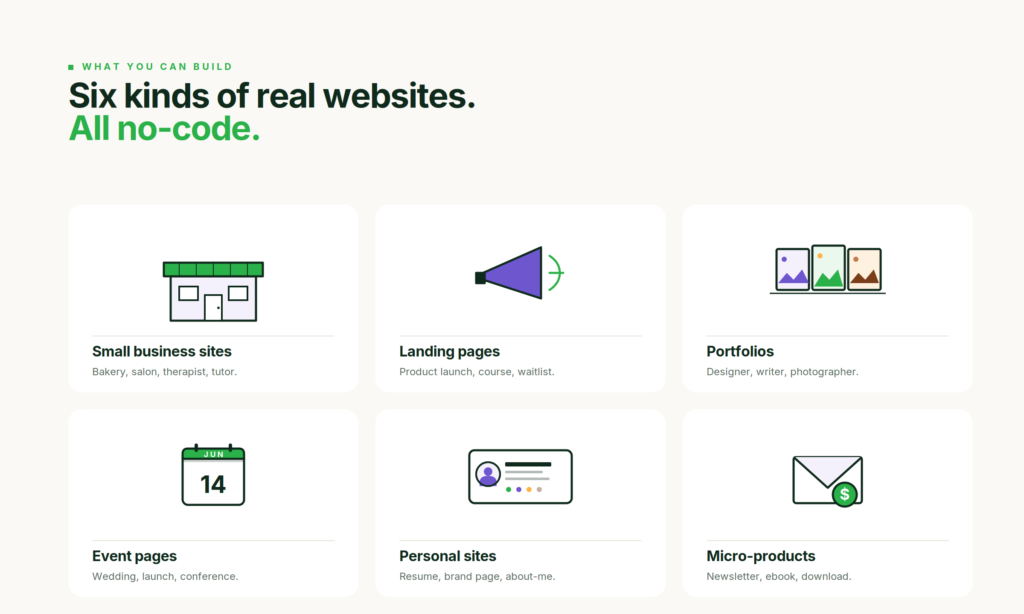
- Small business sites. Restaurants, cleaning services, freelance consultants, tutors, photographers, wedding officiants, bookkeepers, therapists. Anything that needs a “here’s who I am, here’s what I do, here’s how to reach me” website.
- Landing pages. For a product launch, a course you’re selling, a book you wrote, a beta waitlist, an event. Anywhere you’d otherwise use something like Leadpages or Unbounce.
- Portfolios. Designers, writers, photographers, illustrators, videographers, artists. Claude can generate a clean grid of work samples and a short bio.
- Event pages. Weddings, conferences, meetups, book launches. The one-page sites that exist for a single purpose on a single date.
- Personal sites. A “this is me” page for your career, a resume site, a linktree-style profile, or a personal brand landing page.
- Micro-product sites. Newsletters, digital downloads, simple Stripe-checkout products. Claude can add a payment link that routes visitors directly to a Stripe checkout.
What this workflow doesn’t handle is complex interactive applications. If you’re building software, with user accounts, databases, and features that change per visitor, that’s not a static website and this isn’t the tool. But for anything that’s fundamentally a digital brochure or a one-page pitch, Claude and Static.app will get you there faster than any other path.
Handling the Details Nobody Warns You About
Three things tend to come up after you publish your first site. Worth knowing them up front.
Getting a Real Domain
Your first URL will look like something.static.domains. That’s fine for sharing with friends. For a business, you’ll probably want your own domain, something like yourname.com. Buy the domain from any registrar you like (Namecheap and Cloudflare are the two people usually recommend). Upgrade Static.app to the $6 per month Starter plan ($5 per month if you pay yearly), which unlocks custom domain support. The Static.app help center has a step-by-step guide for pointing your domain at their servers. Takes about ten minutes.
Making the Contact Form Actually Send You Emails
If Claude built you a contact form, it looks like a form, but by default it doesn’t know where to send the messages. Static.app solves this with a single HTML attribute called static-form. Ask Claude to add that attribute to your form, in exactly these words: “Add the attribute static-form to the form tag so Static.app can handle submissions.” Claude will update the file, you’ll save it, Static.app will sync it, and form submissions will start appearing in your Static.app dashboard. This feature requires a paid plan, but at $6 a month ($5 on annual billing) it’s cheaper than any third-party form service.
Updating Your Site Six Months From Now
Here’s the real magic. Six months after launch, you’ll want to change something. Maybe you’ve added a new service, or the testimonial isn’t fresh anymore, or you launched a product. The way you make that change is: open Claude again, open the conversation where you built the site (Claude keeps your conversations), describe what you want changed, download the updated file, drag it into your my-website folder (replacing the old one). If you set up the desktop app, that’s it. Your site is updated. If you didn’t, zip the folder and drag the new zip into Static.app.
No “learning the CMS.” No “waiting for my developer to have time.” No version conflicts or broken templates. The site is always one Claude conversation and one save away from whatever you want it to be.
When Your Site Doesn’t Look Right
Most of the time the export just works. When it does not, it is almost always one of these, and each has a quick fix.
Images are missing or broken
Claude’s preview can reference images that live inside the chat or at a temporary link, and those do not travel with the downloaded file. If a picture shows a broken icon after publishing, it either pointed to a temporary URL or the image was never uploaded next to your index.html. Ask Claude to use a public image URL, or put the image in the same folder you drag into Static.app and reference it by filename.
Fonts, icons, or styles look off
If your page loads a font, icon set, or CSS framework from a CDN (Google Fonts, Font Awesome, the Bootstrap CDN), those keep working online as long as their <link> and <script> tags are in the file. To check, double-click the file to open it locally first: if it looks wrong there too, ask Claude to inline the styles or include the CDN link. You can also drop the file into an HTML tester before you upload.
You have more than one page
A single index.html is one page. If you asked Claude for a multi-page site, you will get several HTML files (about.html, contact.html). Keep them in one folder, make sure the links between them use the exact filenames, and drag the whole folder into Static.app, not just index.html.
“File too large” on the free plan
Static.app’s free plan caps storage at 50MB. A text-and-CSS site is tiny, but a few large unoptimized photos can push past it. Compress the images (or ask Claude to use smaller ones), or move up to a paid plan for more room.
The contact form does not send anything
A plain HTML form does nothing on its own. On Static.app you add the static-form attribute (which needs the paid Starter plan) so submissions land in your dashboard, as covered above. Without a form handler, the button just reloads the page.
Your custom domain is not working yet
DNS changes take time. After you point your domain at Static.app, give it up to a few hours to propagate, and double-check that you copied the DNS records exactly. The free SSL certificate is issued automatically once the domain resolves.
Static.app is the simplest path in this guide, but the file Claude gave you is standard HTML, so it runs on any static host. If you want to weigh the options, see our roundup of the best static website hosting providers and the Tiiny Host alternatives.
Ten Minutes, Start to Finish
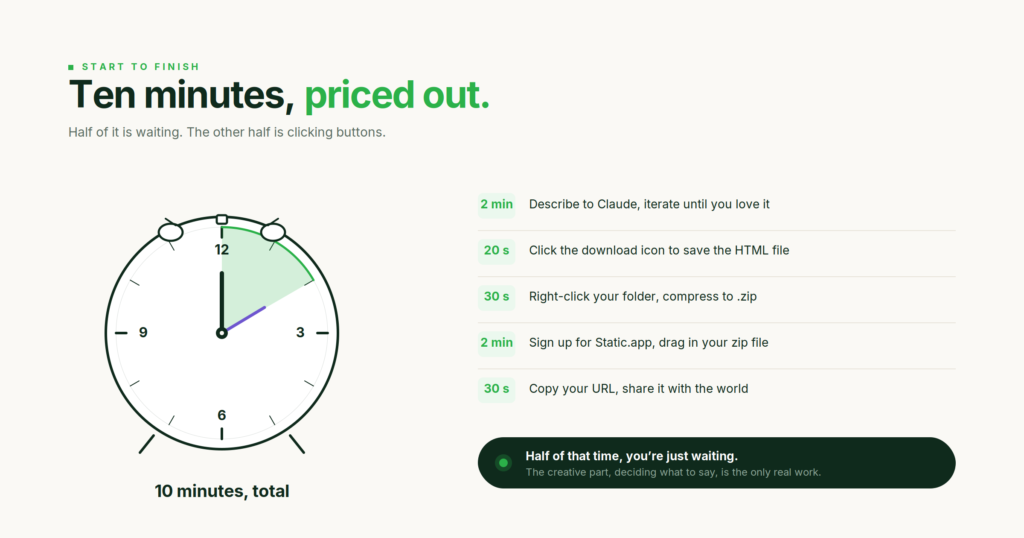
If this guide feels long, that’s because explaining a new workflow always takes longer than doing it. The actual process, once you’ve done it once, takes about ten minutes for a fresh site.
Two minutes to describe what you want in Claude and iterate to something you like. Twenty seconds to download the HTML file. Thirty seconds to zip the folder. Two minutes to sign up for Static.app and drag the zip in. Thirty seconds to copy your URL and share it. Five minutes of that is clicking buttons and waiting. The creative work, the “what should my website actually say” part, is the only part that takes real thought. The publishing is a rounding error.
This is how websites should have worked for the last decade. It’s only recently become possible because AI can produce finished code well enough that the old “you must understand the code” assumption finally stopped being true, and because Static.app quietly built the simplest possible way to get those files online. Together, they close a gap that was never supposed to exist.
If you’ve been waiting to put something on the internet because you didn’t know how, you now know how. Open a Claude conversation, describe your website, and follow the rest of the steps. In about the time it takes to make a cup of coffee, you’ll have a live URL to share.
Once your site is live, the natural next step is seeing who visits it: start with our guide to the best web analytics tools.
FAQ
Is Static.app free?
Yes. The free plan covers one website with 50MB of storage and requires no credit card, and includes a free subdomain with HTTPS. Custom domains and contact-form submissions require the Starter plan at $6 a month ($5 a month billed annually).
Can Claude build a real website?
Yes. Using its Artifacts feature, Claude can generate a complete website from a plain-English description and export it as a single HTML file you can host anywhere. It’s best suited to static sites (small business pages, portfolios, landing pages, and event pages) rather than complex apps with user accounts or databases.
How do I use my own domain?
Buy a domain from any registrar (Namecheap and Cloudflare are common picks), upgrade Static.app to the $6/month Starter plan ($5/month billed annually), then point your domain’s DNS at Static.app following their help-center guide. The whole process takes about ten minutes.
How do I make the contact form send me emails?
Ask Claude to add the static-form attribute to your form tag, then save and sync the file. Submissions will appear in your Static.app dashboard. This feature requires the paid Starter plan ($6/month, or $5/month billed annually).
Why are my images broken after publishing?
Usually the image pointed to a temporary link inside Claude, or it was not uploaded next to your index.html. Ask Claude to use a public image URL, or keep the image in the same folder you upload and reference it by filename.
My site looks unstyled once it is live. What happened?
A font, icon set, or CSS framework loaded from a CDN did not load, or the styles were not included in the exported file. Open the file locally to confirm, then ask Claude to inline the CSS or add the CDN link, and re-upload.
Can I host the Claude-built site somewhere other than Static.app?
Yes. The export is standard HTML, so it runs on any static host. Static.app is the easiest fit for this no-code workflow, but you can compare options in our best static website hosting providers roundup. If a different AI tool built your site and handed you a React project rather than a single HTML file, where to host a website built by AI covers what each builder exports and which hosts can serve it.
Build your Bootstrap theme
Design a custom Bootstrap 5 theme visually with a live preview, then export clean Sass or CSS.
Open the Builder