Where to Host Claude Artifacts: Publish One as a Website on Static.app
A Claude artifact already has a link, so why host it anywhere else? Because that link is a page on Claude’s domain, not your website. It carries a noindex tag, so search engines leave it out. You cannot put your own domain on it, add a working contact form, or password-protect it for a client. And if you unpublish it, or your organization switches artifacts off, the link stops working.
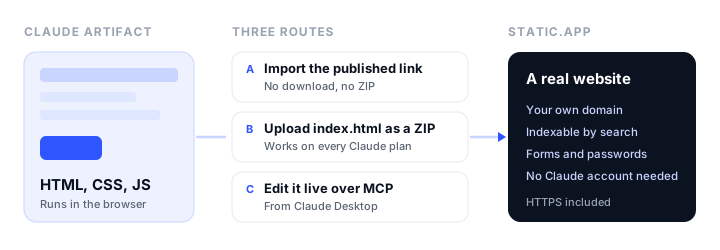
The short answer to where to host a Claude artifact: on a static host, because an artifact is HTML, CSS, and JavaScript that runs in the browser. This tutorial uses Static.app, which can import a published artifact straight from its link, so you never download a file. It covers which route fits your artifact, how to keep one address when you update it, and which artifact features stop working once the page leaves Claude.
Which kind of artifact do you have?
Before you pick a route, check what the artifact actually is. It decides whether hosting takes one minute or needs one extra step.
| Artifact type | Example | Hosts as-is? |
|---|---|---|
| HTML page | Landing page, portfolio, menu, event page | Yes |
| HTML with JavaScript | Calculator, quiz, countdown, chart dashboard | Yes, if the data is in the page |
| React component | An interactive tool Claude wrote in React | After one extra step (see below) |
| Uses Claude features | Calls Claude, uses connected apps, saves shared data | Only the parts that do not depend on Claude |
To check, open the artifact and switch to its code view. If the code starts with <!DOCTYPE html> or <html>, it is an HTML artifact. If it starts with import lines and an export default function, it is a React component.
Route A: import the published link (fastest)
This route needs no download and no ZIP. Static.app fetches the artifact and packages it as a website.
- Publish the artifact in Claude. On Free, Pro, Max, and Ultra plans, open the artifact and click Publish, then copy the link. On Team and Enterprise plans the button is Share, and links stay inside your organization unless an Owner has turned on external sharing or allowed that artifact. If your link only opens for people in your company, Static.app cannot fetch it either. Use Route B instead.
- Open Static.app’s Claude hosting page. Go to static.app/claude-hosting and choose Import from URL.
- Paste the link. It takes
claude.aiandclaude.sitelinks. Confirm, and create an account if you do not have one. The 7-day trial needs no credit card. - Open your live URL. The artifact is now a normal website on a free Static.app subdomain with HTTPS. Anyone can open it without a Claude account.
If the import cannot read your link, the artifact is usually not public yet, or it is a type the importer does not handle. Route B always works for HTML.
Route B: download the HTML and upload a ZIP
Use this route when you would rather not publish the artifact, when you are on a Team or Enterprise plan, or when you want to change the code before it goes live.
- Get the HTML. Use the artifact’s download option, or open the code view and copy everything into a plain text file.
- Name it
index.html. That is the file a web server shows when someone visits your address. Any other name and the visitor sees a file list or an error. - Put it in a folder and zip it. The Static.app upload box takes a ZIP archive, and a loose
.htmlfile is not accepted. If the artifact uses images you saved locally, put them in the same folder and reference them by filename. - Drag the ZIP onto Static.app. The site is live in seconds.
For a multi-page site, ask Claude for each page as its own file, link them with relative paths (about.html, not a full URL), and keep index.html at the top level of the ZIP, not inside a subfolder.
React artifacts: one extra step
Inside Claude, React artifacts run in a sandbox that compiles them for you. Outside Claude, a bare React component is not a web page. Static.app’s own FAQ gives the simplest fix: ask Claude for a self-contained HTML version. A prompt that works:
Convert this artifact into a single self-contained index.html file. Load any libraries from a CDN, keep all the CSS and JavaScript inline, and make sure it runs when opened directly in a browser with no build step.
Open the new file locally first. If it works in your browser, it will work on Static.app. For a bigger React project with several components, it is cleaner to build it as a real app with a build step, which our guide on where to host Claude apps walks through.
What stops working outside Claude
Some artifacts lean on Claude itself, and those parts do not come with the HTML. Anthropic’s help center says that people viewing a shared artifact without signing in find that the parts that use Claude or connected apps do not work. A static host has no Claude account behind it at all, so plan for these:
- Artifacts that call Claude. An AI chat box, a “generate ideas” button, or anything that sends a prompt runs on the viewer’s Claude account inside Claude. On your own website it has nothing to call. Calling the Claude API from your site needs a server that holds your API key, and a key should never sit in public HTML.
- Connected apps (MCP). Live data pulled from tools you connected in Claude does not travel with the page. Replace it with data written into the page, or fetched from a public URL.
- Saved and shared data. Artifact storage belongs to Claude, and unpublishing the artifact deletes it. On a static site, use the browser’s
localStoragefor data that only the visitor needs, or a Static.app form when you need to collect submissions.
Everything else keeps working: layout, styles, animations, calculations, charts drawn from data in the page, and client-side JavaScript in general.
Make it a real website
Once the artifact is live, the Static.app dashboard covers what a Claude link cannot:
- Custom domain. Add your domain from the dashboard, then create one DNS record at your registrar. HTTPS is set up for you. Custom domains need a paid plan, starting at Starter.
- Working forms. Ask Claude to include a contact form, then add the
static-formattribute to the<form>tag. Submissions land in your dashboard. - Password protection. Lock one page or the whole site, useful for client previews.
- QR code. Every site gets one, handy for printed menus or event signs.
Update it without making a duplicate
This is where most people trip up. Running the import again does not update your site; it creates a second website. On the Starter plan, which allows two websites, that can use up your last slot.
To update the site you already have, use one of these instead:
- Small edits: open the website’s files in the dashboard and edit
index.htmlin the built-in code editor. Changes are live when you save. - A new version from Claude: copy the new code from Claude and paste it over the contents of
index.htmlin the editor. Uploading a new file with the same name does not replace the old one, because it arrives under a different name.
Route C: let Claude edit the live site (Claude Desktop)
Static.app runs an MCP connector that lets an AI client read, edit, and download your Static.app websites. In the Claude Desktop app, it connects through mcp-remote, a small bridge that needs Node.js 18 or newer. Create an API key in Static.app under Account > API Keys, then open Settings > Developer > Edit Config in Claude Desktop and add:
{
  "mcpServers": {
    "static-app": {
      "command": "npx",
      "args": ["-y", "mcp-remote", "https://mcp.static.app/sse",
               "--header", "Authorization: ${AUTH_HEADER}"],
      "env": { "AUTH_HEADER": "Bearer sk_xxxx" }
    }
  }
}
Restart Claude Desktop and ask “List my Static.app websites” to check the connection. From then on you can say “On my bakery website, change the opening hours in index.html to 8 to 6” and Claude edits the live file, keeping the same address.
Two limits to know. Claude Desktop can edit, read, and download your websites, but it cannot publish a new one from files on your computer, so do the first publish with Route A or B. And in the claude.ai web app and the mobile app, the connector mostly does not work yet, because sending an API key to a connector is limited to a beta open to some organizations.
What it costs
Prices verified in November 2026, from Static.app’s pricing page.
| Plan | Monthly | Billed annually | Websites | Storage |
|---|---|---|---|---|
| Free trial | $0 for 7 days | n/a | 1 | 50MB |
| Starter | $6/mo | $5/mo ($60/yr) | 2 | 500MB |
| Medium | $12/mo | $10/mo ($120/yr) | 7 | 3GB |
| Large | $18/mo | $15/mo ($180/yr) | 30 | 10GB |
The trial needs no credit card and gives you a free subdomain with SSL. After it ends, publishing needs a paid plan. Starter adds custom domains, forms, analytics, and unlimited traffic. A single artifact is usually a few hundred kilobytes, so storage is rarely the limit.
Other places to host a Claude artifact
- Static.app. The only one here that imports a Claude artifact from its link, with forms, password protection, and a browser editor built in.
- Netlify Drop. Drag a folder and get a site. You download the HTML yourself first, and the free plan runs on a monthly credit allowance.
- GitHub Pages. Free for public repositories, but you need a GitHub account and a repository, which is more setup than most artifact owners want.
For a wider comparison, see our best static website hosting providers roundup. If you have not settled on Claude as the builder yet, our comparison of AI website builders covers the alternatives.
Troubleshooting
The import says the link is not reachable
The artifact is not public. On Free, Pro, Max, and Ultra, publish it first. On Team and Enterprise, ask an Owner whether external sharing is on, or use Route B.
The page is blank after upload
Usually a React artifact uploaded as-is. Ask Claude for the self-contained HTML version described above, open it locally to confirm it renders, then upload that.
Images are missing
The image pointed at a temporary link inside Claude. Ask Claude to use a public image URL, or save the image into the same folder as index.html and reference it by filename before zipping.
The upload is rejected
You dropped a loose .html file. Put it in a folder, zip the folder, and upload the ZIP.
Part of the artifact shows an error
That part used Claude, a connected app, or artifact storage. See “What stops working outside Claude” above for the replacement for each.
FAQ
Where can I host a Claude artifact?
On any static host, since an artifact is HTML, CSS, and JavaScript. Static.app is the simplest because it imports a published artifact from its link with no download. You can also upload the HTML as a ZIP to Static.app or another static host such as Netlify Drop or GitHub Pages.
Can I use a custom domain for a Claude artifact?
Not on the Claude link itself. Host the artifact on Static.app, then connect your domain from the dashboard with one DNS record. Custom domains need a paid plan, starting at Starter for $6 a month ($5 a month billed annually).
Do visitors need a Claude account to see my hosted artifact?
No. Once it is on Static.app it is an ordinary website that opens in any browser. The parts of an artifact that call Claude are the exception, and they will not work on any host outside Claude.
Will my hosted artifact show up on Google?
It can. A published Claude link is marked noindex, so search engines skip it. On Static.app it is a normal page that search engines can crawl, especially with your own domain and a real title and description.
How do I update a Claude artifact after hosting it?
Edit index.html in Static.app’s built-in code editor, or paste Claude’s new code into it. Do not run the import again, because that creates a second website instead of updating the first.
Do React artifacts work on Static.app?
Ask Claude to convert the artifact into a self-contained HTML file first, with libraries loaded from a CDN. That file runs anywhere. A larger React project is better built with a build step and uploaded as a folder of compiled files.
Is Static.app free for hosting an artifact?
For 7 days. The trial needs no credit card and covers one website with 50MB of storage on a free subdomain. After that, publishing needs a paid plan, from $6 a month ($5 a month billed annually).
Build your Bootstrap theme
Design a custom Bootstrap 5 theme visually with a live preview, then export clean Sass or CSS.
Open the Builder