Where to Host Claude Apps: Deploy from Claude Code to Static.app
You built an app with Claude Code, it runs on localhost, and now you need a real address for it. Where you host it depends on one question: does the app need a server once it is built? Most calculators, dashboards, quizzes, portfolios, and React or Vite single-page apps do not. They compile to a folder of HTML, CSS, and JavaScript that any static host can serve, and the fastest way to put that folder online is to let Claude Code publish it for you.
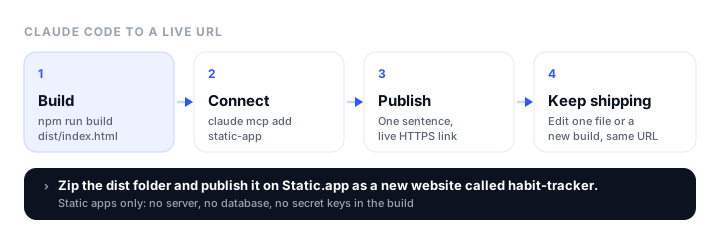
This tutorial connects Claude Code to Static.app through its MCP connector, so a single sentence like “publish the dist folder as a new website” gets you a live HTTPS link. It also covers the apps that will not run on static hosting, and what to do with them instead.
Will your app run on static hosting?
Run through these four questions before you deploy anything:
- Does it have a server? Next.js API routes or server actions, an Express or FastAPI backend, or anything you start with
node server.jsneeds a server. A static host only serves files. - Does it use a database? Postgres, MySQL, or SQLite running next to the app needs a server. A hosted database that the browser talks to directly, such as Supabase with row-level security, can work, because the browser makes those calls.
- Does it hold a secret key? If the app calls the Claude API, Stripe, or another paid API with a secret key, that key has to stay on a server. Anything in your built files is readable by every visitor, including values from
.envthat your bundler baked in. - Does it need user logins? Logins usually mean a server or an auth service. A hosted auth provider with a browser SDK can work; a home-made login system cannot.
If you answered no to all four, your app is static and the rest of this tutorial applies. A quick test: run the production build, then serve the output folder with any local static server (npx serve dist works). If the app works fully with nothing else running, it will work on Static.app.
| Your app | Static hosting? |
|---|---|
| Vite or Create React App single-page app | Yes |
Next.js with output: 'export' |
Yes |
| Vue, Svelte, Astro, or plain HTML and JavaScript | Yes |
| Next.js with API routes or server actions | No |
| App that calls the Claude API from the browser with your key | No, the key would be public |
| App with a database or server-side logins | No, only the frontend |
Step 1: build the app
Ask Claude Code to build it, or run the command yourself:
npm run build
The output folder depends on the tool: Vite writes to dist/, Create React App writes to build/, and a Next.js static export writes to out/ once output: 'export' is set in next.config.js. Whatever it is called, the folder must have index.html at its top level.
Step 2: create a Static.app API key
Sign up for Static.app’s 7-day trial (no credit card) or log in, then open Account > API Keys. Name the key and pick when it expires: 1 day, 1 week, 1 month, 1 year, or never. A shorter expiry is safer if you only need it for one project.
Keep the key out of your chats and your repository. Put it in an environment variable in your shell:
export STATIC_API_KEY=sk_xxxx
Step 3: add the Static.app connector to Claude Code
Static.app hosts the MCP server for you at mcp.static.app, so there is nothing to install or keep running. Add it to Claude Code for all your projects with one command:
claude mcp add --transport sse --scope user static-app \
  https://mcp.static.app/sse \
  --header "Authorization: Bearer $STATIC_API_KEY"
To share the setup with a team, commit a .mcp.json file to the project instead. The key is read from each person’s environment, so it never lands in the repo:
{
  "mcpServers": {
    "static-app": {
      "type": "sse",
      "url": "https://mcp.static.app/sse",
      "headers": { "Authorization": "Bearer ${STATIC_API_KEY}" }
    }
  }
}
Start Claude Code and ask “List my Static.app websites.” If your websites come back (or an empty list on a new account), you are connected. If the tools show up but every action fails, the key is missing or expired, so create a new one.
Step 4: publish the app
Tell Claude Code what to publish and what to call it:
Zip the dist folder and publish it on Static.app as a new website called habit-tracker.
Claude Code asks Static.app for a one-time upload link, zips the folder, and uploads it straight from disk, so the file never passes through the chat. It then creates the website and hands back a live address on a free Static.app subdomain with HTTPS. New websites are usually live a few seconds after the upload finishes.
Website names use lowercase letters and one hyphen. If the name you ask for is taken or not allowed, you get a random address instead, which you can replace with your own domain later. Uploads can be up to 100MB, within your plan’s storage.
Step 5: keep shipping at the same address
This is where the connector beats dragging ZIP files around. Each of these keeps your address:
- Change one thing: “On my habit-tracker website, change the button text in index.html to Start tracking.” Claude Code reads that file, edits it, and writes only that file back. Live right away.
- Add a page: “Add a privacy.html page to my habit-tracker website that matches the style of index.html.”
- Ship a new build: “Run the build and replace my habit-tracker website with the new dist folder. Keep the same address.” The site is offline for a few seconds while the new build unpacks, so use single-file edits for small fixes.
- Save a backup first: “Download my whole habit-tracker website as a ZIP before we start the redesign.” Anyone with that ZIP link can download it, so do not share it.
A note on single-file edits for built apps: the files in dist/ are generated, so the next build overwrites any hand edit. For anything beyond a typo, change the source and ship a new build.
Two things single-page apps need
Deep links that survive a refresh
With React Router or any client-side router, a URL like /settings works when you click to it but returns a 404 on refresh, because no settings file exists on the server. Static.app’s fix is a 200.html file, a copy of index.html, at the top level of the site. Ask Claude Code to add it to your build step:
After the build, copy dist/index.html to dist/200.html.
A contact form with no backend
Add the static-form attribute to a <form> in your app and Static.app collects the submissions in your dashboard, with no endpoint to write. Forms are included from the Starter plan.
No Claude Code? Two other ways in
- Drag and drop. Zip the contents of the build folder (not the folder itself, so
index.htmlsits at the top of the ZIP) and drop it on static.app. - The REST API. Send the ZIP to
POST /v1/sites/zipwith your key, and pass the website’spidto update it instead of creating another. That is the route for a deploy script or CI job. The API documentation lists all endpoints.
The same MCP connector also works in Codex, VS Code, Gemini CLI, and other MCP clients. Claude Desktop can connect too, but it can only edit, read, and download websites, not publish a new one from your files, so use Claude Code for the first publish.
What to do with an app that needs a server
If your app failed the four questions, it needs a host that runs code. You can still split it: put the built frontend on Static.app, and run the server part (the API calls with your secret key, the database, the logins) on a platform such as Cloudflare Workers, Render, or Railway. The frontend calls your backend’s URL, and the backend allows requests from your site’s domain through CORS. That keeps the secret key off the public site. If the app is a chat interface, our guide to building an AI chat interface with Bootstrap covers the frontend half.
For a full-stack app you would rather keep in one place, our Vercel alternatives and Render alternatives guides compare hosts that run servers and databases.
If the “app” is a Claude artifact rather than a Claude Code project, our guide on where to host Claude artifacts covers importing it from its link.
What it costs
Prices verified in November 2026, from Static.app’s pricing page.
| Plan | Monthly | Billed annually | Websites | Storage |
|---|---|---|---|---|
| Free trial | $0 for 7 days | n/a | 1 | 50MB |
| Starter | $6/mo | $5/mo ($60/yr) | 2 | 500MB |
| Medium | $12/mo | $10/mo ($120/yr) | 7 | 3GB |
| Large | $18/mo | $15/mo ($180/yr) | 30 | 10GB |
API and MCP access are listed on the trial and every paid plan. After the 7-day trial, publishing needs a paid plan. Starter adds custom domains, forms, analytics, and unlimited traffic. A Vite build of a small app is usually well under 5MB, so storage is rarely the limit; watch for large images and video.
Troubleshooting
The page is blank after publishing
Open the browser console. A common cause is asset paths that assume a subfolder, often left over from a GitHub Pages setup. In Vite, remove the custom base from vite.config.js (the default is /) and rebuild. Also check that index.html is at the top level of the upload, not inside a dist folder within the ZIP.
Refreshing a page returns 404
Add 200.html as described above. Without it, only the home page survives a refresh.
Every Static.app action fails
The API key is missing from the environment Claude Code started in, or it has expired. Run echo $STATIC_API_KEY in the same terminal, then restart Claude Code. If the key expired, create a new one under Account > API Keys.
Claude Code asks you to paste the key into the chat
Do not. Point it at the STATIC_API_KEY environment variable instead.
The app works locally but API calls fail live
The app depends on a local server or a key from .env that is not in the build. That part needs a backend host, as described in “What to do with an app that needs a server”.
FAQ
Where should I host an app built with Claude?
If it compiles to static files (a React, Vite, Vue, Svelte, or Astro app with no server), host it on a static host. Static.app is the quickest from Claude Code, because its MCP connector lets Claude publish and update the site for you. Apps with a server, a database, or secret keys need a host that runs code.
Can Claude Code deploy my app for me?
Yes, through an MCP connector. Add the Static.app connector with one claude mcp add command and your API key, then ask Claude Code to publish the build folder. It uploads the files and returns a live HTTPS address.
Can I host an app that calls the Claude API on Static.app?
Not on its own. Calling the Claude API needs your API key, and anything in a static site is visible to every visitor. Host the frontend on Static.app and put the API calls on a small backend, such as a Cloudflare Worker, that keeps the key secret.
Does Static.app support React Router?
Yes. Add a 200.html file, a copy of index.html, at the top level of your build so deep links work on refresh.
Can I use my own domain?
Yes, on a paid plan. Connect it from the Static.app dashboard with one DNS record and HTTPS is set up for you. Starter is $6 a month ($5 a month billed annually).
Is the Static.app MCP connector free?
It is included on the 7-day trial and on every paid plan, with no extra charge. After the trial, publishing needs a paid plan from $6 a month ($5 a month billed annually).
Build your Bootstrap theme
Design a custom Bootstrap 5 theme visually with a live preview, then export clean Sass or CSS.
Open the Builder