Best GitHub Pages Alternatives in 2026 (8 Compared)
GitHub Pages is one of the easiest ways to put a static site online: push to a repo, and your HTML, CSS, and JavaScript go live with free HTTPS and a custom domain. For a public docs site, a blog, or a portfolio, it is hard to beat free. But plenty of people outgrow it, and the reasons are consistent.

It is static only. There are no serverless functions, no server-side rendering, no edge runtime, no containers, and no databases, so anything dynamic has to call an external API or be pre-rendered at build time. Publishing from a private repository is gated behind a paid GitHub plan (Pro, Team, or Enterprise). And the limits are real but unmovable: a hard 1 GB site-size cap and a soft 100 GB/month bandwidth limit, with no way to pay to raise them. There are also no deploy previews per pull request out of the box, and the built-in CDN and edge features are thinner than what a dedicated host gives you.
If any of that is biting, this guide covers the best GitHub Pages alternatives in 2026, from dead-simple static hosts to full-stack platforms, with verified pricing and free-tier limits so you can match a host to what you are actually building. For a broader primer, see our overview of static website hosting and the guide on where to host an HTML website.
How we picked
Every platform here was evaluated against the same criteria, weighted toward what matters when you are leaving GitHub Pages:
- Free tier. Is there a genuine free plan, and is it permanent or just a trial?
- Pricing model. Flat subscription or usage-based metering, and how predictable the bill is. We flag bandwidth and build limits because that is where surprise costs hide.
- Static vs dynamic. Pure static hosting, JAMstack with serverless functions and SSR, or full-stack with containers and databases.
- Build and deploy workflow. Git-push CI, CLI, drag-and-drop, or bring-your-own build, plus whether you get deploy previews.
- Custom domains and free SSL. Table stakes now, but the number of domains and where SSL is included still varies.
- Ease of use. How fast you get from files to a live site, and how much config stands in the way.
The best GitHub Pages alternatives at a glance
| Platform | Free tier | Starting price | Static / Dynamic | Custom domain + SSL | Best for |
|---|---|---|---|---|---|
| Static.app | 1 site, 50MB, free subdomain | $6/mo (Starter) | Static only | Paid plans (free SSL on all tiers) | The simplest no-build static site |
| Cloudflare Pages | Unlimited sites + bandwidth, 500 builds/mo | $20/mo (annual) | Static + dynamic (Functions) | Yes, free auto SSL | Unlimited-bandwidth JAMstack |
| Netlify | 300 credits/mo (hard-capped) | $9/mo | Static + dynamic (SSR) | Yes, free auto SSL | Git-based JAMstack with previews |
| Vercel | Hobby (personal use only) | $20/seat/mo | Static + dynamic (SSR) | Yes, free auto SSL | Next.js and SSR apps |
| GitLab Pages | Free with GitLab Free | $29/user/mo | Static only | Yes, free Let’s Encrypt | Teams already on GitLab |
| Surge.sh | Unlimited deploys, free domains | $30/mo | Static only | Yes, basic SSL free | CLI-first static deploys |
| Render | Free static sites, 5GB bandwidth | $25/mo (workspace) | Static + full-stack | Yes, free managed SSL | Full-stack apps with a database |
| Firebase Hosting | 10GB storage, 10GB/mo transfer | Pay-as-you-go (Blaze) | Static + dynamic | Yes, free auto SSL | Sites in the Google ecosystem |
Prices and limits were verified in June 2026. Usage-based plans (Netlify, Vercel, Firebase, Render overages) can vary with traffic, so treat the starting price as a floor, not a ceiling.
The best GitHub Pages alternatives, reviewed
1. Static.app
What it is. Static.app is a one-click static-website host: you publish already-built HTML, CSS, and JavaScript by drag-and-drop, ZIP upload, an in-browser editor, a desktop sync app, a REST API, or an MCP server. It is the closest spiritual match to GitHub Pages, both are about getting a simple static site online without fuss, but it trades GitHub’s git-centric workflow for genuine point-and-click simplicity.
Who it’s for. Non-technical users, freelancers, and developers who want a portfolio, landing page, or docs site live in seconds without writing a CI pipeline. It is bootstrap.build’s hosting partner, and for most people leaving GitHub Pages over its complexity rather than its limits, it is the most direct replacement.
Strengths. Setup is about as frictionless as static hosting gets: drop a folder and you are live. Pricing is flat and transparent (a real differentiator against metered hosts), with unlimited traffic on paid plans and no per-bandwidth or per-build-minute billing to watch. Free SSL is included on every tier, including the free plan, and you get managed extras that GitHub Pages simply does not have: form collection with spam protection, analytics, password-protected pages, and QR codes. The deploy surface is surprisingly modern for the niche, with a REST API, an MCP server for AI agents, GitHub Actions support, and webhooks. If you build with a CSS framework, the customize Bootstrap 5 workflow drops straight in. You can also pair it with an HTML tester for quick local checks before publishing.
The catch. It is static only, with no SSR, serverless functions, containers, or databases, so it cannot host a dynamic or full-stack app. There is no platform-side build step, so you supply pre-built output yourself (an SSG like Hugo or Astro works fine, but the build runs on your machine or in your own GitHub Actions, not on Static.app). And the free plan is tight: one site, 50MB of storage, and a Static.app subdomain only (no custom domain until you pay).
Pricing. Free ($0): 1 site, 50MB, free subdomain. Starter $6/mo, or $5/mo billed annually ($60/yr): 2 sites, 500MB, unlimited traffic, custom domains, analytics, forms, and API/MCP access. Medium $12/mo ($10/mo annually): 7 sites, 3GB. Large $18/mo ($15/mo annually): 30 sites, 10GB.
For more head-to-head options in this category, see our Surge.sh alternatives and Tiiny Host alternatives roundups.
2. Cloudflare Pages
What it is. Cloudflare Pages deploys static sites and dynamic SSR apps from Git to Cloudflare’s global edge network, with serverless Pages Functions running on the Workers runtime.
Who it’s for. Developers and teams who want git-push CI with deploy previews but never want to think about a bandwidth bill. If GitHub Pages’ 100 GB/month soft cap worries you, this is the obvious upgrade.
Strengths. Bandwidth and static requests are unlimited on every tier, including free, which is the headline reason to pick it over Netlify or Vercel for a high-traffic static site. You also get Cloudflare’s large edge network, automatic free SSL with HTTP/3, broad framework auto-detection, and unlimited preview deployments. Need dynamic behavior later? Pages Functions give you serverless and SSR with first-class access to KV, the D1 SQL database, and R2 object storage.
The catch. Cloudflare is steering new full-stack projects toward Workers (Static Assets) rather than Pages; Pages remains fully supported but is no longer where new features land, so there is some platform-direction uncertainty. Free builds are capped at 500/month with one concurrent build and a 20-minute timeout, and dynamic Functions are metered separately under Workers pricing. Our Cloudflare Pages alternatives piece digs into the trade-offs.
Pricing. Free $0. Pro $20/mo billed annually ($25/mo monthly) for 5 concurrent builds and 5,000 builds/month. Business $200/mo annually. Bandwidth stays unlimited on all tiers.
3. Netlify
What it is. Netlify is a JAMstack platform that builds, deploys, and hosts static and SSR apps from Git, CLI, drag-and-drop, or AI prompts, with an integrated edge CDN, serverless and edge functions, managed Postgres, and blob storage.
Who it’s for. Developers who want the smoothest possible git-based workflow with instant deploy previews and one-click rollback, especially for static-first or non-Next.js frameworks like Astro, Hugo, and 11ty.
Strengths. The developer experience is excellent: zero-config CI/CD, an immutable deploy preview on every pull request, and broad auto-detected framework support. The free tier is generous in features, with custom domains and free SSL, serverless and free Deno edge functions, a managed Postgres database, blob storage, and unlimited form submissions. The Pro plan now includes unlimited team seats, which undercuts seat-priced competitors.
The catch. Since September 2025, Netlify uses a credit-based model where bandwidth, compute, requests, and deploys all draw from one pool, which can make costs hard to predict when traffic spikes. The free plan is hard-capped: once the 300 monthly credits run out, sites pause and show a “Site not available” page, so a viral hobby site can go dark. See Netlify alternatives for the full picture.
Pricing. Free $0 (300 credits/mo). Personal $9/mo (1,000 credits). Pro $20/mo (3,000 credits, unlimited seats). Enterprise is custom. Credits cost roughly $0.13/GB for bandwidth and about $0.10 per production deploy.
4. Vercel
What it is. Vercel is the frontend cloud from the company behind Next.js, built for static sites, JAMstack apps, and dynamic SSR with git-driven deploys, a global edge CDN, and serverless and edge compute.
Who it’s for. Frontend and full-stack teams shipping Next.js or modern SSR apps who want the tightest framework integration and the slickest deploy experience available.
Strengths. The git-push experience is best-in-class, with instant preview URLs per pull request and automatic framework detection. Next.js support is first-party, so SSR, ISR, streaming, and edge middleware just work. You get a fast edge CDN, automatic free SSL on all plans, and serverless functions that scale to zero. The free Hobby plan includes 100 GB/month of bandwidth and 1M function invocations.
The catch. Hobby is restricted to personal, non-commercial use, so any business has to move to Pro. Pro is $20 per developer seat per month with usage-based overages on top, and a traffic spike on bandwidth, edge requests, or build minutes can produce a surprise bill. Strong gravity toward Next.js can also mean lock-in. Compare options in Vercel alternatives.
Pricing. Hobby free (personal use). Pro $20 per seat/mo, including a $20 usage credit, 1 TB transfer, and 10M edge requests, then metered overages. Enterprise is custom.
5. GitLab Pages
What it is. GitLab Pages is static-website hosting built into GitLab that publishes your site directly from a repository via GitLab CI/CD pipelines, the GitLab-native equivalent of GitHub Pages.
Who it’s for. Teams already living in GitLab, and anyone who wants free CI-driven static hosting next to their repos, issues, and pipelines, including self-managed or air-gapped setups.
Strengths. It is free on the GitLab Free plan and adds no extra cost. Because you control the full .gitlab-ci.yml, any static site generator works (Hugo, Jekyll, Gatsby, and more). You get free automatic Let’s Encrypt TLS and up to 150 custom domains per site, plus the option to self-host GitLab on your own infrastructure.
The catch. Like GitHub Pages, it is static only, with no functions, SSR, or databases. Deploys are gated by CI/CD compute minutes (400/month on Free), which frequent rebuilds can exhaust, and the only deploy path is a CI pipeline, so there is no drag-and-drop or simple CLI option. Sites are capped at 1 GB. If you are weighing the two git-native hosts, our GitHub Pages alternatives thinking applies in reverse here.
Pricing. Free $0/user/mo (400 CI/CD minutes). Premium $29/user/mo billed annually (10,000 minutes). Ultimate is custom/contact-sales.
6. Surge.sh
What it is. Surge.sh is a CLI-first static publishing service: build locally, then run a single surge command to push your site to a global CDN in seconds.
Who it’s for. Front-end developers who prefer the terminal over a dashboard and want instant, no-config deploys for prototypes, demos, docs, and JAMstack front-ends.
Strengths. Deploys are genuinely fast and frictionless, one command and you are live. The free tier is generous: unlimited projects, unlimited deploys, free custom domains, and basic HTTPS at no cost. Pricing is flat with no metered bandwidth or build minutes, so costs are predictable. It also handles the static-site essentials well, including SPA pushState routing, custom 404s, and CORS, and it works with any SSG and common CI systems.
The catch. Static only, with no functions, SSR, containers, or databases. There is no managed build pipeline and no git-push or PR-preview deploys; you build yourself or wire up your own CI. Pricing jumps straight from free to $30/month with nothing in between, and production features like custom SSL upload, force-HTTPS, password protection, and custom redirects sit behind that paid plan. See Surge.sh alternatives for more.
Pricing. Surge free. Surge Professional $30/mo.
7. Render
What it is. Render is a unified cloud platform that deploys static sites, containerized web services, background workers, cron jobs, and managed Postgres and key-value databases from Git, positioned as a simpler Heroku or AWS alternative.
Who it’s for. Developers and small-to-mid teams who want Heroku-like simplicity to run a full-stack app, an SSR site, and a database from one git-driven workflow, with a static frontend alongside.
Strengths. It covers far more than static hosting: long-running containers in any language, SSR, workers, cron, and managed Postgres and Key Value, all from one pipeline. You get free, auto-renewing TLS on custom domains, zero-downtime deploys, PR preview environments, Docker support, and Infrastructure-as-Code Blueprints. Static sites are served over a global CDN with free DDoS protection. There is a real free tier with no credit card required.
The catch. The free tier has gotchas: free web services spin down after 15 minutes idle with a slow cold start, and free Postgres is deleted about 30 days after creation, so it is not for production. The 2026 plan changes cut included bandwidth sharply (Hobby just 5 GB/month) with $0.15/GB overage, and the workspace fee is separate from per-instance compute and database costs, so the real bill stacks up. For a simple static site this is more machinery than you need. More in Render alternatives.
Pricing. Hobby free. Pro $25/mo flat workspace (25 GB bandwidth). Scale $499/mo. Compute is billed per instance on top, starting around $7/mo, and managed Postgres from around $6/mo.
8. Firebase Hosting
What it is. Firebase Hosting is Google’s global-CDN static host with optional SSR and dynamic content via Cloud Functions or Cloud Run, part of the broader Firebase and Google Cloud ecosystem.
Who it’s for. Developers already using Firebase (Auth, Firestore, Cloud Functions) who want a static site or SPA that can grow into a dynamic backend without leaving the ecosystem.
Strengths. The always-free static tier includes a global CDN, automatic free SSL, and custom domains with zero-config certificates. It integrates tightly with the rest of Firebase, so adding Auth, a Firestore database, or Cloud Functions is straightforward. Deploys are a single firebase deploy CLI command, with GitHub Actions support, preview channels, and atomic rollbacks, all backed by Google’s infrastructure.
The catch. The paid Blaze plan is pay-as-you-go with no hard spending cap by default, so a traffic spike can cause surprise costs (budget alerts notify but do not stop charges). SSR and dynamic content are fragmented across Cloud Functions, Cloud Run, and the newer App Hosting, each requiring Blaze. The free Spark transfer quota is a modest 10 GB/month, and exceeding it means upgrading to Blaze rather than a flat paid plan.
Pricing. Spark free: 10 GB storage, 10 GB/month transfer. Blaze pay-as-you-go: keeps the free allotments, then $0.026/GB storage and $0.15/GB transfer, with $300 in free credit for eligible new users. Dynamic usage is billed separately at Google Cloud rates.
How to choose
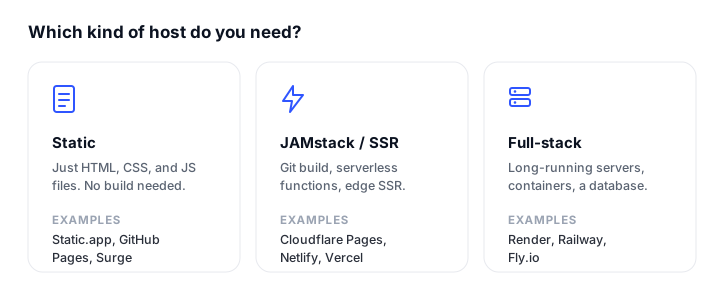
The right host depends almost entirely on what you are building.
- A plain static site (portfolio, docs, blog, landing page). Pick the simplest tool that clears your limits. Static.app is the easiest no-build option and a direct GitHub Pages replacement; Surge.sh suits terminal-first developers; GitLab Pages is the natural choice if you already use GitLab. If high traffic is your concern, Cloudflare Pages removes the bandwidth ceiling entirely.
- A JAMstack or SSR app. You want git-push CI, deploy previews, and serverless functions. Cloudflare Pages wins on unlimited bandwidth, Netlify on workflow polish and breadth of framework support, and Vercel on Next.js and SSR specifically.
- Full-stack with a database or containers. When you need long-running services, a managed database, or background jobs, a static host is not enough. Render is the friendliest entry point; Firebase Hosting fits if you are already in Google’s ecosystem. For more on this tier, see our AWS Amplify alternatives comparison.
- The simplest no-build option. If you just want to drop a folder and have a live, SSL-secured site without a pipeline, Static.app is the shortest path. To go from idea to deploy quickly, our walkthrough on how to build and publish a website with Claude pairs well with it.
Whichever you choose, keep an eye on availability once you are live. A quick read of the best website monitoring tools will help you catch downtime before your visitors do.
FAQ
What is the best free GitHub Pages alternative?
For a pure static site, Cloudflare Pages has the most generous free tier: unlimited sites, unlimited bandwidth, and free SSL, with 500 builds/month. GitLab Pages is the best like-for-like if you want a git-native host, and Static.app is the easiest if you would rather drag-and-drop than push to a repo. The right one depends on whether you value unlimited traffic, a git workflow, or zero-config simplicity.
Is there a cheaper GitHub Pages alternative for a simple static site?
GitHub Pages is free for public repos, so nothing beats it on price there. The closest free alternatives are Cloudflare Pages, GitLab Pages, Surge.sh, and Firebase Hosting’s Spark plan. If your reason for leaving is that you need a custom domain on a no-build host, Static.app starts at $6/month ($5/month billed annually) with unlimited traffic and flat, predictable pricing.
Can these alternatives host a dynamic or full-stack app, unlike GitHub Pages?
Yes, and that is the main reason to switch. GitHub Pages is static only. Cloudflare Pages, Netlify, Vercel, and Firebase Hosting all add serverless functions and SSR, while Render runs full containers and managed databases. If you only need static files, Static.app, Surge.sh, and GitLab Pages stay static but are simpler to operate.
How hard is it to migrate from GitHub Pages?
For a static site, migration is mostly painless because your build output is just HTML, CSS, and JavaScript. With a host like Static.app or Surge.sh you upload or push the built files directly. With Cloudflare Pages, Netlify, Vercel, or GitLab Pages you connect the same repo and the platform builds on push, so you keep your git workflow. Update your DNS records to the new host and re-add your custom domain, and SSL is reissued automatically.
Which GitHub Pages alternative has unlimited bandwidth?
Cloudflare Pages offers truly unlimited bandwidth and static requests on every tier, including free, which is its biggest advantage over Netlify and Vercel. Static.app and Surge.sh advertise unlimited traffic on their paid plans with flat pricing. Netlify, Vercel, Firebase, and Render all meter bandwidth in some form, so heavy traffic can raise the bill.
Do all of these support custom domains and free SSL?
Every platform here supports custom domains with free, auto-renewing SSL. The differences are in the details: Static.app requires a paid plan for custom domains (though SSL is free on all tiers), while Cloudflare Pages, Netlify, Vercel, GitLab Pages, Render, and Firebase all allow custom domains with free certificates from the start. Surge.sh includes free custom domains and basic SSL, but force-HTTPS and custom certificate upload are paid.
Should I use a static host or a JAMstack platform?
Use a dedicated static host (Static.app, Surge.sh, GitLab Pages) if your site is just files and you want the least overhead. Choose a JAMstack platform (Cloudflare Pages, Netlify, Vercel) if you want git-push CI, deploy previews per pull request, and the option to add serverless functions or SSR later without re-platforming. For data-backed apps with a database, step up to a full-stack host like Render.
Build your Bootstrap theme
Design a custom Bootstrap 5 theme visually with a live preview, then export clean Sass or CSS.
Open the Builder