Best Surge.sh Alternatives in 2026 (7 Compared)
Surge.sh has a loyal following for one good reason: typing surge in a project folder pushes a static site to a CDN in seconds, with no dashboard, no Git wiring, and no build step to configure. For prototypes, demos, and front-end JAMstack sites, that workflow is hard to beat. But it is also where Surge stops. The product is static only, with no serverless functions, SSR, containers, or databases, so the moment a project needs a backend it is out of scope. Its pricing jumps straight from free to $30/month with no tier in between, and several production features (custom SSL upload, force HTTPS, password protection, custom redirects) sit behind that paid plan. It also publishes no explicit bandwidth, storage, or file-count limits, which makes capacity planning for a busy site a guessing game.
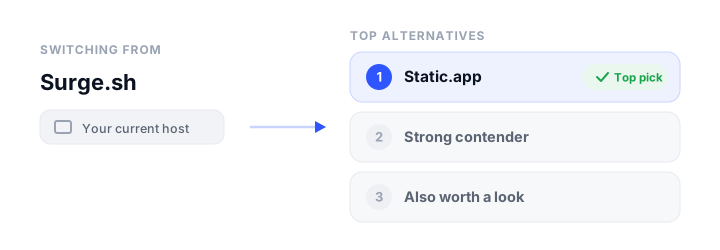
None of that makes Surge bad. It makes it specific. If you have outgrown it, or you want a host with the same simplicity plus a real free SSL story, managed extras, or a build pipeline, this guide compares the best Surge.sh alternatives for 2026. Every price and limit below comes from a pricing review done in June 2026. For broader background, see our roundup of static website hosting.
How we picked
We weighed each platform on the things that actually decide where a site lives:
- Free tier: is there a genuinely free plan, and what does it cap (bandwidth, storage, builds, or commercial use)?
- Pricing model: flat and predictable, or metered usage that can spike with traffic.
- Static vs dynamic: pure static hosting, or full JAMstack/SSR and full-stack with databases and containers.
- Build and deploy workflow: CLI, drag-and-drop, Git push with previews, or all of the above.
- Custom domains and free SSL: supported on the free plan, or gated behind a paid tier.
- Ease of use: how fast a non-expert can get a site live and keep it running.
The best Surge.sh alternatives at a glance
| Platform | Free tier | Starting price | Static / Dynamic | Custom domain + SSL | Best for |
|---|---|---|---|---|---|
| Static.app | 1 site, 50MB, free SSL, subdomain only | $6/mo (Starter) | Static only | Paid plans (free SSL all tiers) | Simple static sites with no build step |
| GitHub Pages | Public repos free, custom domains, free TLS | Free (Pro ~$4/user/mo for private) | Static only | Yes, free Let’s Encrypt TLS | Static sites and docs hosted from a repo |
| Cloudflare Pages | Unlimited bandwidth and sites, 500 builds/mo | $20/mo (annual) | Static + SSR via Functions | Yes, free auto SSL | Unmetered traffic and edge functions |
| Netlify | $0, 300 credits/mo, custom domain + SSL | $9/mo | Static + SSR | Yes, free auto SSL all plans | Git-based deploys with previews |
| Vercel | Hobby free (personal use), 100GB/mo transfer | $20/seat/mo | Static + SSR | Yes, free auto SSL all plans | Next.js and modern SSR apps |
| Render | Free static, web service, and Postgres | $25/mo workspace | Static + full-stack containers | Yes, free managed TLS | Full-stack apps with a database |
| Firebase Hosting | Spark free, 10GB storage, 10GB/mo transfer | Pay-as-you-go (Blaze) | Static + SSR via Cloud Functions/Run | Yes, free auto SSL | Sites in the Google/Firebase ecosystem |
The best Surge.sh alternatives, reviewed
1. Static.app
What it is. Static.app is a purpose-built static hosting platform that publishes pre-built HTML, CSS, and JavaScript without a build step. You can push a site by drag-and-drop, ZIP upload, an in-browser editor, a Mac or Windows desktop sync app, a REST API, or even an MCP server for AI agents. That makes it the most natural direct replacement for Surge: same “host my finished files” model, but with a friendly interface instead of a CLI-only one.
Who it is for. Non-technical users, freelancers, and developers who want a simple static site (portfolio, landing page, docs) live quickly and cheaply, without wiring up Git or a backend.
Strengths. It is genuinely beginner-friendly: drag a folder and you are live. Pricing is flat and transparent, with unlimited traffic on paid plans and no per-bandwidth or per-build metering, so there are no surprise overage bills. Free SSL is included on every tier, including the free plan. It also ships managed extras that Surge charges for or lacks entirely: form collection with spam protection and Airtable integration, analytics, password-protected pages, and QR codes. For automation it offers a REST API, an MCP server, GitHub Actions CI, and webhooks. As bootstrap.build’s hosting partner, it pairs naturally with Bootstrap projects, and the in-browser editor is handy when you want to tweak a customized Bootstrap build without re-uploading.
The catch. Static.app is static only: no SSR, serverless or edge functions, containers, or databases, so it cannot host a full-stack app. There is no platform-side build pipeline, so you supply pre-built output yourself (any SSG works, but it builds in your own GitHub Actions, not on Static.app). Storage caps are tight (50MB free, 500MB on Starter), and custom domains require a paid plan.
Pricing. Free $0 (1 site, 50MB, subdomain only, 7-day trial of paid features). Starter $6/mo, or $60/yr at an effective $5/mo (2 sites, 500MB, unlimited traffic, custom domains, analytics, forms, API/MCP). Medium $12/mo ($10/mo annually, 7 sites, 3GB). Large $18/mo ($15/mo annually, 30 sites, 10GB). Extra sites and storage are available as add-ons.
2. GitHub Pages
What it is. GitHub Pages serves static HTML/CSS/JS straight from a GitHub repository, with changes going live on every push. You can use the built-in Jekyll build or a custom GitHub Actions workflow that supports any static site generator.
Who it is for. Developers and maintainers who already work in Git and want free hosting for docs, blogs, and portfolios with zero extra billing. If you are weighing it specifically, see our GitHub Pages alternatives comparison.
Strengths. It is genuinely free for public, static sites, with free auto-renewing HTTPS via Let’s Encrypt and custom domain support for both apex and subdomains. The Git integration is tight: push to deploy, plus GitHub Actions for any SSG and full CI. It runs on GitHub/Microsoft infrastructure, so it is reliable and low-maintenance. Pages itself does not meter build minutes, and the per-hour build limit is bypassed entirely when you publish with Actions.
The catch. It is static only, so dynamic and full-stack apps are out. Publishing from a private repository requires a paid plan. There is a hard 1GB site-size cap and a soft 100GB/month bandwidth limit with no built-in way to pay to raise them, and there are no per-PR deploy previews out of the box.
Pricing. Free for public repos on GitHub Free. Private-repo Pages needs GitHub Pro (around $4/user/month, as of 2026) or Team at $4/user/month; Enterprise is $21/user/month.
3. Cloudflare Pages
What it is. Cloudflare Pages deploys static sites and dynamic SSR apps from Git to Cloudflare’s global edge network, with serverless Functions powered by Workers. It is a JAMstack and full-stack host rather than a static-only one.
Who it is for. Developers and teams who want unmetered traffic, free SSL, and edge functions without traffic-based billing. For a deeper look, see our Cloudflare Pages alternatives writeup.
Strengths. The headline is truly unlimited bandwidth and static requests on every tier, including free, which is a major differentiator versus metered competitors. It runs on Cloudflare’s large edge network with automatic free SSL and strong out-of-the-box performance. It is full-stack capable through Pages Functions on the Workers runtime, with first-class access to KV, the D1 SQL database, R2 storage, and Durable Objects. The Git-push workflow includes unlimited preview deployments and broad framework auto-detection.
The catch. Cloudflare is steering new full-stack projects toward Workers with Static Assets rather than Pages; Pages remains fully supported but gets less new investment, which adds some platform-direction uncertainty. Dynamic features depend on the Workers ecosystem and its separate pricing, so the free picture for dynamic apps is more nuanced. Free builds are capped at 500/month with 1 concurrent build and a 20-minute timeout.
Pricing. Free $0. Pro $20/mo billed annually ($25/mo monthly). Business $200/mo annually ($250/mo monthly). Enterprise is custom. Bandwidth stays unlimited on every tier; dynamic Functions usage is metered separately under Workers (Workers Paid from $5/mo).
4. Netlify
What it is. Netlify is a JAMstack and composable web platform that builds, deploys, and hosts static and SSR apps from Git, CLI, drag-and-drop, or AI prompts, with a global edge CDN, serverless and edge functions, managed Postgres, and blob storage.
Who it is for. Developers and teams who want frictionless Git-based deploys with previews and an integrated edge plus serverless platform. Comparing options? See our Netlify alternatives guide.
Strengths. The Git-based CI/CD is excellent: instant deploy previews, branch deploys, and one-click rollback. It has broad first-class framework support (Astro, Hugo, 11ty, Next.js, Nuxt, SvelteKit, Remix) with auto-detected builds, and is often the easiest setup for static-first and non-Next.js frameworks. Even the free plan includes custom domains with free SSL, serverless and free Deno edge functions, managed Postgres, blob storage, and unlimited form submissions. The Pro plan now includes unlimited team seats.
The catch. The new credit-based model can make costs hard to predict: bandwidth, compute, requests, deploys, and AI usage all draw from one credit pool, and a traffic spike can drain it fast. The free plan is hard-capped at 300 credits/month; when they run out, sites pause and show a “Site not available” page. Unused monthly credits do not roll over.
Pricing. Free $0 (300 credits/mo). Personal $9/mo (1,000 credits). Pro $20/mo (3,000 credits, unlimited seats). Enterprise is custom. Credits cover deploys (~$0.10 each), bandwidth (~$0.13/GB), compute, and requests; previews, branch deploys, and form submissions are free.
5. Vercel
What it is. Vercel is the frontend cloud platform from the team behind Next.js. It deploys static sites, JAMstack apps, and dynamic SSR applications with Git-driven deploys, a global edge CDN, and serverless and edge compute.
Who it is for. Frontend and full-stack teams shipping Next.js or modern SSR apps who want the smoothest deploy experience. If you are shopping around, see our Vercel alternatives comparison.
Strengths. The developer experience is best-in-class: zero-config Git-push deploys, instant preview URLs per PR, and automatic framework detection. Its Next.js integration is the smoothest of any host because Vercel builds Next.js. It runs on a fast global edge CDN with automatic free SSL and serverless plus edge compute that scales to zero. Deploy paths are flexible: Git, CLI, drag-and-drop via Vercel Drop, deploy hooks, and a REST API.
The catch. Usage-based Pro pricing can produce surprise bills, because bandwidth, function compute, edge requests, and build minutes all meter above the included $20 credit. The free Hobby plan is restricted to non-commercial, personal use, so businesses must upgrade even for a small site. Pro is billed per developer seat, which adds up for teams.
Pricing. Hobby free (personal use; 100GB/mo transfer, 1M edge requests, automatic SSL). Pro $20 per developer seat/month, including a $20 usage credit, 1TB transfer, and 10M edge requests, with usage-based overages beyond that. Enterprise is custom.
6. Render
What it is. Render is a unified cloud platform that deploys static sites, containerized web services, background workers, cron jobs, and managed Postgres and key-value databases from a Git repo. It is positioned as a simpler Heroku or AWS alternative for full-stack teams.
Who it is for. Developers and small-to-mid teams who want Heroku-like simplicity for full-stack apps and SSR sites with a database, plus static frontends. For more, see our Render alternatives guide.
Strengths. It is a genuinely unified platform: static sites, containers, workers, cron, and managed databases under one Git-driven workflow, which is simpler than AWS. It offers free, auto-renewing TLS on custom domains and a real free tier (free static sites, free web services, free Postgres) with no credit card required. The developer experience is strong, with zero-downtime deploys, PR preview environments, autoscaling, Docker support, IaC Blueprints, and CLI/API/MCP. Static sites are served over a global CDN with free DDoS protection.
The catch. The free tier has gotchas: free web services spin down after 15 minutes idle with a slow cold start, and free Postgres is deleted around 30 days after creation. The 2026 plan changes cut included bandwidth sharply (5GB/mo on Hobby, 25GB/mo on Pro) with $0.15/GB overage. Workspace fees are separate from per-instance compute and database costs, so the real bill stacks up.
Pricing. Hobby free. Pro $25/mo flat workspace (25GB bandwidth, ~1,000 build minutes, 15 custom domains). Scale $499/mo. Enterprise is custom. Compute is billed per instance (Starter ~$7/mo and up); managed Postgres from around $6/mo.
7. Firebase Hosting
What it is. Firebase Hosting is Google’s CDN-backed platform for static sites and single-page apps, with optional SSR and dynamic content via Cloud Functions or Cloud Run, sitting inside the broader Firebase and Google Cloud ecosystem.
Who it is for. Developers already in the Google/Firebase world shipping static sites or SPAs that may grow into dynamic backends.
Strengths. The always-free static tier includes a global CDN, free auto-renewing SSL, and custom domains. It integrates tightly with Firebase services (Auth, Firestore, Cloud Functions, Cloud Run) so you can add dynamic features incrementally. Deploys are a single firebase deploy CLI command, with easy GitHub Actions CI, preview channels, and atomic rollbacks. It runs on Google’s infrastructure with Brotli/gzip compression and edge caching.
The catch. Pay-as-you-go Blaze billing has no hard spending cap by default, so traffic spikes can cause surprise costs (budget alerts notify but do not stop charges). SSR and dynamic content are fragmented across Cloud Functions, Cloud Run, and the newer App Hosting, each requiring Blaze. The free Spark transfer quota (~10GB/month) is modest, and exceeding it means upgrading to Blaze rather than a flat paid plan.
Pricing. Spark free (10GB storage, 10GB/mo transfer, custom domains with free SSL). Blaze is pay-as-you-go: keeps the free allotments, then $0.026/GB storage and $0.15/GB transfer, with $300 in free credit for eligible new users. Dynamic/SSR usage bills separately at Google Cloud rates.
If your stack lives on Amazon instead, our AWS Amplify alternatives article covers the equivalent territory there.
How to choose
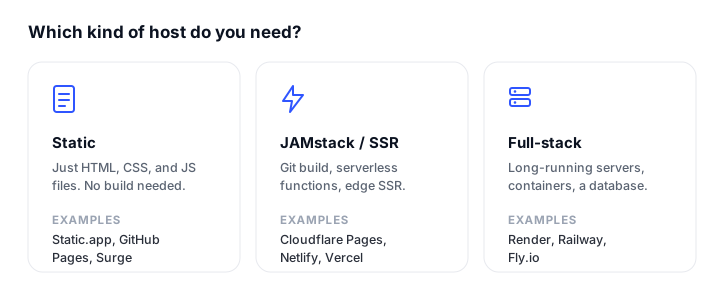
A plain static site (portfolio, landing page, docs). Static.app is the most direct Surge replacement: drag-and-drop, free SSL on every tier, flat pricing, and managed forms and analytics, with no build step to maintain. If you live in Git, GitHub Pages is free for public repos and just as low-maintenance. If you expect high or spiky traffic, Cloudflare Pages gives you unlimited bandwidth on the free plan so you never get a surprise bill, and pairs well with website monitoring to confirm it stays online.
A JAMstack or SSR app. Netlify and Vercel are the frictionless Git-push choices with per-PR previews. Pick Vercel if you are building Next.js, since it is the smoothest host for it. Pick Netlify for static-first and non-Next.js frameworks, or Cloudflare Pages if unmetered bandwidth matters more than the polish.
Full-stack with a database or containers. Render is the clear fit when you need a long-running backend, workers, cron jobs, or managed Postgres alongside the frontend. Firebase Hosting works well if you are already on Google Cloud and want to grow into Cloud Functions or Cloud Run.
The simplest no-build option. If you just want finished files online with the least ceremony, Static.app and GitHub Pages both skip the platform build pipeline. Static.app wins on ease for non-developers; GitHub Pages wins if your files already live in a repo.
For a wider primer on the decision, our guide on where to host an HTML website walks through the tradeoffs end to end.
FAQ
What is the best free Surge.sh alternative?
For a plain static site, Static.app gives you a free plan (1 site, 50MB, free SSL) plus managed forms and analytics that Surge does not include. If you work in Git, GitHub Pages is free for public repositories with free TLS and custom domains. For high or unpredictable traffic, Cloudflare Pages stands out because it offers unlimited bandwidth even on its free tier.
Is Static.app a good replacement for Surge.sh?
Yes, it is the most natural like-for-like swap. Both host pre-built static files with no build step, but Static.app adds a friendly interface, free SSL on every tier, and managed extras (forms, analytics, password protection) instead of Surge’s CLI-only model. The main limitation to know is that it is static only, with 50MB of free storage and no platform-side build pipeline.
Is any alternative cheaper than Surge.sh?
Surge jumps from free straight to $30/month with no tier in between. Static.app’s paid plans start at $6/month ($5/month billed annually), Netlify at $9/month, and Cloudflare Pages, Netlify, Vercel, and Render all have free tiers that cover plenty of static sites. So yes, several alternatives are cheaper than Surge Professional, and most offer a smoother on-ramp between free and paid.
Can these alternatives host dynamic or full-stack apps?
Some can. Surge, Static.app, and GitHub Pages are static only. Cloudflare Pages, Netlify, Vercel, and Firebase Hosting add serverless and SSR support, and Render goes further with long-running containers, background workers, and managed databases. If you need a backend, choose from that second group.
How hard is it to migrate from Surge.sh?
Migration is straightforward because your site is already pre-built static output. For Static.app you drag-and-drop the same folder you would deploy with Surge. For GitHub Pages, Netlify, Vercel, or Cloudflare Pages you push the project to a Git repo and connect it. The main extra steps are repointing your custom domain’s DNS and letting the new host issue a fresh free SSL certificate.
Do these alternatives include free SSL and custom domains?
Free SSL is standard across all of them. Custom domains are included on the free tiers of GitHub Pages, Cloudflare Pages, Netlify, Vercel, and Firebase Hosting. Static.app includes free SSL on every tier but requires a paid plan (from $6/month, or $5/month billed annually) to connect a custom domain rather than a subdomain.
Which alternative is best for non-developers?
Static.app is the easiest for non-developers: drag-and-drop or desktop sync gets a site live with no Git, no CLI, and no build configuration, plus an in-browser editor for quick changes. GitHub Pages and the Git-based hosts are excellent but assume comfort with version control.
Build your Bootstrap theme
Design a custom Bootstrap 5 theme visually with a live preview, then export clean Sass or CSS.
Open the Builder