Best Cloudflare Drop Alternatives in 2026 (7 Compared)
Cloudflare Drop, launched in early July 2026 at cloudflare.com/drop, is the fastest way yet to put a static site on the internet: drag a folder or ZIP of HTML, CSS, and JavaScript onto the page and it is live on a public workers.dev URL in seconds, on Cloudflare’s global network, before you have even created an account. For sharing a prototype or a one-off demo, that zero-friction flow is genuinely hard to beat.
The limitations are just as concrete. An unclaimed Drop site expires after 60 minutes, taking its URL with it, so anything you want to keep means signing in, or creating a Cloudflare account and verifying its email, before the countdown runs out. Pre-claim sites are fully public with no access controls, and anonymous uploads are capped at 1,000 files of 5 MiB each. Cloudflare documents no drag-and-drop way to update a site you already deployed; the documented path is the Wrangler CLI. At least one launch-week tester hit a vague “Something went wrong” error on rejected files, and the terms Drop ships under drew criticism on Hacker News for a broad content license grant, though Cloudflare has not clarified how far that clause reaches for Drop uploads. None of this makes Drop a bad tool. It makes Drop a preview tool, and plenty of people trying it actually want a permanent home for their site.
This guide covers the seven best Cloudflare Drop alternatives in depth, from like-for-like drag-and-drop hosts to git-based and CLI options, so you can match the platform to how you actually work. Prices were verified in July 2026.
How we picked
Every platform here was judged against the same practical criteria, weighted for what matters when you arrive from a tool like Drop:
- Deploy friction: how many steps between finished files and a live URL, and whether an account is required up front.
- Permanence: does the free site stay up indefinitely, or expire like an unclaimed Drop?
- Update workflow: can you push a new version to the same URL without a CLI or a git repo?
- Free tier: is there a genuinely usable free plan, or only a trial?
- Pricing model: flat and predictable, or usage-metered, and what are the storage and bandwidth limits?
- Custom domains and free SSL: supported at all, and on which tier?
If you are still weighing what kind of host you need, our guide to static website hosting and the roundup of where to host an HTML website cover the wider landscape.
The best Cloudflare Drop alternatives at a glance
| Platform | Free tier | Starting price | Static / Dynamic | Custom domain + SSL | Best for |
|---|---|---|---|---|---|
| Static.app | Yes (1 site, 50 MB) | $6/mo (Starter) | Static only | Paid plans, free SSL | Permanent drag-and-drop hosting |
| Netlify Drop | Yes (300 credits/mo) | $9/mo (Personal) | Both (functions/SSR) | Yes, free SSL | Anonymous drops that grow into CI/CD |
| Vercel Drop | Yes (Hobby, personal use) | $20/seat/mo (Pro) | Both (builds frameworks) | Yes, free SSL | Dropping framework code, not just files |
| Cloudflare Pages | Yes (unlimited bandwidth) | $20/mo (Pro, annual) | Both (Functions) | Yes, free SSL | Staying on Cloudflare, minus the countdown |
| Surge | Yes (unlimited sites) | $30/mo (Professional) | Static only | Yes, free managed SSL | One-command CLI deploys |
| GitHub Pages | Yes (public repos) | $4/user/mo (private repos) | Static only | Yes, free SSL | Free hosting straight from a repo |
| Neocities | Yes (1 GB, 200 GB/mo) | $5/mo (Supporter) | Static only | Supporter plan, free SSL | Free permanent hobby and personal sites |
The best Cloudflare Drop alternatives, reviewed
These are ordered roughly by how closely they match what Drop users are looking for: finished files online with as little friction as possible. The “How to choose” section below maps each one to a use case.
Static.app
What it is. Static.app is a one-click static hosting platform where you publish pre-built HTML, CSS, and JS by drag-and-drop, ZIP upload, desktop sync, a REST API, an MCP server, or GitHub Actions, with free SSL and managed extras like form collection and analytics. It is bootstrap.build’s hosting partner, and it is the closest like-for-like replacement for Drop: the same drag-a-folder workflow, except the site stays up with no 60-minute claim countdown.
Who it is for: non-technical users, freelancers, and developers who liked how easy Drop was but want the result to be a permanent website rather than an expiring preview.
Strengths: the deploy flow is exactly what Drop users expect (drag a folder or ZIP and the site is live), and updating is just as simple. Re-upload over the existing site, edit files in the built-in browser editor, or let the desktop app sync a local folder. Pricing is cheap and flat with unlimited traffic on paid plans, so there is no usage metering to watch. Every site gets free SSL, and the managed extras (forms with spam protection, analytics, password-protected pages) cover the things a plain static host usually leaves you to wire up yourself. For automation later, the GitHub Action, REST API, and MCP server are there when you need them.
The catch. It is static only: no server-side rendering, functions, or platform build step, so you upload compiled output (any static site generator works). The free plan is modest (1 site, 50 MB, subdomain only) and custom domains require a paid plan. It is also a smaller vendor without the global edge footprint of Cloudflare.
Pricing: Free $0 (1 site, 50 MB, static2.website subdomain); Starter $6/month, or $5/month billed annually (2 sites, 500 MB, custom domains, unlimited traffic); Medium $12/month, or $10/month annually (7 sites, 3 GB); Large $18/month, or $15/month annually (30 sites, 10 GB). Add-ons cover extra sites, storage, and team seats.
Netlify Drop
What it is. The original drag-and-drop deploy, at app.netlify.com/drop, and the tool Cloudflare Drop most directly imitates. Drag a folder of static files onto the page and it is live on a netlify.app URL immediately, no build step and no login required up front; claiming the site with a free account keeps it and unlocks the full Netlify platform underneath.
Who it is for: people who want Drop’s anonymous instant-preview workflow but with a real platform (custom domains, functions, redirects, forms) waiting behind it once they claim the site.
Strengths: like Cloudflare Drop, you can deploy before identifying yourself, and unlike Cloudflare Drop, a claimed site has a real update path: drag an updated folder onto the site’s Deploys page and the same URL serves the new version. Netlify Drop will also build for you, which Cloudflare Drop will not: as long as you are signed in, you can drop a project that still needs a build step and Netlify detects the framework and runs the build before publishing. Custom domains with free SSL are included on the free plan, and the platform grows with you into CLI deploys, git-based CI/CD, serverless functions, and form handling.
The catch. Unclaimed drops are still temporary, so the claim step remains mandatory for anything permanent, though a site dropped while signed out is now protected with a temporary password rather than being left fully public. The 2026 credit-based free plan is the bigger issue: 300 credits per month is a hard cap, a production deploy costs 15 credits, bandwidth burns 20 credits per GB, and when the credits run out every site on the account is paused until the monthly reset. Drop deploys are also best kept under 50 MB, and individual files over 10 MB can stall the upload.
Pricing: Free $0 (300 credits/month, hard cap); Personal $9/month (1,000 credits, add-on credits available); Pro from $20/month (3,000 credits, unlimited seats), with higher credit tiers at $33 for 5,000, $63 for 10,000, $95 for 15,000, and $126 for 20,000; Enterprise custom. See our Netlify alternatives roundup for the full field.
Vercel Drop
What it is. Vercel’s take on the same idea, at vercel.com/drop, launched a few weeks before Cloudflare’s. Drag a file, folder, or ZIP onto the page and Vercel publishes it to production on a vercel.app URL. The twist is the build pipeline: drop framework source code (Next.js, for example) and Vercel detects the framework and builds it in the cloud, where Cloudflare Drop serves prebuilt files only.
Who it is for: developers who want to drag-and-drop actual projects, not just compiled output, and are happy to live inside a Vercel account.
Strengths: the automatic framework detection and cloud build are the reason to pick it over Cloudflare Drop, though Netlify Drop now builds from source too, and plain static folders deploy as-is with a homepage picker if there is no root index.html. Custom domains with automatic SSL work on the free Hobby plan (up to 50 per project), and a dropped project can graduate to git-based CI/CD by connecting a repository afterward.
The catch. An account is required before your first deploy, so there is no anonymous preview at all. Every drop creates a brand-new project with a new URL; updating an existing site means connecting git or using the CLI, which is the same gap Cloudflare Drop has. And the free Hobby plan is restricted to personal, non-commercial use, so a business site needs Pro at $20 per seat per month.
Pricing: Hobby free (personal use, 100 GB/month data transfer); Pro $20 per seat/month plus usage-based overages; Enterprise custom. Our Vercel alternatives guide compares the wider platform.
Cloudflare Pages (direct upload)
What it is. Cloudflare’s own account-based answer to the expiry problem. Pages direct upload projects take a folder or ZIP by drag-and-drop in the dashboard, or a wrangler pages deploy from the CLI, and publish to a pages.dev URL with the same unlimited free bandwidth and static requests Cloudflare is known for, permanently.
Who it is for: anyone who tried Drop, likes Cloudflare’s network, and simply wants the site to survive past the hour without changing vendors.
Strengths: the free tier is the most generous in this list where traffic is concerned: unlimited bandwidth, unlimited static requests, 100 custom domains per project with automatic SSL, and direct uploads do not consume the 500 builds/month quota, so you can redeploy freely. Re-uploading creates a new deployment of the same project with atomic production updates and rollbacks.
The catch. You need a Cloudflare account from the start, and the dashboard drag-and-drop path is capped at 1,000 files per deployment (Wrangler raises that to the per-site limit, which is 20,000 files on free and 100,000 on paid plans). A direct upload project can never be converted to a git-connected one later. The bigger caveat is platform direction: as of 2026 Cloudflare is steering new projects toward Workers with static assets rather than Pages, and claimed Drop sites land on Workers, so Pages is best understood as fully supported but no longer where the new features ship.
Pricing: Free $0 covers most static sites; Pro $20/month billed annually ($25 monthly) mainly buys build capacity that direct uploads do not use. See our Cloudflare Pages alternatives roundup for the platform’s own field.
Surge
What it is. A CLI-first static publisher: npm install --global surge, run surge in your project folder, and the site is live on a surge.sh subdomain, with account creation handled inline in the terminal on first run. It is the command-line equivalent of a drag-and-drop.
Who it is for: developers who live in the terminal and want the fewest possible steps between a build folder and a URL, without a dashboard at all.
Strengths: the free tier allows unlimited sites and unlimited publishing, custom domains work on free via a CNAME record with managed certificates provisioned automatically, and the same free plan covers the CDN, clean URLs, revisions, and collaborators. Redeploying is just running surge again, with a CNAME file in the project pinning the domain so repeat deploys need no prompts. Previews are built in: surge publish --preview uploads a revision to its own permanent URL without changing what production serves, then surge cutover promotes it or surge discard throws it away. The project also shows renewed maintenance in 2026 after a quiet stretch, with fresh releases and restructured docs.
The catch. The only paid tier is a steep jump: $30/month for Professional, which is what it takes to get password protection, custom redirects, cross-origin headers, and bring-your-own SSL certificates. Project size is informally capped (around 430 MB and a few thousand files), which you discover via an “Application too large” error rather than documentation, and there are no published bandwidth figures.
Pricing: Free $0 (unlimited sites, custom domains, basic SSL); Professional $30/month. Our Surge.sh alternatives guide covers similar CLI-style hosts.
GitHub Pages
What it is. GitHub’s built-in static hosting: push HTML, CSS, and JS to a repository and it is served from a github.io subdomain or your own domain, built by Jekyll or any static site generator via GitHub Actions.
Who it is for: developers whose projects already live on GitHub and who want free, permanent hosting with version history built in, rather than the fastest possible one-off deploy.
Strengths: genuinely free for public repositories with no expiry, free automatic HTTPS on custom domains via Let’s Encrypt, and a git-native workflow where every deploy is a commit you can inspect and roll back. With an Actions workflow it hosts the output of any framework or generator.
The catch. There is no drag-and-drop or upload path at all; everything goes through git or the GitHub web editor, which is exactly the friction Drop users are trying to avoid. Limits are soft but real (1 GB site size, 100 GB/month bandwidth, 10 builds/hour), publishing from a private repository requires a paid plan, and GitHub’s terms rule out running an e-commerce site or commercial SaaS on Pages.
Pricing: Free for public repos; GitHub Pro at $4/month enables Pages on private repos. Our GitHub Pages alternatives roundup covers where to go when you outgrow it.
Neocities
What it is. A free static host and community of more than a million personal sites, in the spirit of GeoCities: every account gets a neocities.org subdomain and builds the site with an in-browser editor or dashboard file uploads, with a CLI and API also available.
Who it is for: hobbyists, personal homepages, and anyone who wants a permanent free site with a community around it rather than a corporate platform.
Strengths: the free tier is generous and genuinely permanent, with 1 GB of storage and 200 GB of monthly bandwidth, no ads, and no inactivity deletion. Updating is as simple as editing in the browser or re-uploading files, and the $5/month Supporter plan adds 50 GB storage, 3 TB bandwidth, multiple sites, and custom domains with SSL.
The catch. Custom domains require the Supporter plan, and free accounts are limited to one site and a whitelist of web file types (no audio or video uploads). The free tier is better than it used to be: the global anycast CDN, one-click backups, and full AI blocking control are now included rather than being Supporter perks. The whole platform is tuned for personal sites, so it is a cultural mismatch for business landing pages.
Pricing: Free $0 (1 site, 1 GB storage, 200 GB bandwidth); Supporter $5/month (50 GB storage, 3 TB bandwidth, custom domains, multiple sites).
How to choose
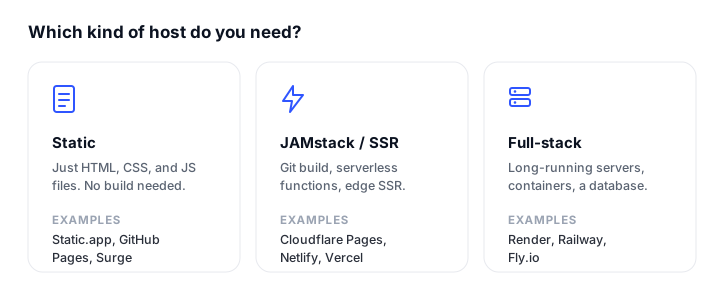
Match the host to what you were actually using Drop for:
- You want Drop, but permanent: Static.app is the closest match: the same drag-and-drop deploy, plus simple re-upload updates, flat pricing, and no claim countdown. Neocities is the free-forever pick for personal sites.
- You want the anonymous instant preview: Netlify Drop still deploys before asking who you are, and a claimed site keeps a drag-and-drop update path. Nothing stops you from using Cloudflare Drop itself for throwaway previews and hosting the permanent site elsewhere.
- You are dropping framework source, not built files: Vercel Drop is the only one that builds Next.js and friends in the cloud from a drag-and-drop.
- You want to stay on Cloudflare: claim the Drop into a free account, or set up a Cloudflare Pages direct upload project for unlimited-bandwidth hosting with a dashboard upload flow.
- You prefer the command line: Surge gets a folder live in one command, and GitHub Pages is the natural home when the project already lives in a repo.
Whatever you pick, put an uptime check on it once it is live: our roundup of the best website monitoring tools covers free options. And if you are still building the site itself, our guides on customizing Bootstrap 5 and how to build and publish a website with Claude get you to finished files faster. If an AI builder made the site, where to host a website built by AI maps what each tool exports to the hosts that can serve it.
FAQ
What is Cloudflare Drop?
Cloudflare Drop is a free tool launched in July 2026 that deploys a static site by drag-and-drop, with no Cloudflare account required. You drop a folder or ZIP of HTML, CSS, JavaScript, images, and fonts, and the site goes live on a public workers.dev URL in seconds. The deployment is temporary: it expires after 60 minutes unless you claim it into a new or existing Cloudflare account.
What happens if I do not claim a Cloudflare Drop site in time?
The site and its URL expire and are deleted along with the temporary account that held them, roughly 60 minutes after deployment. There is no recovery path afterward; you would deploy again from your local files. Claiming within the window (signing in, or creating and verifying a new account) makes the site permanent under your account.
What is the best free Cloudflare Drop alternative?
For a permanent free site, Neocities offers 1 GB of storage and 200 GB of monthly bandwidth with no expiry, and GitHub Pages is free for public repositories with free SSL on custom domains. Cloudflare Pages has the most generous free traffic terms (unlimited bandwidth) but needs an account, and Static.app has a free single-site plan on a subdomain. Netlify Drop is free but its 300 monthly credits can run out under real traffic.
Which alternative is closest to Cloudflare Drop’s drag-and-drop workflow?
Static.app: you drag a folder or ZIP into the dashboard and the site is live, and unlike Drop there is no expiry timer and updates are a simple re-upload. Netlify Drop is the other close match and even keeps Drop’s deploy-before-you-sign-in flow, though the site must still be claimed to survive.
Can I update a drag-and-drop site without redeploying from scratch?
It depends on the platform. Static.app (re-upload, browser editor, or desktop sync) and Netlify (re-drag onto the Deploys page) update the same site in place. Cloudflare Pages direct upload projects accept repeat uploads as new deployments of the same project. Cloudflare Drop and Vercel Drop are the weak spots: Drop’s only documented update path is the Wrangler CLI, and every Vercel drop creates a new project with a new URL.
Do these alternatives include custom domains and free SSL?
Netlify, Vercel, Cloudflare Pages, and GitHub Pages include custom domains with free automatic SSL on their free plans. Surge supports free custom domains via a CNAME record, with managed certificates provisioned automatically at no cost. Static.app includes free SSL on every site but reserves custom domains for paid plans (from $6/month, or $5/month billed annually), and Neocities requires the $5/month Supporter plan.
Is Cloudflare Drop itself free?
Yes. Deploying is free and anonymous, and a claimed site becomes a normal Workers project in your account, typically on the free Workers plan, where static asset requests are free and unlimited. Costs only appear if you add paid Cloudflare features later, such as the Workers Paid plan for dynamic code in front of the site. The practical price of Drop is the workflow, not money: the 60-minute claim window, public-only previews, and CLI-based updates.
Build your Bootstrap theme
Design a custom Bootstrap 5 theme visually with a live preview, then export clean Sass or CSS.
Open the Builder