AI Email Generators 2026: 9 Tools for Designed Emails
An AI email generator turns a prompt into an email, but what you get differs: a full designed template with HTML, an image or PDF, or just copy inside an editor. For marketers and newsletter writers who want a designed, send-ready email for any platform, Postcards by Designmodo is the strongest pick, while Klaviyo, Mailchimp, and beehiiv make more sense if you already send from them. This guide compares 9 tools by what their AI produces and what you still have to fix, with every price and AI feature checked on the vendor’s own pages in November 2026.
TL;DR
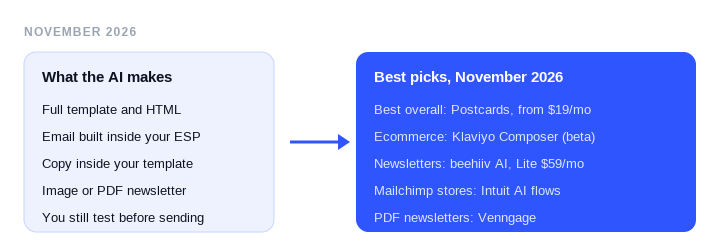
- Best AI email template generator overall: Postcards. AI Suite builds layout, copy, and images from a prompt, translates whole templates, and exports HTML to 18 ESPs. AI starts on Plus at $19 a month.
- Best for ecommerce brands on Klaviyo: Klaviyo Composer. It drafts the campaign, layout, copy, and on-brand images inside Klaviyo, still in beta.
- Best AI newsletter generator for creators: beehiiv. In-editor AI writes, rewrites, translates, and adds images inside your newsletter template, on Lite ($59 a month) and up.
- Best for designed flow emails in Mailchimp: Intuit AI flow templates, beta, Standard plan and up with a connected store.
- Best for visual one-off newsletters: Venngage. Designed layouts from a prompt, but exports are PDF, PNG, or JPG unless you pay for Business.
- Best for HTML coders: MailerLite’s Custom HTML editor, which has an AI coding agent built in.
Three kinds of AI email generator
Search for “AI email designer” and the results mix three different products:
- Template generators. You describe the email and the tool builds a full, editable template: layout, copy, images, and the HTML behind it, ready to export to any email platform. Postcards is the clearest example. Venngage also generates the layout, but as a design file rather than email HTML on most plans.
- Email platforms with AI that builds whole emails. Klaviyo Composer and Mailchimp’s Intuit AI flow templates generate a designed email inside their own platform, and it is sent from there.
- Copy assistants inside an editor. beehiiv AI, MailerLite, Brevo, and Canva’s Magic Write write and rewrite text in a template you choose. The layout is not the AI’s.
A fourth route is asking a general chatbot for the HTML. MailerLite tested three major AI chatbots: every email looked fine in previews but displayed wrongly in at least one inbox (mobile alignment, Outlook misalignment, a missing background), and the code included phantom preheaders and non-HTTPS links. That is the main reason to generate inside a tested email builder.
How these were chosen: each tool here has an AI feature that produces email content or design, as described on the vendor’s own site. Every pricing and feature page was checked on November 25, 2026, and prices are regular prices, not Black Friday offers. Prices are monthly billing in USD unless marked EUR.
AI email generators at a glance
| Tool | What the AI produces | Best for | Free plan | Paid from (monthly billing) | Key limit |
|---|---|---|---|---|---|
| Postcards | Full template: layout, copy, images, HTML | Designed emails for any ESP | Yes, but 0 AI credits | $19/mo (Plus, 5,000 AI credits) | Plus caps exports at 20/mo |
| Klaviyo Composer | Full campaign inside Klaviyo (beta) | Ecommerce brands | Yes, 250 profiles, 500 emails/mo | $20/mo (Email) | Beta; emails stay in Klaviyo |
| Mailchimp Intuit AI | Designed flow emails and copy (beta) | Stores already on Mailchimp | Yes | $20/mo (Standard) | Standard+, store needed for flows |
| beehiiv AI | Copy and images inside your template | Newsletter creators | Yes, no in-editor AI | $59/mo (Lite) | Writes content, not layout |
| MailerLite | Copy in any text box; AI agent writes HTML | Small senders, HTML coders | Yes, 250 subscribers | $12/mo (Comfort) | AI via paid features and trial |
| Canva Email | Copy (Magic Write) on a template | Brands already in Canva | Yes, 25 Magic Write uses | EUR 12/mo (Pro) | General design tool |
| Venngage | Visual newsletter design | Printable or PDF newsletters | Yes, 5 designs | $19/mo (Premium) | Email HTML only on Business |
| Brevo | Copy and subject lines | Budget multichannel senders | Yes, 300 emails/day | EUR 14/mo (Starter) | Copy only |
| Kit | Uses your own AI assistant via MCP | Creators who already use an AI chat tool | Yes, up to 10,000 subscribers | $39/mo (Creator) | No built-in generator confirmed |
The best AI email generators, reviewed
1. Postcards: best AI email template generator overall
What it is. A drag-and-drop email builder from Designmodo whose AI Suite generates complete templates from a plain-language prompt, then lets you keep editing them by chat or by hand.
What the AI produces. A full template with layout, copy, and fitting images, built from the same modules as the manual editor. It can pull your logo, colors, and fonts from your website URL. You can then ask it to convert a newsletter into another email type, restyle every button at once, add matching product blocks, rewrite the tone, make a dark mode or mobile-first version, or translate the whole email with layout adjustments for longer text. An AI design analysis flags contrast and alignment issues, and AI HTML import turns an existing HTML email into an editable template. Designmodo says its own test built a ten-section email in 2:48 with AI against 21:17 by hand.
Export and sending. Preview in Gmail, Outlook, Apple Mail, and Yahoo, then export HTML or push to 18 platforms, including Mailchimp, HubSpot, Klaviyo, Brevo, and SendGrid. A deliverability test is built in, and an API and MCP server let AI assistants export HTML.
Pricing.
| Plan | Monthly | Billed yearly | AI credits | Exports | Client previews |
|---|---|---|---|---|---|
| Start | $0 | $0 | 0 | 5/mo | None |
| Plus | $19 | $16/mo | 5,000/mo | 20/mo, 5/day | 20/mo |
| Pro | $29 | $24/mo | 10,000/mo | Unlimited | 50/mo |
Designmodo says a full email from scratch uses roughly 150 to 300 credits on the Basic model, or 1,000 to 1,500 on the higher-quality Ultra model, and edits cost much less. By that range, Plus covers about 16 to 33 Basic generations a month or 3 to 5 Ultra ones, and Pro about 33 to 66 Basic or 6 to 10 Ultra. Top-ups cost $7 for 5,000 credits, $14 for 15,000, or $25 for 40,000.
Limitations. The free Start plan has no AI credits (only 5 free HTML imports), so AI generation starts at $19 a month. Plus caps exports at 20 a month. If a paid license lapses, you keep your 10 most recent templates but lose AI credits, and hosted images are deleted after 14 days.
Good for: marketers, agencies, and freelancers who want an AI-built, editable email they can test and send through any ESP.
2. Klaviyo Composer: best for ecommerce brands
What it is. Klaviyo’s AI marketing agent, which plans and drafts campaigns inside the Klaviyo platform.
What the AI produces. Klaviyo says Composer creates a complete campaign from a brief: audience recommendations, subject lines, body copy, and on-brand design and images, in the language you ask for. You review and edit the result in Klaviyo’s drag-and-drop editor, and nothing is published without your approval. Klaviyo’s own pages describe Composer as in beta and advise checking each draft line by line for prices, discounts, product names, dates, and links.
Pricing. Free covers 250 active profiles and 500 emails a month and includes $10 of Composer usage a month. The Email plan starts at $20 a month for 500 active profiles and 5,000 emails. The pricing page lists Composer as included in one place and as an add-on in its comparison table, so confirm in your account.
Limitations. Beta status, usage-based AI, and the email only exists inside Klaviyo.
Good for: Shopify and other online stores already sending from Klaviyo.
3. Mailchimp (Intuit AI): best for designed flow emails in Mailchimp
What it is. Mailchimp’s generative AI, powered by Intuit, available in the email builder and in some automation flow templates.
What the AI produces. AI-powered flow templates use your Brand Kit to generate fully designed emails for flows such as abandoned cart, popup welcome, and cart price drop, which you can edit before turning the flow on. Separately, Write with AI drafts and edits text in your chosen tone. For a deeper look at the editor itself, see our guide to the Mailchimp email builder.
Pricing. Free plan available. Paid plans start at $13 a month (Essentials) and $20 a month (Standard) for the smallest contact tier. Both AI features need Standard or higher.
Limitations. Both features are beta. Write with AI is rolling out to a small share of users in Australia, Canada, the UK, and the US. AI flow emails need a connected store, such as Shopify or WooCommerce.
Good for: small stores already on Mailchimp Standard that want automations built quickly.
4. beehiiv AI: best AI newsletter generator for creators
What it is. A newsletter platform with AI blocks inside its editor.
What the AI produces. You add an AI block, describe what you want, and set tone and length. The AI writes and rewrites copy, translates, and generates header and section images inside your existing template. It does not generate the layout.
Pricing. Free covers up to 2,500 subscribers but marks in-editor AI as not included. Lite is $59 a month ($49 billed yearly) and Pro $109 a month ($95 yearly) at 1,000 subscribers, with Pro getting about 5 times Lite’s AI usage. Every plan includes unlimited sends.
Limitations. Copy and images only, no AI layout. The newsletter lives on beehiiv, and the cheapest plan with AI is $59 a month.
Good for: writers who publish a regular newsletter and want help drafting each issue in the editor they send from.
5. MailerLite: best for AI-assisted HTML emails
What it is. An email platform with three editors: drag and drop, a simple text editor, and a Custom HTML editor.
What the AI produces. The AI writing assistant works from any text box and writes paragraphs, titles, and calls to action in four tones and 36 languages. The Custom HTML editor adds an AI coding agent that builds or edits sections from plain English, checks for broken tags and missing alt text, and inlines CSS automatically.
Pricing. Free covers 250 subscribers and 2,500 emails a month. At 500 subscribers, Comfort is $12 a month and Power is $25 a month ($22.50 billed yearly). MailerLite offers a 14-day premium trial with complimentary AI credits; its pricing page lists the subject line generator as limited on Free and the AI writing assistant among Comfort features.
Limitations. The drag-and-drop AI writes copy, not layouts. The HTML agent still produces code you need to test, which is the same point MailerLite makes in its own AI HTML test.
Good for: small businesses that want low prices, and people comfortable reviewing HTML.
6. Canva Email: best if your brand lives in Canva
What it is. Canva’s email designer, with hundreds of templates, test emails, and HTML export.
What the AI produces. Magic Write writes email copy on a template you pick, and Magic Resize turns existing designs into emails. You can export HTML or publish directly to Gmail, Mailchimp, Outlook, Klaviyo, Flodesk, and Constant Contact. Our Canva email templates guide covers the export limits in detail.
Pricing. Canva calls its email maker free. Its Magic Write page lists 25 total uses on Free and up to 250 a month on paid plans, while the pricing page now describes a shared AI allowance per plan. Pro is EUR 12 a month for one person and Business EUR 17 a month per person (monthly billing; the pricing page showed EUR).
Limitations. A general design tool, not an email-first builder, and test emails go only to your Canva login address.
Good for: small teams whose brand assets and social designs are already in Canva.
7. Venngage: best for visual and printable newsletters
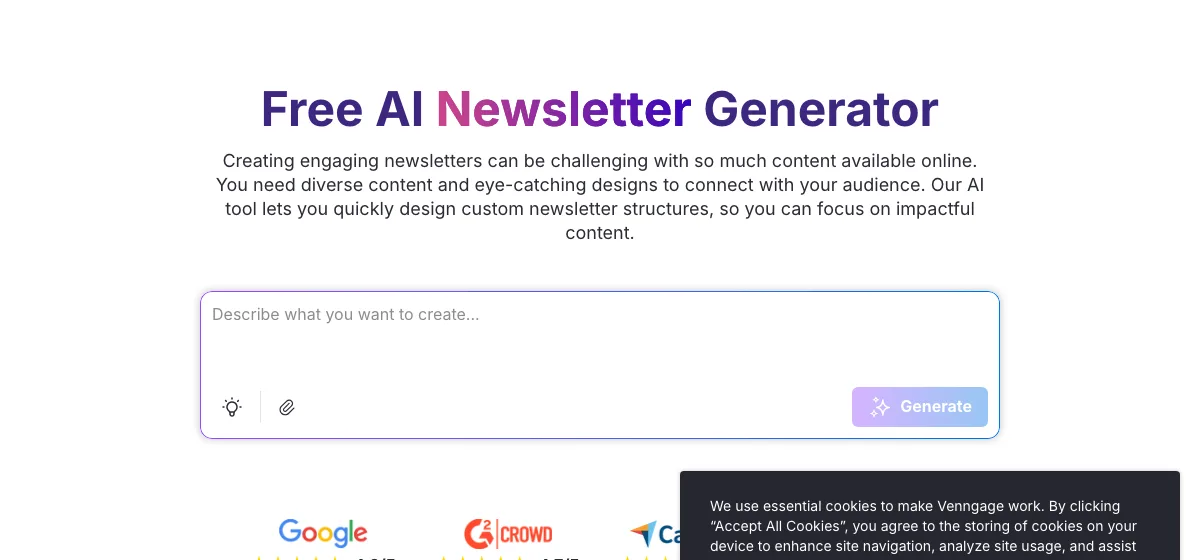
What it is. An infographic and design tool with an AI newsletter generator and an AI email template generator.
What the AI produces. A designed newsletter layout from a prompt, with sections, placeholder images, brand colors, and auto-filled copy you edit in a drag-and-drop editor. Business adds brand kits.
Pricing. Free includes 5 designs and 80 daily AI credits. Premium is $19 a month ($10 billed yearly) with 160 daily credits. Business is $49 a month per user ($24 yearly) with 1,600 daily credits.
Limitations. The generator’s FAQ lists PDF, PNG, JPG, or a share link as exports, and the pricing table shows Email HTML only on Business and Enterprise. An email that is one big image has no live text, poor accessibility, and few clickable links.
Good for: school, nonprofit, and internal newsletters that will be printed, shared as a PDF, or linked from a short email.
8. Brevo: best budget copy assistant
What it is. A multichannel email, SMS, and WhatsApp platform.
What the AI produces. The AI content generator drafts subject lines and email copy and adjusts tone. Standard adds AI send time optimization.
Pricing. Free allows up to 300 emails a day. Starter is EUR 14 a month and Standard EUR 29 a month on monthly billing (the pricing page showed EUR).
Limitations. Copy only; layouts come from Brevo’s templates.
Good for: small businesses that want a cheap, all-in-one sender with basic AI copy help.
9. Kit: for creators who already use an AI assistant
What it is. A creator email platform formerly called ConvertKit.
What the AI produces. Kit’s AI story is its MCP server, which connects outside AI assistants such as ChatGPT and Gemini to your Kit account to research subscribers and build emails, landing pages, and automations. Kit’s own pages do not document a built-in email generator.
Pricing. Free up to 10,000 subscribers. At 1,000 subscribers, Creator is $39 a month and Pro $79 a month.
Limitations. You bring and pay for the AI tool yourself.
Good for: creators who already work in an AI chat tool and want it connected to their list.
What you still have to fix before sending
No AI generator in this list removes the pre-send check. These are the problems that show up most often in generated emails:
- Rendering in Outlook and Gmail. Chatbot HTML is the riskiest, but even builder output is worth previewing. Our guide to responsive email templates for Gmail covers the common layout fixes.
- Dark mode. Check that logos and dark text don’t disappear on dark backgrounds.
- Facts and links. AI invents plausible prices, dates, discount codes, and URLs. Click every link and confirm it uses HTTPS.
- Merge tags and unsubscribe. Make sure personalization fields use your ESP’s syntax and that a working unsubscribe link and your postal address are in the footer.
- Brand fit. Swap generic imagery for your own photos and edit the voice.
- Images and alt text. Avoid image-only emails and add descriptive alt text.
For the final check, Unspam runs a free spam test with no signup and a 0 to 100 score covering SPF, DKIM, DMARC, blacklists, and content. It also previews emails in 60+ clients and devices, including dark mode, and tests inbox placement across 10 seed mailboxes. See our roundup of the best email testing tools for other options.
Which AI email generator should you choose?
- You want a designed, editable email you can send from any platform: Postcards Plus or Pro. See our full list of email template builders if you don’t need AI.
- You run an online store on Klaviyo: try Composer while it’s in beta.
- You’re on Mailchimp Standard with a connected store: use the AI-powered flow templates.
- You write a newsletter and want help with each issue: beehiiv Lite or MailerLite.
- Your newsletter will also be printed or shared as a PDF: Venngage.
- Your designs live in Canva: Canva Email with Magic Write.
- You only need cheap copy help: Brevo or MailerLite.
FAQ
What is the best AI newsletter generator?
For creators publishing a regular newsletter, beehiiv’s in-editor AI is the most newsletter-focused, from $59 a month. If you want the AI to design the whole template too, Postcards generates layout, copy, and HTML for any platform, from $19 a month.
Is there a free AI email template generator?
Mostly no, for full templates. Postcards’ free plan has no AI credits, Venngage’s free plan allows 5 designs, and Klaviyo’s free plan includes $10 of Composer usage a month. Canva’s free plan includes 25 Magic Write uses in total, which covers copy but not layout.
Can ChatGPT design an HTML email?
It can write HTML that looks good in a preview, but MailerLite’s test of three major AI chatbots found display errors in every generated email. If you use a chatbot, test the result in real inboxes first, or generate inside an email builder that uses tested code.
What does an AI email designer still get wrong?
Prices, dates, product names, and links that look right but aren’t, generic images, and layout breaks in Outlook or dark mode. Treat AI output as a first draft and test it before it goes to your list.
Can I export an AI-generated email to my email platform?
It depends on the tool. Postcards exports HTML or pushes to 18 ESPs, and Canva exports HTML. Klaviyo, Mailchimp, beehiiv, MailerLite, and Brevo generate emails inside their own platform, and Venngage exports Email HTML only on its Business plan.
Build your Bootstrap theme
Design a custom Bootstrap 5 theme visually with a live preview, then export clean Sass or CSS.
Open the Builder