Coolify vs Dokploy (2026): Which Self-Hosted PaaS to Use?
Coolify and Dokploy are the two most popular open-source platforms for running your own Heroku, Vercel, or Railway on a server you rent. Install either one on a VPS with a single command, and you get a dashboard that deploys apps from Git, runs databases, sets up HTTPS on your domains, and backs everything up, with no per-app or usage pricing. They overlap a lot. The differences are in how they handle more than one server, how mature each project is, and their licenses. This comparison covers both as they are in November 2026: Coolify 4.7.5 and Dokploy 0.31.1.
The short answer
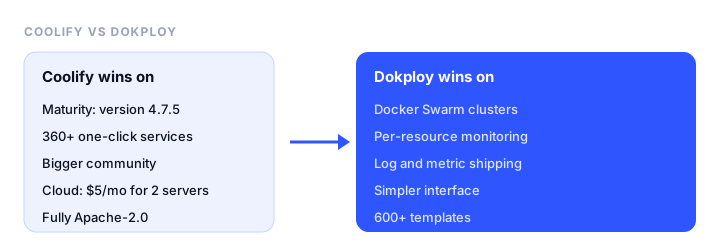
Choose Coolify if:
- You want the more established project, with the bigger community (about 66,000 GitHub stars) and a stable 4.x release.
- You want the widest catalog of one-click services, more than 360.
- You want to deploy from GitHub, GitLab, Bitbucket, or Gitea, with pull request previews.
- You want a fully Apache-2.0 license, and a cheap managed dashboard: Coolify Cloud is $5 a month for 2 servers.
Choose Dokploy if:
- You want to run apps across several servers as a Docker Swarm cluster.
- You want resource monitoring built in, and logs and metrics shipped to Grafana, Datadog, Better Stack, and others.
- You like a simpler, more focused interface built around projects, applications, databases, and Docker Compose.
For a single VPS running a few apps and a database, both do the job well, and Coolify is the safer default.
Coolify vs Dokploy at a glance
| Coolify | Dokploy | |
|---|---|---|
| Latest version (Nov 2026) | 4.7.5 | 0.31.1 |
| GitHub stars | About 66,000 | About 38,000 |
| License | Apache-2.0 | Apache-2.0, with a source-available license for any proprietary folder |
| Install | curl -fsSL https://cdn.coollabs.io/coolify/install.sh | bash |
curl -sSL https://dokploy.com/install.sh | bash |
| Minimum server | 2 CPU, 2 GB RAM, 10 GB disk | 2 GB RAM, 30 GB disk |
| Builds | Nixpacks, Railpack, Dockerfile, Docker Compose, Docker image | Nixpacks, Railpack, Dockerfile, buildpacks, static, Docker Compose |
| Git providers | GitHub, GitLab, Bitbucket, Gitea | GitHub, GitLab, Bitbucket, Gitea |
| Databases | Postgres, MySQL, MariaDB, MongoDB, Redis and more | Postgres, MySQL, MariaDB, MongoDB, Redis, libSQL |
| One-click services | More than 360 | More than 600 templates (per its README) |
| Multi-server | Yes, one dashboard for many servers | Yes, plus Docker Swarm clusters |
| PR preview deployments | Yes | Yes (GitHub) |
| Monitoring | Resource status and logs | CPU, memory, disk, and network per resource, log shipping |
| Managed cloud plan | $5/mo for 2 servers, +$3 per server | $4.50/mo for 1 server; Startup $15/mo for 3 servers |
Template and service counts come from each project’s own README, and the two count differently, so treat them as rough.
Installation and requirements
Both install on a fresh Linux server with one command and then open a web dashboard where you create the first admin account.
- Coolify needs 2 CPU cores, 2 GB of RAM, and 10 GB of disk, and runs on Debian, Ubuntu, Red Hat-based, SUSE, Arch, Alpine, and Raspberry Pi OS (64-bit), on amd64 or arm64. The recommended setup puts Coolify on one server and your apps on others, though a single server works for small projects.
- Dokploy needs at least 2 GB of RAM and 30 GB of disk, has been tested on Ubuntu, Debian, Fedora, and CentOS, and needs ports 80, 443, and 3000 free.
A $5 to $10 VPS from Hetzner, DigitalOcean, or a similar provider is enough to try either one.
Deploying apps
Both deploy on every push to your Git repository, build with Nixpacks (which detects the language), a Dockerfile, or Docker Compose, and route your domains through a reverse proxy with automatic Let’s Encrypt certificates.
- Coolify adds Railpack builds, prebuilt Docker images, deployment webhooks, rollbacks to earlier images, pull request previews, scheduled tasks, and a container terminal in the browser.
- Dokploy organizes everything into projects and environments, with applications, databases, and Compose stacks side by side. Preview deployments are supported for GitHub repositories.
Day to day, they feel similar. Coolify has more settings per resource; Dokploy’s screens are simpler.
Databases and backups
Both run Postgres, MySQL, MariaDB, MongoDB, and Redis as containers with persistent volumes and generated credentials, and both schedule backups to S3-compatible storage. Dokploy also supports libSQL. Coolify’s catalog of one-click services adds databases and tools such as ClickHouse, along with hundreds of apps, from Plausible and Umami to n8n and Supabase.
Either way, the database runs on your server, so test your backups by restoring one before you rely on them.
Multiple servers and scaling
This is the biggest technical difference.
- Coolify connects any number of servers over SSH and lets you choose which server each app runs on. It’s built for many separate servers managed from one place.
- Dokploy connects remote servers too, and can also join them into a Docker Swarm cluster, so one application runs as replicas spread across nodes, with Traefik balancing traffic between them.
If you need an app spread across several machines, Dokploy’s Swarm support gets you there with less work.
Monitoring and notifications
Dokploy shows CPU, memory, disk, and network usage for every resource, and can ship container logs and metrics to Grafana (Loki and Prometheus), Datadog, New Relic, Better Stack, Elasticsearch, Splunk, or AWS CloudWatch. Coolify shows resource status and logs, with notifications on deployments, backups, and server problems.
Both send alerts to Slack, Discord, Telegram, and email. Neither checks your sites from outside, so add an external monitor such as Pulsetic to know when a site goes down or its server stops responding. Our free uptime monitoring guide compares the options.
Pricing and licenses
Self-hosted, both are free. You pay only for your servers.
Managed cloud plans run the dashboard for you, while your apps still run on your own servers:
- Coolify Cloud is $5 a month for 2 servers, plus $3 for each additional server, with 20% off yearly.
- Dokploy Cloud Hobby is $4.50 a month for 1 server, 1 user, and 1 organization. Startup starts at $15 a month for up to 3 servers, with unlimited users, role-based access, and 2FA, and extra servers at $4.50 each. Yearly billing saves 20%.
For three servers, Coolify Cloud costs $8 a month and Dokploy Startup $15.
Licenses. Coolify is Apache-2.0. Dokploy’s code is Apache-2.0 except anything in a proprietary folder, which is covered by the Dokploy Source Available License and needs a commercial agreement for production use. For self-hosting your own apps this rarely matters, but if you plan to build a product on top of either, read the license first.
Which should you choose?
- One VPS, a few apps, and a database: Coolify, for its maturity and service catalog. Dokploy works just as well if you prefer its interface.
- Several servers managed from one dashboard: Coolify.
- One app spread across several servers: Dokploy with Docker Swarm.
- You want logs and metrics in Grafana or Datadog: Dokploy.
- You don’t want to maintain the dashboard: Coolify Cloud, at $5 a month for 2 servers.
- You’d rather not run servers at all: a managed platform such as Render or Railway. Our Render vs Railway and Coolify alternatives guides cover those options.
If all you need to host is a static site, such as a landing page, documentation, or a frontend build, you don’t need either platform. A static host like Static.app publishes it by drag-and-drop with no server to maintain.
FAQ
Is Coolify or Dokploy better?
Coolify is better for most people: it’s more mature, at version 4.7.5, with a larger community and more than 360 one-click services. Dokploy is better if you want to run apps across several servers with Docker Swarm or ship logs and metrics to tools like Grafana and Datadog.
Are Coolify and Dokploy free?
Yes. Both are open source and free to self-host on your own server. Each also has a paid cloud plan that runs the dashboard for you: Coolify Cloud from $5 a month for 2 servers, and Dokploy Cloud from $4.50 a month for 1 server.
What are the server requirements for Coolify and Dokploy?
Coolify needs 2 CPU cores, 2 GB of RAM, and 10 GB of disk. Dokploy needs at least 2 GB of RAM and 30 GB of disk. Both run on Linux, and a small VPS is enough to start.
Does Dokploy support Docker Swarm?
Yes. Dokploy can join servers into a Docker Swarm cluster and run an application as replicas across the nodes, with Traefik routing traffic. Coolify manages many servers too, but places each app on a chosen server.
Can I migrate from Coolify to Dokploy?
There’s no automatic migration. Both deploy from Git or Docker Compose, so you recreate each app in the other dashboard, copy its environment variables, restore databases from a backup, and switch DNS.
Is Coolify a good Heroku or Vercel alternative?
Yes, if you’re comfortable maintaining a server. Coolify gives you Git push deploys, preview deployments, databases, and HTTPS on hardware you control, at a fixed server cost. You take on updates, security, and backups that Heroku or Vercel would handle.
Build your Bootstrap theme
Design a custom Bootstrap 5 theme visually with a live preview, then export clean Sass or CSS.
Open the Builder