Law Firm Website Design: A 2026 Guide for Small Firms
Good law firm website design answers three questions in the first screen: what kind of law the firm practices, where it practices, and how to reach a lawyer. This guide to website design for lawyers is for solo attorneys and small firms building or rebuilding a site. It covers pages, trust signals, advertising rules, accessibility, intake forms, speed and local SEO, with six live firm sites as examples and builder prices checked in November 2026.
TL;DR
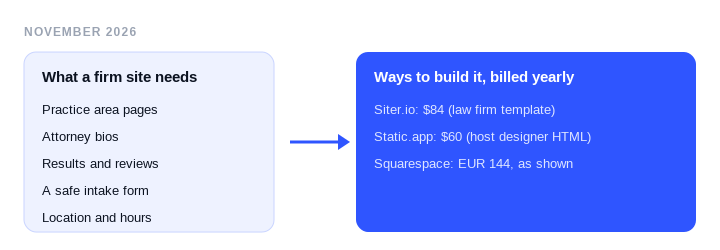
- Pages every firm needs: home, one page per practice area, attorney bios, results and testimonials, contact and intake, and location. Five to ten pages is enough for most solo practices.
- Trust comes from specifics: real attorney photos, bar admissions, a street address, a phone number in the header and client reviews you are allowed to publish.
- Ad rules apply to your website: the ABA Model Rules in the 7.x series cover lawyer communications, advertising and solicitation, and your state’s version is the one that binds you. Check it before you publish results or testimonials.
- Keep the intake form short: name, contact details, practice area and a brief, non-confidential description. No case details, documents or ID numbers.
- Best way to build it yourself: Siter.io, which has a law firm template, forms on every plan and costs $84 a year for one site. If a designer hands you HTML, host it on Static.app from $60 a year.
Pages a law firm website needs
A small firm site needs the right pages, not many of them, each with a clear next step.
| Page | What it must answer | Common mistake |
|---|---|---|
| Home | What you do, where, and how to contact you | No phone number or contact button in the first screen |
| Practice areas | Who you help, with what, and what happens next | One page listing ten areas in a single paragraph |
| Attorney bios | Who the client will actually work with | Stock photos and no bar admissions |
| Results and testimonials | Evidence that you have done this before | Outcomes with no context, which can mislead |
| Contact and intake | How to start, and what not to send | A long form asking for the whole story |
| Location | Where you meet clients, and when | An address only in a footer image |
Practice area pages. Give each main practice area its own page, written for the person searching for it: “DUI defense in Tampa” rather than “Criminal Law Services”. Explain who you represent, the usual steps, what a first consultation covers and how fees work if you can say so.
Attorney bios. Clients hire people. Use a recent, professional photo, the states where the attorney is admitted, education, practice focus and a few plain sentences.
Results, testimonials and intake. Both are covered below: the first by advertising rules, the second by confidentiality.
Location. Show the street address as text, a map, office hours and whether you offer phone or video consultations. Use the same name, address and phone number here, in the footer and on your Google Business Profile.
Trust signals that work on a law firm site
Visitors often compare several firms in a few minutes, so trust signals should be easy to verify:
- A phone number in the header, tappable on phones.
- Real attorney photos and bar admissions on each bio.
- Memberships and recognitions only if they are real and current, and only in the way your state’s rules allow.
- Client reviews you have permission to use, ideally linked to where they were posted.
- A secure site. A “Not secure” warning on a contact page costs inquiries. See fixing an SSL certificate error.
- A clear privacy policy and disclaimer in the footer.
Attorney advertising rules and website disclaimers
A firm website is a communication about a lawyer’s services, so the advertising rules that apply to ads also apply to it. This section explains the framework in general terms. It is not legal advice, and the rules that bind you are your state’s, which often differ from the ABA model.
The American Bar Association’s Model Rules of Professional Conduct deal with lawyer communications, advertising and solicitation in the Rule 7.x series. They are a model, not law: each state decides its own version.
States adopt their own versions, and many differ from the model or add requirements, for example on advertising labels, testimonials or past results. Before you publish, read your state bar’s advertising rules and any ethics opinions on lawyer websites.
Design choices that commonly touch these rules:
- Case results and dollar figures. Many firms add a note that past results do not guarantee a similar outcome. Check whether your state requires specific wording, or limits how results can be shown.
- Testimonials and reviews. Some states regulate how they are presented.
- “Specialist” and “expert”. Check your state’s rules before describing a lawyer this way.
- Template placeholders. Templates often ship with sample statistics such as “cases won” or “settlement rate”. Replace them with your own real figures or remove them.
- Disclaimers. Many firm sites state in the footer, the contact page or both that the content is general information, not legal advice, and that using the site or contacting the firm does not create an attorney-client relationship.
Accessibility: ADA and WCAG 2.2 basics
The U.S. Department of Justice’s guidance on web accessibility, published March 18, 2022, says the ADA applies to the websites of businesses open to the public. It also says the department has no regulation setting detailed standards for these businesses, and it points to the Web Content Accessibility Guidelines (WCAG) as helpful guidance. An accessibility widget alone does not fix the page underneath.
WCAG 2.2 became a W3C Recommendation on December 12, 2024. For a small firm site, the checks that matter most:
- Contrast: body text needs a contrast ratio of at least 4.5:1 (3:1 for large text). Gray text on a photo background often fails.
- Target size: buttons and links should be at least 24 by 24 CSS pixels, a new AA criterion in WCAG 2.2.
- Consistent help: if you show a phone number or contact link on several pages, keep it in the same place on each one (also new in 2.2).
- Forms: every field needs a visible label, errors must be explained in text, and visitors should not have to type the same information twice in one process.
- Keyboard and focus: every menu, button and form must work with a keyboard, and the focused element must not be hidden behind a sticky header or chat bubble.
Intake forms and confidentiality: what not to collect
Anything a visitor sends through a form lands in an inbox, and usually in the form tool’s database, before you have checked conflicts or agreed to represent them.
Collect only what you need to call back and run a conflict check:
- Name, phone and email, and the best time to call
- Practice area (a dropdown)
- The names of other parties, if you need them for a conflict check
- A short, general description, with a character limit
Do not ask for, and tell visitors not to send:
- Detailed facts of the case, admissions or strategy questions
- Documents or file uploads
- Social Security numbers, dates of birth, driver’s license or immigration numbers
- Medical records, financial account details or passwords
Put a short notice directly above the Send button, not only in the footer: sending the form does not create an attorney-client relationship, and confidential details should wait until the firm confirms it can take the matter. One of the firms below, Ballerini Law, shows this kind of disclaimer in its footer. Turn on spam protection, send submissions to a firm-controlled email address, and follow your state’s guidance on prospective clients.
Mobile and speed
On mobile, the phone number and a contact button should be visible without scrolling, menus should open with one tap, and forms should use the right keyboard for phone and email fields.
Google’s Core Web Vitals give concrete speed targets, measured at the 75th percentile of page loads: Largest Contentful Paint within 2.5 seconds, Interaction to Next Paint within 200 milliseconds, and Cumulative Layout Shift of 0.1 or less. Full-screen hero videos, uncompressed photos and stacked chat and tracking scripts are common culprits. The guide on how to make a website mobile friendly walks through the fixes.
Local SEO and Google Business Profile
Small firms win most clients locally, so the Google Business Profile matters as much as the site. Google’s guidelines for individual practitioners such as lawyers say:
- A public-facing practitioner reachable at the verified location during stated hours can have one profile, not one per specialty.
- When several practitioners work at one location, the firm has a profile for the location and each practitioner’s profile uses only that person’s name.
- A firm with a single public-facing practitioner shares one profile, named in the format “Firm: Practitioner name”.
- The business name must match the real-world name, without taglines, locations or service descriptions added.
- The address must be a real location where clients are served during business hours; virtual offices are not eligible.
Match the profile on the site: the same name, address and phone number, a page per office, and practice pages that name the city or county you serve. The guide to the best website builder for SEO compares the SEO settings each builder exposes.
Design patterns from real law firm websites
Six live small-firm sites, loaded in November 2026. The notes describe only what each home page shows.
Ballerini Law: service area and phone in a top bar

A dark top bar lists the cities served (Miami, New York and D.C.), a phone number and social links, with Client Login and Make Payment on the right. Below it are Book a Consult and Contact buttons and a headline naming the practice areas: business and real estate law. The footer carries a disclaimer about the attorney-client relationship and confidential information.
June James Legal: existing clients and new clients in one header
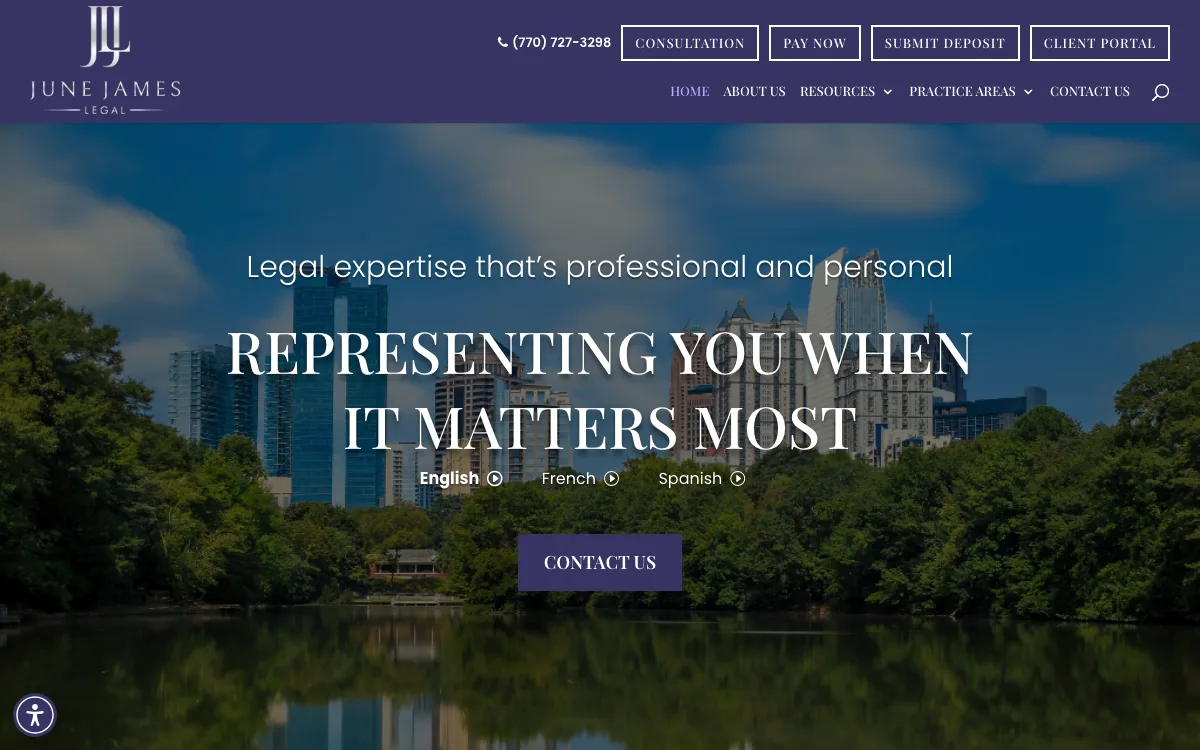
The header separates two audiences: Consultation for new clients, and Pay Now, Submit Deposit and Client Portal for existing ones, next to a phone number. The hero offers English, French and Spanish, and a single contact button.
Raulston & Associates: three calls to action and a consultation bar
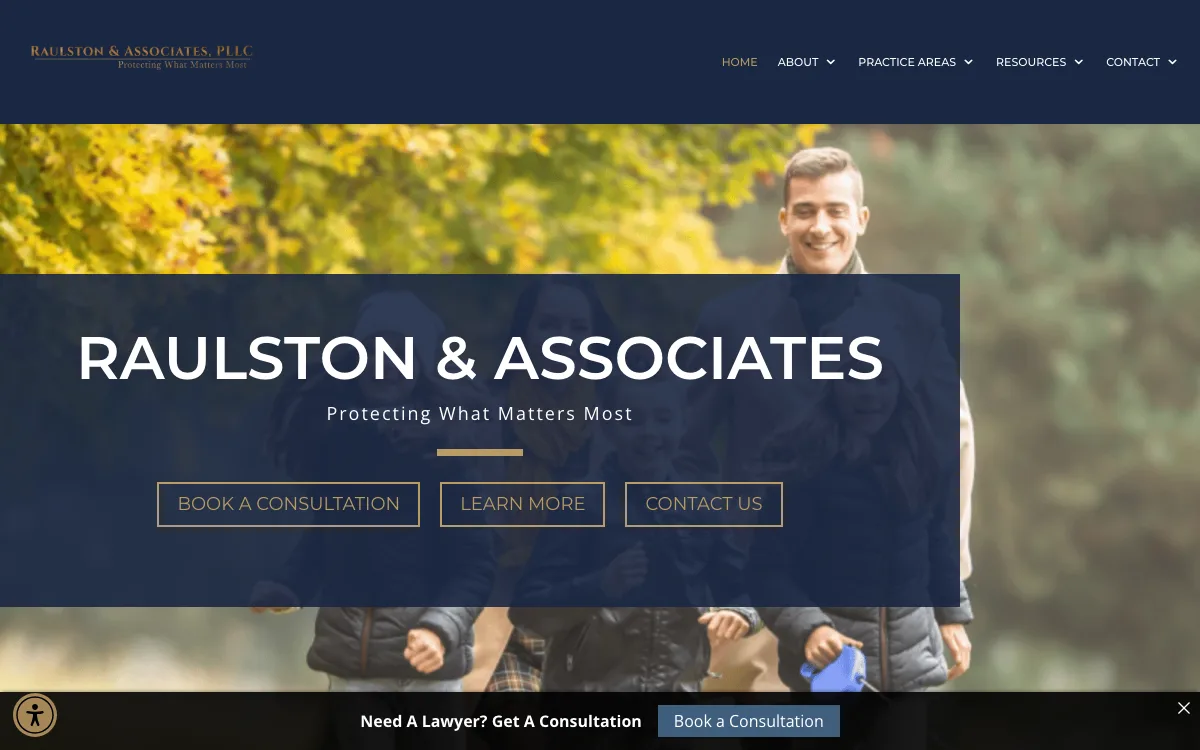
The hero offers three buttons (Book a Consultation, Learn More and a contact button), and a bar along the bottom of the screen repeats “Book a Consultation”. The navigation keeps Practice Areas and Resources as dropdowns.
Law Office of Adam Bessen: practice areas as cards
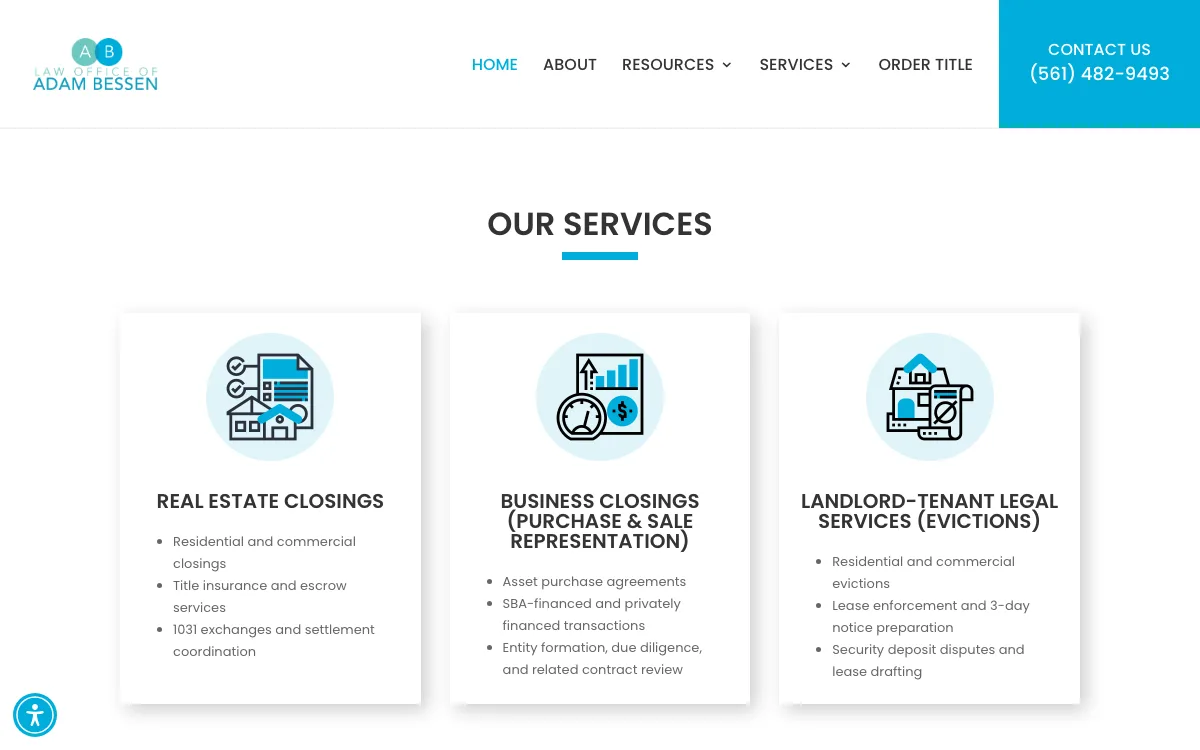
The phone number doubles as the main header button, in a solid color block. Practice areas appear as three cards, each with an icon, a heading and a short list of the matters it covers. A testimonials section follows further down the page.
Dixit Law: a short navigation

The navigation has four items (home, practice areas, a team page and contact) around a centered logo, and the hero states the positioning in three words: “Boutique trial law firm”.
Denelle Law: region and language up front
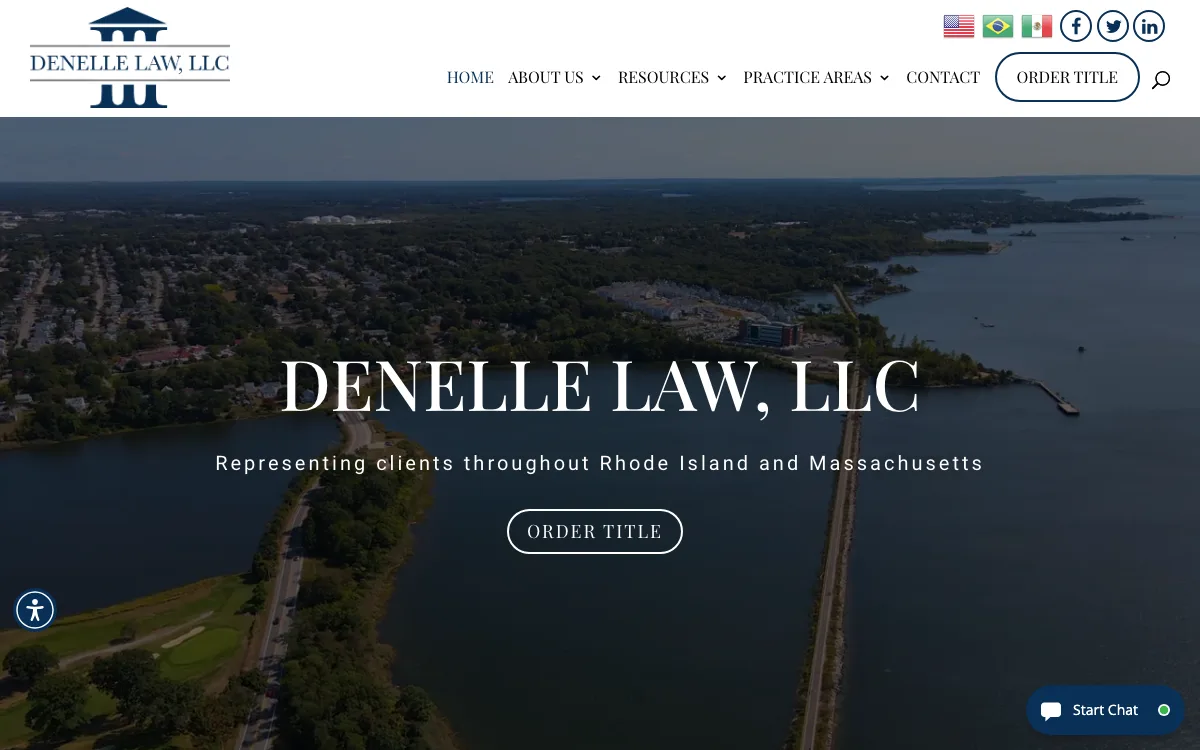
The hero names the states served (Rhode Island and Massachusetts), flag icons offer language options, and a chat button sits in the corner. The home page includes a testimonials block with a named client quote.
Law firm website builders at a glance
Three practical routes for attorney website design on a small budget, from building it yourself to hosting a designer’s files.
| Option | Best for | Free plan | Starting price | Key limits |
|---|---|---|---|---|
| Siter.io | Solo attorneys and small firms building it themselves | No (3-day trial, card required) | $7/mo yearly ($8 monthly) | Solo: 1 site, 10 pages, 3 forms; no file uploads in forms |
| Static.app | Firms whose designer delivers HTML | 7-day trial, no card | $5/mo yearly ($6 monthly) | Starter: 2 sites, 500 MB; you edit code, not a visual editor |
| Squarespace | Firms that want a template and built-in extras | No (14-day trial) | EUR 12/mo yearly, as shown | Template-bound layouts; priced per site |
How to build a law firm website
1. Siter.io: best for building it yourself

What it is. Siter.io is a browser-based website builder with a free-form canvas, where each screen size (desktop, tablet and phone) keeps its own layout. Its library has 143 templates in 17 categories, including a law firm template, Hart & Vale, under Professional services. The template already has the sections a firm needs: services, people, fees, client quotes and a “Book a consultation” button in the header.
Forms. Website forms are part of the page design, with 8 field types (including phone, date and dropdown), required fields, Google reCAPTCHA v3, and a redirect to a thank-you page. Each entry is emailed to the site’s collaborators and any address you add, and kept in Form Entries, private to the site’s team, with CSV export and a Zapier trigger. Forms do not take file attachments, which suits the intake advice above.
Pricing. Solo is $7/mo billed yearly ($8 monthly) for 1 website, 10 pages and 3 forms. Plus is $12/mo yearly ($14 monthly) for 3 websites, 50 pages and 5 forms. Pro is $24/mo yearly ($28 monthly) for 5 websites, unlimited pages and forms. Every plan includes hosting, SSL, a custom domain, SEO settings and cookieless analytics.
Limitations. No free plan: every plan starts with a 3-day trial that needs a card. The Hart & Vale template is written for a UK firm with fees in GBP and sample results such as a settlement rate, so replace the copy, prices and figures with your own. Solo’s 10 pages is tight if you want a page per practice area plus a blog; Plus covers that.
Good for: solo attorneys and small firms who want a professional site in a weekend and full control over how it looks on phones.
2. Static.app: best for hosting a site your designer built
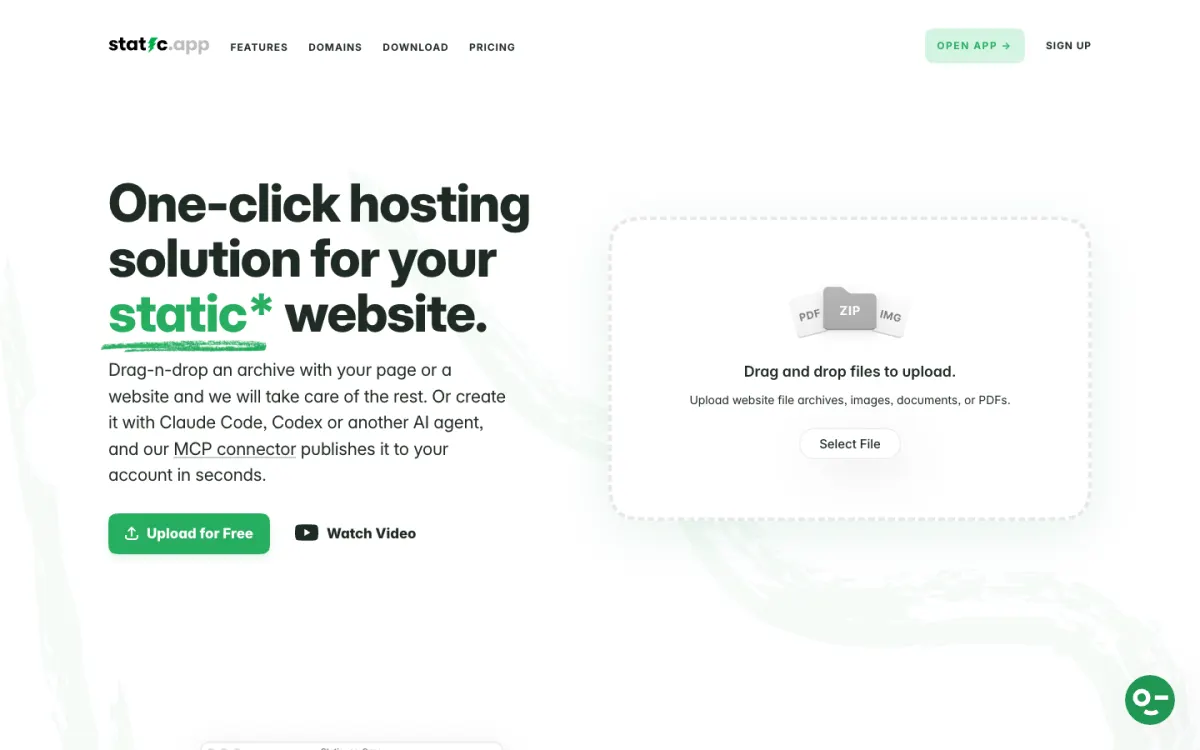
What it is. Static.app hosts static websites: upload a ZIP of HTML, CSS and images, or individual files, and the site goes live with SSL and your custom domain.
Key features. Forms collect submissions when the designer adds a static-form attribute to the form tag, and submissions appear in the website’s settings. Password protection for a single page or the whole site, built-in privacy-friendly analytics, an in-browser code editor and unlimited traffic on paid plans.
Pricing. Starter is $5/mo billed yearly ($60 a year, or $6 monthly) for 2 websites and 500 MB. Medium is $10/mo yearly ($12 monthly) for 7 websites and 3 GB. Large is $15/mo yearly ($18 monthly) for 30 websites and 10 GB. A 7-day trial needs no card.
Limitations. Editing happens in code, so text changes depend on the designer or someone comfortable with HTML. The trial uses a free subdomain only. The guide on how to publish a website covers the steps from files to a live domain.
Good for: firms with a custom design already built, who want cheap, simple hosting for it.
3. Squarespace: best for an all-in-one template

What it is. Squarespace is a template-based builder with hosting, built-in SEO and mobile optimization on every plan, and a 14-day free trial.
Pricing (EUR, as shown from this network, unconverted). Basic is EUR 12/mo billed yearly (EUR 17 monthly) and Core is EUR 18/mo yearly (EUR 24 monthly). Each plan covers one site.
Limitations. Layouts stay inside the template’s sections, and prices are per site.
Good for: firms that prefer a guided template over a design canvas.
Legal website agencies
Agencies that build websites only for law firms also exist, and can handle design, content and hosting for the firm. If you go that route, ask in writing who owns the domain and the site content.
For a wider comparison of builders beyond legal sites, see the guide to the best website builders for small business.
Which approach should you choose?
- You are a solo attorney and want to build it yourself this month: Siter.io Solo, starting from the law firm template.
- You need a page for every practice area plus a blog: Siter.io Plus (50 pages).
- A designer already built your site in HTML: Static.app Starter.
- You want a guided template and do not mind per-site pricing: Squarespace.
Whatever you choose, check the finished site against this guide: practice area pages, real bios, a short intake form with a confidentiality notice, your state’s ad rules, WCAG basics, mobile speed and a matching Google Business Profile.
FAQ
How much does a law firm website cost?
Building it yourself costs from about $60 to $150 a year. Siter.io Solo is $84 a year for one site with forms and hosting, and Static.app Starter is $60 a year if you already have the HTML. A domain name is usually extra.
What pages should a lawyer website have?
At minimum: a home page, a page for each main practice area, attorney bios, a results or testimonials page if your state rules allow it, a contact page with a short intake form, and a location page with your address and hours. Add a privacy policy and a disclaimer in the footer.
Do law firm websites need a disclaimer?
Most firms include one, stating that the site is general information, not legal advice, and that contacting the firm does not create an attorney-client relationship. Some states also require specific labels or wording on lawyer advertising, including websites. Check your state bar’s rules.
Does the ADA apply to law firm websites?
The Department of Justice’s 2022 guidance says the ADA applies to the websites of businesses open to the public, without setting a detailed technical standard for them. WCAG 2.2 Level AA is the usual practical target, and WCAG is the guideline the DOJ points to. This is general information, not legal advice.
What should a law firm intake form ask?
Only what you need to call back and run a conflict check: name, phone, email, practice area, other parties’ names if needed, and a short general description. Do not ask for case details, documents or identification numbers, and add a notice above the Send button telling visitors not to send confidential information yet.
Build your Bootstrap theme
Design a custom Bootstrap 5 theme visually with a live preview, then export clean Sass or CSS.
Open the Builder