SSL Certificate Error: Causes, Codes and Fixes (2026)
An SSL certificate error means a visitor’s browser checked the certificate your site presented and refused to trust it: it has expired, it doesn’t cover the hostname, its chain doesn’t lead to a trusted authority, or the connection settings are too old. This guide is for site owners who see “Your connection is not private” on their own site, or hear about it from a customer. It maps each Chrome and Firefox error code to its cause and fix, shows how to check a certificate, how to renew one, and how to get warned before the next expiry. Error codes, commands and dates were checked against browser source code and official documentation in November 2026.
TL;DR
- Read the code, not the headline. Chrome shows “Your connection is not private” for most certificate problems. The code under it (for example
NET::ERR_CERT_DATE_INVALID) tells you the cause. - Most common causes: an expired certificate after a silent auto-renew failure, a certificate that doesn’t include
www(or the bare domain), and a server that doesn’t send its intermediate certificate. - Check from the outside:
openssl s_clientwith-showcertsshows exactly what the server sends; the free Qualys SSL Labs test grades the whole setup. - Renewal is now frequent: publicly trusted certificates are capped at 200 days since 15 March 2026, falling to 100 days in 2027 and 47 days in 2029. Let’s Encrypt certificates last 90 days.
- Get warned first: Pulsetic checks certificates hourly on every plan, the free one included, and sends reminders 14, 7 and 1 day before expiry.
What the browser warning means
When a browser opens an HTTPS site, the server sends its certificate and usually one or more intermediate certificates. The browser checks four things: the certificate is within its validity dates, it names the hostname in the address bar, it chains up to a root the browser trusts, and the connection uses a protocol version and cipher both sides support. If any check fails, the page doesn’t load. For the basics of what HTTPS adds over plain HTTP, see HTTP vs HTTPS.
What the visitor sees depends on the browser:
- Chrome: a page titled “Privacy error” with the heading “Your connection is not private” and an error code below it. If the visitor’s own clock is wrong, Chrome shows “Your clock is behind” or “Your clock is ahead” instead.
- Firefox: “Warning: Potential Security Risk Ahead”, with the error code under Advanced. On sites that use HSTS the title is “Did Not Connect: Potential Security Issue” and there is no way to continue.
- Protocol failures (no shared TLS version or cipher) skip the warning page entirely and show a connection error.
For most visitors a certificate error is an outage, and API clients and apps refuse to connect. Our guide on why websites go down covers the other causes of a site that won’t load.
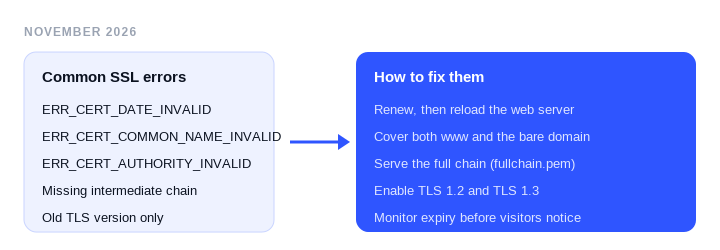
SSL certificate errors at a glance
The Chrome codes below come from Chromium’s network error list, and the Firefox codes from Firefox’s own error strings. All of them were confirmed in the current source in November 2026.
| Problem | Chrome code (also Edge) | Firefox code | Usual fix |
|---|---|---|---|
| Certificate expired (or not yet valid) | NET::ERR_CERT_DATE_INVALID |
SEC_ERROR_EXPIRED_CERTIFICATE (MOZILLA_PKIX_ERROR_NOT_YET_VALID_CERTIFICATE if not yet valid) |
Renew and reload the server |
Name mismatch, often www vs. bare domain |
NET::ERR_CERT_COMMON_NAME_INVALID |
SSL_ERROR_BAD_CERT_DOMAIN |
Reissue with every hostname listed |
| Self-signed or untrusted issuer | NET::ERR_CERT_AUTHORITY_INVALID |
MOZILLA_PKIX_ERROR_SELF_SIGNED_CERT or SEC_ERROR_UNKNOWN_ISSUER |
Use a publicly trusted certificate |
| Missing intermediate certificate | Often none on desktop; ERR_CERT_AUTHORITY_INVALID in some clients |
Sometimes SEC_ERROR_UNKNOWN_ISSUER |
Serve the full chain (for example fullchain.pem) |
| Old TLS version or cipher only | ERR_SSL_VERSION_OR_CIPHER_MISMATCH |
SSL_ERROR_UNSUPPORTED_VERSION or SSL_ERROR_NO_CYPHER_OVERLAP |
Enable TLS 1.2 and 1.3 |
| Broken TLS setup on the server | ERR_SSL_PROTOCOL_ERROR |
“Secure Connection Failed” | Check server TLS config, ports and proxy |
| Revoked certificate | NET::ERR_CERT_REVOKED |
SEC_ERROR_REVOKED_CERTIFICATE |
Replace the certificate |
| Visitor’s clock is wrong | NET::ERR_CERT_DATE_INVALID with “Your clock is behind/ahead” |
“Your Computer Clock is Wrong” | Visitor fixes date and time |
| Mixed content | No error page; insecure parts blocked or upgraded | Same | Load every resource over HTTPS |
To confirm the Chrome column, the public badssl.com test hosts were loaded in a headless Chromium browser in November 2026. The expired host returned ERR_CERT_DATE_INVALID, the wrong-host host ERR_CERT_COMMON_NAME_INVALID, the self-signed and untrusted-root hosts ERR_CERT_AUTHORITY_INVALID, and the TLS 1.0-only host ERR_SSL_VERSION_OR_CIPHER_MISMATCH.
Causes and fixes
Expired certificate
Codes: NET::ERR_CERT_DATE_INVALID (Chrome), SEC_ERROR_EXPIRED_CERTIFICATE (Firefox).
On most sites this means automatic renewal stopped working weeks ago. Chromium’s own description of the code is that the certificate “appears not yet valid or expired according to the local clock”, so if only one visitor sees it, check their clock first (see below). If everyone sees it, the certificate really is out of date.
Fix: renew the certificate (next section), then reload or restart every service that uses it. A renewed file on disk does nothing until the web server, load balancer or proxy reads it again. If renewal ran but the error remains, the server is still presenting the old certificate.
Name mismatch: www vs. bare domain
Codes: NET::ERR_CERT_COMMON_NAME_INVALID (Chrome), SSL_ERROR_BAD_CERT_DOMAIN (Firefox).
The certificate doesn’t list the hostname in the address bar, typically because:
- The certificate covers
example.combut a link or redirect sends visitors towww.example.com(or the other way round). - A wildcard
*.example.comcoversshop.example.combut notexample.comitself, and nota.b.example.com. - A new subdomain points at a server that only has a certificate for the main site.
- On shared hosting, the server returns its default certificate because the domain isn’t set up in the hosting panel.
Fix: list the names the certificate actually covers (the command is in the checking section below) and reissue with every hostname visitors use. Most sites need both example.com and www.example.com. Then redirect one to the other.
Self-signed or untrusted certificate
Codes: NET::ERR_CERT_AUTHORITY_INVALID (Chrome), MOZILLA_PKIX_ERROR_SELF_SIGNED_CERT or SEC_ERROR_UNKNOWN_ISSUER (Firefox).
Browsers only trust certificates that chain up to a root in their trust store. A self-signed certificate, a certificate from a private or internal CA, or the default “snakeoil” certificate a fresh server install generates will all fail. Corporate proxies and antivirus software that inspect HTTPS can cause the same error for one visitor only.
Fix: replace it with a certificate from a publicly trusted CA. Free ones from Let’s Encrypt are fine for any public site. Self-signed certificates only belong on internal tools where you control every client.
Missing intermediate certificate
This one is confusing because it often works on your laptop. Your certificate is signed by an intermediate, which is signed by a root. The server must send the intermediate along with your certificate. Desktop browsers often fill the gap themselves from a cache or by downloading the missing intermediate, so the site looks fine for you, while some phones, apps, curl, payment webhooks and other API clients reject it with an untrusted-issuer error.
Fix: configure the server with the full chain file, not the leaf certificate alone. With Certbot, the documentation says fullchain.pem is “what Nginx needs for ssl_certificate”, and Apache 2.4.8 or newer uses it for SSLCertificateFile. With a paid CA, install the CA bundle they provide. Confirm with -showcerts or SSL Labs (below), not with your own browser.
Mixed content
Mixed content doesn’t produce an error page. The page loads over HTTPS but some resources still use http:// URLs. Per MDN, browsers now upgrade images, audio and video to HTTPS automatically and block scripts, stylesheets, iframes, fonts and fetch() requests. So the symptom is a broken layout, a missing form or a dead checkout button, plus warnings in the browser console.
Fix: change hard-coded http:// links in templates, the database (common after a WordPress move) and third-party embeds to https://. As a safety net, the Content-Security-Policy: upgrade-insecure-requests header asks browsers to upgrade every request, blockable ones included.
Old TLS version or cipher
Codes: ERR_SSL_VERSION_OR_CIPHER_MISMATCH (Chrome), SSL_ERROR_UNSUPPORTED_VERSION or SSL_ERROR_NO_CYPHER_OVERLAP (Firefox).
The browser and server share no protocol version or cipher suite. Chrome’s team announced that it would stop connecting to TLS 1.0 and 1.1 sites altogether, replacing the old warning with a network error page that can’t be bypassed. A server, appliance or old CDN configuration that only offers TLS 1.0 or 1.1 now simply fails.
Fix: enable TLS 1.2 and TLS 1.3 on the server or load balancer and remove legacy ciphers. Your host’s or CDN’s TLS settings page usually has a one-click option.
ERR_SSL_PROTOCOL_ERROR
Chromium describes this one only as “An SSL protocol error occurred”, so it’s a catch-all. Common causes on the server side: HTTPS configured on a port that actually speaks plain HTTP, a broken TLS configuration after an edit, a proxy or firewall interfering with the handshake, or a CDN that can’t complete the connection to your origin. If you use Cloudflare, its error 526 means Cloudflare is in Full (strict) mode and can’t validate your origin server’s certificate, which usually means the origin certificate is expired, self-signed or for the wrong name.
Visitor’s clock is wrong
If one visitor reports NET::ERR_CERT_DATE_INVALID and your certificate is valid, their device clock is probably wrong. Chrome detects this and shows “Your clock is behind” or “Your clock is ahead” with a button to the date and time settings. Firefox shows “Your Computer Clock is Wrong”. The fix is on their side: set the correct date, time and time zone, ideally automatic, and reload.
How to check an SSL certificate
In the browser. Click the icon left of the address bar and open the certificate details to see the names, validity dates and issuer. This shows what your browser accepted, which may hide a missing intermediate.
With OpenSSL. These commands show what the server actually sends. -servername matters on servers that host several sites:
# Whole chain the server sends, plus the verification result
echo | openssl s_client -connect example.com:443 -servername example.com -showcerts 2>/dev/null \
  | grep -E "s:|i:|Verify return code"

# Hostnames the certificate covers
echo | openssl s_client -connect example.com:443 -servername example.com 2>/dev/null \
  | openssl x509 -noout -ext subjectAltName
In the first output, 0 s: is your certificate and 1 s: should be the intermediate named in the i: (issuer) line above it. If there is no 1 s: line, the chain is incomplete. Verify return code: 0 (ok) means OpenSSL trusts the chain; 10 (certificate has expired) and 18 (self-signed certificate) are the common failures. Adding -verify_hostname example.com makes it check the name too, returning 62 (hostname mismatch) when it doesn’t match. These commands were run against live and badssl.com hosts with OpenSSL 3.6 in November 2026. Our guide to SSL certificate monitoring has the commands for reading the expiry date and for scripting an expiry check.
With SSL Labs. The free Qualys SSL Labs Server Test analyzes the full setup: chain, supported protocols, ciphers and known weaknesses. Tick “Do not show the results on the boards” to keep your domain off its public lists.
How to renew an SSL certificate
Renewing means getting a new certificate and installing it; the old one is never extended. How you do it depends on where the certificate came from.
Let’s Encrypt with Certbot. Certificates last 90 days. Most installs already run certbot renew on a schedule (check systemctl list-timers or the crontab), and Certbot renews a certificate once less than a third of its lifetime is left. To renew and test:
sudo certbot certificates        # list certificates, domains and expiry
sudo certbot renew --dry-run     # test renewal against the staging server
sudo certbot renew --deploy-hook "systemctl reload nginx"
The deploy hook runs only after a successful renewal, which is how the web server picks up the new file.
A paid CA. Generate a new key and CSR, complete validation, download the certificate and the CA bundle, install both and reload. Maximum lifetimes are shrinking, so a “1-year” purchase no longer means one certificate a year. DigiCert, for example, caps certificates at 199 days and adjusts 1-year API requests to 199 days, so you reissue and reinstall within the subscription.
A managed host or CDN. Platforms such as Static.app, Cloudflare and most website builders issue and renew certificates for your custom domain automatically. You only need to keep DNS pointing at them.
Why renewal is getting more frequent
The CA/Browser Forum’s ballot SC-081, whose vote closed on 11 April 2025, wrote a shrinking cap into the Baseline Requirements: 200 days for certificates issued from 15 March 2026, 100 days from 15 March 2027 and 47 days from 15 March 2029. Let’s Encrypt is moving its default certificates from 90 days to 64 days on 10 February 2027 and 45 days on 16 February 2028. Every extra renewal is another chance for automation to fail.
Why auto-renew fails
Most expired certificates had auto-renew turned on. The usual reasons:
- Validation can’t complete. A firewall or redirect blocks port 80 for the HTTP challenge, DNS moved to a new provider, or the API token used for DNS validation expired.
- The renewal job stopped. A server migration dropped the cron job or timer, or the container that ran it was rebuilt without it.
- Renewed but not reloaded. The new certificate is on disk and the server still serves the old one from memory.
- One node is behind. A load balancer pool where a single server never got the new certificate, so the error appears for some requests only.
- Nobody heard the warning. Let’s Encrypt stopped sending expiration emails on 4 June 2025, so there is no reminder unless you set one up.
certbot renew --dry-run catches the first two. The last three only show up when something checks the live certificate from outside.
How to get alerted before a certificate expires
Pulsetic: hourly certificate checks with uptime monitoring
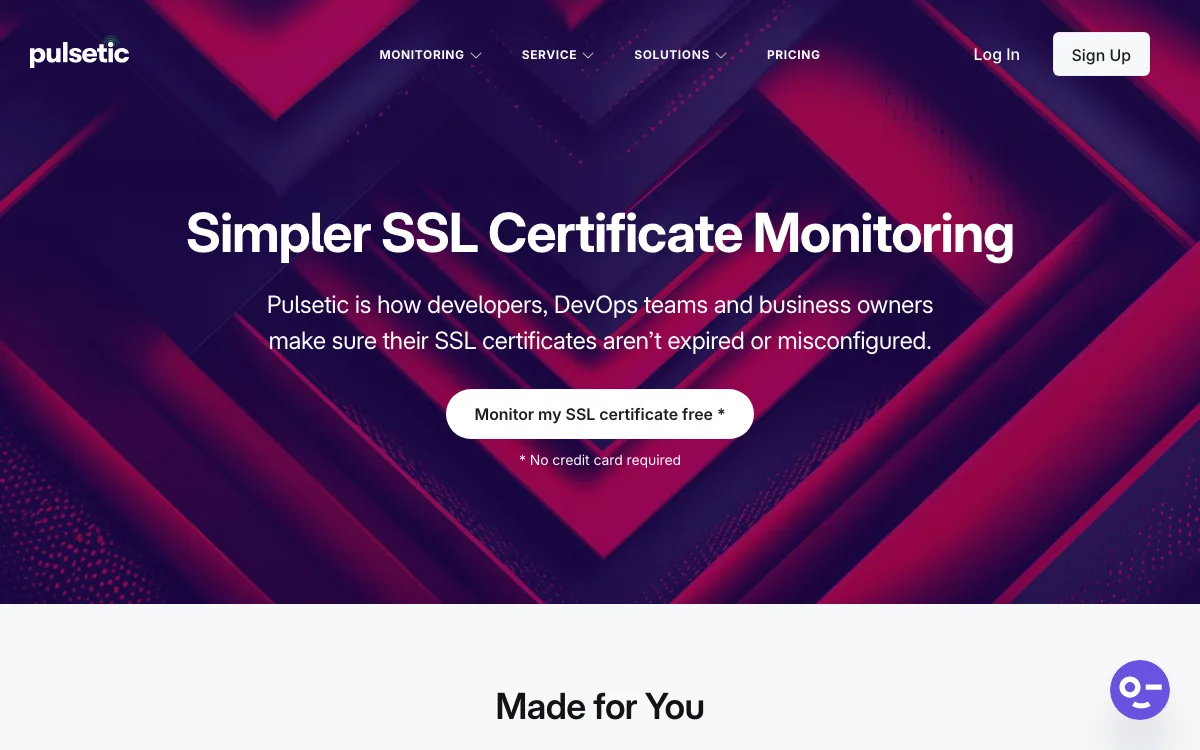
Pulsetic’s SSL monitoring re-reads each certificate every hour and confirms it is still valid. Beyond the expiry date, that catches the auto-renew failures above: a renewal that deployed the wrong certificate, a broken intermediate chain, or a server still serving the old certificate, at the next hourly check. Expiry reminders go out 14 days, 7 days and 1 day before the certificate expires, which leaves two weeks to fix a failed renewal calmly.
SSL monitoring is included on every plan, the free one too, next to uptime, keyword, port, heartbeat and domain expiry monitoring and status pages, so the certificate and the site it protects share one dashboard.
- Free: 10 monitors, 3 status pages, uptime checks every 5 minutes, alerts by email and webhook.
- Paid: Solo $9/month (60-second checks), Team $19/month (50 monitors, 30-second checks), Organization $49/month (300 monitors). Paid plans add SMS, phone call, WhatsApp, Slack, Microsoft Teams, Discord and Telegram alerts.
Limitations: it doesn’t grade TLS configuration (protocols, ciphers) the way SSL Labs does, and it doesn’t watch Certificate Transparency logs for certificates you didn’t request.
Red Sift Certificates Lite: free certificate inventory
Red Sift Certificates Lite is free for up to 250 certificates. It discovers certificates on your domains and subdomains, scans them daily over HTTPS and sends email alerts for upcoming expirations. It is the service Let’s Encrypt pointed users to when it ended its own emails. It is an inventory and expiry tool with daily scans and email only, with no uptime checks.
For more options, see the roundups of free uptime monitoring tools and the best website monitoring tools. Domain expiry breaks HTTPS too, since a lapsed domain can’t renew its certificate; domain monitoring covers that.
FAQ
What does “SSL certificate error” mean?
The browser couldn’t verify the certificate your site presented, so it won’t load the page without a warning. The cause is in the error code: ERR_CERT_DATE_INVALID means expired or a wrong clock, ERR_CERT_COMMON_NAME_INVALID a hostname mismatch, and ERR_CERT_AUTHORITY_INVALID an untrusted or self-signed certificate.
How do I fix an invalid SSL certificate?
Find out which check failed using the error code or openssl s_client, then fix that: renew an expired certificate, reissue one that’s missing a hostname such as www, replace a self-signed certificate with a publicly trusted one, or install the full chain. Reload the web server afterward.
Why does my site work for me but show an SSL error for others?
Usually a missing intermediate certificate, which your browser fills in from its cache while phones, apps and API clients can’t. It can also be one server in a load balancer pool with an old certificate, or the other visitor’s clock or antivirus. Check with -showcerts or SSL Labs.
How do I renew an SSL certificate?
With Let’s Encrypt, run certbot renew (most servers already do it on a schedule) and reload the web server with a deploy hook. With a paid CA, generate a new CSR, validate, and install the new certificate and CA bundle. Managed hosts renew for you.
How long is an SSL certificate valid in 2026?
At most 200 days for publicly trusted certificates issued since 15 March 2026, dropping to 100 days in March 2027 and 47 days in March 2029. Let’s Encrypt certificates last 90 days, moving to 64 days in February 2027.
Build your Bootstrap theme
Design a custom Bootstrap 5 theme visually with a live preview, then export clean Sass or CSS.
Open the Builder