404 Error: What It Means and How to Fix It (2026)
A 404 error means the server was reached but found nothing at the requested URL: the page was deleted or moved, the link has a typo, or the path doesn’t match a file on the host. This guide is for site owners who need to find and fix 404s, with a short section at the end for visitors who just hit one. Status code definitions, Google’s guidance and host settings were checked against official documentation in November 2026.
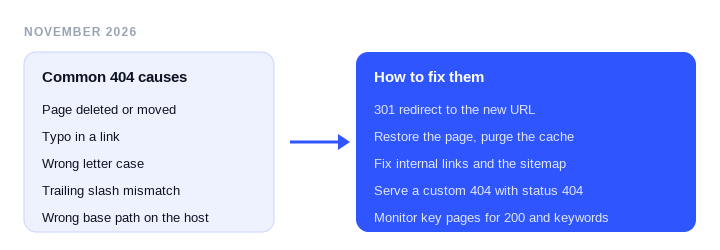
TL;DR
- What it means: 404 (Not Found) says the server has no current page at that URL. It doesn’t say whether the page is gone for good; 410 (Gone) does.
- Common causes: deleted or renamed pages without a redirect, typos, wrong letter case, trailing slash mismatches, a folder without
index.html, and a wrong base path on static hosts. - How to fix: 301 redirect moved pages, restore pages removed by mistake, and fix your own links. A page gone with no replacement should keep returning 404 or 410.
- SEO: 404s don’t count against the rest of your site. The real problems are 404s on pages you link to or list in a sitemap, and soft 404s (an error page that returns 200).
- Prevent it: a helpful custom 404 page that still returns status 404, plus monitoring on key URLs.
What a 404 error means
Status codes in the 400 range are client errors: the request reached a working server, but it can’t be served. RFC 9110, the current HTTP standard, says a 404 means the origin server “did not find a current representation for the target resource or is not willing to disclose that one exists.”
Two details in the RFC matter for site owners:
- 404 is neutral about time. It “does not indicate whether this lack of representation is temporary or permanent.” For a page you removed on purpose, 410 (Gone) is more precise.
- 404 can be cached. The RFC marks it heuristically cacheable, so a browser or CDN may keep serving a 404 for a while after you restore the page. Purge the CDN cache after a fix.
MDN calls links that lead to a 404 “broken or dead links” and names the usual causes: mistyped URLs and pages moved or deleted without a redirect.
A 404 is not the same as a site being down. If the server doesn’t answer, or answers with a 5xx code such as 503 Service Unavailable, the problem is the server, not the URL. The guide on why websites go down covers those cases.
404 vs. 410, soft 404 and 301 at a glance
| Response | What it says | What Google does | Use it when |
|---|---|---|---|
404 Not Found |
No page here, maybe temporary | Drops the URL from the index if indexed, crawls it less often over time | The page doesn’t exist |
410 Gone |
Removed on purpose, likely permanent | Same handling as 404 | You deleted it deliberately, no replacement |
| Soft 404 | “Not found” text, but status 200 OK |
Flags it as “Soft 404” in Search Console | Never; fix the status or the content |
301 / 308 |
Moved permanently | Follows it and shows the target in results | The content moved or has a close replacement |
302 / 307 |
Temporarily elsewhere | Follows it, treats the move as temporary | Short-term moves you will revert |
404 vs. 410. RFC 9110 says 410 means the condition “is likely to be permanent”, and that 404 “ought to be used instead” if the server can’t tell. For search the difference is small: Google’s status code documentation says all 4xx errors except 429 are treated the same. Use 410 if your server makes it easy; a plain 404 is fine.
Soft 404s. A soft 404 says “not found” (or is nearly empty) but returns 200 OK. Google’s documentation says that if a 200 page’s content suggests an error, Search Console shows a soft 404. Typical causes are a custom error page served with status 200, a single-page app (React, Vue) that renders “Page not found” while the server answers 200 for every path, redirecting every missing URL to the homepage, and empty category or search pages. An uptime check that only looks for status 200 thinks they are fine.
404 vs. 301. Google’s redirect documentation says 301 and 308 mean a page “has permanently moved” and recommends a permanent server-side redirect “whenever possible”. Use a 301 when there is a real new home for the content, not to hide every 404. Google’s site move guide warns against redirecting many old URLs to “one irrelevant single URL destination, such as the home page”, which may be treated as a soft 404.
Common causes of 404 errors
Deleted or moved pages. A page was removed, its slug renamed, or the site rebuilt with a new URL structure, and nobody added redirects. Old links and search results still send traffic there.
Typos in links. A missing letter in a menu link, or a URL pasted with a trailing period or parenthesis. One typo in a template repeats the 404 on every page.
Letter case. RFC 3986 says the path part of a URL is case-sensitive unless the scheme defines otherwise, and most Linux-based servers and static hosts treat /About.html and /about.html as different files. A site built on macOS or Windows, where file names usually aren’t case-sensitive, can work locally and break after upload.
Trailing slashes. /pricing and /pricing/ are different URLs. Netlify’s Pretty URLs feature (on by default) sends /about to /about/, and Cloudflare Pages redirects /about/index.html to /about/. If your links use one form and the host serves only the other, you get 404s. In a November 2026 check, http://bootstrap.build/articles/static-website-hosting (no https, no trailing slash) reached the page with status 200 after two redirects, which is the behavior you want.
A folder without index.html. On a static host, /blog/ usually means “serve /blog/index.html”. If the folder only has post.html, or the file is named Index.html, the folder URL returns 404.
Broken internal links. Navigation, footer, sitemap and article links still pointing at old URLs. These are the 404s you create yourself, and crawlers find them on every visit.
Wrong base path on static hosts. GitHub’s documentation says a project site is served at <owner>.github.io/<repositoryname>, not at the domain root. Absolute links like /css/style.css then request files from the root and fail, while the homepage loads. The same happens when a React or Vite build that assumes / is deployed to a subfolder. Set the base path in your build tool, or use a custom domain so the site lives at the root; see the guide on GitHub Pages custom domains.
How to find 404 errors on your site
Google Search Console: Page indexing report
The Page indexing report lists URLs Google couldn’t index, with reasons. Two matter here: Not found (404), where the page returned 404 when Google requested it, and Soft 404, where it returned a “not found” message without a 404 status code. From Google’s help page:
- The report shows only URLs that returned 404 in the past month.
- The example list is capped at 1,000 URLs and isn’t guaranteed to be complete.
- Google recommends fixing “only 404 errors that you link to yourself or list in a sitemap”; 404s for pages removed without a replacement are “not necessarily a problem”.
Click the inspect icon next to a URL to open URL Inspection, and use Test live URL to see what Google gets today. After fixing every instance, click Validate fix; validation typically takes up to about two weeks.
A crawler
A site crawler follows every link the way a search engine does and reports each URL’s status code and the pages that link to it. That second part tells you which template or article holds the broken link. Screaming Frog SEO Spider and the site audit tools in most SEO suites do this. Filter for 4xx errors, check the linking pages for each, and run a crawl after every redesign or migration.
Server and CDN logs
Logs show the 404s real visitors and bots hit, including URLs no crawler would find: old links on other sites, bookmarks and email links. With Nginx or Apache access logs:
# Most requested URLs that returned 404 (common/combined log format)
awk '$9 == 404 {print $7}' access.log | sort | uniq -c | sort -rn | head -20
The top of that list is your redirect to-do list. Bot probes for paths like /wp-login.php are correct 404s.
Check one URL with curl
The browser hides the status code. curl shows it:
curl -I https://example.com/old-page/
# Follow redirects, print the final status and URL
curl -sIL -o /dev/null -w "%{http_code} %{url_effective}\n" https://example.com/old-page
Missing URLs on bootstrap.build, static.app and pages.github.com all returned 404 this way in November 2026. If a URL that should be missing returns 200, you have a soft 404.
How to fix 404 errors
For each 404 that matters (traffic, backlinks, internal links or a sitemap entry), pick one fix:
- Redirect it with a 301. If the content moved or has a close replacement, redirect the old URL to it. Map each old URL to its own best match, not to the homepage. Google’s site move guide says to keep redirects “for as long as possible, generally at least 1 year.” Redirecting several merged pages to the one new page is fine.
- Restore the page. If it was deleted by mistake or renamed in a deploy, put it back at the original URL, check case and trailing slash, and purge the CDN cache.
- Fix the links. Redirects help visitors arriving from outside. For links you control (menus, templates, sitemaps, articles), point them straight at the right URL so there is no redirect hop.
- Leave it as 404 or 410. If the page is gone with no equivalent, that is the correct answer. Remove it from your sitemap and internal links.
For soft 404s, Google’s guidance gives three paths:
- Truly missing: return a real 404. Search Console’s help recommends a 404 code for “not found” pages.
- A real page flagged by mistake: add more information to the page, then check Google’s rendering with URL Inspection.
- A single-page app: Google’s JavaScript SEO guide suggests a JavaScript redirect to a URL where the server returns 404 (such as
/not-found), or adding<meta name="robots" content="noindex">to the error view.
On Nginx, a permanent redirect for one page is location = /old-page/ { return 301 /new-page/; }. On Apache, Redirect 301 /old-page/ /new-page/ in .htaccess does the same. Static hosts use a dashboard or a _redirects file, covered below.
How 404 errors affect SEO
Google’s position has been consistent for years:
- 404s don’t hurt the rest of the site. A 2011 Google Search Central blog post said a 404 “does not hurt you or count against you in Google’s search results”, and that 404s for URLs that never existed on your site can be safely ignored.
- They don’t slow crawling. Google’s current documentation says 4xx codes, except 429, “have no effect on crawl rate.”
- The page itself drops out. Indexed URLs that start returning 4xx are removed from the index. A 404 on a page that ranked costs that page’s traffic, which is the reason to redirect moved pages.
- A custom 404 page is for people, not rankings. Google doesn’t index 4xx pages; the page’s job is to keep the visitor on the site.
For what does help a site rank, see the guide to the best website builders for SEO.
How to make a good custom 404 page
- Return a real 404 status. The step most often missed. Check with
curl -Iafter publishing. - Say what happened in plain words, such as “This page doesn’t exist or has moved.” MDN’s advice: humor in moderation, without confusing visitors about why they see the page.
- Keep the site header and navigation so the page looks like part of the site.
- Offer next steps: a search box, links to popular pages or categories, and the homepage.
- Keep it light. It loads for every bad URL, bot traffic included.
- Use unique text, such as “Error 404: page not found”, which helps monitoring (below).
MDN notes the convention of a 404.html file at the top level of the site; on Apache, ErrorDocument 404 /404.html points to it.
Custom 404 pages and redirects on static hosts
Static hosts don’t run server code, so 404 pages and redirects are host settings. Here is how four hosts handle them, checked in their documentation in November 2026. For a broader comparison, see the guide to static website hosting.
Static.app
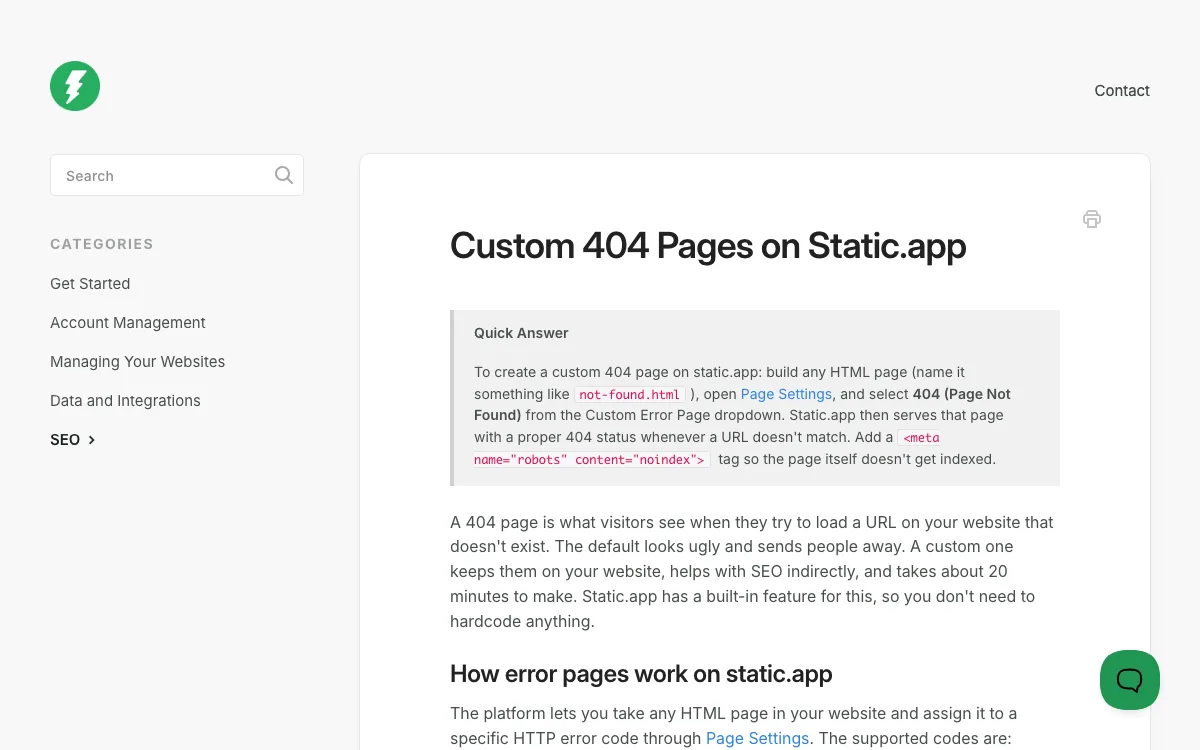
Static.app handles both from the dashboard, without config files:
- Custom 404 page: create a page (for example
not-found.html), open its Page Settings and choose 404 (Page Not Found) in the Custom Error Page dropdown. Static.app’s help center says it then serves that page with “a proper HTTP 404 status code” whenever a URL doesn’t match. The same dropdown covers 400, 401, 403, 500, 503 and 504. - Redirects: open the old page’s Page Settings, tick Custom Redirect, choose 301, 302, 307 or 308, and point it at an existing page or a full external URL.
- Limits: one custom error page per status code per website. Redirects are set from the old page’s settings, so keep the old page in the dashboard when you move content.
Pricing: Starter $5/month billed yearly ($6 month to month) for 2 websites and 500 MB; Medium $10/month yearly ($12 monthly) for 7 websites and 3 GB; Large $15/month yearly ($18 monthly) for 30 websites and 10 GB. All include custom domains, SSL and unlimited traffic. There is a 7-day free trial without a credit card, not a free plan.
Netlify
Add a 404.html and Netlify serves it automatically for any path that doesn’t resolve to a file. Redirects go in a _redirects file, with the status as the third field; if you leave it out, Netlify uses 301:
/old-page    /new-page    301
/en/*        /en/404.html 404
Netlify’s docs say you can’t add or remove a trailing slash with a redirect rule; Pretty URLs handles that.
Cloudflare Pages
Pages serves the closest 404.html, looking in the requested folder and moving up to /404.html. With no top-level 404.html, it assumes a single-page app and serves the root page for any path that doesn’t match a file. That suits SPAs and risks soft 404s for everything else, so add a 404.html and check the status with curl -I. In a _redirects file the default status is 302, so write 301 explicitly for permanent moves. The limit is 2,000 static and 100 dynamic redirects.
GitHub Pages
Create 404.html (or 404.md with permalink: /404.html in its front matter) in your publishing source. There is no redirects file; the supported jekyll-redirect-from plugin, added to your Jekyll config, generates HTML pages with a meta refresh tag, and Google treats an instant meta refresh as a permanent redirect. Project sites live under /<repositoryname>/, so watch the base path.
Monitor key URLs so 404s don’t go unnoticed
Search Console and crawlers find 404s after the fact. The costly ones are on pages that matter today: pricing, signup, checkout, top landing pages, docs. A deploy that renames a folder can break any of them while the homepage still loads, so the site looks “up”.
Pulsetic: status code and keyword checks

Pulsetic checks each URL you add on a schedule and alerts when a check fails. Per its help center, two settings make it useful for 404s:
- Expected statuses: by default a check passes on 200 to 206, so a 404 on a monitored page fails it. A custom list of codes replaces the default.
- Keyword checks: “Response text / Keyword” fails the check if the text is missing, and “Not in response” fails it if the text appears.
To catch soft 404s too, give each key URL a keyword that only appears on that page (a product name or heading) and put your 404 page’s unique text in “Not in response”. If a deploy turns the page into a 200 error page, or a redirect sends it to the homepage, the check fails even though the status is 200. A notification delay can hold alerts for a few minutes. Failures are re-checked from other regions before an alert goes out.
- Free: 10 monitors, checks every 5 minutes, email alerts, keyword monitoring included.
- Paid: Solo $9/month (60-second checks), Team $19/month (50 monitors, 30-second checks), Organization $49/month (300 monitors). Paid plans add SMS, phone call, WhatsApp, Slack, Microsoft Teams, Discord and Telegram alerts.
Limitations: it checks the URLs you add and doesn’t crawl your site for new broken links, so pair it with a crawler or Search Console.
Launching or moving a site? See the guide on how to publish a website.
If you’re a visitor who hit a 404
The problem is usually the link or the page, not your device:
- Check the URL for typos, extra characters at the end, or a missing slash.
- Reload, in case it was a short error during a deploy.
- Go up a level by deleting the last part of the path, or start from the homepage.
- Use the site’s search, or search the page title in a search engine.
- Try the Wayback Machine if the page was removed.
- Tell the site owner if a link on their own site is broken.
FAQ
What does error 404 mean?
The server was reached but has no page at that URL. The page may have been deleted or moved without a redirect, or the link has a typo. It is a client error, not a sign that the whole site is down.
How do I fix a 404 error on my website?
Find the cause first: a moved page, a typo, letter case, a trailing slash, a missing index.html or a wrong base path. Then add a 301 redirect, restore the page, or fix the link. If the page is gone with no replacement, let it return 404 or 410.
Do 404 errors hurt SEO?
Not for the rest of your site. Google has said a 404 doesn’t count against your site, and its documentation says 4xx codes other than 429 don’t affect crawl rate. The missing page drops out of the index, so redirect pages that had traffic or backlinks.
What is a soft 404?
A page that shows a “not found” message, or almost no content, but returns 200 OK. Search Console reports it in the Page indexing report. Return a real 404 for missing pages, or add real content if the page should exist.
Should I redirect all 404 pages to the homepage?
No. Google’s site move guidance warns against redirecting many old URLs to one irrelevant page such as the homepage, which may be treated as a soft 404. Redirect each old URL to its closest match and let pages with no replacement return 404.
Build your Bootstrap theme
Design a custom Bootstrap 5 theme visually with a live preview, then export clean Sass or CSS.
Open the Builder