Email Marketing for Small Business: 2026 Starter Guide
Email marketing for small business comes down to seven steps: pick an email service provider, authenticate your domain, build a permission-based list, set up a handful of core campaigns, design them, test before sending, and measure clicks rather than opens. This guide is for owners and solo marketers starting from zero, or restarting a list that went quiet. Prices, free plan limits, and the Gmail, Yahoo, and FTC rules below were checked on the official pages in November 2026.
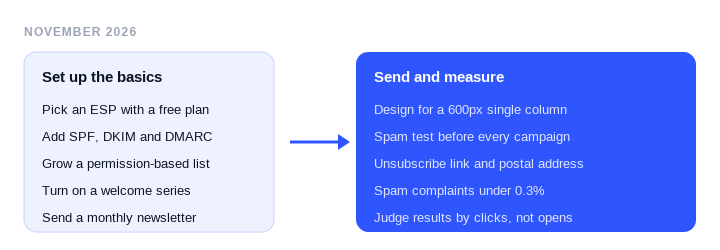
TL;DR
- Best free plan for a small list: Kit (free up to 10,000 subscribers) or Brevo (300 emails a day), depending on whether you value list size or send volume.
- Cheapest paid entry: Brevo Starter at $9 a month for 5,000 emails, then MailerLite Comfort at $12 and Mailchimp Essentials from $13.
- Authenticate before the first send: SPF and DKIM for everyone, plus DMARC and one-click unsubscribe once you send 5,000 or more emails a day to Gmail or Yahoo.
- Start with five campaigns: a welcome series, a monthly newsletter, a promotion, a re-engagement email, and a review request.
- Design and test every send: build on a template builder such as Postcards, then run a spam test and inbox placement check with Unspam.
- Judge results by clicks: Apple Mail Privacy Protection hides whether a reader opened the email, so open rates are unreliable.
Why small business email marketing is worth the setup
Email is the one channel a small business owns outright: social reach depends on an algorithm, but your list stays yours if you change platforms. A few hundred real customers are enough to announce a product, fill a slow week, or collect reviews.
The catch is that inbox providers have tightened their rules, so a sender with no authentication, a bought list, or a high complaint rate lands in spam. The steps below are in the order that avoids that, and they apply to email marketing small business owners run themselves as much as to agencies.
Step 1: Pick an email service provider
An email service provider (ESP) stores your list, hosts signup forms, sends campaigns, runs automations, and handles unsubscribes for you. In email marketing for small businesses, the deciding factors are the free plan limit, the price of the first paid tier, and whether the editor and automations fit how you work.
Regular monthly prices, billed monthly, in USD, from each vendor’s pricing page in November 2026:
| ESP | Free plan | Paid plan from | What the entry price covers | Best for |
|---|---|---|---|---|
| Brevo | 300 emails a day | Starter $9/month | 5,000 emails a month, 500 contacts | Low budgets, email plus SMS |
| Kit | Up to 10,000 subscribers, 1 user | Creator $39/month | 1,000 subscribers | Creators, newsletters, digital products |
| MailerLite | 250 subscribers, 2,500 emails a month | Comfort $12/month | 500 subscribers, 5,000 emails a month | Simple newsletters and landing pages |
| Mailchimp | 250 contacts, 500 emails a month (250 a day) | Essentials from $13/month | 5,000 emails a month; Standard from $20 with 6,000 | Familiar editor, wide integrations |
| Klaviyo | 250 active profiles, 500 emails a month | Email $20/month | 500 active profiles, 5,000 emails a month | Online stores |
How to read the table:
- Brevo prices by emails sent, not by contacts stored, which suits a business with a large list it emails rarely. The Starter plan still shows Brevo branding in the footer unless you add the “No Brevo logo” option ($10.80 a month), and marketing automation starts on the Standard plan ($35 a month).
- Kit has the largest free plan by list size, limited to one user, and the highest paid entry price.
- MailerLite is the cheapest paid plan priced by subscribers. Billed yearly, Comfort is $10.80 a month.
- Mailchimp offers a 14-day trial on Essentials and Standard. Its free plan pauses sending when you exceed the contact or email limit.
- Klaviyo is built around store data (orders, browsing, carts): the strongest fit for online shops, more than a service business needs.
Constant Contact is a common small business pick, but its US pricing could not be loaded from the pricing page on the check date, so it is not in the table.
A simple rule: under 250 contacts, any free plan works. If you expect more than 1,000 contacts within a year, compare prices at that tier before you commit, because migrating automations later takes time.
Step 2: Set up SPF, DKIM, and DMARC
Authentication proves to inbox providers that your ESP may send mail for your domain. Every ESP has a “domain authentication” screen that gives you the exact DNS records; add them at your DNS host, then click verify.
- SPF lists the servers allowed to send email for your domain.
- DKIM adds a cryptographic signature that shows the message was not changed in transit.
- DMARC tells receiving servers what to do when SPF or DKIM fails, and sends you reports about who is sending as your domain.
Send from an address on your own domain (hello@yourshop.com), not a free Gmail address.
What Google requires. Google’s sender guidelines require every sender to Gmail accounts to set up SPF or DKIM, have valid forward and reverse DNS, use TLS, and keep the spam rate reported in Postmaster Tools below 0.3%. Bulk senders, those sending more than 5,000 messages a day to Gmail, must set up SPF, DKIM, and DMARC (a DMARC policy of none is acceptable), align the From domain with the SPF or DKIM domain, and support one-click unsubscribe with a clearly visible unsubscribe link in the body. Google also advises keeping the spam rate below 0.1%.
What Yahoo requires. Yahoo’s sender best practices ask all senders to implement SPF or DKIM at minimum and keep the spam rate below 0.3%. Bulk senders must implement both SPF and DKIM, publish a DMARC policy of at least p=none that passes, support one-click unsubscribe, and honor unsubscribe requests within 2 days.
Most small businesses send far fewer than 5,000 emails a day, but set up all three records anyway, so nothing breaks if a promotion pushes you over. If reports show failures later, the guide to fixing a DMARC fail walks through the common causes.
New domain or first send from a new ESP? Start with small batches to your most engaged contacts and increase volume over a few weeks. The email domain warm-up guide has a schedule.
Step 3: Build your list legally
In the US, commercial email falls under the CAN-SPAM Act. According to the FTC’s compliance guide, every marketing email must:
- Use accurate header information (From, To, Reply-To) that identifies who sent it.
- Use a subject line that reflects the content.
- Identify the message as an ad, clearly and conspicuously.
- Include a valid physical postal address (a street address, a US Postal Service box, or a registered private mailbox).
- Explain how to opt out, with an option to stop all marketing email.
- Honor opt-outs within 10 business days, keep the opt-out working for at least 30 days after sending, and not charge a fee or ask for more than an email address to opt out.
The FTC notes the law makes no exception for business-to-business email, that you remain responsible if you hire another company to send for you, and that each violating email can bring penalties of up to $53,088.
CAN-SPAM itself is an opt-out law, but your ESP is stricter. Mailchimp’s acceptable use policy, for example, prohibits sending to purchased, rented, or third-party lists, and the other ESPs above have similar rules. In practice, that means only adding people who asked to hear from you.
Where small businesses get subscribers:
- A signup form on the website footer and a dedicated page, hosted by your ESP.
- A checkbox at checkout or booking (unchecked by default).
- A sign-up sheet or QR code at the counter, entered with a note of where each contact came from.
- A small, honest incentive: a discount on the first order, a free guide, early access to sales.
If you are importing an old customer list, clean it first. Bounces and dead addresses hurt your sender reputation from the first campaign. The comparison of email list cleaning services covers the options.
Step 4: Plan your core campaigns
A small business does not need dozens of campaign types. Five cover most of the value.
1. Welcome series (automated). Two or three emails after someone joins. Email 1 goes out immediately: deliver any promised incentive and say what they will get and how often. Email 2 introduces best sellers or common questions. Email 3 tells your story and gives one clear next step.
2. Monthly newsletter. One email a month with something useful: a tip, a behind-the-scenes update, new arrivals, an upcoming event. Keep it to three or four short sections. The collection of newsletter examples shows formats that work for small teams.
3. Promotion. A sale, a launch, or a seasonal offer. One offer, one deadline, one button. Send it to the whole list, then a reminder near the deadline only to people who did not click.
4. Re-engagement. For contacts who have not clicked anything in a set period (90 to 180 days is a common window). Ask if they still want to hear from you and make it easy to stay or leave. Remove those who do not respond: a smaller, active list delivers better than a large, quiet one.
5. Review request (automated). A few days to a week after a purchase or appointment, ask for a review on the platform that matters most to you (Google, a marketplace, your own site). Link directly to the review form and ask only one question.
A simple monthly email calendar
Here is a starting calendar for a small business sending four campaigns a month, with two automations running in the background.
| Week | Campaign | Audience | Goal |
|---|---|---|---|
| Always on | Welcome series (3 emails) | New subscribers | Introduce the business, first purchase |
| Always on | Review request | Customers, a few days after purchase | Reviews |
| Week 1 | Monthly newsletter | Full list | Stay in touch, drive traffic |
| Week 2 | Promotion or launch | Full list | Sales |
| Week 3 | Promotion reminder | Non-clickers from week 2 | Sales before the deadline |
| Week 4 | Re-engagement | No clicks in 90 to 180 days | Clean the list |
Send on the same weekday so results are comparable. If four sends a month is too many, run the reminder and re-engagement email every other month and keep the newsletter.
Step 5: Design emails people can read on a phone
Small business emails need to load fast, read well on a phone, and point to one action.
- Single column, about 600px wide, that shrinks to full width on mobile.
- Live text for headlines, prices, dates, and buttons, so the email still works when images are blocked.
- 16px body text and a clear button with descriptive text (“Book a table”, not “Click here”).
- A footer with your postal address, unsubscribe link, and a line on why the reader is getting the email.
The full rules (type, dark mode, accessibility, footer) are in the guide to email newsletter design.
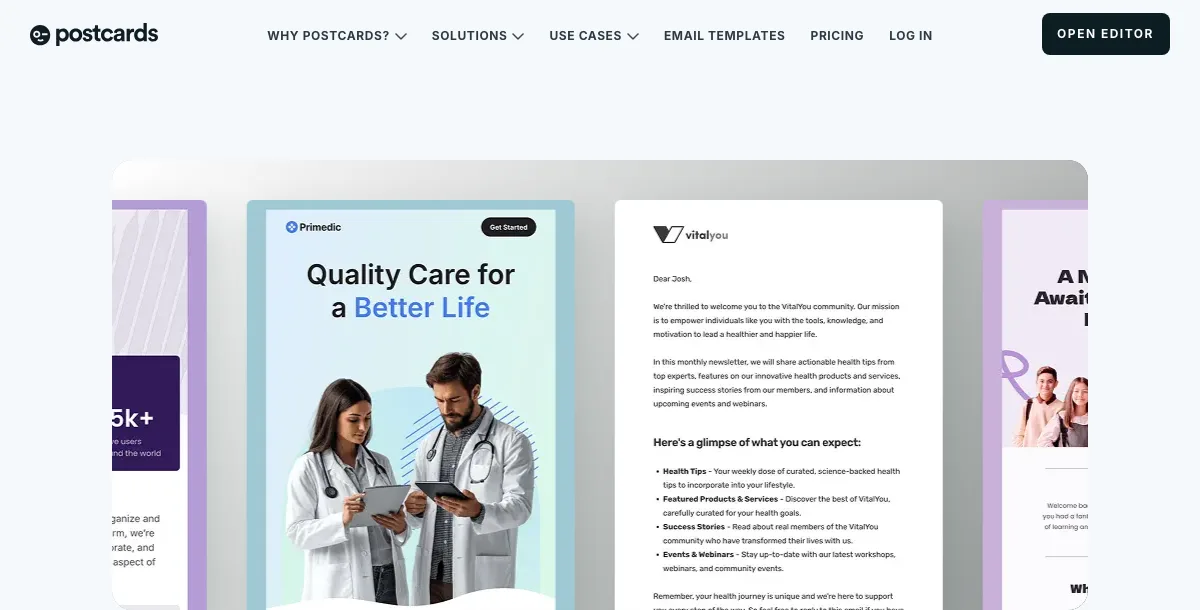
Most ESP editors are fine for a plain newsletter. If you want branded templates you can reuse across campaigns, or you might switch ESPs later, design in a separate builder and export. Postcards by Designmodo is a drag-and-drop email builder with 100+ ready-made modules, brand presets, and saved modules, so the header and footer stay consistent from one campaign to the next. It exports to ESPs including Mailchimp, Brevo, Kit, Klaviyo, and Constant Contact, and as HTML for any platform that accepts custom code, such as MailerLite.
Pricing: the free Start plan includes 10 template projects and 5 exports a month, with basic modules only. Plus is $19 a month ($16 a month billed yearly) with unlimited template projects, 20 exports a month, and 20 email client preview runs. Pro is $29 a month ($24 billed yearly) with unlimited exports and 50 preview runs.
Limitations: Postcards designs and exports emails; it does not store your list or send campaigns, so you still need one of the ESPs above. The free plan has no client previews.
For other options, see the roundup of the best email template builders.
Step 6: Test before you send
Before every send:
- Send a test to yourself on a phone and a desktop, and click every link.
- Check the subject line and preview text together, as they appear in the inbox list.
- Check personalization fallbacks, so “Hi ,” never goes out when a first name is missing.
- Run a spam test to check authentication, content, blocklists, and HTML.
- Run an inbox placement test on important sends to see whether the email lands in the inbox, Promotions, or spam at the major providers.
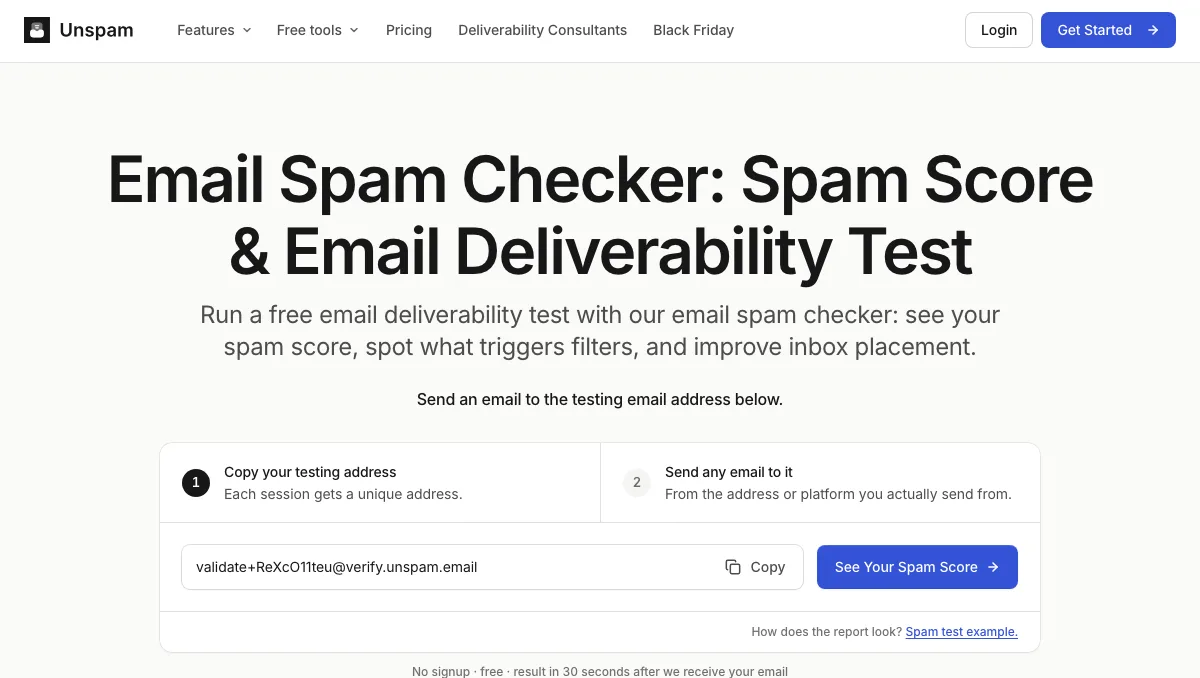
Unspam covers steps 4 and 5 and adds email client previews. Its spam test scores a message against SPF, DKIM, and DMARC authentication, content, blocklists, and HTML. Inbox placement tests send the email to a seed list across Gmail, Outlook, Yahoo, and others and report where each copy landed: Inbox, Promotions, Spam, or Missing. Previews render the email across 60+ clients and devices, including dark mode.
Pricing: the Free plan includes 5 spam tests, 3 inbox placements, and 3 device previews a month, and a limited spam test is available without signing up. The usage-based Custom plan adds email verification of single addresses and lists, DMARC monitoring, history, and API access. Its default configuration on the pricing page is $6.40 a month for 25 tests, with spam tests at $0.18 and inbox placements at $0.50 each; email verification costs $6.40 per 1,000 addresses.
Limitations: email verification is not on the Free plan, and free test results are kept for 14 days.
Step 7: Measure clicks, not opens
Open rates used to be the headline metric, but they are no longer reliable. Apple’s Mail Privacy Protection, when turned on, hides the reader’s IP address and prevents senders from seeing whether a message was opened. So for any list with Apple Mail users, open rates are skewed.
Track these instead:
- Click rate: clicks divided by delivered emails. This is your main measure of whether a campaign worked.
- Conversions: purchases, bookings, or replies from the email. Add UTM parameters to links so your analytics tool attributes the sale to email.
- Unsubscribe rate per campaign: a spike means the content or frequency missed.
- Spam complaints: under the 0.3% limit Google and Yahoo set, ideally under Google’s advised 0.1%.
- Bounces: a rising bounce rate means the list needs cleaning.
Opens still help compare subject lines in an A/B test sent at the same time. For deciding who is engaged, use clicks and purchases.
Review results once a month and change one thing at a time (send day, subject style, offer) so you can tell what moved the numbers.
FAQ
What is the best email marketing platform for a small business?
It depends on the business. Online stores get the most from Klaviyo’s store-data automations, creators and newsletters from Kit’s 10,000-subscriber free plan, and budget-focused businesses from Brevo ($9 a month for 5,000 emails) or MailerLite ($12 a month for 500 subscribers). Mailchimp is a familiar middle option from $13 a month.
How much does email marketing cost for a small business?
Under 250 contacts, it can cost nothing: Mailchimp, MailerLite, and Klaviyo all have free plans at that size, Kit’s free plan goes up to 10,000 subscribers, and Brevo’s allows 300 emails a day. Paid entry plans run from $9 to $39 a month at the November 2026 regular prices. Optional tools, such as a template builder or a testing tool, add to that.
How often should a small business send marketing emails?
Start with a monthly newsletter plus automated welcome and review request emails, then add a promotion when you have something to sell. Two to four campaigns a month suits most small businesses. Consistency matters more than volume: pick a schedule you can keep.
Do I need SPF, DKIM, and DMARC if I only send a few emails?
Yes. Google and Yahoo require every sender to have SPF or DKIM, and require all three plus one-click unsubscribe for bulk senders (5,000 or more emails a day). Setting up all three from the start is a one-time task and avoids deliverability problems as the list grows.
Can I buy an email list for my small business?
No. CAN-SPAM is an opt-out law, but ESPs such as Mailchimp prohibit sending to purchased, rented, or third-party lists, and bought lists produce bounces and spam complaints that damage your sender reputation. Grow the list through your website, checkout, and in-store signups instead.
Build your Bootstrap theme
Design a custom Bootstrap 5 theme visually with a live preview, then export clean Sass or CSS.
Open the Builder