How Long to Warm Up an Email Domain? 2026 Guide
Plan on about 2 to 6 weeks to warm up a new email domain before a full campaign, and about 6 weeks for a new dedicated IP. If you send through a shared IP at an email service provider (ESP) or from a Google Workspace or Microsoft 365 mailbox, the IP is already warm, but the new domain still needs a gradual ramp. This guide is for marketers, founders and SDR teams launching a new domain or IP; the ESP schedules and Google and Yahoo rules below were checked in November 2026.
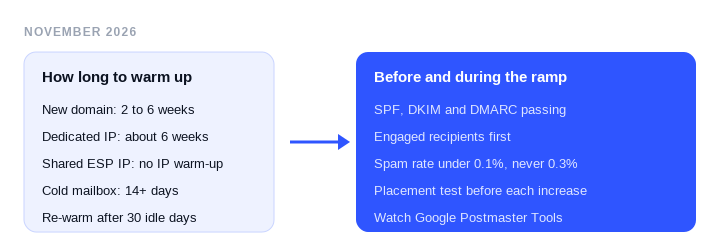
TL;DR
- New domain on a shared ESP IP: no IP warm-up needed, but ramp the domain for 2 to 6 weeks. Postmark says most senders reach full-volume deliverability in 3 to 6 weeks.
- New dedicated IP: about 6 weeks. SendGrid’s automated warm-up runs to day 41, and Postmark’s managed warm-up takes 3 to 6 weeks.
- Authenticate first: SPF, DKIM and DMARC must pass before day one. Google and Yahoo require all three for bulk senders.
- Watch complaints: Google and Yahoo both set a 0.3% spam complaint limit, and Google asks senders to stay below 0.1%.
- Warm-up tools: networks like MailReach warm individual mailboxes; they do not replace a real ramp to engaged recipients.
- Check it is working: run inbox placement tests at each step (Unspam’s free plan includes 3 a month) and watch Google Postmaster Tools.
Why new domains and IPs need warming
Mailbox providers judge mail partly by the history of the domain and IP that send it. A brand new domain or IP has none, so a sudden burst of messages looks like a spammer with a fresh domain. Mailgun’s documentation says mail from an unknown IP is “initially suspicious.” Warming means starting small, sending to the people most likely to engage, and increasing volume only while results stay healthy.
Two separate reputations are being built:
- IP reputation belongs to the sending server. An ESP’s shared pool, Google Workspace or Microsoft 365 already has history, shared with other senders.
- Domain reputation belongs to the domain in your From address and DKIM signature, and follows you to every ESP. Postmark calls it the lasting asset, because IPs change.
So you may skip IP warm-up, but a new domain always needs time.
How long to warm up an email domain before a campaign
New domain on a shared ESP IP
SendGrid says customers on its Free and Essentials plans use shared pools and “don’t require a warm up strategy.” Mailgun says the same about shared IPs, then adds that new domains “still need to go through a similar process to establish a solid domain reputation.”
Realistic range: 2 to 6 weeks. Postmark’s guide to warming a domain uses a 30-day schedule and says most senders can expect dependable full-volume deliverability in 3 to 6 weeks. For a cold email mailbox, MailReach recommends at least 14 days of warm-up on a brand new domain or mailbox, with no campaigns during that time.
Mailgun also advises against sending from a freshly purchased domain: it should have been active for at least 30 days and attached to a real website. Buy a campaign domain a month early and set up DNS on day one. The guide to what an MX record is covers the records a sending domain needs to receive replies and bounces.
New dedicated IP
A dedicated IP starts with zero history, so the ramp is longer and stricter:
- SendGrid: its automated IP warm-up caps how much the IP sends each hour based on the IP’s age in days. The cap starts at 20 messages an hour on day 0, reaches 1,000 an hour by day 12, and the schedule ends after day 41, when SendGrid removes the IP from automated warm-up. SendGrid also says to warm an IP again if it has not sent mail in more than 30 days.
- Mailgun: recommends dedicated IPs from about 100,000 emails a month. Start with 100 emails on day one and grow 20% a day; at that rate, 100,000 a day takes about 38 days. Its automatic warm-up raises limits in stages with resting periods between them.
- Postmark: dedicated IPs require 300,000 messages a month. Managed warm-up sets a daily limit, sends overflow through the shared pool, and takes most customers 3 to 6 weeks. Below 20,000 messages a week for 4 weeks, the IP must be warmed again.
Realistic range: 3 to 6 weeks, longer if you send only a few times a week. Mailgun notes that senders who mail three times a week or less can still warm up, but providers take longer to assess them.
Timelines at a glance
| Setup | IP warm-up | Domain warm-up | Typical time before full volume |
|---|---|---|---|
| New domain, ESP shared IP | Not needed (SendGrid, Mailgun) | Yes | 2 to 6 weeks |
| New domain, Google Workspace or Microsoft 365 mailbox (cold email) | Not needed | Yes, per mailbox | 14+ days (MailReach) |
| New dedicated IP, established domain | Yes | Usually not | 3 to 6 weeks (Postmark), 41-day schedule (SendGrid) |
| New dedicated IP and new domain | Yes | Yes | 6 weeks or more |
A sample week-by-week warm-up schedule
The table below follows Postmark’s published 30-day domain schedule. Treat it as an example, not a rule: the volumes are per major mailbox provider (Gmail, Yahoo, Microsoft and so on) per day, and your own numbers should move only as fast as your results allow.
| Week | Daily volume per provider (example) | What to send | Move on when |
|---|---|---|---|
| Week 1 (days 1 to 7) | 50 to 100, rising to about 400 | Your most engaged recipients only | Bounces under 2%, no spike in complaints |
| Week 2 (days 8 to 14) | 600 to 1,500 | Engaged recipients, growing by about 30% to 50% a day | Opens holding, placement tests mostly inbox |
| Week 3 (days 15 to 21) | 2,000 to 5,000 | Add recent but less active recipients | Complaints well under 0.1% |
| Week 4 (days 22 to 30) | 7,500 to 10,000, then full volume | Full list, minus long-term inactives | Postmaster Tools and placement stay stable |
Postmark’s rules for moving between steps matter more than the numbers: check performance by receiver before every increase, double early, slow to 20% to 50% a day later, and cut volume by 25% to 30% if bounces, complaints or opens slip.
Authentication first: SPF, DKIM and DMARC
Warm-up on a domain that fails authentication only builds a bad reputation faster. Set these up and confirm they pass before the first message:
- SPF lists the servers allowed to send for your domain, including your ESP.
- DKIM signs each message with a key in your DNS. Sign with your own domain, not the ESP’s default, so the reputation is yours. Google requires keys of at least 1,024 bits.
- DMARC tells receivers how to treat failures and sends you reports.
p=nonesatisfies Google and Yahoo, but the From domain must align with SPF or DKIM.
Send a test to Gmail, open “Show original” and confirm spf=pass, dkim=pass and dmarc=pass. If DMARC fails, the guide to fixing DMARC fail walks through the alignment causes. Once reports arrive, DMARC monitoring shows every service sending as your domain, which is how you catch a forgotten tool before it hurts the new domain.
Google and Yahoo bulk sender requirements
Both providers have enforced sender rules since February 2024. The all-sender rules apply from the first message, and the campaign you are warming up for may cross the bulk threshold.
Google:
- All senders need SPF or DKIM, valid forward and reverse DNS, TLS, and a spam rate in Postmaster Tools below 0.3%.
- A bulk sender sends close to 5,000 or more messages to personal Gmail accounts in 24 hours, counted across the same primary domain. The status is permanent once reached.
- Bulk senders also need SPF, DKIM and DMARC (
p=noneis fine) with alignment, plus one-click unsubscribe and a visible unsubscribe link for marketing mail. - Google’s FAQ asks senders to keep the user-reported spam rate below 0.1% and never reach 0.3%. Bulk senders above 0.3% lose eligibility for mitigation until they stay below it for 7 consecutive days.
- Since November 2025, Gmail has ramped up enforcement, and non-compliant mail can get temporary and permanent rejections.
Yahoo:
- All senders: SPF or DKIM, valid forward and reverse DNS, and a complaint rate below 0.3%.
- Bulk senders: SPF, DKIM, a passing DMARC record of at least
p=none, alignment, one-click unsubscribe, and unsubscribes honored within 2 days.
On a ramp of a few hundred messages a day, one or two complaints can move the rate sharply, another reason to send only to engaged recipients early on.
Engagement signals that make or break warm-up
Mailgun notes that Gmail and Yahoo look heavily at engagement when rating IPs. The signals that matter most:
- Positive: opens, replies, clicks, and recipients moving a message out of spam.
- Negative: spam complaints, hard bounces, blocks, and long stretches of mail nobody opens.
Practical rules from the ESP guides:
- Send to your most active subscribers first (Mailgun, Postmark).
- Remove hard bounces immediately and repeated soft bounces after several attempts (Mailgun).
- Drop recipients who have not opened your last five emails, and wait until warm-up is over before trying to win back inactive contacts (Mailgun).
- Send on a consistent schedule; daily is ideal (Mailgun).
- Verify cold or old lists before the first send; a burst of bounces in week one stalls a new domain fast.
For cold email specifically, the guide to cold emails going to spam covers the extra checks for prospecting domains.
Automated warm-up tools: what they do and their limits
Automated warm-up tools connect your mailbox to a network of other mailboxes. The tool sends messages between them, and the receiving mailboxes open them, reply, mark them as important and pull them out of spam, so your mailbox builds engagement history before real campaigns start.
MailReach is a typical example. It describes a network of about 30,000 inboxes, sends up to 100 warm-up emails a day, recommends at least 14 days for a brand new domain or mailbox, and suggests keeping warm-up running during and between campaigns.
They are useful for getting a new cold email mailbox through its first weeks and keeping a baseline of activity on low-volume outreach mailboxes. Where they stop:
- They work per mailbox, not per IP. A network sending up to 100 emails a day cannot warm a dedicated IP meant to send 100,000 or more a month. That still needs a real volume ramp.
- The engagement is not from your recipients. Providers also weigh how your actual prospects or subscribers react. A list full of people who never open will still pull reputation down once real sending starts.
- They cannot fix setup problems. Warm-up does nothing for broken SPF or DKIM, a blocklisted domain or a list with many invalid addresses. If a listing is the issue, see email blacklist removal.
Alongside a real ramp to engaged recipients, a warm-up tool can help; instead of one, it mainly delays finding out where your mail lands.
How to tell warm-up is working
Do not judge warm-up by “nothing bounced.” Measure where mail lands at every step up in volume.
Inbox placement tests
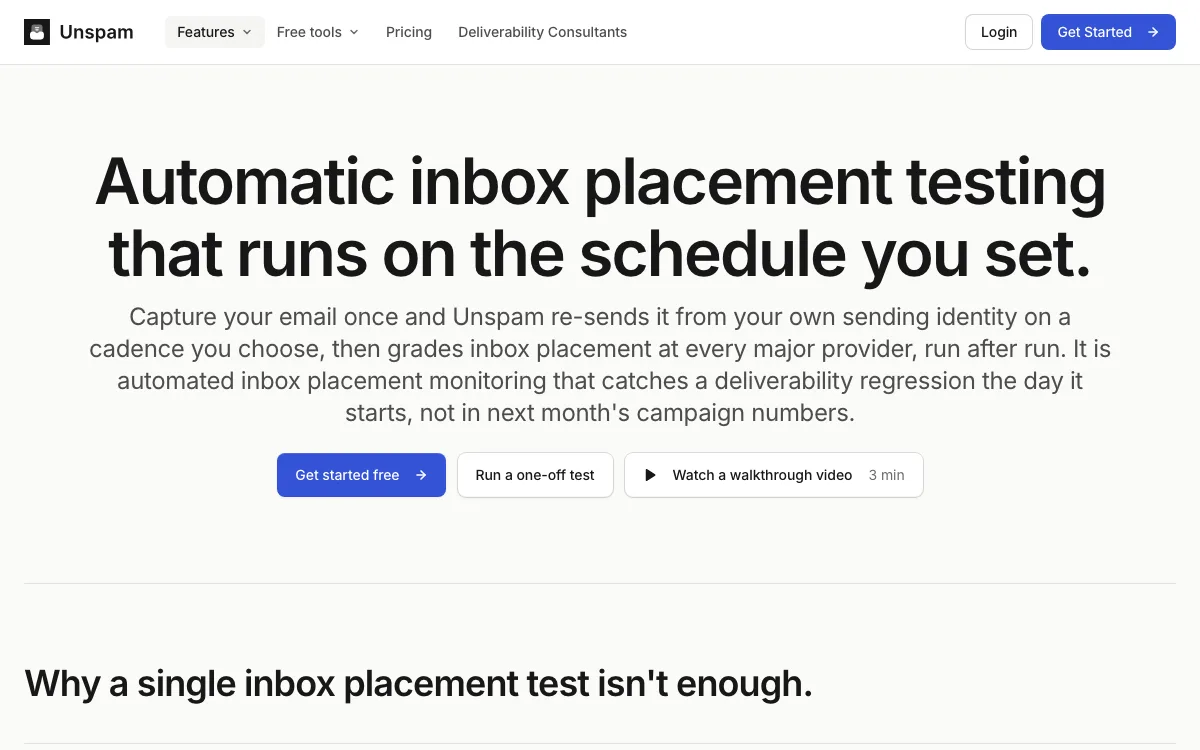
An inbox placement test sends your real campaign from your real setup to seed mailboxes and reports whether each copy landed in the inbox, a tab or spam. Run one before week one and before each volume increase.
Unspam combines this with a spam test. The spam test scores a message from 0 to 100 using SPF, DKIM, DMARC, reputation, blocklists and content, and lists what cost points. The placement test sends to 10 seed mailboxes at 7 providers, 7 consumer accounts and 3 business tenants, so you see Gmail, Outlook and Yahoo side by side as well as business mail filters.
For warm-up, the most useful feature is scheduled testing. Unspam’s automatic inbox placement re-sends a saved email daily, weekly, monthly or on set weekdays through a sending account you connect over SMTP, grades placement per provider and emails you when the spam rate crosses your threshold. That gives the ramp a dated history instead of one-off checks.
Unspam also offers DMARC monitoring, which groups aggregate reports into named sending sources and flags when the domain is ready for p=quarantine or p=reject.
- Free plan: 21 tests a month (5 spam tests, 3 inbox placements, 3 device previews, 5 screenshots, 5 heatmaps), no card, results kept 14 days.
- Custom plan: priced per test, at $0.18 per spam test and $0.50 per inbox placement; the default setup of 25 tests is $6.40 a month, and annual billing saves 15%. It adds scheduled tests, API access and DMARC monitoring at $6 per domain a month, with the first domain free.
- Limits: Unspam does not warm up mailboxes or send your campaigns, and its 10 seed mailboxes are a sample, not your real audience.
For a wider comparison of placement and monitoring tools, see the list of best email deliverability tools.
Google Postmaster Tools
Google Postmaster Tools is free and shows how Gmail sees your domain. Verify the domain with a TXT or CNAME record, then check these dashboards during the ramp:
- Spam rate: the share of your mail Gmail users report as spam. Keep it under 0.1%.
- Compliance status: whether your mail meets Gmail’s sender requirements.
- Authentication: how much of your mail passes SPF, DKIM and DMARC.
- Delivery errors: the share of messages rejected or temporarily failed.
Google says dashboards might not include all data on low-volume days, so a blank dashboard in week one is normal. That is when placement tests matter most.
Signs to slow down
Placement tests showing Gmail or Outlook copies in spam, a Postmaster spam rate above 0.1%, bounces above 2%, or a jump in 4.7.x deferrals from Gmail (rate limiting) all mean the same thing: cut volume by a quarter or more, fix the cause and hold steady until the numbers recover.
FAQ
How long should I warm up an email domain before a campaign?
Plan on 2 to 6 weeks for a new domain on a shared ESP IP or a Google Workspace or Microsoft 365 mailbox. Postmark says most senders reach dependable full-volume deliverability in 3 to 6 weeks, and MailReach recommends at least 14 days for a brand new cold email mailbox. A new dedicated IP needs about 6 weeks.
Do I need to warm up if my ESP uses shared IPs?
You do not need to warm up the IP: SendGrid and Mailgun both say shared IPs need no IP warm-up. You still need to warm up a new domain, because domain reputation is built separately and follows you to every IP. Ramp volume gradually and send to engaged recipients first.
What is IP warming?
IP warming is the gradual increase of sending volume on a new dedicated IP so mailbox providers can build a reputation for it. SendGrid’s automated schedule starts at 20 messages an hour and runs to day 41, while Mailgun suggests starting with 100 emails on day one and growing about 20% a day.
Is an automated email warmup tool enough on its own?
No. Warm-up networks build engagement history for individual mailboxes, but they cannot fix failing authentication, blocklist listings or a list your real recipients ignore. They also cannot warm a high-volume dedicated IP. Use them alongside a gradual ramp to engaged recipients, not instead of one.
How do I know my domain is warmed up?
Placement tests at Gmail, Outlook and Yahoo show mostly inbox results at your target volume, the Postmaster Tools spam rate stays below 0.1%, and bounces stay under about 2%. When that holds at full volume, the domain is ready.
Build your Bootstrap theme
Design a custom Bootstrap 5 theme visually with a live preview, then export clean Sass or CSS.
Open the Builder