DMARC Fail? How to Find the Cause and Fix It (2026)
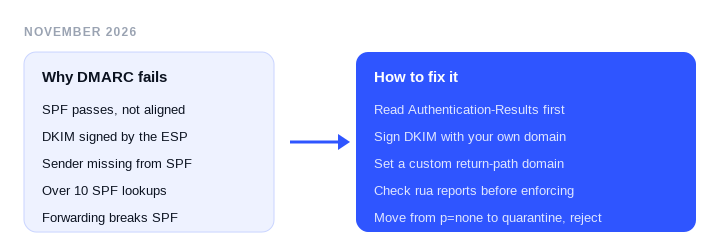
A DMARC fail means neither SPF nor DKIM produced a pass for a domain that matches the From address your recipients see. Most failures come from a legitimate service (a newsletter platform, CRM or help desk) that authenticates with its own domain instead of yours, so the fix is usually custom DKIM or a custom return-path domain at that service, not a change to your DMARC record. Below: how to read the evidence, fix each cause, handle Google Workspace and Microsoft 365, and clear “DMARC policy not enabled” warnings. Every rule and setting was checked against official documentation in November 2026.
TL;DR
- The rule: DMARC passes when SPF or DKIM passes and the domain it passed for aligns with your From domain. Passing SPF or DKIM alone is not enough.
- Most common cause: a third-party sender passes SPF on its own bounce domain or signs DKIM with its own domain. Turn on custom DKIM for your domain in that tool.
- Where to look first: the
Authentication-Resultsheader of a failed message, then your aggregate (rua) reports for volume and source IPs. - Google Workspace: DKIM is set up in the Admin console under Apps > Google Workspace > Gmail > Authenticate email. Microsoft 365: custom domains are not DKIM signed until you enable it in the Defender portal.
- “DMARC policy not enabled”: your record says
p=none. That still meets the Gmail and Yahoo bulk sender minimum, but it doesn’t protect the domain from spoofing. - Tooling: Unspam shows SPF, DKIM and DMARC results for a real message in its spam test and turns daily reports into named sources with its DMARC monitoring.
What DMARC pass and fail actually mean
DMARC was first defined in RFC 7489 (2015). In May 2026 it was replaced by RFC 9989, a Standards Track document that keeps the same pass logic. A message passes DMARC when at least one of two checks succeeds:
- SPF passes and aligns. SPF checks the envelope sender (the Return-Path, or
5321.MailFrom), not the From header. The envelope domain has to match the From domain. - DKIM passes and aligns. DKIM checks the signature, and the signing domain (the
d=value) has to match the From domain.
If both fail, DMARC fails and the receiver applies your policy (p=). That’s how a message can show spf=pass and dkim=pass and still fail DMARC: both passed for someone else’s domain.
Relaxed vs. strict alignment
The aspf (SPF) and adkim (DKIM) tags set how closely the domains must match. Both default to relaxed.
| From address | Authenticated domain | Relaxed (r, default) |
Strict (s) |
|---|---|---|---|
you@example.com |
example.com |
Aligned | Aligned |
you@example.com |
bounces.example.com |
Aligned | Not aligned |
you@news.example.com |
example.com |
Aligned | Not aligned |
you@example.com |
example.onmicrosoft.com |
Not aligned | Not aligned |
you@example.com |
example.net |
Not aligned | Not aligned |
Relaxed alignment only needs the same organizational domain, so subdomains count. Strict needs an exact match. Google’s troubleshooting guide warns that strict alignment “increases the likelihood that messages are rejected or sent to spam”. If you set aspf=s or adkim=s and failures started afterward, switch back to relaxed first.
How to read the evidence
A single failed message plus a few days of aggregate reports will usually point to the cause.
The Authentication-Results header
Open the full headers of a failed message (in Gmail: More next to Reply, then Show original) and find the Authentication-Results line added by the receiving server. Formats differ slightly between providers. This example follows the format in Microsoft’s DMARC documentation:
Authentication-Results: spf=pass (sender IP is 198.51.100.10)
  smtp.mailfrom=bounces.example.net; dkim=pass (signature was verified)
  header.d=example.net; dmarc=fail action=oreject
  header.from=example.com
Read it in three steps:
- Find the From domain:
header.from=example.com. - Compare the SPF domain:
smtp.mailfrom=bounces.example.net. SPF passed, but for a different organizational domain, so it isn’t aligned. - Compare the DKIM domain:
header.d=example.net. DKIM passed, but again for the service’s domain.
Both checks passed and DMARC still failed, so the fix belongs at the sending service, not in your DMARC record. The Google Admin Toolbox Messageheader tool parses a pasted header for you.
Aggregate reports: “passed” vs. “aligned”
Aggregate reports (sent to your rua address, usually daily per receiver) show the same split for every source IP. As Microsoft’s documentation points out, <auth_results> holds the raw SPF and DKIM result and <policy_evaluated> shows whether it aligned.
| What the report shows | What it means | What to do |
|---|---|---|
auth_results SPF pass, policy_evaluated SPF fail |
Authorized sender, wrong envelope domain | Custom return-path at the service, or rely on DKIM |
auth_results DKIM pass, policy_evaluated DKIM fail |
Service signs with its own domain | Enable custom DKIM for your domain |
| Known service, SPF and DKIM both fail | Service missing from SPF and not signing | Add it to SPF and set up DKIM |
| Unknown IPs, all failing | Spoofing, or a forgotten tool | Identify it; if nobody owns it, enforcement will stop it |
| Mailing list or forwarder IPs, all failing | Forwarding changed the message | Expected in part; see the forwarding cause below |
Not every receiver sends reports, so expect partial coverage. Our guide to DMARC monitoring explains how to sort every source and what changed in the tags under RFC 9989.
Why DMARC fails: causes and fixes
| Cause | How it shows up | Fix |
|---|---|---|
| Third-party sender not authorized | Service’s IP fails SPF and has no DKIM for your domain | Add the service’s SPF include and set up its DKIM records |
| DKIM not set up at an ESP | dkim=pass with header.d= set to the ESP’s domain |
Turn on custom or branded DKIM in the ESP and publish its records |
| SPF passes on the bounce domain | spf=pass with smtp.mailfrom= on the ESP’s domain |
Set a custom return-path (MAIL FROM) on a subdomain of yours |
| Forwarding and mailing lists | Fails only for some recipients; reports show list or forwarder IPs | Rely on DKIM; ask list operators not to modify messages; ARC at the receiver |
| SPF over 10 DNS lookups | spf=permerror for every message |
Remove unused includes; move senders to subdomains |
| DKIM key rotation or body changes | dkim=fail (body hash or key not found) after a change |
Publish the new key before switching; stop gateways adding footers |
| Subdomain policy surprises | Mail from news.example.com fails or gets quarantined |
Give each sending subdomain its own SPF and DKIM; check sp |
Third-party senders and DKIM at your ESP
Every tool that sends as your domain needs its own authentication: newsletter platform, invoicing, help desk, contact forms, CRM. Microsoft’s fix: configure DKIM signing with your domain at the service, or change its MAIL FROM to your domain or a subdomain. Prefer DKIM, because it survives forwarding when the body isn’t changed. If a service can’t sign with your domain, send its mail from a dedicated subdomain with its own records.
Forwarding and mailing lists
A forwarding server isn’t in your SPF record, so SPF fails. DKIM survives unless the message is changed, which mailing lists often do with subject tags and footers. Two things help:
- Make sure all your mail is DKIM signed with your domain. RFC 9989 says domains that publish
p=rejectmust not rely on SPF alone and must apply valid DKIM signatures (section 7.4). - ARC (RFC 8617, an Experimental protocol) lets intermediaries record the results they saw. Trusting it is a receiver-side setting (Microsoft 365 calls it trusted ARC sealers), not something you publish.
RFC 9989 also says domains whose users post to mailing lists should not publish p=reject, or should first spend at least a month at p=none and an equally long period at p=quarantine comparing results.
The SPF 10-lookup limit
SPF allows at most 10 mechanisms that trigger DNS lookups (include, a, mx, ptr, exists and the redirect modifier). Exceed it and the check returns permerror (RFC 7208, section 4.6.4), so SPF can’t help any message pass DMARC. Nested includes count too. Remove services you no longer use, and move high-volume tools to their own subdomains, each with a short SPF record:
example.com.        TXT  "v=spf1 include:<your mailbox provider> -all"
mail.example.com.   TXT  "v=spf1 include:<your transactional ESP> -all"
Use the exact include value each provider documents.
DKIM key rotation and body modification
DKIM fails when the receiver can’t find the selector’s public key, or the message changed after signing. Common triggers:
- A key was rotated in the sending tool, but the new selector’s DNS record wasn’t published (or the old one was deleted too early).
- A security gateway, disclaimer rule or archiving tool adds a footer or rewrites links after the message was signed.
- A DNS editor split or truncated a long 2048-bit key in a TXT record.
Google’s troubleshooting guide asks admins of servers in the path “to not modify messages, which can cause DKIM to fail”. Check the published key, then send a test through the full path, gateway included.
Subdomain policy
A DMARC record on example.com also covers subdomains without their own record, and with no sp tag they get the p policy (RFC 7489, section 6.3). Each sending subdomain still needs its own SPF and DKIM, so tightening the root domain can make a forgotten subdomain sender fail overnight. RFC 9989 adds an np tag for subdomains that don’t exist at all.
Fixing DMARC failures in Google Workspace
From Google’s DKIM setup guide, DMARC setup guide and DMARC troubleshooting guide:
- Set up DKIM for your domain. In the Admin console, go to Menu > Apps > Google Workspace > Gmail > Authenticate email, select the domain and generate a new record. Choose a 2048-bit key if your DNS host supports it, otherwise 1024. If Gmail was only just turned on, Google says you must wait 24 to 72 hours before the key is available.
- Publish the TXT record, then click Start authentication. Google says not to start authentication until the record is live, and that DKIM can take up to 48 hours to start working.
- Check SPF. Every server that sends as your domain must be in your SPF record. Google notes that messages from servers not in your SPF record can fail.
- Wait before adding or tightening DMARC. Google recommends allowing 48 hours after setting up SPF and DKIM before setting up DMARC, and starting with
p=none. - Trace failed messages. Use Email Log Search, searching by sender IP, to see what happened to a message, and paste headers into the Messageheader tool.
A 5.7.26 bounce from Gmail means the message wasn’t authenticated as Gmail requires. Gmail doesn’t support ruf, so it sends aggregate reports only.
Fixing DMARC failures in Microsoft 365
From Microsoft’s DKIM guide and DMARC guide:
- Enable DKIM for each custom domain. Microsoft says no DKIM signing happens for outbound mail from custom domains until you configure it, so a new tenant’s mail aligns only through SPF. In the Defender portal, go to Email & collaboration > Policies & rules > Threat policies > Email authentication settings, open the DKIM tab, and toggle the domain on.
- Publish the two CNAME records. The first toggle shows an error with the values for
selector1._domainkeyandselector2._domainkey. Copy the targets exactly from the portal: the record format changed for custom domains added from May 2025. Once the records resolve, turn on Sign messages for this domain with DKIM signatures. - Don’t forget the onmicrosoft.com domain. Its DMARC record is created in the Microsoft 365 admin center under Settings > Domains, on the domain’s DNS records tab. If you don’t send from it, Microsoft recommends
v=DMARC1; p=reject. - Read the inbound results. In headers,
dmarc=bestguesspassmeans the sender has no DMARC record and Microsoft inferred a pass.action=orejectmeans the sender publishedp=reject; with Honor DMARC record policy on, such mail is rejected with550 5.7.1, andp=quarantinemail goes to Junk.
Two specifics catch people out. Outbound Microsoft 365 mail that fails DMARC at the destination is routed through the high-risk delivery pool if your policy is quarantine or reject. And Microsoft 365 only sends aggregate reports when the receiving domain’s MX points directly to it, and never sends failure reports. For how mail routing works, see what an MX record is.
What “DMARC policy not enabled” means
Checkers such as MxToolbox show “DMARC Policy Not Enabled” when your record exists but has no protective policy: it doesn’t ask receivers to quarantine or reject failing mail. In practice that means p=none.
| Policy | What receivers are asked to do with failing mail | Protects against spoofing? |
|---|---|---|
p=none |
Nothing; deliver as usual and send reports | No |
p=quarantine |
Treat as suspicious, usually spam or junk folder | Partly |
p=reject |
Refuse the message during delivery | Yes |
The warning doesn’t mean you break the big mailbox providers’ rules:
- Gmail: bulk senders (more than 5,000 messages a day to Gmail accounts) must set up DMARC, and Google says the policy “can be set to none”. The From domain must align with the SPF or DKIM domain. All senders need SPF or DKIM (Google’s sender guidelines).
- Yahoo: bulk senders must publish “a valid DMARC policy with at least p=none”, and DMARC must pass. Yahoo strongly urges all senders to publish DMARC (Yahoo’s sender best practices).
So p=none meets the minimum. It’s the right starting point and the wrong place to stay, since anyone can still send as your domain. MxToolbox itself advises evaluating your reports before moving to quarantine or reject.
To see what your live record says, run it through a free checker such as Unspam’s DMARC checker.
A safe path from p=none to p=reject
- Publish
p=nonewith aruaaddress and collect at least two to four weeks of reports, so monthly senders (invoices, newsletters) appear. - Fix every legitimate source using the cause table above, highest volume first. Confirm each one turns aligned in the next reports.
- Move to
p=quarantine. Under RFC 9989, addingt=yasks receivers to apply one level lower while you test. Google’s and Microsoft’s guides still describepctsteps, a tag RFC 9989 removed. - Move to
p=rejectonce quarantine runs clean, ideally starting with sending subdomains and saving the root domain for last, which is also Microsoft’s recommended order.
v=DMARC1; p=none; rua=mailto:dmarc@example.com
v=DMARC1; p=quarantine; rua=mailto:dmarc@example.com
v=DMARC1; p=reject; sp=reject; rua=mailto:dmarc@example.com
The DMARC monitoring guide covers each step, including when p=reject is the wrong target.
Tools that help
Unspam: test one message, then monitor the domain
Unspam covers both halves of DMARC troubleshooting:
- Spam test for a single message. Send a real email to the test address and the report scores authentication (SPF, DKIM, DMARC), reputation, blacklists and content. A failed SPF, DKIM or DMARC check flags the message as high risk regardless of the score, which makes it a quick way to confirm a fix before a campaign. The free plan includes 5 spam tests a month.
- DMARC monitoring collects your aggregate reports, groups IPs into named sending sources, shows why each one fails and how to fix it, and checks whether each domain is ready for
p=quarantineorp=reject. Setup is one DNS record; if you already have a DMARC record, Unspam adds its reporting address and keeps your policy. A weekly summary arrives every Monday. - Free checks: the DMARC checker validates the live record in your browser with no signup.
Pricing: DMARC monitoring is part of the Custom plan at $6 per domain per month, with the first domain included and up to 500 domains; the Custom plan has a $5 monthly minimum. Annual billing takes 15% off, and paid plans have a 14-day refund window. DMARC monitoring isn’t on the Free plan.
Limitations: monitoring needs the paid Custom plan, and like any report-based tool it only sees receivers that send reports.
Free options
- Google Postmaster Tools: the Authentication dashboard shows the percentage of your mail that passes SPF, DKIM and DMARC, and the Compliance status dashboard checks DMARC for bulk senders. Data covers Gmail recipients only and can be missing at low volume (Postmaster Tools dashboards).
- Cloudflare DMARC Management: lists the sources sending as your domain with their SPF, DKIM and DMARC results. Cloudflare says it’s available on all plans for domains using Cloudflare DNS (Cloudflare docs).
- dmarcian: its free Personal plan is limited to non-business use, 2 domains and under 1,250 emails a month. Paid plans start at $19.99 a month billed yearly (dmarcian pricing).
For wider comparisons, see our roundups of email deliverability tools and email testing tools. If authentication passes but mail still lands in spam, try the cold email spam checklist or the blacklist removal guide.
FAQ
Why does DMARC fail when SPF and DKIM pass?
Because neither passed for your domain. SPF probably passed for the sending service’s bounce domain and DKIM for its signing domain. DMARC needs at least one of them to align with the From domain, so set up custom DKIM or a custom return-path at that service.
Does a DMARC fail mean my email was rejected?
Not necessarily. With p=none, failing mail is delivered as usual and only reported. With p=quarantine it usually goes to spam, and with p=reject it’s usually refused, though each receiver makes the final call.
How do I fix “DMARC policy not enabled”?
Change p=none to p=quarantine, and later p=reject, but only after your reports show every legitimate sender passing and aligned. Raising the policy first will send your own mail from misconfigured tools to spam or get it rejected.
Can forwarded email fail DMARC even if my setup is correct?
Yes. Forwarding breaks SPF, and forwarders or mailing lists that change the message break DKIM too. Signing all mail with DKIM for your domain keeps most forwarded mail passing, and receivers can use ARC to trust the original results.
How long after fixing DNS will DMARC pass?
DNS changes usually apply within the record’s TTL, though Google says Workspace DKIM can take up to 48 hours to start working. Test a real message right away, and expect to confirm the fix in aggregate reports a day or two later.
Build your Bootstrap theme
Design a custom Bootstrap 5 theme visually with a live preview, then export clean Sass or CSS.
Open the Builder