What Is an MX Record? How It Works and How to Check It
An MX (mail exchanger) record is the DNS record that tells other mail servers where to deliver email for your domain. When someone sends a message to you@example.com, their server looks up the MX records for example.com, picks the host with the lowest preference number, and connects to it. This guide explains how that lookup works, what a correct record looks like, how to check yours with dig, nslookup or Google Admin Toolbox, and what breaks when MX is wrong. Every rule and value was checked against the RFCs and official provider documentation in November 2026.
TL;DR
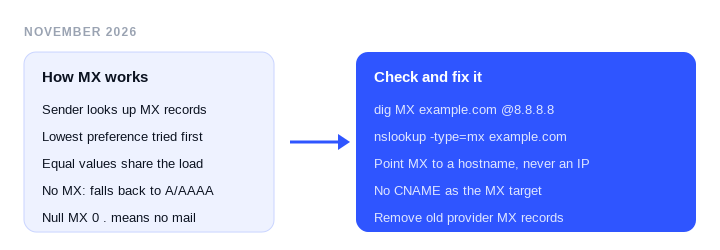
- What it is: a DNS record that names the mail server (or servers) that accept incoming email for a domain. It controls inbound mail only.
- Priority: each MX record has a preference number. Lower numbers are tried first; records with equal numbers share the load at random.
- No MX at all: senders treat the domain itself as an implicit MX with preference 0 and deliver to its A or AAAA address. If any MX record exists, that fallback is never used.
- Format rules: an MX must point to a hostname that has A or AAAA records. Not an IP address, and not a CNAME.
- Domains that never receive mail can publish a null MX (
0 .) so senders fail fast instead of retrying for days. - How to check:
dig MX example.com,nslookup -type=mx example.com, or the Dig tool in Google Admin Toolbox.
What is an MX record?
A and AAAA records map a name to an IP address; MX records answer one question: which servers accept email for this domain?
RFC 1035, the original DNS specification, defines the MX record with two fields:
- PREFERENCE: a 16-bit integer that orders the records. Lower values are preferred.
- EXCHANGE: a domain name, the host that is willing to act as a mail exchange for the domain.
A domain can have one MX record or several; large providers publish several for redundancy.
How mail servers use MX records
The delivery rules live in RFC 5321, the SMTP standard. Section 5.1, “Locating the Target Host”, describes what a sending server does with the domain part of a recipient address:
- Look up MX records for the domain.
- Sort them by preference. RFC 5321 says “lower numbers are more preferred than higher ones.” If several records share the same preference, the sender must randomize them to spread the load.
- Resolve each exchange host to its A or AAAA addresses and try them in order. The client must be able to try each address in the list until a delivery attempt succeeds, and should try at least two.
- Fall back only when there is no MX. If the lookup returns no MX records, the domain is treated as if it had an implicit MX with preference 0 pointing to itself, so the sender connects to the domain’s own A or AAAA address. If MX records exist, the sender must not use address records it didn’t reach through them.
So a domain with a website and no MX may receive mail attempts on the web server’s IP. Once MX records exist, that A record plays no part in mail delivery.
MX record priority in practice
Here’s how Gmail’s five records (from the lookup below) are read:
| Preference | Host | Role |
|---|---|---|
| 5 | gmail-smtp-in.l.google.com. |
Tried first |
| 10 | alt1.gmail-smtp-in.l.google.com. |
Second choice |
| 20 | alt2.gmail-smtp-in.l.google.com. |
Third choice |
| 30 | alt3.gmail-smtp-in.l.google.com. |
Fourth choice |
| 40 | alt4.gmail-smtp-in.l.google.com. |
Last resort |
Only the order matters, not the size of the numbers. 1 and 2 behave exactly like 10 and 20. Two hosts both at 10 split incoming connections between them.
A backup MX is not a separate mailbox: every MX host should belong to the same mail system or relay to it, or mail that lands there may never reach your users.
MX record format and TTL
In a zone file an MX record looks like this:
example.com. 3600 IN MX 10 mail.example.com.
| Field | Example | Meaning |
|---|---|---|
| Name (host) | example.com. |
The domain that receives mail. Most DNS panels write it as @. |
| TTL | 3600 |
How long, in seconds, resolvers may cache the answer. 3600 is one hour. |
| Class and type | IN MX |
Internet class, mail exchanger record. |
| Preference | 10 |
Order of use. Lower wins. |
| Exchange | mail.example.com. |
The mail server’s hostname. The trailing dot marks it as a full name. |
TTL matters when you change providers: resolvers can serve the old answer until it expires, so lowering it a day or two before a migration shortens the overlap. Microsoft’s reference value for its MX record is 3600 seconds.
MX must point to a hostname, not an IP or a CNAME
Two rules trip up a lot of manual DNS edits:
- No IP addresses. RFC 1035 defines EXCHANGE as a domain name, and RFC 5321 says the data field of an MX response “MUST contain a domain name” that resolves to at least one address record. Typing
203.0.113.25into the MX value field doesn’t create a valid mail route. Create an A record such asmail.example.comfor the IP, then point the MX at that name. - No CNAMEs. RFC 2181, section 10.3 says the domain name in an MX record “must not be an alias.” The exchange host needs its own A or AAAA records. Some mail systems may still follow the alias, but you can’t count on every sender doing so.
Null MX: telling the world a domain takes no mail
Parked domains and microsites never receive email, but without an MX they fall back to their A record, so senders may retry for days against a web server that doesn’t speak SMTP.
RFC 7505 (June 2015, Standards Track) fixes this with a null MX: a single MX record with preference 0 and an exchange of . (the root, which can’t be a real host). You can see one on example.com today:
$ dig MX example.com +noall +answer @8.8.8.8
example.com.		107	IN	MX	0 .
The rules are short:
- The null MX must be the only MX record for the domain.
- Senders shouldn’t attempt delivery. A server that refuses a recipient for this reason should use reply code 556 with enhanced status 5.1.10.
- Don’t publish a null MX on a domain you send from. Receivers may reject mail whose envelope or From domain has a null MX, with 550 5.7.27. For a non-sending domain, pair the null MX with an SPF record of
v=spf1 -all, as RFC 7505 suggests.
How to check MX records
These methods query public DNS, so they show what senders see, not what your DNS panel says you saved. Outputs were captured on November 25, 2026, via Google Public DNS (8.8.8.8).
dig (macOS, Linux)
$ dig MX gmail.com +noall +answer @8.8.8.8

; <<>> DiG 9.10.6 <<>> MX gmail.com +noall +answer @8.8.8.8
;; global options: +cmd
gmail.com.		2683	IN	MX	30 alt3.gmail-smtp-in.l.google.com.
gmail.com.		2683	IN	MX	5 gmail-smtp-in.l.google.com.
gmail.com.		2683	IN	MX	40 alt4.gmail-smtp-in.l.google.com.
gmail.com.		2683	IN	MX	10 alt1.gmail-smtp-in.l.google.com.
gmail.com.		2683	IN	MX	20 alt2.gmail-smtp-in.l.google.com.
Each line reads: name, TTL in seconds, class, type, preference, host. +noall +answer keeps only the answer section; drop it to see the status line (NOERROR means the name exists, NXDOMAIN means it doesn’t).
The records came back unsorted, and a second run returned a different order. Always read the preference number, not the line order.
nslookup (Windows, macOS, Linux)
$ nslookup -type=mx gmail.com 8.8.8.8
Server:		8.8.8.8
Address:	8.8.8.8#53

Non-authoritative answer:
gmail.com	mail exchanger = 10 alt1.gmail-smtp-in.l.google.com.
gmail.com	mail exchanger = 5 gmail-smtp-in.l.google.com.
gmail.com	mail exchanger = 40 alt4.gmail-smtp-in.l.google.com.
gmail.com	mail exchanger = 30 alt3.gmail-smtp-in.l.google.com.
gmail.com	mail exchanger = 20 alt2.gmail-smtp-in.l.google.com.
“Non-authoritative answer” just means the result came from a resolver’s cache. The same command works in Windows Command Prompt and PowerShell.
A Microsoft 365 domain shows the provider’s host pattern clearly:
$ dig MX microsoft.com +noall +answer @8.8.8.8
microsoft.com.		327	IN	MX	10 microsoft-com.mail.protection.outlook.com.
Google Admin Toolbox
If you’d rather not use a terminal, the Google Admin Toolbox Dig tool runs the same lookup in a browser. Enter the domain, pick MX, and it lists each exchange host with its preference and remaining TTL.
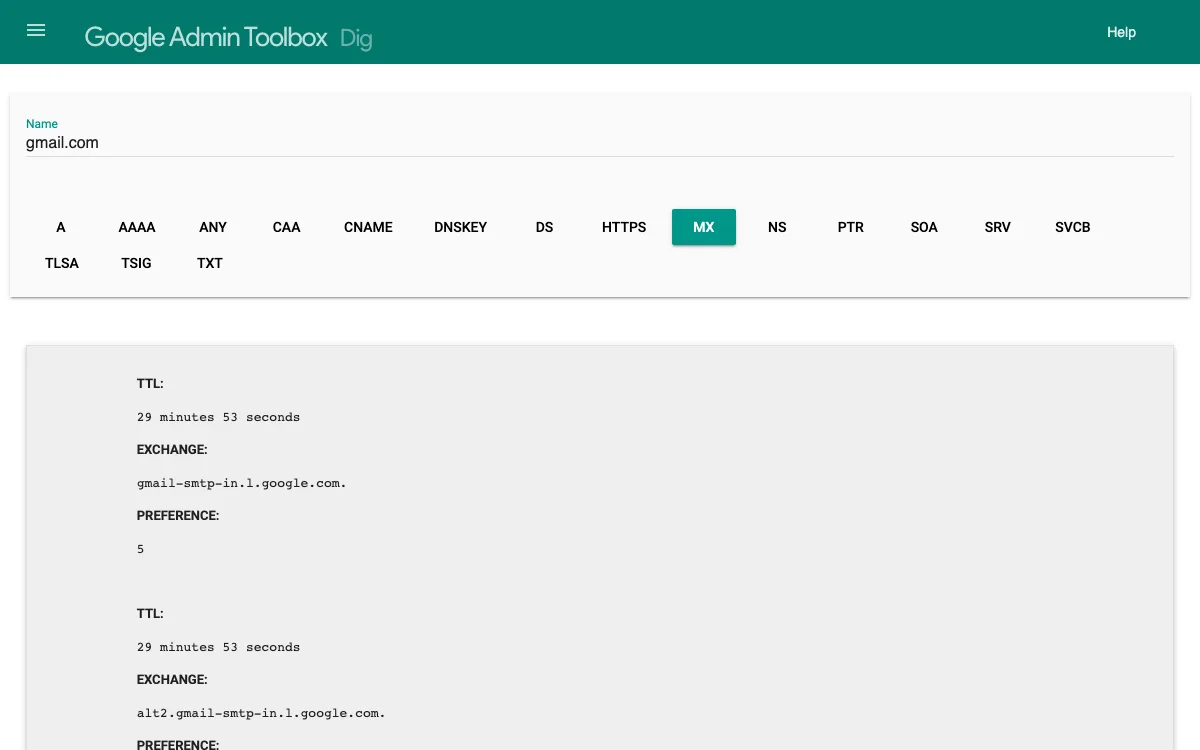
The toolbox also has a Check MX tool, but it’s built for Google Workspace domains: it checks MX, SPF, DKIM and DMARC against Google’s requirements and warns when no Google mail exchangers are found. Use it to validate a Workspace setup, and Dig for everything else.
Official MX values for Google Workspace and Microsoft 365
Always copy values from your provider’s admin console. These are the documented defaults as of November 2026.
Google Workspace
From Google’s Set up MX records for Google Workspace guide:
| Host | Type | Priority | Value |
|---|---|---|---|
@ |
MX | 1 |
smtp.google.com |
- Delete every other MX record. Google warns that old or incorrect MX records can stop email from working correctly.
- Trailing dot: some registrars need
smtp.google.com.with a period at the end. Others offer a preset option. - Timing: it can take up to 72 hours for new MX records to be recognized.
- Older accounts: setups that began before 2023 may use values starting with
aspmx. Google says those are still supported, and if mail works you don’t need to change anything.
Microsoft 365
From Microsoft’s External DNS records for Microsoft 365 reference:
| Host | Type | Priority | Value | TTL |
|---|---|---|---|---|
@ |
MX | Lower than any other MX (for example, 1) |
<MX token>.mail.protection.outlook.com |
3600 |
- Find your MX token in the Microsoft 365 admin center under Domains: choose Fix issues for the domain, then What do I fix? in the MX records section. The
microsoft-comexample above shows the pattern, but copy your own value rather than guessing. - Remove old MX records once mail flows to Exchange Online. Microsoft notes that multiple MX records “can cause problems for mail delivery” and recommends a single MX pointing to one mail system.
- Microsoft has announced a move toward DNSSEC-capable mail hosts under
mx.microsoftfor newly added domains, so a new domain may show a different host in the admin center. Use whatever value the admin center gives you.
Common MX mistakes and what happens when MX is wrong
| Mistake | What senders experience |
|---|---|
| MX points to a host with no A or AAAA record | No usable mail server; delivery fails and senders get a bounce |
| MX value is an IP address | Not a valid exchange name, so there’s no usable mail route |
| MX points to a CNAME | Breaks the RFC 2181 rule; some senders may refuse to deliver |
| Old and new provider MX both live | Some mail lands in the old system, often unseen or rejected as “user unknown” |
| Missing trailing dot in a zone file | smtp.google.com becomes smtp.google.com.example.com, which doesn’t exist |
Typo in the domain (NXDOMAIN) |
Senders report a permanent error immediately |
| Null MX on a sending domain | Your outbound mail may be rejected with 550 5.7.27 |
| No MX at all | Mail is attempted to the website’s A record |
RFC 5321 says a non-existent domain must be reported as an error right away. A temporary DNS failure means the message must be queued and retried, with a retry interval of at least 30 minutes and a give-up time that “generally needs to be at least 4-5 days.” That’s why a broken MX can stay silent for days: senders keep retrying, and only then do your contacts receive a bounce. The guide to hard bounces vs. soft bounces explains how to read the codes those messages carry.
Because a broken MX gives you no visible error, it’s worth watching DNS for changes; the DNS monitoring guide covers tools that alert you when a record changes or disappears.
How MX relates to SPF, DKIM and DMARC
All four are DNS records about email, so they get mixed up. The split is simple: MX handles mail coming in; SPF, DKIM and DMARC authenticate mail going out.
| Record | DNS type | Direction | What it does |
|---|---|---|---|
| MX | MX | Inbound | Tells senders which servers accept your mail |
| SPF | TXT | Outbound | Lists servers allowed to send as your domain |
| DKIM | TXT (or CNAME to the provider’s key) | Outbound | Publishes the public key that verifies your signatures |
| DMARC | TXT at _dmarc |
Outbound | Sets the policy when SPF and DKIM don’t pass and align, and where reports go |
A few practical consequences:
- Changing MX doesn’t change who can send as you. Moving inbound mail to a new provider still requires updating SPF and DKIM for that provider’s outbound servers.
- The SPF
mxmechanism authorizes your MX hosts to send. It costs one of SPF’s 10 DNS lookups and is only correct if your inbound servers also send your mail. - DMARC reports arrive by email, so the mailbox in your
ruaaddress needs working MX records to receive them.
If outbound authentication is failing, the DMARC fail guide walks through reading headers and fixing alignment, and the DMARC monitoring guide covers moving from p=none to p=reject.
Test whether your outbound mail lands in the inbox
A correct MX record means you can receive mail. It says nothing about whether the mail you send reaches the inbox; for that, send a real message and see where it lands.
Unspam does both halves of that check:
- Inbox placement test: sends your email to a seed list across Gmail, Outlook, Yahoo and other providers, then reports where each copy landed: Inbox, Promotions, Spam or Missing.
- Spam test: send any email to the unique test address from the platform you actually use. The report gives a 0 to 100 spam score built from authentication (SPF, DKIM, DMARC), sender reputation, blacklists and content, and shows which checks cost points. If SPF, DKIM or DMARC fails, the report flags the message as high risk regardless of the score, since a failed check alone can send mail to spam.

Pricing: you can run a spam test with no account (3 spam tests and 2 inbox placements a month). The Free plan adds more: 5 spam tests, 3 inbox placements and 3 device previews a month, the AI assistant, and 14-day result retention. The usage-based Custom plan is $6.40 a month for its default 25-test allowance (spam tests are $0.18 each, inbox placements $0.50), adds DMARC monitoring and API access, and annual billing saves 15%.
Limitations: Unspam tests messages you send; it doesn’t audit your MX records. Use dig or the toolbox for inbound DNS and Unspam for outbound delivery.
For broader comparisons, see the email deliverability tools roundup.
FAQ
What is an MX record in simple terms?
It’s a DNS entry that says which server receives email for your domain. Sending servers look it up before delivering, so a wrong MX record means mail can’t find your mailbox provider.
What does MX record priority mean?
Priority (preference) sets the order in which senders try your mail servers. The lowest number is tried first, higher numbers are backups, and records with equal numbers share the load at random. Only the order matters, so 1, 2 works the same as 10, 20.
Can I have more than one MX record?
Yes, and large providers publish several for redundancy. Every MX host must belong to the same mail system, though. Mixing an old and a new provider’s records splits your incoming mail between them.
Can an MX record point to an IP address or a CNAME?
No. The MX value must be a hostname with its own A or AAAA records. To use an IP, create an A record such as mail.example.com and point the MX at that name; RFC 2181 also says the MX target must not be a CNAME alias.
How long does an MX record change take to work?
New resolvers see it right away, but cached answers last until the old record’s TTL expires, often one hour. Google says Workspace MX changes can take up to 72 hours to be recognized, so check with dig MX yourdomain.com @8.8.8.8 before removing the old mail service.
Build your Bootstrap theme
Design a custom Bootstrap 5 theme visually with a live preview, then export clean Sass or CSS.
Open the Builder