What Is a Subdomain? How It Works and How to Create One
A subdomain is an extra label added to the left of a domain name, such as blog in blog.example.com, that lets you run a separate site, app or service under a domain you already own. You create one with a DNS record, not by registering anything new. This guide covers how domain names are built, subdomains vs subdirectories for SEO, how to set one up with A, AAAA or CNAME records, and how to keep it secure. Every rule and value was checked against the RFCs and official documentation in November 2026.
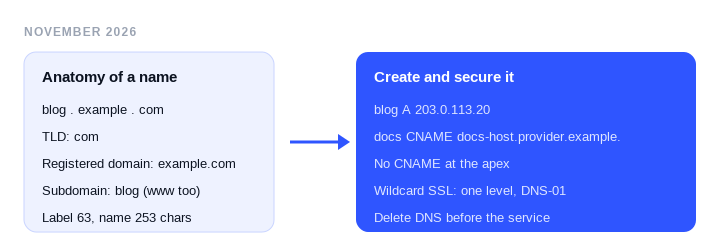
TL;DR
- What it is: a name below your registered domain, like
shop.example.com. It’s free and needs no new registration. - How to create one: add a DNS record. Use an A or AAAA record to point it at an IP address, or a CNAME to point it at another hostname.
- www is a subdomain too, so
www.example.comandexample.comeach need their own record. - SEO: Google’s SEO Starter Guide lists subdomains vs subdirectories among topics not to focus on: “do whatever makes sense for your business.” Some things, like robots.txt, still work per host.
- SSL: a wildcard certificate (
*.example.com) covers one level of subdomains. Let’s Encrypt issues wildcards only through the DNS-01 challenge. - Security: remove the DNS record when you retire the service behind a subdomain, or a dangling CNAME can let someone else claim it.
Anatomy of a domain name
DNS reads a name from right to left. Each part between the dots is a label, and each label sits one level below the one to its right. Take blog.example.com:
| Part | Example | What it is |
|---|---|---|
| Root | . (usually invisible) |
The top of the DNS tree; the trailing dot in example.com. |
| Top-level domain (TLD) | com |
Run by a registry. Generic (.com, .org) or country code (.uk, .de) |
| Registered domain | example.com |
The name you buy from a registrar |
| Subdomain | blog |
Any label you add to the left of the registered domain |
Strictly, every name is a subdomain of the one above it, so example.com is a subdomain of com. In everyday use, “subdomain” means a name below the domain you registered. Subdomains can also nest: eu.api.example.com sits under api.example.com.
www is a subdomain
www is just a label that became a convention. www.example.com and the bare domain (the apex, written @ in most DNS panels) are two different names, and each needs a record. A common setup points the apex at the server, makes www an alias of it, and redirects one to the other.
A lookup through Google Public DNS on November 25, 2026 shows GitHub doing exactly that:
$ dig www.github.com +noall +answer @8.8.8.8
www.github.com.		3596	IN	CNAME	github.com.
github.com.		60	IN	A	74.161.79.192
www.github.com is a CNAME to github.com, which has an A record. docs.github.com, by contrast, resolves to its own A records with different IPs.
Length and character limits
RFC 1035, section 2.3.4 sets the size limits:
- Each label: 63 octets or less.
- The whole name: 255 octets or less in DNS wire format. That format stores a length byte before each label, so the longest name you can write in dotted text form is 253 characters.
Hostname labels conventionally use letters, digits and hyphens, without a hyphen at the start or end. RFC 1123 relaxed the older rule so a label may start with a digit. Name comparisons are case insensitive, per RFC 1034, so Blog.example.com and blog.example.com are the same.
Subdomain vs domain
| Domain | Subdomain | |
|---|---|---|
| Example | example.com |
shop.example.com |
| How you get it | Register and renew at a registrar | Add a DNS record in a zone you control |
| Cost | Yearly registration fee | Free |
| Expires | When the registration lapses | Never on its own, but goes down with the parent |
Every subdomain depends on the parent registration: if example.com expires, shop., app. and status. go with it. The guide to domain monitoring covers how to get warned in time.
What subdomains are used for
Subdomains let you send parts of one brand to different servers or providers:
| Subdomain | Typical use | Usually points to |
|---|---|---|
blog. |
Blog on a separate CMS | The blog platform, often by CNAME |
shop. |
Online store | The store provider’s hostname |
app. |
Logged-in web application | Your app servers or load balancer |
status. |
Public status page | A status page provider |
docs. |
Documentation | A docs host or static site |
mail. |
Webmail or the mail server’s hostname | The mail provider |
A mail server hostname is often a subdomain that the domain’s MX record points to. The guide to MX records explains why that target needs its own A or AAAA record rather than a CNAME.
Subdomain vs subdirectory for SEO
A subdirectory is a path on the same host (example.com/blog/); a subdomain is a different host (blog.example.com). Which is better for search is heavily debated, and Google’s own statements are more modest than most claims.
What Google says directly. The SEO Starter Guide lists “Subdomains versus subdirectories” under things Google believes you shouldn’t focus on, with this advice: “From a business point of view, do whatever makes sense for your business.” It adds that subdirectories may be easier to manage, while sometimes it makes sense to partition topics into subdomains. Separately, it notes that on sites with more than a few thousand URLs, grouping topics in directories can help Google learn how often each section changes.
Where each host is handled separately. These are mechanics from Google’s documentation, not ranking statements:
- robots.txt: Google’s robots.txt guide says “A robots.txt on a subdomain is only valid for that subdomain.”
- Site names: site names can appear for domains and subdomains, but “Google Search does not support site names at the subdirectory level.”
- Search Console: a DNS-verified Domain property covers all subdomains; a URL-prefix property for
https://example.com/doesn’t includeblog.example.com. - International sites: the multi-regional guide lists both structures. Subdomains allow different server locations and easy separation; subdirectories are low maintenance on one host but make separation harder.
A fair reading. Google doesn’t say subdomains rank worse or better. The real differences are operational: a subdomain is a separate host with its own robots.txt, server and analytics setup, while a subdirectory shares everything with the main site. Use a subdirectory when the content belongs to the same site and your platform can serve it. Use a subdomain when it runs on a different system, like a store, app or help center. Either way, link the sections together and keep the structure stable, since moving later means redirects.
How to create a subdomain
Subdomains are created wherever your domain’s DNS is hosted: usually the registrar, or a DNS provider such as Cloudflare if you moved your nameservers there.
- Get the target from your host: an IP address or a hostname.
- Add the record: Name (or Host)
blog, type A, AAAA or CNAME, and that value. - Add the name on the hosting side too, or visitors reach the right server and still get an error.
- Test it with
dig blog.example.com +noall +answer @8.8.8.8ornslookup blog.example.com 8.8.8.8.
Example zone entries
In zone file form (with reserved documentation IPs), a domain with several subdomains might look like this:
$ORIGIN example.com.
@       3600  IN  A      203.0.113.10
www     3600  IN  CNAME  example.com.
blog    3600  IN  A      203.0.113.20
blog    3600  IN  AAAA   2001:db8::20
docs    3600  IN  CNAME  docs-host.provider.example.
shop    3600  IN  CNAME  shops.store-platform.example.
An A record maps a name to an IPv4 address and AAAA to an IPv6 address; a name can have both. A CNAME makes the name an alias, and resolvers then look up the target’s addresses.
A record vs CNAME
| A / AAAA record | CNAME record | |
|---|---|---|
| Points to | An IP address | Another hostname |
| Best when | You control a server with a stable IP | A provider gives you a hostname |
| Can share the name with other records | Yes | No |
| Allowed at the apex | Yes | No |
The CNAME rules come from the DNS standards. RFC 1034, section 3.6.2 says that if a CNAME is present at a node, “no other data should be present.” RFC 1912, section 2.4 is blunter: “A CNAME record is not allowed to coexist with any other data.”
That’s why a CNAME can’t sit on the bare domain, which must hold SOA and NS records. RFC 1912 warns specifically against combining CNAME and NS records and suggests an A record instead. Some DNS providers offer CNAME flattening or ALIAS/ANAME records that act like a CNAME in the panel but answer with A records; those are provider features, not a standard record type. On a subdomain, either type works.
TTL: how long changes take
Every record has a TTL in seconds. RFC 1034 defines it as “a time limit on how long an RR can be kept in a cache.” With a TTL of 3600, resolvers may serve the old value for up to an hour after a change, so lower the TTL to around 300 a day before a planned move.
Wildcard subdomains
A wildcard record uses * as the left-most label:
* 3600 IN A 203.0.113.30
Now anything.example.com resolves to that IP, which is how some multi-tenant apps give each customer a subdomain. RFC 1034, section 4.3.3 says a wildcard doesn’t apply when the query name is known to exist, so blog above keeps its own record. It applies only to names below the domain, never to the domain itself, so it doesn’t match example.com.
Use wildcards deliberately. RFC 1912 notes that wildcard A and CNAME records “are really confusing to users,” and a typo like wwww.example.com loads your site instead of failing.
Point a subdomain at a site on Static.app
For a static site (HTML, CSS and JavaScript, including site builder and AI tool exports), Static.app hosts the files and handles the DNS check and SSL for a custom domain or subdomain.
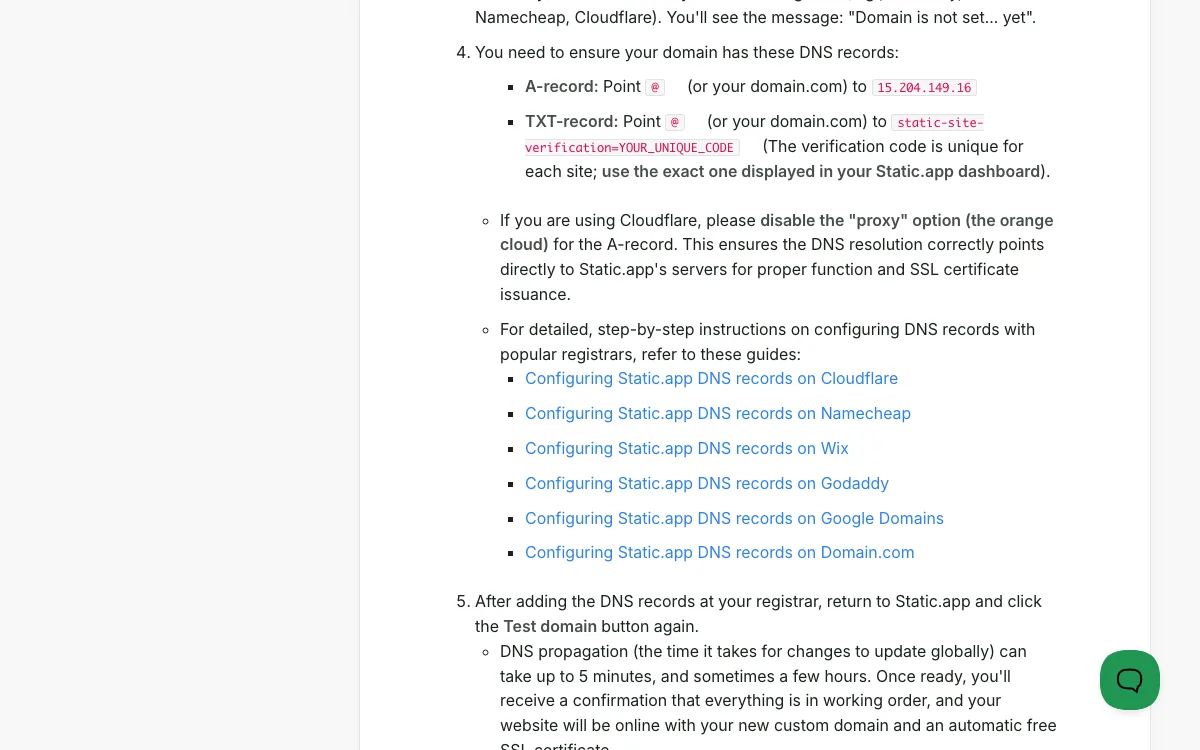
Per Static.app’s domain help article:
- In the site’s Settings > Domains, type the full name in Custom Domain, for example
docs.yourbusiness.com, and click Test domain. If DNS isn’t ready, the dashboard lists the records to add. - For a root domain, the documented records are an A record for
@pointing to15.204.149.16and a TXT record with astatic-site-verificationcode unique to the site. Thewwwredirect uses an A record to the same IP. Copy the values from your own dashboard. - On Cloudflare, turn off the proxy (orange cloud) for the A record so the certificate can be issued.
- Click Test domain again. Propagation takes up to 5 minutes, sometimes a few hours, and the site then goes live with a free SSL certificate.
Pricing: custom domains need a paid plan. Starter is $6 a month (2 websites, 500 MB), Medium $12 (7 websites, 3 GB) and Large $18 (30 websites, 10 GB), or $60, $120 and $180 billed yearly. All paid plans include SSL and unlimited traffic.
Limitations: no permanent free plan, only a 7-day trial on a free static.domains subdomain. Static files only, so server-side code and databases need another host. The help center asks you not to reconnect a custom domain more than 5 times a week.
On GitHub Pages instead? The GitHub Pages custom domain guide covers the CNAME and apex setup there.
SSL certificates for subdomains
Every hostname a browser visits must appear on the certificate it receives; a certificate for example.com doesn’t cover blog.example.com, and the mismatch triggers a browser warning. The SSL certificate error guide covers how to fix those.
| Certificate | Covers | Good for |
|---|---|---|
| Single name | One hostname | One subdomain on its own server |
| SAN (multi-domain) | A list of names, like example.com, www.example.com, blog.example.com |
A fixed set of names |
| Wildcard | *.example.com: any single-label subdomain |
Many or changing subdomains |
- A wildcard covers one level only. RFC 9525 says a wildcard “can only match one label,” so
*.example.commatchesblog.example.combut noteu.api.example.com. It doesn’t cover the bareexample.comeither, so certificates usually list the apex as a second name. - Let’s Encrypt wildcards need DNS validation. Its challenge types page says HTTP-01 “cannot be used to issue wildcard certificates,” while DNS-01 can. Your ACME client must be able to create a TXT record at
_acme-challenge.example.com, usually through your DNS provider’s API. - SAN limits: Let’s Encrypt’s rate limits page says a certificate can include up to 100 identifiers.
Cookies and security
Cookies are shared downward
A cookie set with Domain=example.com goes to example.com and every subdomain. MDN’s Set-Cookie reference explains that omitting Domain makes a host-only cookie that subdomains don’t receive. Leave Domain off session cookies unless you need them shared, and use the __Host- prefix for sensitive ones: browsers accept it only with Secure, Path=/ and no Domain.
Subdomain takeover from dangling CNAMEs
A takeover happens when a DNS record still points at an external service you stopped using. If shop.example.com has a CNAME to a store platform and you close the store but keep the record, someone else may be able to claim that hostname on the platform and serve content on your subdomain.
MDN’s subdomain takeover page recommends:
- Order your steps. Claim the name on the hosting service before adding DNS, and when shutting down, remove the DNS record first.
- Keep an inventory of every subdomain and what it points to.
- Ask providers how they verify ownership, like the TXT record Static.app requires.
The DNS monitoring guide covers tools that alert you when records change.
Keep every subdomain working
Each subdomain has its own DNS record, server and certificate, so the main site can be fine while app. serves an expired certificate. Pulsetic watches these pieces separately:
- Uptime per subdomain: one monitor per host. Failures are confirmed from other regions before an alert goes out.
- SSL expiry: the certificate is re-read every hour, with reminders 14, 7 and 1 days before expiry; a wrong certificate after renewal shows up at the next check.
- Domain expiry: alerts 14 and 7 days out and the day before, for the parent domain every subdomain depends on.
- DNS changes: hourly checks of A, AAAA, CNAME, MX, NS, TXT and CAA records log old and new values. This covers the domain and its
wwwonly, so cover other subdomains with uptime and SSL monitors. - Status page on
status.yourdomain.com; the status pages guide compares options.
Pricing: Free covers 10 monitors, heartbeats and domains with 5-minute checks, SSL monitoring and 3 status pages. Solo is $9 a month (60-second checks), Team $19 and Organization $49 (30-second checks); yearly billing saves 2 months.
Limitations: on Free, each subdomain uses one of the 10 monitors, and SMS, call and WhatsApp alerts are paid-plan only.
FAQ
What is a subdomain in simple terms?
It’s a name added in front of your domain, like blog in blog.example.com, used for a separate section, site or service. It’s free and created with a DNS record, and each one can point to a different server.
What’s the difference between a subdomain and a subdirectory?
A subdomain is a separate host (blog.example.com); a subdirectory is a path on the same host (example.com/blog/). Google’s SEO Starter Guide says to do whatever makes sense for your business. A subdomain needs its own robots.txt and certificate coverage, while a subdirectory shares the main site’s.
Should I use an A record or a CNAME for a subdomain?
Use a CNAME when your provider gives you a hostname, and an A or AAAA record when it gives you an IP address. A CNAME can’t share its name with other records, which is why it isn’t allowed on the bare domain.
Do I need a separate SSL certificate for each subdomain?
Each subdomain must be on a certificate, either by name (single or SAN) or through a wildcard like *.example.com. A wildcard covers one level only and not the bare domain. Many hosts issue a certificate automatically when you connect the name.
How long does a new subdomain take to work?
A new name usually resolves within minutes. Changes to an existing record can take up to its TTL, often one hour, to reach everyone. Check what public DNS returns with dig yourname.example.com @8.8.8.8.
Build your Bootstrap theme
Design a custom Bootstrap 5 theme visually with a live preview, then export clean Sass or CSS.
Open the Builder