Cold Email Templates: 12 Plain-Text Examples for 2026
A good cold email template is short, plain text, and built around one reason to write to this person now: a trigger, a referral, or a specific idea. Below are 12 original B2B templates, including two follow-ups and a breakup email, each with when to use it, why it works and what to customize, plus the deliverability checks that get them to the inbox. Sender rules and tool limits were checked in November 2026.
TL;DR
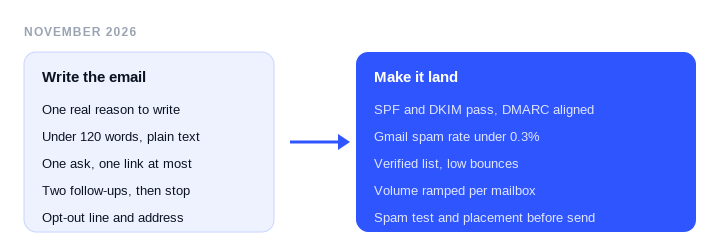
- Lead with a reason: open with something true about the recipient (a hire, a launch, a referral), not your company.
- Under 120 words, plain text, one ask: no images or attachments, at most one link.
- Make it land: SPF, DKIM and DMARC passing, a verified list, modest daily volume per mailbox, and a Gmail spam rate under 0.3% (Google recommends under 0.1%).
- Test before the campaign: Unspam gives a spam score and inbox placement across 10 seed mailboxes, free for 5 spam and 3 placement tests a month.
How to use these templates
Text in square brackets is a placeholder. Replace every one, and write the personal sentence by hand: it makes a cold email read like a message, not a mail merge. Rules for all 12:
- One reason, one ask. If you want two things, send two emails weeks apart.
- Short subject lines, 2 to 5 words, that look like a colleague’s email, not a campaign.
- An opt-out line and a postal address. The FTC’s CAN-SPAM guide says the law “makes no exception for business-to-business email”: commercial messages need a working opt-out (a return email address is allowed), honored within 10 business days, and a valid physical postal address.
First-touch cold email templates
1. The trigger email
Subject: [company]'s new [team/office/product]

Hi [First name],

Saw that [company] just [specific trigger: opened a Denver office / hired a Head of RevOps / launched X]. Teams at that stage usually hit [specific problem] within a few months.

We help [type of company] [outcome in plain words], for example [customer or result you can name].

Worth a 15 minute call to see if it applies to you?

[Your name]
[Signature with postal address]

Not the right time? Just reply "no" and I won't follow up.
When to use it: something changed at the account in the last 30 to 60 days: funding, a senior hire, a new market, a launch.
Why it works: the first line answers “why me, why now”.
What to customize: the trigger, the problem tied to it, and one proof point. Drop the proof line rather than invent one.
2. The referral email
Subject: [Referrer first name] suggested I reach out

Hi [First name],

[Referrer full name] mentioned you're the person who handles [area] at [company]. I spoke with [him/her/them] about [topic], and [he/she/they] thought it might be relevant to you because [reason the referrer gave].

In short: [one sentence on what you do and for whom].

Open to a short call next week, or should I send a two-line summary first?

[Your name]
[Signature with postal address]

If this isn't useful, a quick "no thanks" is completely fine.
When to use it: only when the referral is real and the referrer agreed to be named.
Why it works: a trusted name does the credibility work.
What to customize: the referrer’s reason, in their words. A faked referral is exposed by one reply to the referrer.
3. The agency or freelancer pitch
Subject: idea for [company]'s [page/campaign/app]

Hi [First name],

I looked at [specific page, campaign or flow] and noticed [one concrete issue: the pricing page loads in 6 seconds on mobile / the signup form asks for 9 fields].

I'm a [role] who works with [type of client]. For [past client or similar company], fixing a similar issue [result you can verify].

I can send a short written breakdown of what I'd change, no call needed. Want it?

[Your name]
[Portfolio URL]
[Postal address]

Reply "pass" and I'll leave you alone.
When to use it: designers, developers, writers and agencies pitching a specific improvement.
Why it works: it proves you looked at their work, and the offer is a useful asset, not a meeting.
What to customize: a specific, checkable observation. Keep the portfolio as the only link, on your own domain.
4. The partnership email
Subject: [your product] + [their product]

Hi [First name],

A lot of [their customer type] we work with also use [their product], and several have asked whether the two connect.

I'd like to explore [specific idea: an integration / a co-written guide / a joint webinar for shared customers]. On our side we can bring [concrete asset: X customers in the segment, an API, a newsletter of Y readers].

Are you the right person for partnerships, or is there someone better to ask?

[Your name]
[Signature with postal address]

If this isn't a fit, just say so and I won't follow up.
When to use it: integrations, co-marketing and referral deals between companies with overlapping customers.
Why it works: it starts from shared customers, and the last question still works if you picked the wrong person.
What to customize: the evidence of overlap and one concrete idea. “Let’s partner” with no proposal rarely gets a reply.
5. The recruiting email
Subject: your work on [project]

Hi [First name],

I came across your [talk/repo/article/portfolio] on [topic], especially [specific detail].

I'm hiring a [role] at [company] to work on [the actual problem]. The team is [size], the role is [remote/location], and the range is [salary range].

Would you be open to a 20 minute conversation, even if you're not looking right now?

[Your name]
[Signature with postal address]

Not interested? Reply "no" and I won't reach out again about this role.
When to use it: sourcing candidates who are not actively applying.
Why it works: it names their own work, the problem they would own, and the salary range up front.
What to customize: the detail from their work and the real range. Skip company boilerplate.
6. The investor intro request
Subject: [company]: [one-line description]

Hi [First name],

I'm [name], founder of [company]. We [what you do] for [who].

Why I'm writing to you: you invested in [portfolio company or theme], and we're [how you relate to it, without overlapping a competitor].

Where we are: [2 or 3 metrics: revenue, growth, customers]. We're raising [amount] for [use of funds].

Would you like the deck, or a 20 minute call?

[Your name]
[Signature with postal address]

If this is outside your focus, a one-word reply is appreciated and I won't follow up.
When to use it: angels and funds when no warm intro is available.
Why it works: it answers what, why them, and traction in under 100 words.
What to customize: the thesis match and real metrics. Check the portfolio for competitors first.
7. The event follow-up
Subject: after [event name]

Hi [First name],

I was at [event] too and caught your [talk/panel/comment] on [topic]. The point about [specific point] matches what we see with [your customers].

I work on [what you do] at [company]. If it's useful, I can share [relevant asset: our notes from the event / a short case study on that topic].

Want me to send it over?

[Your name]
[Signature with postal address]

No worries if not, just reply "no" and I won't follow up.
When to use it: within a week of an event you both attended, including people you didn’t talk to.
Why it works: quoting a specific point proves you paid attention.
What to customize: the event detail and a real asset. Don’t claim you met if you didn’t.
8. The insight email
Subject: question about [specific process]

Hi [First name],

Most [role]s I talk to at [company size/type] handle [process] by [common approach], and it usually breaks at [specific point].

I'm curious how [company] handles it. We built [product] to [outcome], and [named customer] uses it to [specific result].

Is this something on your list for [this quarter/next year]?

[Your name]
[Signature with postal address]

If it's not a priority, reply "not now" and I'll stop here.
When to use it: no trigger, but you know the recipient’s job well.
Why it works: a question about their process is easier to answer than a meeting request.
What to customize: the process and where it breaks. Try it on a small batch before scaling.
9. The right-person email
Subject: who handles [area]?

Hi [First name],

I'm trying to find who owns [area, e.g. email deliverability / vendor security reviews] at [company]. Would that be you, or someone on your team?

Context in one line: we help [type of company] [outcome].

Thanks either way,
[Your name]
[Signature with postal address]

If you'd rather not get emails like this, reply "no" and I won't write again.
When to use it: the company fits but you don’t know who owns the problem.
Why it works: it is a five-second ask, and a forward from a colleague carries internal credibility.
What to customize: the area, in the words the company uses in its own job posts.
Follow-up and breakup templates
10. Follow-up 1: add something new
Subject: Re: [original subject]

Hi [First name],

One more thing that might help: [new piece of value: a relevant stat from your own data / a short teardown / an answer to an objection].

Still worth a quick call, or should I send a two-line summary?

[Your name]
[Signature with postal address]

Reply "no" anytime and I'll stop.
When to use it: 3 to 4 business days after the first touch, in the same thread.
Why it works: “just bumping this” asks for a reread; a new fact gives a fresh reason to answer.
What to customize: the new value. It should make sense to someone who never read email one.
11. Follow-up 2: change the angle
Subject: Re: [original subject]

Hi [First name],

Maybe [original topic] isn't the priority right now. A different angle: teams like [company] often use [product] for [secondary use case] instead, for example [short example].

Is either of these relevant, or should I check back in [quarter]?

[Your name]
[Signature with postal address]

If neither applies, just reply "no" and I'll close this out.
When to use it: about a week after follow-up 1.
Why it works: a second use case may hit where the first missed, and the later date makes “not now” easy to say.
What to customize: a secondary use case your customers actually use.
12. The breakup email
Subject: Re: [original subject]

Hi [First name],

I haven't heard back, so I'll assume [topic] isn't a priority right now and stop following up.

If that changes, this thread is the easiest way to reach me.

Thanks for reading,
[Your name]
[Signature with postal address]
When to use it: the last message in a sequence, 7 to 10 days after the previous one.
Why it works: it closes the loop without pressure, instead of a fifth email that invites spam complaints.
What to customize: keep it short, no guilt-tripping. Never send it to someone who asked you to stop.
Make the templates land: deliverability
A template in spam gets no replies. Our guide to cold emails going to spam diagnoses an existing problem, including Outlook; below is what to set up before the first send.
Plain text beats HTML
Use plain text, or minimal HTML without images. A designed message from an unknown sender looks like marketing to filters and readers.
Links and tracking pixels
- One link or none in the first email, and no link shorteners.
- Consider turning off open tracking. It adds a remote image (a pixel), which turns a plain-text email into HTML, and it is unreliable: Apple says Mail Privacy Protection prevents senders from seeing whether you opened their email. Measure replies instead.
- Click tracking rewrites links through a tracking domain. If you use it, set up a custom tracking domain rather than sharing the platform’s.
Personalization variables
- Check fallbacks. A blank first name produces “Hi ,” so preview real rows before every launch.
- Personalize meaning, not fields. The trigger or observation line matters more than any merge tag.
Spintax: use with caution
Spintax such as {Hi|Hello|Hey} creates variations of one email, but it doesn’t change who you send to or how they react, and spun sentences read awkwardly. Write two or three real versions instead.
Sending limits and warm-up
Mailbox providers publish hard caps, not safe cold-email volumes:
- Google Workspace: 2,000 messages per user per day on paid accounts and 500 on trial accounts, and Google says limits aren’t increased during the free trial.
- Microsoft Exchange Online: a recipient rate limit of 10,000 recipients per day and a message rate limit of 30 messages per minute.
Stay far below these. Start a new mailbox with small daily volumes, increase gradually while bounces and complaints stay low, and spread sends across the day. Warm-up tools build history but don’t fix broken authentication or a bad list.
Authentication: SPF, DKIM and DMARC
Google’s sender guidelines require all senders to Gmail to use SPF or DKIM, valid forward and reverse DNS, and TLS, and to keep the spam rate in Postmaster Tools below 0.3%. Bulk senders (over 5,000 messages a day to Gmail) also need SPF, DKIM and DMARC (p=none is accepted), a From domain aligned with SPF or DKIM, and one-click unsubscribe for marketing messages. Google recommends a spam rate below 0.1%.
Yahoo’s rules are similar for bulk senders, plus unsubscribes honored within 2 days and a spam rate below 0.3%.
Meeting the bulk-sender bar costs little even below 5,000 a day. If DMARC reports show failures, our DMARC fail guide goes cause by cause.
Verify the list
Bounces tell providers you don’t know who you are emailing. Verify every list before the first send and remove invalid and disposable addresses. Our comparison of email verification tools covers pricing and accuracy. If you already have a blocklist listing, follow the official routes in our email blacklist removal guide before you scale.
Test a template before the campaign
Before the first real batch, send each final template from your real mailbox and platform to a testing tool. You want two answers: what costs you points, and where the email lands at major providers.
1. Unspam: spam score plus inbox placement
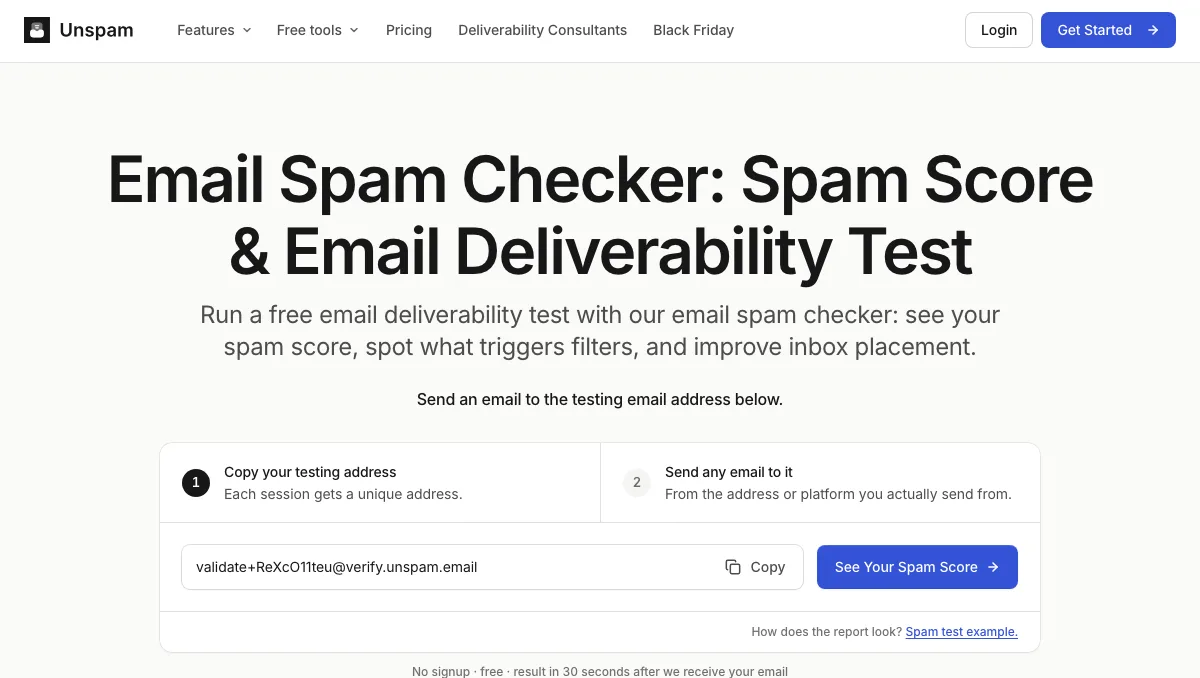
Unspam covers both in one workflow. You send the email to a unique testing address and get a spam score from 0 to 100, calculated from SPF, DKIM and DMARC authentication, sender reputation, blacklists and content, with each warning explaining why it fired. Its inbox placement test sends to 10 seed mailboxes at 7 providers (7 consumer accounts and 3 business tenants, including Gmail and Outlook) and reports whether each copy landed in the inbox, a tab, spam or went missing.
- Free plan: 21 tests a month: 5 spam tests, 3 inbox placements, 3 device previews, 5 email screenshots and 5 heatmaps, with 14-day result retention and an AI assistant that explains what to fix.
- Custom plan: pay per test, starting at $0.18 per spam test and $0.50 per inbox placement, with rates dropping as volume grows; the default bundle of 25 tests shown on the pricing page is $6.40 a month. It adds API access, scheduled tests, DMARC monitoring (first domain free) and email list verification at $6.40 per 1,000 addresses.
Limitations: seed mailboxes are a sample, not your recipients’ inboxes, so real placement can differ. Retest after changing the template, domain or platform.
How to test: fill the placeholders with a realistic row, send it exactly as the campaign will (same mailbox and tracking), fix what the score flags, then run a placement test.
2. mail-tester.com: a quick free score
mail-tester.com gives a spam score for one message sent to a testing address, with no account. Its FAQ allows 3 free tests within 24 hours; paid plans start at $10 a month for 50 tests. It does not show inbox placement.
3. GlockApps: a larger testing suite
GlockApps combines inbox placement testing with DMARC analytics and uptime monitoring. The free plan includes 2 spam test credits, and Essential is $59 a month billed annually ($708 a year) with 360 credits.
For more options, see the best email deliverability tools and our MailGenius alternatives roundup.
FAQ
What is the best cold email template?
The one that opens with a real reason to contact this person: a trigger, a referral, or a specific observation. For B2B sales, start with template 1, the trigger email.
How many follow-ups should I send?
Two or three after the first touch, several business days apart, ending with a breakup email. Each should add something new, and anyone who replies “no” comes off the list immediately.
Do cold emails need an unsubscribe link?
In the US, CAN-SPAM requires commercial emails, B2B included, to offer an opt-out (a reply address is allowed), honor it within 10 business days, and include a postal address. Google and Yahoo also require one-click unsubscribe from bulk marketing senders.
How do I know if my cold email template will go to spam?
Send the final version from your real mailbox to a spam checker such as Unspam, fix what the score flags, then run an inbox placement test to see where it lands at Gmail, Outlook and other providers.
Build your Bootstrap theme
Design a custom Bootstrap 5 theme visually with a live preview, then export clean Sass or CSS.
Open the Builder