What Is a Cron Job? Crontab Syntax and Examples (2026)
A cron job is a command or script that a Unix-like system runs automatically on a schedule, such as every night at 2:00 or every 15 minutes. The schedule lives in a file called a crontab, and a background service called cron checks it every minute and starts whatever is due. This guide is for web developers and site owners who need to read, write or debug one, on a server or on a cloud platform. Syntax and platform details were checked against the official documentation in November 2026.
TL;DR
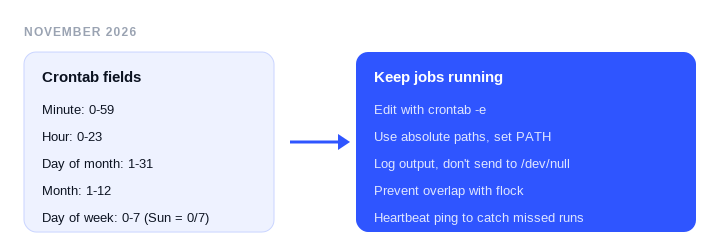
- What it is: a scheduled task. Cron reads a schedule of five time fields (minute, hour, day of month, month, day of week) followed by the command to run.
- How to edit one: run
crontab -eto edit your own crontab andcrontab -lto list it. System-wide jobs go in/etc/crontabor/etc/cron.d/, which add a user field. - Most common bug: the job works in your terminal but not in cron, because cron runs with a minimal environment (a different PATH and
/bin/shas the shell). - In the cloud: cPanel, Kubernetes, GitHub Actions, Vercel and Cloudflare Workers all accept cron expressions, but time zones and limits differ. GitHub, Vercel and Cloudflare run on UTC by default.
- Biggest risk: cron says nothing when a job stops running. A heartbeat monitor such as Pulsetic alerts you when an expected ping doesn’t arrive.
What is a cron job? The meaning in plain terms
Cron is the time-based job scheduler found on Linux and other Unix-like systems. Three terms get mixed up a lot:
- cron (or
crond): the daemon, a background service that wakes up every minute. - crontab: the “cron table”, a text file with one scheduled job per line. It is also the name of the command you use to edit that file.
- cron job: a single line in a crontab, meaning one schedule plus one command.
So the cron job meaning is simple: one line that says “run this command at these times”. On a website, that usually means framework schedulers (such as Laravel’s php artisan schedule:run every minute), nightly backups, certificate renewals, cache and log cleanup, digest emails and data syncs.
Cron doesn’t need a restart after you change a crontab: on Debian-based systems the daemon checks for changed crontabs every minute.
Crontab syntax: the five fields
Every cron job line has five time fields, then the command:
┌───────────── minute (0-59)
│ ┌─────────── hour (0-23)
│ │ ┌───────── day of month (1-31)
│ │ │ ┌─────── month (1-12, or jan-dec)
│ │ │ │ ┌───── day of week (0-7, or sun-sat; 0 and 7 are both Sunday)
│ │ │ │ │
30 2 * * * /usr/local/bin/backup.sh
That line runs backup.sh at 2:30 every day, in the server’s time zone.
Operators: asterisk, ranges, lists and steps
The crontab(5) manual defines four building blocks you can use in any field:
| Operator | Example | Meaning |
|---|---|---|
* |
* * * * * |
Every value of the field (“first to last”), so every minute here |
- (range) |
0 9-17 * * * |
Every hour from 9 through 17, inclusive |
, (list) |
0 8,12,18 * * * |
At 8:00, 12:00 and 18:00 |
/ (step) |
*/15 * * * * |
Every 15 minutes (0, 15, 30, 45) |
| Range plus step | 0 0-23/2 * * * |
Every 2 hours, on even hours |
| Names | 0 9 * * mon,wed,fri |
Monday, Wednesday and Friday at 9:00; names are case-insensitive |
One rule surprises almost everyone. If you restrict both day of month and day of week, the job runs when either one matches, not when both match. So 0 9 1 * mon runs on the 1st of every month and on every Monday. If you need “the first Monday of the month”, schedule it for Mondays and check the date inside the script.
One more trap: a % in the command becomes a newline, and what follows is sent to the command’s standard input. Escape it as \%, for example in date +\%Y-\%m-\%d.
Special strings: @daily, @hourly and @reboot
Most cron implementations accept shortcuts in place of the five fields:
| String | Same as | Runs |
|---|---|---|
@reboot |
none | Once, when the cron daemon starts |
@yearly or @annually |
0 0 1 1 * |
Midnight on January 1 |
@monthly |
0 0 1 * * |
Midnight on the 1st of each month |
@weekly |
0 0 * * 0 |
Midnight between Saturday and Sunday |
@daily or @midnight |
0 0 * * * |
Every day at midnight |
@hourly |
0 * * * * |
At minute 0 of every hour |
@reboot fires when the cron daemon starts, which is usually but not always the same as the machine booting. Not every scheduler supports these strings: GitHub Actions doesn’t, while Kubernetes does.
Cron cheat sheet: common schedules
| Schedule | Cron expression |
|---|---|
| Every minute | * * * * * |
| Every 5 minutes | */5 * * * * |
| Every 15 minutes | */15 * * * * |
| Every hour, on the hour | 0 * * * * |
| Every 6 hours | 0 */6 * * * |
| Every day at 2:30 | 30 2 * * * |
| Twice a day (9:00 and 21:00) | 0 9,21 * * * |
| Weekdays at 8:00 | 0 8 * * 1-5 |
| Every Sunday at 3:00 | 0 3 * * 0 |
| First day of every month at 4:00 | 0 4 1 * * |
| Every 10 minutes during business hours on weekdays | */10 9-17 * * 1-5 |
| Every quarter (Jan, Apr, Jul, Oct 1st) | 0 0 1 */3 * |
If you’re unsure what an expression does, paste it into an editor like crontab.guru, which translates it into plain English and shows the next run time.
How to create and edit a crontab
User crontabs: crontab -e and crontab -l
Each user on a server can have their own crontab. You don’t edit the file directly; you use the crontab command:
crontab -e      # open your crontab in an editor; saved changes are installed on exit
crontab -l      # print your current crontab
crontab -r      # remove your crontab entirely (careful)
crontab -i -r   # remove, but ask for confirmation first
sudo crontab -u www-data -e   # edit another user's crontab (root only)
crontab -e opens the editor named in your VISUAL or EDITOR environment variable. -r sits next to -e on the keyboard, and one typo deletes every job, so keep a copy with crontab -l > crontab.backup.
If crontab says you aren’t allowed to use it, check /etc/cron.allow and /etc/cron.deny, which control who can edit crontabs.
System crontabs: /etc/crontab and /etc/cron.d
System-wide jobs live in /etc/crontab and in files under /etc/cron.d/, where packages often drop their own file. These files have one extra field after the five time fields: the user to run the command as.
# /etc/cron.d/site-backup
SHELL=/bin/bash
PATH=/usr/local/sbin:/usr/local/bin:/usr/sbin:/usr/bin:/sbin:/bin
MAILTO=ops@example.com

30 2 * * * www-data /usr/local/bin/backup.sh
You edit these files directly with root access; no crontab command is needed. On Debian and Ubuntu, files in /etc/cron.d/ must be owned by root and their names may only contain letters, digits, underscores and hyphens. A file named backup.cron is silently ignored because of the dot, which is a classic cause of a job that “never runs”.
Many distributions also have /etc/cron.daily/ and /etc/cron.weekly/ folders for scripts that need no cron syntax at all.
Environment gotchas: why it works in the terminal but not in cron
Most cron problems aren’t syntax problems. Cron starts your command in a minimal environment, not your interactive shell.
PATH. Cron sets only a few variables (SHELL, HOME and LOGNAME), and the PATH it uses is much shorter than your login shell’s. A command like node, php, composer or anything installed under /usr/local/bin or a version manager may not be found. Use absolute paths (/usr/bin/php), or set PATH= at the top of the crontab.
Shell. Cron runs commands with /bin/sh, not bash or zsh, so bash features like [[ ]], source or brace expansion can fail. Set SHELL=/bin/bash at the top of the crontab or call bash explicitly. Your .bashrc and .profile aren’t loaded either.
Working directory. Jobs start in the user’s home directory, not in your project folder. cd /var/www/app && php artisan schedule:run is safer than relying on relative paths.
Time zone. Schedules follow the time zone of the cron daemon, usually the server’s system time zone, which on many cloud servers is UTC. Some cron versions accept CRON_TZ=Europe/Berlin in the crontab to change the time zone for the jobs in it. How jobs in the hour skipped or repeated by a daylight saving change are handled varies between cron versions, so avoid scheduling critical jobs between roughly 1:00 and 3:00 local time, or run the server on UTC.
Output and MAILTO. Anything a job prints is emailed to the crontab’s owner. If MAILTO is set to an address, mail goes there instead; if it is set to an empty string (MAILTO=""), no mail is sent at all. Many servers have no mail transfer agent configured, so that output simply disappears. Redirect it to a log file you can read:
*/15 * * * * /usr/local/bin/sync.sh >> /var/log/sync.log 2>&1
The 2>&1 sends error output to the same file. The common habit of appending > /dev/null 2>&1 throws errors away too, which is exactly how failures go unnoticed.
Logging. Cron itself logs to the system log under the cron facility. On Debian and Ubuntu, grep CRON /var/log/syslog or journalctl -u cron shows whether a job started at all, which is the first thing to check.
Overlapping runs. Cron starts a job on schedule whether or not the previous run has finished. A job scheduled every 10 minutes that sometimes takes 15 will eventually run twice at once. Wrap it in flock so a second copy exits if the first still holds the lock:
*/10 * * * * /usr/bin/flock -n /tmp/backup.lock /usr/local/bin/backup.sh
Cron in hosting panels and cloud platforms
You don’t need a server shell to use cron. Most platforms accept the same five-field expressions, but time zones and limits differ: GitHub Actions, Vercel and Cloudflare Workers run on UTC by default.
cPanel cron jobs
cPanel’s Cron Jobs page has five boxes for the fields and a Common Settings dropdown that fills them in. Use the absolute path to your script. The Cron Email field sets where job output goes; clearing it disables those emails for every job. If you are moving off cPanel, see our guide to cPanel alternatives, most of which have their own cron screen.
Kubernetes CronJob
A CronJob creates a Job on a schedule and accepts macros like @daily:
apiVersion: batch/v1
kind: CronJob
metadata:
  name: nightly-report
spec:
  schedule: "0 3 * * *"
  timeZone: "Etc/UTC"
  concurrencyPolicy: Forbid
  jobTemplate:
    spec:
      template:
        spec:
          containers:
          - name: report
            image: my-app:1.4
            command: ["/app/report.sh"]
          restartPolicy: OnFailure
timeZone has been stable since v1.27; without it, the schedule follows the controller’s local time zone. concurrencyPolicy: Forbid skips a run while the previous one is still going (the default, Allow, lets them overlap). The docs warn that occasionally two Jobs, or none, are created for one run, so jobs should be safe to run twice.
GitHub Actions schedule
on:
  schedule:
    - cron: "17 4 * * *"
Scheduled workflows run in UTC unless you set an IANA timezone, and only from the default branch. The shortest interval is every 5 minutes. Runs can be delayed under heavy load, especially at the top of the hour, so pick an odd minute like 17. In public repositories they are disabled after 60 days without repository activity.
Vercel cron jobs
Vercel sends an HTTP GET request to a path on your production deployment:
{
  "crons": [{ "path": "/api/cron/cleanup", "schedule": "0 5 * * *" }]
}
The time zone is always UTC, names like MON aren’t supported, and day of month and day of week can’t both be set. Hobby allows once per day, and a job set for 1:00 can fire any time between 1:00 and 1:59; Pro allows once per minute. Vercel now labels Cron Jobs a legacy feature that will move to its newer Schedules product.
Cloudflare Workers Cron Triggers
A Worker’s scheduled() handler runs on triggers set in the Wrangler config:
{
  "triggers": { "crons": ["*/30 * * * *", "0 15 1 * *"] }
}
Cloudflare supports Quartz-style extras such as L (last) and # (nth weekday), and counts 1 as Sunday through 7 as Saturday, so names like MON are safer than numbers. Triggers run on UTC, and a changed trigger can take up to 15 minutes to propagate, during which runs can be missed.
Why cron jobs fail silently
Cron is a scheduler, not a supervisor: it starts commands and doesn’t care whether they succeed.
- The job never starts. The server was down, a deploy overwrote the crontab, or a GitHub workflow was disabled after 60 quiet days. Nothing runs, so nothing errors.
- The job starts and fails. A missing PATH entry, an expired API key or a full disk. The error goes to an email nobody reads or to
/dev/null. - The job hangs. A stuck network call keeps it alive for hours, printing nothing.
- The job overlaps itself. Two copies run at once and corrupt a backup or send duplicate emails.
Uptime checks don’t catch any of this: your homepage can return 200 while backups haven’t run for three weeks. Our guide on why websites go down covers the visible failures; failed cron jobs are the invisible ones.
How to monitor cron jobs with heartbeat monitoring
The reliable fix is heartbeat monitoring, also called a dead man’s switch. Instead of a monitor checking your server, your job checks in with the monitor:
- You create a heartbeat check and get a unique URL.
- You tell the monitor how often the job runs and how long a delay to tolerate (the grace period).
- At the end of the job, you request that URL.
- If the request doesn’t arrive in time, the monitor alerts you.
Because the alert is based on the absence of a ping, it catches every failure mode above: jobs that never start, crash, hang or stall. Add the ping so it only fires when the job succeeds:
30 2 * * * /usr/local/bin/backup.sh && curl -fsS -m 10 --retry 3 https://example.com/your-heartbeat-url > /dev/null
The && means the ping is sent only if backup.sh exits with status 0. For GitHub Actions or Kubernetes, add the same curl as the last step of the workflow or container command. Our full guide to cron job monitoring has longer scripts, examples for each platform and a comparison of eight tools.
Pulsetic
Pulsetic is an uptime monitoring service that includes heartbeat monitors for cron jobs alongside website, SSL, domain and DNS checks and status pages. Each job gets its own heartbeat URL that any server, container or CI runner can request; you set a grace period, and Pulsetic alerts you when a check-in is overdue by more than that. Alerts can go to email, webhooks, Slack, Microsoft Teams, Discord and WhatsApp, with SMS and voice calls for critical jobs, and every missed check-in and recovery is kept in the job’s history.
Heartbeats share the plan’s monitor limit. The free plan includes 10 monitors that can be any mix of websites, heartbeats and domains, with no credit card required. Paid plans start at $9/month (Solo), then $19/month (Team) and $49/month (Organization). SMS and call credits come with paid plans only.
The limitation: Pulsetic accepts a completion ping only, with no separate “start” or “fail” signal and no run-time tracking, so a failed job is reported when its deadline passes, not the moment it exits with an error. It fits best when you want site uptime and scheduled jobs in one dashboard.
Healthchecks.io and Cronitor
Two dedicated alternatives are worth knowing. Healthchecks.io is an open-source (BSD-licensed) cron monitor you can also self-host. Its free Hobbyist plan covers 20 jobs, Business is $20/month for 100 jobs, and appending /start and /fail to the ping URL lets it show run times and report failures as they happen. Cronitor (the company behind crontab.guru) offers 5 free monitors, then $2 per monitor and $5 per user each month; its telemetry API accepts run, complete and fail states, a duration and a short message from the job. For broader options, see our roundups of the best website monitoring tools and free uptime monitoring services.
FAQ
What is a cron job in simple terms?
A cron job is a task your server runs automatically on a schedule. You write one line with five time fields (minute, hour, day of month, month, day of week) and the command to run, and the cron service starts that command whenever the time matches.
What does * * * * * mean in cron?
Five asterisks mean “every minute of every hour of every day”. An asterisk matches every value of its field, so a job with * * * * * runs 1,440 times a day.
What is the difference between cron and crontab?
Cron is the background service that runs scheduled jobs. A crontab is the file that lists those jobs, and crontab is also the command used to edit it (crontab -e) or list it (crontab -l).
Why is my cron job not running?
Check the system log first to see whether cron started it at all. If it never started, look for a syntax error, a file in /etc/cron.d/ with a dot in its name, or the wrong time zone. If it started but failed, the cause is usually the environment: a missing PATH entry, /bin/sh instead of bash, or a relative path.
How do I know if a cron job failed?
Cron doesn’t tell you by default, and its emails often go nowhere. Log output to a file, and add a heartbeat ping that a monitoring service expects on schedule. If the ping is late, you get an alert, whether the job crashed, hung or never ran.
Build your Bootstrap theme
Design a custom Bootstrap 5 theme visually with a live preview, then export clean Sass or CSS.
Open the Builder