September Newsletter Ideas for Bootstrap Developers
September marks the shift from summer to fall, presenting Bootstrap developers with a prime opportunity to refresh and elevate their email campaigns. With the back-to-school season, Labor Day, and the onset of autumn, this month is brimming with themes that can inspire your design work. Whether you want to showcase your latest Bootstrap projects, promote your services, or simply engage your audience with stunning layouts, this guide offers tailored ideas, real Bootstrap 5 snippets, and a fall colour palette to help you craft visually compelling and technically robust September newsletters.
If you are new to building email layouts with the framework, our guide to Bootstrap email templates is a useful starting point, and you can carry the same series forward from last month’s August newsletter ideas.
Read this first: Bootstrap and the inbox
Email clients are not web browsers. Gmail, Outlook, and Apple Mail strip out <script> and most modern CSS, so the following will not work inside an inbox no matter how cleanly you code them:
- JavaScript components: carousels, modals, accordions, tabs, tooltips, popovers, dropdowns.
- Layout engines: Flexbox and CSS Grid render inconsistently (Outlook ignores them outright), so the responsive grid and most flex utilities are unreliable.
- Sticky/fixed positioning, parallax, and animations driven by CSS or JS.
That does not make Bootstrap useless for email. It is excellent for prototyping the layout: use its grid, spacing, typography, and card markup to design the structure fast, then export the design to inlined, table-based HTML so it renders reliably everywhere. Swap interactive features for email-safe equivalents:
| Bootstrap on the web | Email-safe equivalent |
|---|---|
| JavaScript carousel | Animated GIF, or a static image grid |
| Modal / popover | Link out to a landing page |
| JS countdown timer | Image-based countdown service (renders as a live GIF) |
| Accordion / tabs | Short scannable sections + anchor links |
| Embedded video | Thumbnail image linking to the video |
Everything below assumes this workflow, so the per-idea tips focus on layout and theming rather than repeating the caveat. For client-by-client rendering specifics, see responsive email templates for Gmail.
Fall colour palette (hex reference)
A seasonal palette is the fastest way to make a September send feel different from August. These warm, autumnal values work well for backgrounds, headings, and CTA buttons. Drop them into your build as Sass variables so every component picks them up consistently, then export. Our customize Bootstrap 5 guide covers the variable overrides and recompile step.
| Role | Colour | Hex |
|---|---|---|
| Primary (pumpkin) | Burnt orange | #C75B12 |
| Secondary (harvest) | Golden amber | #E8A33D |
| Accent (cranberry) | Deep red | #8C2F22 |
| Foliage | Olive green | #6B7A3A |
| Background | Warm cream | #FBF3E4 |
| Text | Espresso brown | #3B2A1A |
Set them before compiling rather than overriding inline:
// _custom.scss, imported before Bootstrap
$primary:    #C75B12;
$secondary:  #E8A33D;
$danger:     #8C2F22;
$body-bg:    #FBF3E4;
$body-color: #3B2A1A;

@import "bootstrap/scss/bootstrap";
When you export to email, these compiled colours become inline style attributes on your tables and cells, which is exactly what inbox clients expect.
9 September newsletter ideas
1. Back-to-school themed designs
Idea: Use Bootstrap’s grid system and card components to build polished back-to-school newsletters aimed at educational institutions, online retailers, or any audience capitalising on the academic season. September catches the late wave: students still settling in, replenishment buys, and dorm or classroom add-ons. For the full back-to-school playbook (checklists, segmentation, send timing, and email-safe modules), see our August newsletter ideas, which is the canonical home for the season.
Subject line: “Gear Up for School: Essential Bootstrap Tools and Themes”
Content: Showcase a range of Bootstrap-based templates and components ideal for educational sites or stores targeting students and parents. Group offerings into clear categories such as tools, templates, and services.
Prototype it: Cards are the workhorse of back-to-school layouts because they convert cleanly to table cells on export.
<div class="row row-cols-1 row-cols-md-3 g-4">
  <div class="col">
    <div class="card h-100 border-0 shadow-sm">
      <img src="supplies.jpg" class="card-img-top" alt="School supplies">
      <div class="card-body">
        <h3 class="h5 card-title">Classroom Kits</h3>
        <p class="card-text">Everything a new term needs, ready to ship.</p>
        <a href="/shop/kits" class="btn btn-primary">Shop kits</a>
      </div>
    </div>
  </div>
  <!-- repeat .col for each category -->
</div>
Pro tip: Keep each card self-contained and uniform in height (h-100) so the design stays clean when columns stack on mobile.
2. Labor Day promotions
Idea: Use Labor Day to promote special offers on your Bootstrap services or products with utility classes and pre-built components.
Subject line: “Labor Day Special: Save Big on Bootstrap Services!”
Content: Highlight a discount across service types (theme customisation, plugin development, full builds) in a grid, and add urgency with a countdown. Use an image-based timer (it renders as a live GIF), since Bootstrap’s JS timers do not run in email.
Prototype it: A high-contrast promo banner using contextual text-bg-* utilities reads clearly in any inbox once inlined.
<div class="text-bg-primary p-4 p-md-5 rounded-3 text-center">
  <h2 class="fw-bold mb-2">Labor Day: 30% off all services</h2>
  <p class="mb-3 opacity-75">Offer ends Monday at midnight.</p>
  <a href="/labor-day" class="btn btn-light btn-lg">Claim the discount</a>
</div>
Pro tip: Showcase your portfolio with a static image grid or animated GIF (a carousel will not animate), linking each piece to a live case study on your site.

3. Fall-themed Bootstrap designs
Idea: Update your designs for the season with warm colours, fall imagery, and a strong hero. Pair this idea with the palette above.
Subject line: “Autumn in Design: Bootstrap Themes for the Fall”
Content: Lead with a full-width hero image and overlay text, then follow with cards highlighting each fall-themed template or service, linking to live demos.
Prototype it: Build the hero with an overlay card so the headline stays legible over imagery, then inline the seasonal hex values on export.
<div class="card text-bg-dark border-0">
  <img src="autumn-hero.jpg" class="card-img" alt="Autumn leaves">
  <div class="card-img-overlay d-flex flex-column justify-content-center text-center">
    <h2 class="display-6 fw-bold">Fresh themes for fall</h2>
    <p class="lead mb-0">Warm palettes, ready to send.</p>
  </div>
</div>
Pro tip: Skip parallax and JS animation; for movement, a tasteful animated GIF in the hero is the email-safe equivalent. See what is landing this season in our email and web design trends roundup.
4. Seasonal Bootstrap tips and tutorials
Idea: Help your audience prepare their Bootstrap projects for fall with tips, tutorials, and best practices on theming, performance, and current trends.
Subject line: “Top Bootstrap Tips for a Seamless Fall Transition”
Content: Present a sectioned layout of quick tips (changing colour schemes, optimising images, seasonal accents), each linking to a fuller tutorial or code snippet on your site.
Pro tip: Keep the inbox version simple: short scannable sections with anchor links to the full version, not in-email tabs. Use an eye-catching thumbnail that links to any video rather than embedding it.
5. Highlighting your charity work
Idea: Showcase community or non-profit projects you built with Bootstrap. Highlighting social responsibility strengthens your brand and encourages support.
Subject line: “Building Communities: How We’re Using Bootstrap to Give Back”
Content: Outline a recent non-profit build using grid and card components for images, testimonials, and milestones. Include a clear CTA for donations or volunteer sign-ups.
Pro tip: Embed only a minimal sign-up prompt; link the actual donation or volunteer form to a dedicated, fully responsive landing page so it works across clients.
6. September contests or giveaways
Idea: Engage your audience with a September-themed contest that highlights Bootstrap skills or projects. It builds community and attracts new clients.
Subject line: “Enter Our September Bootstrap Contest: Win Custom Design Services!”
Content: Use a clean grid-and-card layout to outline contest details, with a CTA button to a custom entry landing page. Show previous winners as a static image grid (a carousel would not animate), linking to the full gallery.
Pro tip: Match the contest landing page to the email for a consistent experience, and A/B test CTA placement and form layout to maximise participation.
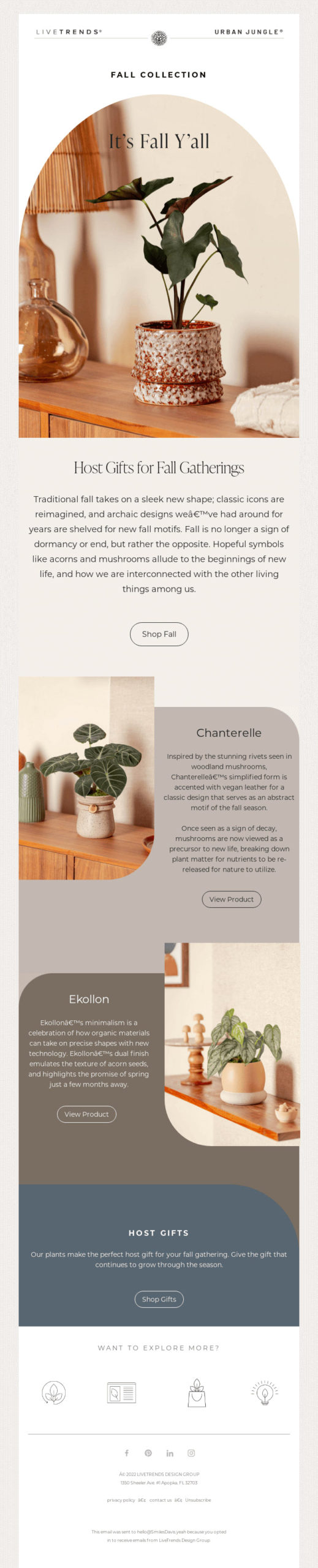
7. Customer appreciation with a Bootstrap touch
Idea: Thank your clients with a personal, professional email that also highlights your latest work.
Do you like this design? Download Figma email templates from the community here.
Subject line: “A Special Thank You from [Your Brand]: Exclusive Bootstrap Offer Inside!”
Content: Use a clean grid to carry a personalised message, testimonials, and a special offer such as a discount or free consultation. Since modals do not open inside email, link the offer details and sign-up form to a dedicated landing page.
Pro tip: Lean on typography and spacing utilities to guide the eye. Keep navigation to a short anchor-link menu near the top (a sticky navbar is ignored by clients), and confirm the layout holds up in responsive email templates for Gmail and elsewhere.
8. The feel of interactivity (without breaking the inbox)
Idea: Create the impression of interactivity with email-safe techniques instead of Bootstrap’s JS components.
Subject line: “Boost Engagement with a More Dynamic Bootstrap Email”
Content: Replace a JS carousel with an animated GIF of your latest themes; instead of a live quiz, use clickable “choose your theme” cards that link to matching pages; and rather than popovers, label product images clearly inline.
Pro tip: Build in Bootstrap but plan for email from the start: provide static fallbacks for anything interactive and lead readers to your site with clear CTAs. Well-designed illustrations and animated GIFs reinforce your brand even when scripted elements are unsupported. Business illustrations are one source worth keeping bookmarked.

9. Promoting Bootstrap courses and workshops
Idea: September is prime time to promote courses, workshops, or webinars with a consistent, informative layout.
Subject line: “Master Bootstrap This Fall: Join Our Workshops”
Content: Use a multi-column layout for courses with dates, key takeaways, and testimonials. Use a clearly styled callout for registration deadlines or special offers.
Pro tip: Keep the email focused on the pitch and link to a dedicated registration page, since complex forms are unreliable in an inbox. For early-bird urgency, an image-based countdown timer is the email-safe way to show the clock ticking down.
Conclusion
With these September newsletter ideas, snippets, and a fall palette tailored for Bootstrap developers, you are equipped to create emails that are both visually appealing and reliably functional. Prototype and design the layout fast in Bootstrap, set your seasonal colours as Sass variables, then export to inlined, table-based HTML so your message renders the same way everywhere. For a deeper dive into the whole workflow, see our guide to email marketing for Bootstrap developers.
FAQ
What should a September newsletter include?
Lean into the season’s themes: back-to-school promotions, Labor Day offers, fall theming, customer-appreciation notes, and any courses or workshops you are running. Keep the layout clean with Bootstrap’s grid and card markup, apply a warm seasonal palette, and link out to your site for anything detailed or interactive.
Do Bootstrap interactive components work in email?
No. Email clients like Gmail, Outlook, and Apple Mail strip JavaScript and most modern CSS, so Bootstrap’s carousels, modals, accordions, tabs, tooltips, and popovers will not run in an inbox, and Flexbox and the grid render inconsistently. Use Bootstrap to design the layout, then export to inlined, table-based HTML and swap interactive elements for email-safe fallbacks such as animated GIFs and anchor links.
What are good September email subject lines?
Front-load the seasonal hook and the benefit, for example “Gear Up for School: Essential Bootstrap Tools and Themes,” “Labor Day Special: Save Big on Bootstrap Services!,” or “Autumn in Design: Bootstrap Themes for the Fall.” Keep them short enough to avoid truncation on mobile.
When should I send a back-to-school or Labor Day email?
Send back-to-school campaigns from mid-to-late August through early September, while shoppers are still preparing. Time Labor Day promotions to land a few days before the holiday so recipients can act on the offer before it ends.
What colours work for a fall newsletter?
Reach for warm autumnal tones: burnt orange (#C75B12), golden amber (#E8A33D), deep cranberry red (#8C2F22), olive foliage green (#6B7A3A), a warm cream background (#FBF3E4), and espresso brown text (#3B2A1A). Set them as Sass variables and recompile so every component matches before you export, following the customize Bootstrap 5 guide.
Build your Bootstrap theme
Design a custom Bootstrap 5 theme visually with a live preview, then export clean Sass or CSS.
Open the Builder