Webflow Pricing in 2026: Plans, Costs and Hidden Fees
Webflow pricing in 2026 starts at $0 for a free Starter site on a webflow.io address, $15 a month (billed yearly) for a Basic site on your own domain, and $25 a month for Premium, the cheapest plan with a CMS. Teams pay for Workspace seats on top, stores pay $29 to $212 a month, and the new Team plan is $2,500 a month on an annual contract. This guide is for anyone budgeting a Webflow site, from a solo portfolio to an agency with client sites. Every price below was checked on webflow.com/pricing in November 2026, with both the monthly and yearly toggles and every plan tab.
TL;DR
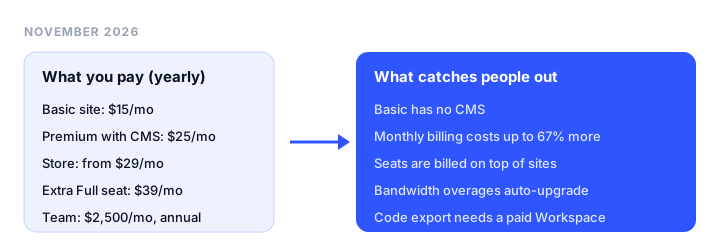
- Most people pay $15 to $25 a month per site. Basic ($15/mo billed yearly, $25 monthly) has no CMS; Premium ($25/mo yearly, $39 monthly) adds the CMS with 20,000 items.
- A blog or portfolio with case studies needs Premium. Basic can’t run CMS collections at all, even though the free Starter plan includes a limited CMS.
- Teams pay per seat. One full seat is free; each extra Full seat is $39 a month billed yearly ($45 monthly), and a Limited (content) seat is $15 ($19 monthly).
- Stores start at $29 a month billed yearly on Ecommerce Standard, plus a 2% Webflow transaction fee that disappears on Plus ($74/mo).
- Yearly billing saves up to 40%, but only Basic hits 40%. Premium saves 36%, Ecommerce Plus 12%.
- Cheaper for small sites: Siter.io covers 3 sites for $12 a month billed yearly, with a CMS on every plan.
How Webflow pricing works now
Webflow charges on two separate axes, and most confusion about its pricing comes from mixing them up.
Site plans pay for a website. Each site you publish on a custom domain needs its own Site plan: Starter (free), Basic, Premium, or one of three Ecommerce plans. Hosting, bandwidth, page limits, and the CMS are set by the Site plan. Prices are per site, in USD, with tax added at checkout.
Workspace plans pay for the people and the building space. Every account gets a free Starter Workspace with 1 full seat, 2 staging sites, and 200 AI credits a month. Webflow lists “Unlimited paid hosted sites” on the free Workspace, so you do not need a paid Workspace just to run paid sites. You upgrade the Workspace for more staging sites, custom code on staged sites, code export, Shared Libraries, more AI credits, and team controls. There are two families: Core and Growth “for teams”, and Freelancer and Agency “for freelancers and agencies”.
Seats are bought separately from both. Extra Full seats (design and admin) and Limited seats (content editing and building pages from components) are added to the Workspace. Reviewers and commenters are free.
Platform plans bundle everything for larger organizations. Team and Enterprise wrap a site, seats, Localize, and governance features into one contract.
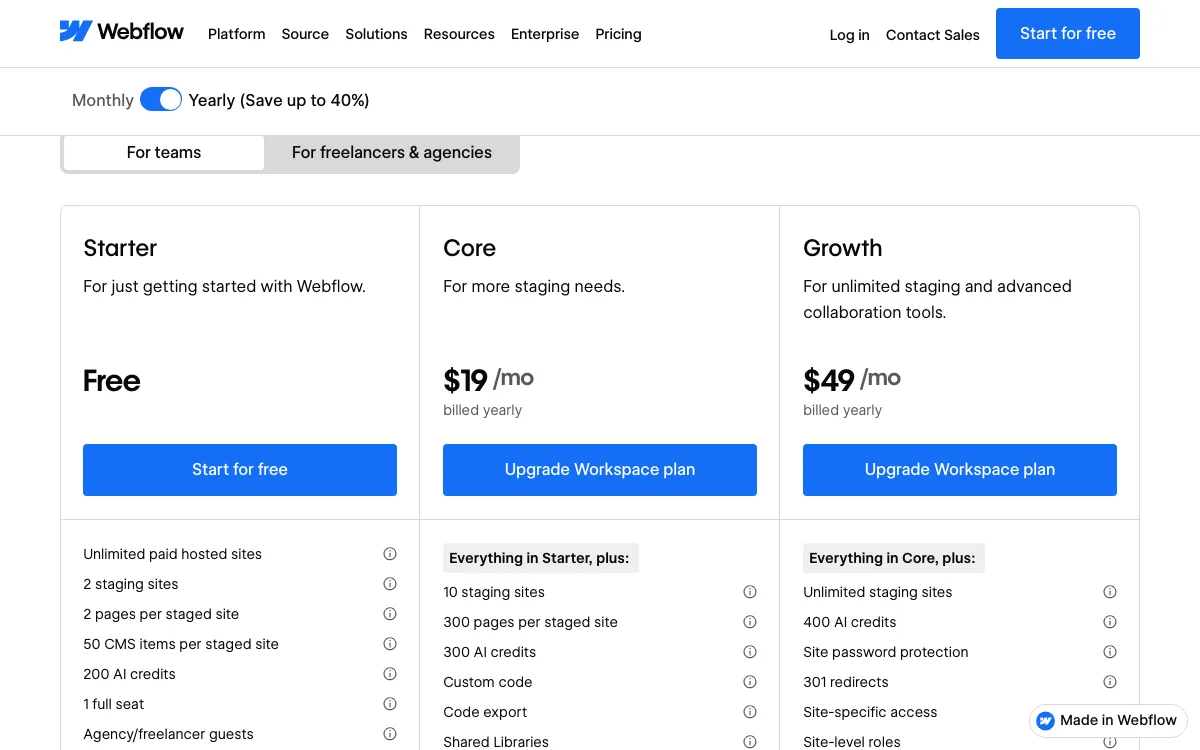
Webflow reorganized this lineup on May 13, 2026. The CMS and Business Site plans were merged into Premium, the Team plan was added, and AI credits were added to every Workspace. More on what changed below.
Webflow plans and prices at a glance
| Plan | Type | Billed yearly | Billed monthly | Key limits |
|---|---|---|---|---|
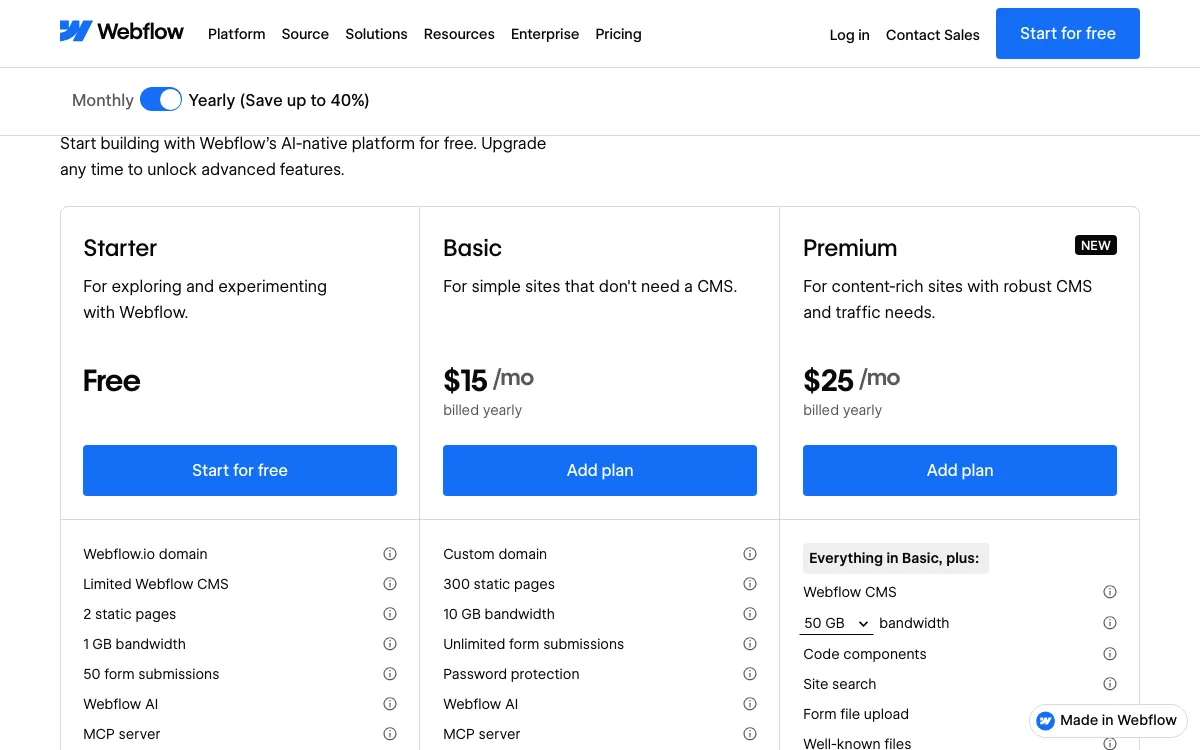
| Starter | Site | Free | Free | webflow.io domain, 2 static pages, 50 CMS items, 1 GB bandwidth, 50 form submissions |
| Basic | Site | $15/mo | $25/mo | Custom domain, 300 static pages, 10 GB bandwidth, no CMS |
| Premium | Site | $25/mo | $39/mo | CMS with 20,000 items and 40 collections, 50 GB bandwidth (up to 2.5 TB with add-ons), site search |
| Ecommerce Standard | Site | $29/mo | $42/mo | 500 products, 2% transaction fee, 2,000 CMS items, 50 GB, 3 staff accounts |
| Ecommerce Plus | Site | $74/mo | $84/mo | 5,000 products, 0% fee, up to 10,000 CMS items, 100 GB, 10 staff accounts |
| Ecommerce Advanced | Site | $212/mo | $235/mo | 15,000 products, 0% fee, up to 10,000 CMS items, 100 GB, 15 staff accounts |
| Starter Workspace | Workspace | Free | Free | 1 full seat, 2 staging sites, 200 AI credits/mo, no code export |
| Core | Workspace | $19/mo | $28/mo | 10 staging sites, custom code, code export, 300 AI credits/mo |
| Growth | Workspace | $49/mo | $60/mo | Unlimited staging, site-level roles, publishing permissions, 400 AI credits/mo |
| Freelancer | Workspace | $16/mo | $24/mo | 10 staging sites, client payments, 1 free client seat per site, 300 AI credits/mo |
| Agency | Workspace | $35/mo | $42/mo | Unlimited staging, 3 free client seats per site, 400 AI credits/mo |
| Full seat | Seat | $39/mo | $45/mo | Design full sites or manage admin settings |
| Limited seat | Seat | $15/mo | $19/mo | Edit content or build pages with components |
| Team | Platform | $2,500/mo | Annual contract only | 1 site with 100 CMS collections, 10 seats, Localize, 100,000 AI credits a year |
| Enterprise | Platform | Custom | Custom | Custom limits, SLAs, dedicated account manager, EU hosting |
Webflow’s ecommerce plans also cover the CMS, so a store doesn’t need Premium on top. Ecommerce transaction fees are charged in addition to Stripe or PayPal processing fees.
Add-ons
| Add-on | Billed yearly | Billed monthly | What you get |
|---|---|---|---|
| Extra bandwidth (Premium) | +$20/mo for 100 GB total, up to +$974/mo for 2.5 TB | +$30/mo for 100 GB, up to +$1,460/mo for 2.5 TB | Premium at 100 GB is $45/mo yearly or $69 monthly |
| AI credits | $20/mo per 2,000 credits | $25/mo per 2,000 credits | Up to 15 packs per Workspace; credits reset monthly |
| Localize Essential | $9/mo per locale | $12/mo per locale | Up to 3 locales, 10,000 translated words a month |
| Localize Advanced | $29/mo per locale | $35/mo per locale | Up to 10 locales, 50,000 words, localized URLs and visitor routing |
| Analyze | From $9/mo (2,000 sessions) | From $12/mo | Site analytics, up to $229/mo yearly for 500,000 sessions |
| Optimize | From $299/mo (25,000 page views) | From $379/mo | A/B testing and personalization |
What Webflow really costs: 4 worked examples
All examples use Webflow’s own list prices from the pricing page, before tax.
1. A designer’s portfolio
A 6-page portfolio with no blog fits on Basic: $15 a month, or $180 a year billed yearly. Billed monthly it is $25, or $300 a year. The free Starter Workspace is enough because one person builds it.
If each project is a CMS case study (the usual Webflow pattern), you need Premium: $300 a year billed yearly or $468 billed monthly. That is the single most common surprise for portfolio builders, because the free plan you prototyped on had a small CMS and Basic has none.
2. A small business site with a blog
A 15-page business site with a blog, built by the owner and updated by one staff member:
- Premium Site plan: $25/mo
- One Limited seat for the staff member: $15/mo
- Total: $40 a month, or $480 a year billed yearly
Billed monthly, the same setup is $39 + $19 = $58 a month, or $696 a year. Add a second language with Localize Essential and it is another $9 a month yearly ($108 a year).
3. An agency with 5 client sites
A two-person studio running five client sites with blogs, on yearly billing:
- Agency Workspace: $35/mo
- One extra Full seat for the second designer: $39/mo
- 5 Premium Site plans: 5 x $25 = $125/mo
- Total: $199 a month, or $2,388 a year
On monthly billing the same setup is $42 + $45 + $195 = $282 a month, or $3,384 a year. In practice many agencies use Webflow’s client payments feature (Freelancer and Agency Workspaces) so each client’s card pays for its own Site plan, which leaves the agency paying $74 a month for the Workspace and seat. A solo freelancer can drop to the Freelancer Workspace at $16 a month ($192 a year), since Webflow says published sites don’t count against the staging site limit.
4. A small online store
A store with 200 products on Ecommerce Standard costs $29 a month, or $348 a year billed yearly, plus Webflow’s 2% transaction fee and your payment processor’s fees. At $3,000 a month in sales, the Webflow fee is $60, so Standard really costs $89 a month.
Ecommerce Plus ($74/mo yearly) has a 0% Webflow fee. The break-even point is simple: Plus costs $45 more than Standard, which equals 2% of $2,250 in monthly sales. Above that, Plus is cheaper. On monthly billing the gap is $42 ($42 vs $84), so the break-even drops to $2,100 a month.
Hidden costs and gotchas
Seats add up faster than sites. The Workspace owner gets one full seat. Every other designer is $39 a month billed yearly, and every content editor $15. A five-person marketing team with three designers and two editors pays $108 a month in seats (the owner’s Full seat is free) before a single Site plan.
Bandwidth overages become automatic upgrades. Basic includes 10 GB a month and Premium 50 GB. Webflow’s help center explains that the first month over the limit only brings a notice, but a second consecutive month triggers an automatic upgrade to a plan or add-on with more bandwidth, charged from the next billing month. Webflow also says it can’t refund bandwidth overages. A Premium site that needs 150 GB pays $65 a month yearly, not $25.
Code export needs a paid Workspace. Exporting HTML and CSS is listed on Core, Growth, Freelancer, and Agency, not on the free Starter Workspace. Webflow notes that dynamic content (CMS items and pages) can’t be exported with the code, so a CMS site needs a separate CSV export of each collection and a rebuild elsewhere.
Monthly billing costs a lot more. Yearly billing saves 40% on Basic, 36% on Premium, 31% on Ecommerce Standard, and only 12% on Plus and 10% on Advanced. Over a year, Premium is $300 yearly against $468 monthly.
Basic is not “Premium without extras”. Basic has no CMS, no site search, no form file upload, and no code components. If you might add a blog later, price Premium from the start.
AI credits are metered. Credits are pooled per Workspace and don’t roll over. Webflow says running out doesn’t cause an automatic charge; AI features that use credits simply stop until you buy a 2,000-credit pack ($20/mo yearly). Building a site and designing sections with AI don’t use credits, while generating copy, CMS items, code components, and SEO audits do.
The Team plan has no monthly option. At $2,500 a month on an annual contract, it is a $30,000 yearly commitment.
What changed in May 2026
Webflow announced the new lineup on its blog and help center on May 13, 2026. According to Webflow’s own pages:
- CMS and Business were merged into Premium, priced at $25 a month yearly or $39 monthly. Premium includes 20,000 CMS items and 40 collections, and CMS item add-ons were removed.
- Former CMS plan customers got higher limits: static pages from 150 to 300, CMS items from 2,000 to 20,000, and collections from 20 to 40, plus higher Webflow Cloud limits.
- Former Business plan customers pay less on the base price (Webflow’s examples show $39 yearly or $49 monthly before, $25 or $39 after), but included bandwidth dropped from 100 GB to 50 GB. Webflow’s own examples show a Business site using 150 GB going from $59 to $65 a month, and one using 500 GB staying at $199.
- Basic went up to $15 a month yearly and $25 monthly, and its static page limit doubled from 150 to 300.
- Ecommerce plans did not change.
- The Team plan was introduced, and AI credits were added to every Workspace, with limits enforced from June 29, 2026.
The changes reached existing sites in phases: new purchases on May 13, most existing sites at their next renewal or billable change on or after June 29, and sites in Freelancer or Agency Workspaces or on legacy pricing from November 16, 2026. All phases have now started, so any existing site moves to the new prices at its next renewal or billing change.
Is Webflow worth it? Cheaper alternatives
Webflow is worth the price when you use what it is built for: a large CMS (20,000 items on Premium), complex interactions with its GSAP-based editor, a team working on shared components, and code export. Nothing in the list below matches all of that. If you are publishing a portfolio, a landing page, or a few small client sites, you are likely paying for capacity you won’t use. Our Webflow alternatives guide compares nine options in depth; here are four with lower prices.
- Siter.io prices per plan, not per site. Solo is $7 a month billed yearly ($8 monthly) for 1 website, Plus $12 ($14 monthly) for 3 websites, and Pro $24 ($28 monthly) for 5 websites with HTML download. A CMS and blog come on every plan, and the canvas works like a design tool with a layout per breakpoint. Three Webflow Basic sites cost $45 a month yearly; three Siter sites on Plus cost $12. Limits: no ecommerce, no free plan (a 3-day trial with a card), and a newer, simpler CMS than Webflow’s.
- Framer showed prices in EUR from our location: Basic EUR 10 a month and Pro EUR 30 billed yearly, per site. Basic has 2 CMS collections and 1,000 items, Pro 10 collections and 2,500 items, and extra editors are EUR 20 a month. It has a free plan on a Framer domain. See how it compares in our Framer vs Squarespace breakdown.
- Carrd is the cheapest way to put one-page sites online: Pro Standard is $19 a year for 10 sites with custom domains and forms. It has no CMS, so it suits landing pages and link pages, not blogs.
- Squarespace suits a small store that doesn’t need Webflow’s design control. From our location it showed Basic at EUR 12 a month billed yearly with a 2% store fee, and Core at EUR 18 with no store fee. More options are in our Squarespace alternatives roundup.
If you are choosing a builder for design work rather than for price alone, see our best website builders for designers.
FAQ
How much does Webflow cost per month?
A Webflow site costs $15 a month on Basic or $25 on Premium when billed yearly, and $25 or $39 when billed monthly. Online stores cost $29 to $212 a month billed yearly. Extra seats, add-ons, and paid Workspace plans are charged on top.
Is Webflow free?
Yes, partly. The free Starter plan lets you build and publish a site on a webflow.io address with 2 static pages, 50 CMS items, 1 GB of bandwidth, and 50 form submissions. Connecting your own domain requires a paid Site plan.
What is the cheapest Webflow plan with a CMS?
Premium, at $25 a month billed yearly or $39 monthly. It includes 20,000 CMS items and 40 collections. Basic, the cheaper paid plan, has no CMS.
Do I need a Workspace plan and a Site plan?
You always need a Site plan to publish on a custom domain. A paid Workspace plan is optional: the free Starter Workspace can hold paid sites, but code export, more staging sites, and team controls need Core, Growth, Freelancer, or Agency.
Can I export my Webflow site?
Code export is available on paid Workspace plans (Core, Growth, Freelancer, and Agency). The export contains HTML and CSS but not CMS items or CMS pages, which you export separately as CSV files from each collection.
Did Webflow raise its prices in 2026?
For some plans. In May 2026 Basic rose to $15 a month yearly ($25 monthly), while the old Business plan’s base price fell to Premium’s $25 with half the included bandwidth. Webflow says some customers pay more, some less, and some the same; ecommerce prices did not change.
Build your Bootstrap theme
Design a custom Bootstrap 5 theme visually with a live preview, then export clean Sass or CSS.
Open the Builder