How to Stop Spam Signups with an Email Verification API
Spam signups cost more than a messy user table. Every fake or mistyped address you accept gets a welcome email, a confirmation email, and maybe a trial nurture sequence. The bad ones bounce, the disposable ones vanish after an hour, and a few land on spam traps. Mailbox providers read all of that as a sender who does not look after their list, and your real customers’ email starts landing in spam.
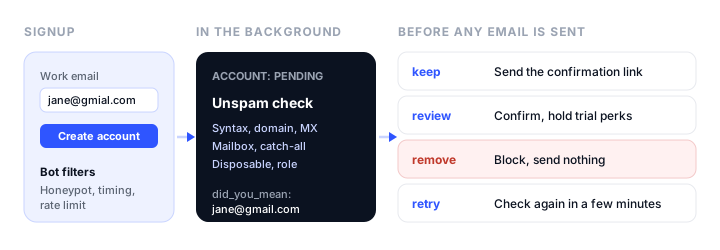
This tutorial builds a signup flow that stops those addresses before you send them anything. It uses the Unspam email verification API to check each new address in the background: whether the domain takes mail, whether the mailbox exists, and whether it is disposable, a role address, or a typo. The code is Node.js, and the form is plain Bootstrap 5, but the design works in any stack.
Three kinds of bad signups, three different fixes
“Spam signups” covers three different problems, and no single tool stops all of them:
| Problem | What it looks like | What stops it |
|---|---|---|
| Bots | Hundreds of signups a minute, random names, filled hidden fields | Honeypot field, rate limiting, a CAPTCHA if it gets bad |
| Bad addresses | Disposable domains, typos like gmial.com, mailboxes that do not exist |
Email verification |
| Someone else’s real address | A bot or a prank signs up a real person who never asked | Double opt-in: a confirmation link the owner has to click |
The email verification API handles the middle row, and it is the row that hurts deliverability the most. But it cannot tell you whether the person typing the address owns it. A real address belonging to someone else verifies as deliverable, so you still need a confirmation email. The flow below uses all three layers.
How the Unspam API fits a signup form
The detail that shapes everything else: Unspam’s single-address check is asynchronous. You send an address and get an ID back with status: "pending", then read the check until its status is completed or failed. Unspam says plainly that it is not a synchronous check that holds a signup form until it answers.
So the right design is not “verify, then create the account”. It is:
- Run the cheap bot filters on the form submission itself.
- Create the account in a
pending_verificationstate and respond to the visitor straight away. - Verify the address in a background job.
- Decide what to do with the result before any email goes out.
The visitor sees a normal “check your inbox” page. Your sending reputation never sees the bad addresses, because nothing is sent to them.
Each completed check returns four fields you will use:
status:deliverable,risky,undeliverable, orunknown.reason: why, for exampleaccepted,catch_all,full_inbox,disposable,invalid_domain,rejected,timeout, orprovider_unverifiable.action: Unspam’s suggestion:keep,review,remove, orretry.flagsanddid_you_mean: flags such asdisposable,throwaway,role,free_provider, andno_reply, plus a likely intended address when the input looks like a typo.
Step 1: get an API token
API access comes with Unspam’s Custom plan. Once you are on it, create a token in your account settings and keep it in an environment variable on the server, never in front-end code:
export UNSPAM_TOKEN=your_token_here
To see what the results look like before you write any code, the free email verifier checks up to 10 addresses a day with no sign-up.
Step 2: filter bots on the form
Bots are cheap to stop at the form, and every bot you stop there is a verification you do not pay for. Two filters catch most of them.
A honeypot field. Add a field that people never see but form-filling bots do. Do not use type="hidden", which many bots skip; move a normal text field off-screen instead:
<form id="signup" class="needs-validation" novalidate>
  <div class="mb-3">
    <label for="email" class="form-label">Work email</label>
    <input type="email" class="form-control" id="email" name="email"
           autocomplete="email" required>
    <div class="invalid-feedback">Enter a valid email address.</div>
  </div>

  <!-- Honeypot: people never see or fill this field -->
  <div class="position-absolute overflow-hidden" style="left:-9999px; width:1px; height:1px;" aria-hidden="true">
    <label for="website">Website</label>
    <input type="text" id="website" name="website" tabindex="-1" autocomplete="off">
  </div>

  <input type="hidden" name="started_at" id="started_at">
  <button type="submit" class="btn btn-primary w-100">Create account</button>
  <div id="signup-message" class="mt-3" role="status"></div>
</form>
A minimum time to submit. Set started_at when the page loads, and reject submissions that arrive within two or three seconds. People cannot type an email and click that fast; scripts do it every time.
Add a per-IP rate limit on the signup route too, such as five attempts per IP per hour. If a determined bot gets past all three, add a CAPTCHA such as Cloudflare Turnstile, but try the invisible filters first because they cost real visitors nothing.
Step 3: accept the signup and queue the check
The signup route does the cheap work, saves the account as pending, and hands the address to a background job. It answers in milliseconds, whatever the verifier is doing:
// POST /signup
app.post('/signup', signupRateLimit, async (req, res) => {
  const { email, website, started_at } = req.body;

  // Bots fill the honeypot or submit instantly. Answer as if it worked.
  const tooFast = Date.now() - Number(started_at) < 2500;
  if (website || tooFast) return res.status(202).json({ ok: true });

  const address = String(email || '').trim().toLowerCase();
  if (!/^[^\s@]+@[^\s@]+\.[^\s@]+$/.test(address)) {
    return res.status(422).json({ error: 'Enter a valid email address.' });
  }

  const user = await db.users.create({ email: address, state: 'pending_verification' });
  await queue.add('verify-signup-email', { userId: user.id });

  res.status(202).json({ ok: true, signupId: user.id });
});
Telling a bot that it succeeded is deliberate. An error message teaches it which filter it tripped.
The regular expression is only a sanity check to stop obvious junk before it costs a verification. The real syntax, domain, and mailbox checks happen at Unspam.
Step 4: verify the address in the background
The job starts a check, then reads it with a growing delay until it completes. Any job queue works here (BullMQ, Sidekiq, a cron worker, or a serverless queue); the logic is the same:
const API = 'https://api.unspam.email/ext/v2';
const headers = {
  Authorization: `Bearer ${process.env.UNSPAM_TOKEN}`,
  'Content-Type': 'application/json',
};
const sleep = ms => new Promise(r => setTimeout(r, ms));

async function verifyEmail(email, { timeoutMs = 120000 } = {}) {
  const start = await fetch(`${API}/email-verification/instant-checks`, {
    method: 'POST',
    headers,
    body: JSON.stringify({ email }),
  });
  if (start.status === 429) throw new Error('rate_limited');   // let the queue retry later
  if (!start.ok) return null;                                  // 403 = out of credits, 422 = bad input
  const { id } = await start.json();

  let wait = 1000;
  const deadline = Date.now() + timeoutMs;
  while (Date.now() < deadline) {
    await sleep(wait);
    const res = await fetch(`${API}/email-verification/instant-checks/${id}`, { headers });
    if (res.status === 429) { wait = Math.min(wait * 2, 30000); continue; }
    if (!res.ok) return null;
    const check = await res.json();
    if (check.status === 'completed') return check.result;
    if (check.status === 'failed') return null;
    wait = Math.min(wait * 2, 15000);
  }
  return null; // no answer in time: treat as unknown
}
Two things to plan for. The API is rate-limited to 100 requests a minute per account, and every poll counts, so cap the queue’s concurrency rather than starting a verification per request in parallel. And when the API returns 429, back off and retry; do not treat it as a bad address.
Step 5: decide what each result means
Map the result to one of four outcomes. Unspam’s action field does most of the work, and you add your own policy on top:
function decide(result) {
  if (!result) return 'confirm';                       // no answer: fall back to double opt-in
  const flags = result.flags || [];
  if (flags.includes('disposable') || flags.includes('throwaway')) return 'block';
  if (result.reason === 'provider_unverifiable') return 'confirm';  // Yahoo and AOL: let double opt-in decide
  if (result.reason === 'full_inbox') return 'retry';                // real mailbox, try again later
  switch (result.action) {
    case 'keep':   return 'confirm';
    case 'review': return 'confirm_limited';           // catch-all, role, and other risky addresses
    case 'remove': return 'block';                     // invalid domain, rejected, disabled
    case 'retry':  return 'retry';                     // timeout or mail server unavailable
    default:       return 'confirm';
  }
}
What each outcome does:
confirm: send the confirmation email. The account activates when the link is clicked.confirm_limited: send the confirmation email, but hold back anything abusable until it is clicked: free trial credits, API keys, invites to other people. Catch-all domains accept every address, so the mailbox cannot be proven, and role addresses likeinfo@are shared inboxes that complain more.block: send nothing. Mark the account rejected and, if the visitor is still on the page, ask for a different address.retry: requeue the job in a few minutes. After two or three tries, fall back toconfirmand let double opt-in decide.
Two reasons get their own lines in the code. provider_unverifiable means the address is at Yahoo or AOL, which accept every address during a mailbox check, so no verifier can confirm it. Do not block these; real people use them, and double opt-in covers them. And full_inbox means a real mailbox that cannot take mail right now, so a confirmation email would bounce. Retry it later instead.
Unknown answers are not charged, so falling back to double opt-in costs you nothing.
Step 6: catch typos while the visitor is still there
Typos are the most fixable bad signup: the person is real and wants your email, they just typed gmial.com. Store did_you_mean from the result, expose it on a small status endpoint, and have the “check your inbox” page ask about it:
// GET /signup/:id/status
app.get('/signup/:id/status', async (req, res) => {
  const user = await db.users.find(req.params.id);
  res.json({ state: user.state, suggestion: user.emailSuggestion || null });
});
// On the "check your inbox" page: poll your own endpoint for up to ~20 seconds
async function watchSignup(signupId) {
  const box = document.getElementById('signup-message');
  for (let i = 0; i < 10; i++) {
    await new Promise(r => setTimeout(r, 2000));
    const s = await fetch(`/signup/${signupId}/status`).then(r => r.json());
    if (s.suggestion) {
      box.className = 'alert alert-warning mt-3';
      box.textContent = `Did you mean ${s.suggestion}? Check the address and sign up again if it was a typo.`;
      return;
    }
    if (s.state === 'rejected') {
      box.className = 'alert alert-danger mt-3';
      box.textContent = 'We could not deliver to that address. Please use a different email.';
      return;
    }
    if (s.state !== 'pending_verification') return;
  }
}
The visitor’s browser polls your server, not Unspam, so the token stays private and you control the timing. If the check has not finished within the window, the page simply keeps its “check your inbox” message.
Clean the list you already have
New signups are only half the problem if you have been collecting addresses for a while. The list endpoint takes up to 100,000 addresses as JSON, or a CSV or TXT file of up to 20 MB, and finds the address column itself:
curl -X POST https://api.unspam.email/ext/v2/email-verification/list-checks \
  -H "Authorization: Bearer $UNSPAM_TOKEN" \
  -F "file=@users.csv"
Read the list back by its ID for progress, then page through /email-verification/list-checks/{id}/results once it is done. Duplicates and malformed rows are counted but not charged, and lists and their results are deleted 30 days after upload. Suppress the remove addresses before your next campaign; a sudden drop in bounces is one of the fastest deliverability wins there is.
What it costs
Prices verified in November 2026, from Unspam’s pricing page.
- Plan: API access comes with the Custom plan, from a $5 monthly minimum.
- Verification rate: from $6.40 per 1,000 addresses, falling band by band to $1.20 per 1,000 above 100,000.
- Free checks: the first 10 single checks each day are free, through the API as well as the app.
- Not charged: unknown answers, duplicates, and malformed addresses never use a credit.
For a sense of scale: a site with 3,000 signups a month that reach the verifier pays about $19 at the first-band rate, before the free daily checks. The bot filters in Step 2 keep that number honest, because blocked bots never reach the verifier.
Privacy and compliance notes
You are sending each new address to a third party, so say so. Name email verification in your privacy policy, and add Unspam to the list of processors in your data processing records. The check talks to the recipient’s mail server without sending a message, so the person is never contacted by Unspam.
Double opt-in is also the cleanest consent record you can have: a timestamped click from the address owner. GDPR does not strictly require it, but it is the easiest way to show that someone agreed to your email. It also keeps spam complaints down, and Gmail and Yahoo watch complaint rates closely for bulk senders.
Troubleshooting
Every check comes back unknown
Look at the reason. provider_unverifiable is Yahoo or AOL and is expected. timeout and smtp_unavailable mean the recipient’s mail server did not answer; retry later. If almost every address is unknown, check that your requests are not being cut short by your own timeout.
The API answers 403
The response body carries a reason. insufficient_credits means your plan quota and top-up credits are used up for the month. Have your job fall back to double opt-in instead of failing the signup.
The API answers 429
You are over 100 requests a minute. Lower the queue’s concurrency and lengthen the polling delay; a check rarely needs to be read more than a handful of times.
Real customers are getting blocked
Log the reason and flags for every blocked signup and review them weekly. If legitimate signups are being blocked, it is usually a policy that is too strict for your audience, such as blocking all role addresses for a B2B product where sales@ is a real buyer.
Where this fits in your email setup
Verification keeps bad addresses out. The rest of deliverability is proving your mail is really from you and watching how it is received. Our DMARC monitoring guide covers authentication, and if your mail is already landing in spam despite a clean list, our comparison of email deliverability agencies covers who can fix the infrastructure. For the emails themselves, our guide to email marketing for Bootstrap developers covers building templates that render everywhere.
FAQ
How do I stop spam signups on my website?
Use three layers. Stop bots at the form with a honeypot field, a minimum time to submit, and a rate limit. Verify each address in the background with an email verification API so disposable, mistyped, and nonexistent addresses never get an email. Then send a confirmation link, so an address only becomes active when its owner clicks it.
Can I block disposable email addresses at signup?
Yes. Unspam flags disposable and throwaway addresses in the verification result, so your code can refuse those signups before sending anything. Blocking them matters most for free trials and anything with credits, where disposable addresses are used to sign up again and again.
Is the Unspam email verification API real-time?
No, it is asynchronous. You start a check, get an ID, and read the result once its status is completed. That is why the flow in this guide accepts the signup as pending and verifies in a background job instead of making the visitor wait on the form.
Does email verification replace double opt-in?
No. Verification tells you a mailbox exists and can receive mail. It cannot tell you whether the person signing up owns it. Double opt-in proves ownership, and it is the record you want if anyone ever disputes how they joined your list.
How much does email verification cost with Unspam?
API access is on the Custom plan, from a $5 monthly minimum. Verification costs from $6.40 per 1,000 addresses, dropping to $1.20 per 1,000 above 100,000. The first 10 single checks each day are free, and unknown results, duplicates, and malformed addresses are never charged.
Should I block role addresses like info@ and sales@?
Usually not outright. They are shared inboxes that complain more and engage less, so a consumer product can reasonably refuse them. For a B2B product, sales@ can be a real buyer. A middle path is to accept them with a confirmation email and hold back free-trial perks until the link is clicked.
Build your Bootstrap theme
Design a custom Bootstrap 5 theme visually with a live preview, then export clean Sass or CSS.
Open the Builder