Google Sites Custom Domain: Setup Guide (2026)
To put a Google Sites site on your own domain, verify the domain in Google Search Console, add a CNAME record that points a subdomain such as www to ghs.googlehosted.com, and connect it in Settings > Custom domains. Google Sites can’t serve the bare root domain (example.com), so you redirect that to www separately. This guide covers personal accounts and Google Workspace, the DNS values, timing, HTTPS and common errors, all checked against Google’s help pages in November 2026.
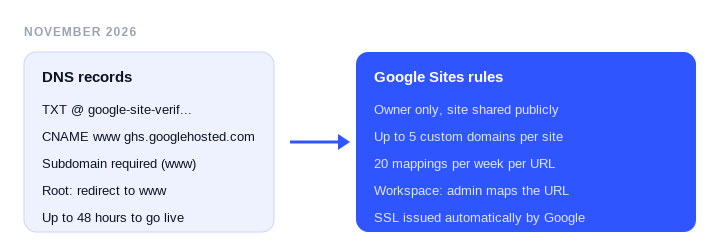
TL;DR
- Records: a TXT record from Search Console to verify the domain, and a CNAME for
wwwpointing toghs.googlehosted.com. - Subdomain required: Google Sites only accepts an address with a subdomain, like
www.example.com. The root domain needs a redirect. - Who can do it: only the site owner, and the site must be published and shared publicly. On work or school accounts, a Workspace admin sets it up.
- Limits: up to 5 custom domains per site and 20 URL mappings per week.
- Timing: Google says changes can take up to 48 hours, though they usually show up sooner.
- HTTPS: Google issues the certificate automatically. You can’t upload your own.
What Google Sites supports
Google’s custom domain help page and the Workspace URL mapping article set these rules:
| Requirement | What Google says |
|---|---|
| Who can connect | Only the owner of the site |
| Site visibility | Must be published and shared with the world, or visitors get redirected to the sites.google.com address |
| Domains per site | Up to 5 custom domains |
| Address format | Must include a subdomain, such as www |
| Weekly limit | 20 mappings per week for a URL |
| Work or school accounts | Contact your administrator; the admin maps the URL in the Admin console |
| Workspace account limit | Up to 2,000 custom site addresses; trial accounts can’t map URLs |
| Verification | Domain ownership verified in Google Search Console |
These steps cover the current builder (“new Google Sites”). Google also notes that embedded Google Groups don’t render properly, features that rely on Google Account sign-in may not work, and some fonts from Google Docs don’t carry over to a custom domain. The domain disconnects if you delete the site, transfer ownership or move it into a shared drive (Google says Team Drive).
Step 1: Verify the domain in Search Console
Google Sites asks you to prove you own the domain the first time you connect it. If Settings shows a verification prompt, do this first, then come back.
- Open Google Search Console and add a property with the Domain option (enter
example.com, nowww). - Choose the “Any DNS provider” instructions. Search Console gives you a TXT value that starts with
google-site-verification=. - At your DNS provider, add a TXT record with the host
@(or blank) and that value. - Click Verify.
Google’s verification article says a new record can take up to two or three days to start being served, so if it fails, wait a day and try again. Leave the TXT record in place afterwards. Search Console checks it periodically, and removing it un-verifies the domain after a grace period.
Step 2: Connect the domain (personal Google account)
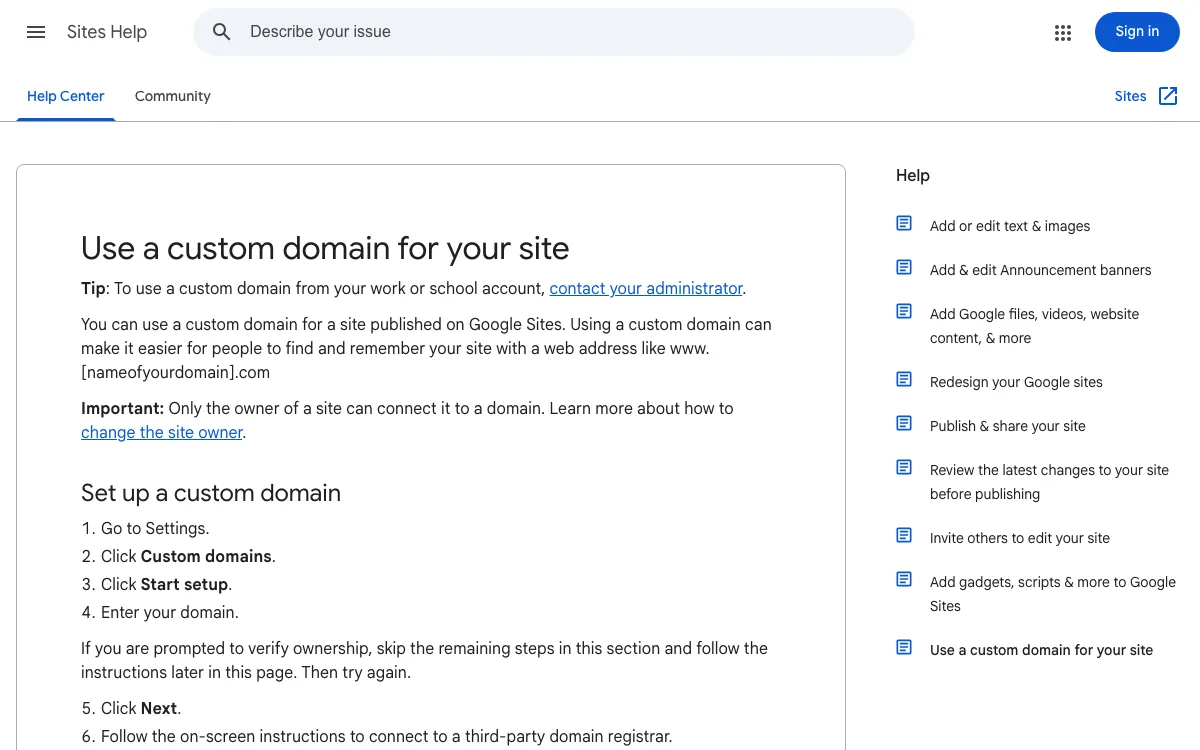
For a site owned by a personal @gmail.com account:
- Open the site in the Google Sites editor and make sure it’s published and shared publicly.
- Click the gear icon for Settings, then Custom domains, then Start setup.
- Enter the full address with its subdomain, for example
www.example.com, and click Next. - If you’re asked to verify ownership, complete Step 1 above and start again.
- Follow the on-screen instructions to connect your registrar. Google notes the steps vary by registrar; where you set DNS yourself, add the CNAME record from the next section.
- Click Done.
Step 2 (Workspace): Map the URL in the Admin console
For a site owned by a work or school account, an admin does the mapping. Per Google’s Workspace article, the admin needs the Sites administrator privilege and the Domain Settings privilege, and the domain must already be verified in the Workspace account.
- In the Admin console, go to Menu > Apps > Google Workspace > Sites.
- Make sure site creation is on for users (under New Sites, “Users can edit sites” and “Allow users to create new sites”).
- Open the custom URL setting, click Continue, and enter the current site address without
https://, for examplesites.google.com/example.com/sitename. - Pick the verified domain, type the custom URL (such as
www.example.com), click Continue, then Add Custom URL. - At your DNS host, create the CNAME record shown below.
You can’t map a site to a URL under a different domain, and for a secondary domain the owner’s email must use that domain (otherwise copy the site into an account on it). The custom address also shows only if the site is shared outside your organization.
The DNS records
Google’s CNAME values page lists the record for a Google Sites address:
| Type | Host / Name | Value | TTL |
|---|---|---|---|
| TXT | @ |
google-site-verification=... (from Search Console) |
default |
| CNAME | www |
ghs.googlehosted.com. |
3600 |
Google also lists ghs4.googlehosted.com (IPv4 only), ghs6.googlehosted.com (IPv6 only) and ghs46.googlehosted.com (both) for setups that need one protocol. Most sites should use the default.
Before adding the CNAME, delete any other record on www, such as a parking page A record or an old CNAME. A CNAME can’t share its name with other records. The guide What is a subdomain? explains why, and why a CNAME can’t sit on the root domain at all.
To check what public DNS returns:
dig www.example.com CNAME +short @8.8.8.8
The answer should be ghs.googlehosted.com.
How long propagation takes
Google gives different windows on different pages:
| Change | Google’s stated window |
|---|---|
| Search Console TXT record being served | Up to 2 or 3 days |
| Personal account domain connection | Up to 48 hours |
| Workspace URL mapping | Up to 24 hours |
| Root domain A records (Workspace redirect) | Up to 72 hours |
Google says changes usually happen sooner. An old record with a long TTL is the common delay, so lower it to 300 seconds a day before replacing it.
Redirect the root domain to www
Google Sites can’t serve example.com itself, because the address has to include a subdomain and a CNAME isn’t allowed at the root. Without a redirect, visitors who type the bare domain get an error. There are two ways to fix it.
Personal accounts: registrar forwarding
Use your registrar’s or DNS provider’s URL forwarding to send example.com to https://www.example.com with a permanent (301) redirect. Google doesn’t document this step because it happens outside Google.
At Cloudflare, it’s a Redirect Rule; the root-to-www example sends https://example.com/* to https://www.example.com/${1} with a 301.
Then test both http://example.com and https://example.com. A certificate warning on the https one means your forwarding doesn’t cover HTTPS.
Workspace: the Admin console redirect
Workspace has a built-in redirect for the primary domain only. Per Google’s naked domain article:
- In the Admin console, go to Account > Domains > Manage domains.
- Next to the primary domain, click Set up redirect, enter
www, and save. - At your DNS host, replace the root’s A records with Google’s four A record values:
| Type | Host | Value |
|---|---|---|
| A | @ |
216.239.32.21 |
| A | @ |
216.239.34.21 |
| A | @ |
216.239.36.21 |
| A | @ |
216.239.38.21 |
The catch: Google says this address mapping “is supported only by HTTP and not HTTPS.” If your domain uses HSTS (check it on hstspreload.org), the redirect won’t work and you need registrar forwarding instead. Changing the root A records also breaks anything else hosted on the root, so don’t use this if the domain serves other services.
HTTPS and SSL
On the www address, Google handles HTTPS for you. The Workspace article says address mappings “automatically supply domain-validated SSL certificates,” and other certificates aren’t supported, so there’s nothing to upload or renew.
If the certificate doesn’t appear, Google lists two fixes: delete and re-add the mapping (the “Missing certificate” error), and check your CAA records, which can block certificate issuance if they don’t allow Google’s certificate authority. The difference between the two protocols is covered in the HTTP vs HTTPS guide.
Troubleshooting common errors
Google’s help page maps each error message to a fix:
| Error | Cause and fix |
|---|---|
| Invalid DNS | The CNAME isn’t visible yet. Add it, or if you already did, wait 24 to 48 hours and retry. On Workspace, also check CAA records. |
| This isn’t a valid URL | Typo, or no subdomain. Enter www.example.com, not example.com. |
| URL check failed | Retype the URL and click Assign again. |
| URL not verified | Verify the domain in Search Console first. |
| URL already in use by another Google service | Remove the existing mapping (another site, a Workspace service URL, or an old personal account mapping), then retry. |
| Missing certificate | Delete the custom URL and assign it again. |
| Maximum URLs reached | You hit the 20 mappings per week limit. Wait and try later. |
“Google Sites custom domain not working” with no error. Work through these in order:
- Site not public. If it’s private or internal, the custom address redirects back to
sites.google.com. - Bare domain typed.
example.comneeds the redirect above; onlywwwis served by Google. - Conflicting records. An extra A record or old CNAME on
wwwcan keep resolvers from returning the new CNAME. Delete it. - Wrong place. DNS is edited where the domain’s nameservers point, which may be Cloudflare rather than the registrar.
- Ownership changed. Transferring the site or moving it to a shared drive disconnects the domain.
If you’re connecting a different static host instead, the GitHub Pages custom domain guide covers the root domain setup that Google Sites can’t do.
When Google Sites’ domain limits are a dealbreaker
The www-only rule and the HTTP-only Workspace root redirect are fine for an internal site but awkward for a public one. Two builders serve the root domain directly. The Google Sites alternatives roundup compares more options.
Siter.io: best for a designed site on your own root domain. A visual builder with a free-form canvas, mobile layouts, forms and SEO settings, with a custom domain and SSL on every plan. Per Siter’s domain help article, you add A records for both @ and www pointing to 5.161.34.112, so the bare domain works without a forwarding service. Pricing: Solo is $7 a month billed yearly ($8 month to month) for 1 website and 10 pages; Plus is $12 ($14 monthly) and Pro $24 ($28 monthly). There’s no free plan, only a 3-day trial that needs a card,.
Static.app: best if you already have HTML. Upload a ZIP or HTML files and the site goes live on your custom domain with free SSL. The domain help article lists an A record for @ to 15.204.149.16 plus a TXT verification code, and a www record with a redirect. Custom domains need a paid plan: Starter is $6 a month (2 websites, 500 MB), Medium $12 (7 websites, 3 GB) and Large $18 (30 websites, 10 GB), or $60, $120 and $180 billed yearly. There’s no visual editor and no permanent free plan, just a 7-day trial on a free subdomain.
Whichever host you use, a domain or certificate can break quietly after a DNS change or renewal. Pulsetic monitors uptime and SSL certificates and alerts you when either fails; the free plan covers 10 monitors. The DNS monitoring guide covers watching the records themselves.
FAQ
Can I use a custom domain on Google Sites for free?
Yes. Google Sites has no separate fee for connecting a domain you own; you pay only your registrar for the domain itself. The connection needs a published, publicly shared site and a domain verified in Search Console.
Why can’t I use my root domain on Google Sites?
Google Sites requires a subdomain such as www, connected with a CNAME, and DNS doesn’t allow a CNAME on the root. Redirect example.com to www with registrar forwarding, or the Admin console redirect on Workspace.
How many custom domains can one Google Site have?
Up to five, per Google’s help page, with at most 20 mappings a week per URL. A Workspace account can have up to 2,000 custom site addresses.
Does Google Sites support HTTPS on a custom domain?
Yes, on the www address. Google issues a domain-validated certificate automatically and doesn’t support uploading your own. The Workspace root domain redirect is HTTP only, so use registrar forwarding if https://example.com must work.
Why does my Google Sites custom domain show the sites.google.com address?
The site isn’t shared publicly. Google redirects visitors to the sites.google.com address when the site isn’t shared with the world, or on Workspace, with people outside your organization. Change the publish settings and reload.
Build your Bootstrap theme
Design a custom Bootstrap 5 theme visually with a live preview, then export clean Sass or CSS.
Open the Builder