Static vs Dynamic Website: Differences and Which to Pick
A static website sends every visitor the same prebuilt HTML, CSS, and JavaScript files, while a dynamic website builds each page on a server when it is requested, usually from a database. Static is faster, cheaper, and safer for content that changes when you publish; dynamic is what you need for logins, carts, and per-user data. This explainer is for site owners and designers choosing how to build their next site, and every definition, limit, and price was checked in November 2026.
TL;DR
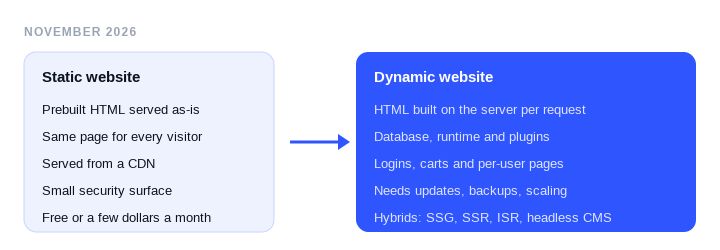
- Static website: files built ahead of time and served as-is. Every visitor to a URL gets the same page. Best for portfolios, landing pages, docs, and most blogs.
- Dynamic website: a server runs code (PHP, Node, Python) and often queries a database on each request. Best for stores, SaaS apps, and membership sites.
- The middle ground is where most modern sites live: static site generators, server-side rendering, incremental regeneration, and headless CMSs mix the two.
- A static site can still have forms, search, and comments through form services, client-side search, and embeds, without a server of your own.
- Hosting a static site is cheap or free: Static.app (drag and drop, from $6/month), Cloudflare Pages, Netlify, and GitHub Pages all serve static files with free SSL.
What is a static website?
A static website is a set of ready-made files: HTML pages, stylesheets, scripts, images, and fonts. When someone visits a URL, the host finds the matching file and sends it. Nothing is computed on the server at that moment.
MDN puts the key property simply: static sites “do not have server-side logic, so for any given URL, all users will receive the same content.” That does not mean the page cannot move or react. JavaScript still runs in the browser, so sliders, tabs, animations, and even small web apps work fine. “Static” describes how the server delivers the page, not how lively the page looks.
Because the files exist before anyone asks for them, they can be copied to a content delivery network (CDN) and served from a location near each visitor.
What is a dynamic website?
A dynamic website generates its HTML at request time. A program on the server receives the request, reads data (from a database, a session, an API), fills a template, and sends back a page that may be different for each visitor.
WordPress is the classic example: a PHP application reads posts and settings from a MySQL database and assembles each page. Online stores, social networks, banking portals, and dashboards all work this way because the page depends on who you are and what is in the database right now.
That power comes with moving parts: a language runtime, an application, a database, and usually plugins or packages, all of which need hosting, updates, and backups.
How each one serves a page
The clearest way to see the difference is to follow a single request.
Static site, request flow:
- The visitor’s browser requests
/about/. - The CDN edge nearest the visitor already has
about/index.htmlcached. - The file is returned immediately. No code runs and no database is touched.
Dynamic site, request flow:
- The browser requests
/about/. - The web server passes the request to the application (PHP, Node, Python, Ruby).
- The application queries the database, loads plugins or modules, and renders a template.
- The finished HTML goes back to the browser. Caching layers can skip steps 2 and 3 for repeat visits, but any page that is personal (a cart, an account page) has to be built fresh.
The work in a static site happens once, at build time. The work in a dynamic site happens on every uncached request. Almost every difference in the table below follows from that.
Static vs dynamic website: side-by-side comparison
| Factor | Static website | Dynamic website |
|---|---|---|
| Speed | Prebuilt files served from a CDN; no server processing per request | Depends on server, code, database, and caching; uncached pages wait for rendering |
| Security surface | Small: no database, no server-side code to exploit, no plugins running on the server | Larger: runtime, CMS core, plugins, database, and admin login all need patching |
| Hosting cost | Free tiers are common; paid static plans start at a few dollars a month | Needs a server or managed app hosting; cost grows with traffic and database load |
| Scaling | A CDN serves copies of the same files; traffic spikes are rarely a problem | More traffic means more compute and database capacity, or aggressive caching |
| Content editing | Edit files or Markdown and redeploy, or connect a headless CMS | Built-in admin panel; editors publish without touching code |
| Personalization | Same page for everyone; per-user content only via browser JavaScript and APIs | Full: pages can change by user, location, cart, or permissions |
| Forms | Needs a form service or a host with built-in forms | Handled by the application |
| Search | Client-side index or a hosted search service | Database queries or a search server |
| Ecommerce | Possible with embedded checkout or buy buttons; not for large catalogs | Native: inventory, accounts, orders, payments |
| Maintenance | Very little; nothing on the server to update | Ongoing updates, backups, and monitoring |
If you are weighing hosts for the static column, our static website hosting guide compares eight providers in depth.
The modern middle ground
The line between static and dynamic has blurred. Most frameworks now let you decide per page whether HTML is built ahead of time or on request. These are the terms worth knowing.
Static site generators (SSG)
A static site generator takes content you write (Markdown, HTML, or components) and templates, and compiles them into plain static files before you deploy. MDN describes it as software that compiles content “into a set of optimized static files that can be rendered by the browser.” Hugo, Eleventy, Jekyll, and Astro are popular examples. You get the editing comfort of templates and reusable layouts, and the output is still a static site.
Server-side rendering (SSR)
MDN defines server-side rendering as “generating HTML content on the server and sending it to the client,” as opposed to client-side rendering, where JavaScript in the browser builds the page. SSR at request time is dynamic. MDN also notes that a static site can be seen as a form of SSR done at build time instead of request time, which is exactly the distinction this article is about.
Incremental Static Regeneration (ISR)
ISR is a Next.js feature that lets you “update static content without rebuilding the entire site.” Pages are prerendered and cached, and after a set interval (for example 60 seconds) the next request triggers a fresh version in the background. It is a hybrid: visitors get cached pages, but a server is still needed to regenerate them. The Next.js docs state that ISR needs the Node.js runtime and is not supported in a static export, so it does not run on a plain static host.
Jamstack
Jamstack.org describes Jamstack as “an architecture designed to make the web faster, more secure, and easier to scale.” In practice it means prebuilding the front end, serving it from a CDN, and calling APIs or third-party services for anything dynamic. The name was coined at Netlify. Most of the “add dynamic features” section below is Jamstack thinking.
Headless CMS
A headless CMS, in Sanity’s words, “separates where content is stored (the ‘body’) from where it is presented (the ‘head’).” Editors get an admin panel like a traditional CMS, but the content is delivered through an API. A static site generator pulls that content at build time, so the published site stays static while non-technical editors still have a familiar dashboard.
Which one should you pick? 9 common sites
- Portfolio: static. The content changes when you add a project, the audience is anonymous, and speed matters for first impressions. Export from your design tool or a template and upload the folder.
- Landing page: static. One page, one goal, often a form. A host with built-in forms covers the only dynamic part.
- Documentation: static, built with a generator. Docs live in Markdown in a repository, and a client-side search index handles lookup.
- Blog: usually static. A generator or headless CMS gives you posts, tags, and feeds. Choose dynamic (WordPress, Ghost) if several non-technical authors need scheduled publishing and an editorial workflow out of the box. Our WordPress alternatives roundup covers both kinds.
- Small business site: static in most cases. Services, hours, a gallery, a contact form, and a map embed do not need a database.
- Restaurant or event site: static. Menus and schedules change weekly at most; a booking widget can be embedded.
- Online store: dynamic for anything beyond a handful of products. Inventory, accounts, and order history need a back end. A very small shop can stay static with embedded buy buttons from a payment provider. Note that GitHub’s own documentation says GitHub Pages is not intended for ecommerce or commercial transactions.
- SaaS app: dynamic, or a hybrid. The marketing site can be static, while the logged-in app runs on servers with SSR or an API behind a client-side front end.
- Membership or course site: dynamic. Logins, paywalls, progress tracking, and per-user content are the definition of server-side logic. Simple password protection on a static host only gates a page; it is not a member system.
A useful rule: if two logged-out visitors should see the same page, it can be static. If the page depends on who is looking, some part of it has to be dynamic.
How to add “dynamic” features to a static site
Most features people assume need a server can be bolted onto static files.
Forms
Contact and signup forms are the most common need. You have two routes:
- A host with built-in forms. On Static.app, you add a
static-formattribute to an existing HTML form and submissions appear in the dashboard, where you can export them. Netlify’s build system scans HTML at deploy time for forms markeddata-netlify="true"and handles their submissions. - A form backend service. Formspree gives you an endpoint to post to. Its free plan includes 50 submissions per month, and the Personal plan is $15/month billed monthly.
Search
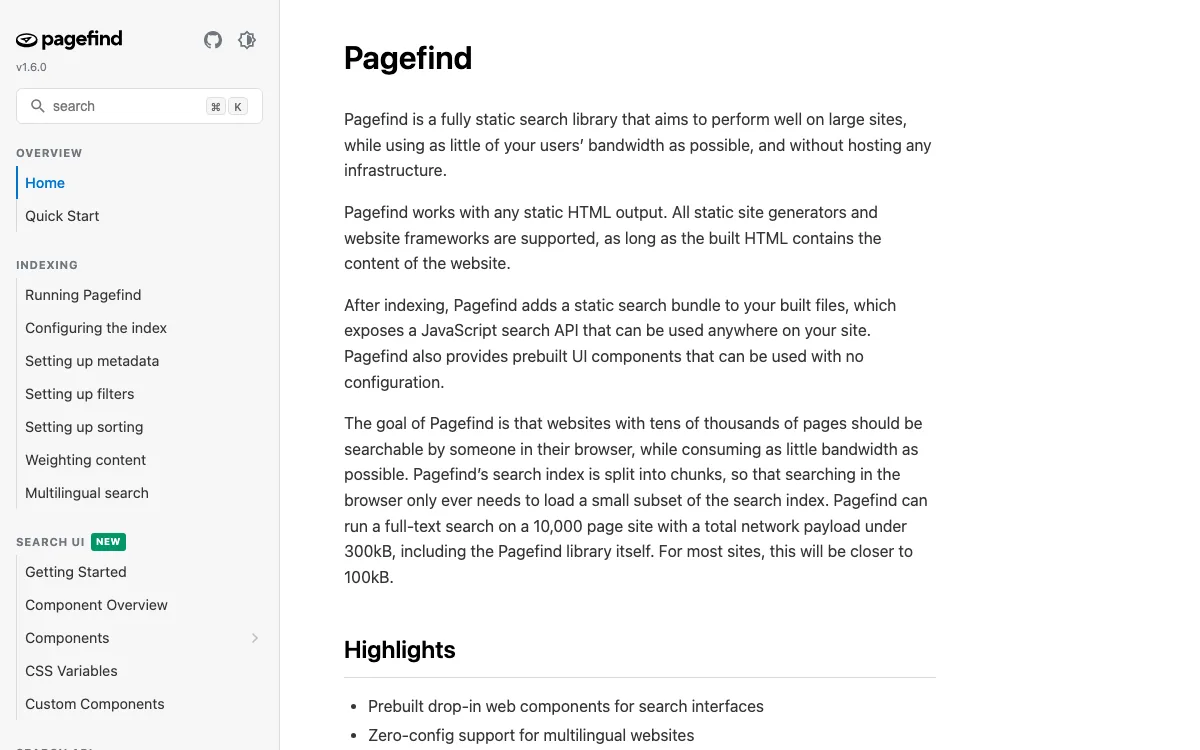
Client-side search libraries index your built pages and ship the index as static files. Pagefind describes itself as “a fully static search library”: after indexing, it adds a search bundle to your built files, so search runs in the browser with no server to host.
Comments
giscus is a free comments widget “powered by GitHub Discussions.” You add a script tag, and comments are stored as discussions in a GitHub repository. It suits developer blogs and docs, where readers already have GitHub accounts.
Embeds and third-party widgets
Maps, booking calendars, video, newsletter signups, chat, and checkout buttons are all delivered as embeds. The provider runs the dynamic part on its own servers; your page just loads their script or iframe. Keep the number of third-party scripts low, since each one adds weight and a dependency you do not control.
Personal data and logins
This is where static stops. You can call authentication and database services from browser JavaScript, but once you are building accounts, roles, and private data, you are building an application, and a dynamic or hybrid setup is the more honest choice.
How to host a static website
A static site is just a folder of files, so hosting comes down to how you want to upload them and what extras you need. Four solid options, with limits checked on each provider’s own pages:

Static.app: best for uploading a finished folder without Git. Drag a ZIP or files into the browser and the site is live on a subdomain with an SSL certificate. The Starter plan is $5/month billed yearly ($60 a year, or $6 month to month) and covers 2 websites, 500 MB of storage, custom domains with SSL, unlimited traffic, built-in forms, website analytics, and API and MCP access. Medium is $10/month billed yearly ($12 monthly) for 7 sites and 3 GB; Large is $15/month billed yearly ($18 monthly) for 30 sites and 10 GB. There is a 7-day free trial with no credit card (1 site, 50 MB, subdomain only), but no permanent free plan. There is also no built-in repository build pipeline like Netlify’s; you deploy built files by upload, the Mac desktop app, the API, or a GitHub Action. It fits designers, freelancers, and anyone with exported HTML or an AI-generated site; see our guide to hosting an AI-generated website.
Cloudflare Pages: best for high traffic on a free plan. Cloudflare’s docs state that on free and paid plans, requests to static assets are free and unlimited. The free plan allows 500 builds per month, up to 20,000 files per site, 25 MiB per file, and 100 custom domains per project. It connects to a Git repository or accepts direct uploads.
Netlify: best for Git workflows with deploy previews. The Free plan includes 300 credits and custom domains with SSL; Personal is $9/month (1,000 credits) and Pro is $20/month (3,000 credits). Usage is metered in credits, for example 20 credits per GB of bandwidth and 15 per production deploy, so heavy traffic needs watching. Compare options in our Netlify alternatives roundup.
GitHub Pages: best free option for public repositories. On GitHub Free it publishes from public repositories only. Published sites can be up to 1 GB, with a soft limit of 100 GB of bandwidth per month and 10 builds per hour. GitHub says Pages is not meant for online businesses or ecommerce. See GitHub Pages alternatives if those terms do not fit.
For a step-by-step walkthrough, including connecting your own domain, read how to host a website for free.
FAQ
What is the main difference between a static and a dynamic website?
Timing. A static site’s pages are built before anyone visits and are sent as-is, so every visitor sees the same page. A dynamic site builds each page on the server when it is requested, which allows personalized content but needs a runtime, usually a database, and more maintenance.
Can a static website have interactive features?
Yes. JavaScript runs in the browser on a static site, so menus, animations, filters, and even single-page apps work. Forms, search, and comments can be added through services such as built-in host forms, Pagefind, and giscus. What a static site cannot do on its own is run server code or store private user data.
Is WordPress static or dynamic?
Dynamic. WordPress runs PHP on the server and reads content from a MySQL database to build each page. Plugins can export a WordPress site to static HTML, which is a common way to keep the editor while serving fast static files.
Is a static website better for SEO?
Search engines index both equally well when the HTML contains the content. Static sites often load faster and have fewer things that break, which helps page experience, but a well-cached dynamic site can be just as fast. Content quality and structure matter more than the architecture.
Can I convert a dynamic website to static?
Often, yes, if the site does not depend on logins or per-user data. Export the pages with a static export tool or rebuild them with a static site generator, move forms to a form service, and upload the output to a static host.
How much does it cost to host a static website?
It can be free. Cloudflare Pages, Netlify, and GitHub Pages all have free plans with limits, and paid static hosting such as Static.app starts at $6/month with a custom domain, forms, and unlimited traffic included.
Build your Bootstrap theme
Design a custom Bootstrap 5 theme visually with a live preview, then export clean Sass or CSS.
Open the Builder